
1. Introduction
This manual provides essential information for the safe and efficient operation of your APC Smart-UPS SRT1000XLA. This Uninterruptible Power Supply (UPS) is designed to provide reliable power protection for your electronic equipment, safeguarding against power outages, sags, surges, and other power disturbances. Please read this manual thoroughly before installation and operation to ensure proper use and to prevent damage to the unit or connected equipment.
2. Safety Information
Observe all warnings and operating instructions in this manual. Failure to do so may result in injury or equipment damage.
2.1 General Safety
- This UPS is intended for indoor use only.
- Do not operate this UPS in direct sunlight, in contact with fluids, or where there is excessive dust or humidity.
- Ensure the ventilation openings on the UPS are not blocked.
- Do not open the UPS enclosure. There are no user-serviceable parts inside. Refer servicing to qualified personnel.
- The UPS contains internal batteries that may present a risk of electric shock and high short-circuit current.
2.2 Electrical Safety
- Connect the UPS to a grounded outlet only.
- Do not remove the grounding prong from the power cord.
- Ensure the input power cord is securely connected to the UPS and the wall outlet.
- Disconnect the UPS from the power supply before performing any maintenance or cleaning.
2.3 Battery Safety
- Battery service should be performed or supervised by personnel knowledgeable about batteries and the required precautions.
- Do not dispose of batteries in a fire. The batteries may explode.
- Do not open or mutilate batteries. Released electrolyte is harmful to the skin and eyes. It may be toxic.
- Replace batteries with the same type and number of batteries as originally installed.
3. Package Contents
Carefully unpack the unit and inspect for shipping damage. If any damage is found, notify the carrier and dealer. The package should contain the following items:
- APC Smart-UPS SRT1000XLA Unit
- Power Cord(s)
- USB Communication Cable
- Serial Communication Cable
- Network Management Card (if included with model)
- Documentation CD and Safety Guide
- Rack-mounting hardware (if applicable)
- Tower stands (if applicable, as this is a floor standing model)

Figure 3.1: Front view of the APC Smart-UPS SRT1000XLA. This image shows the main unit with its front display panel and a large ventilation grille, indicating its tower form factor.
4. Setup
4.1 Placement
Place the UPS in a protected area that is free of excessive dust, humidity, and is well-ventilated. Ensure adequate clearance around the unit for proper airflow. This model is designed for floor standing use, utilizing the included tower stands for stability.
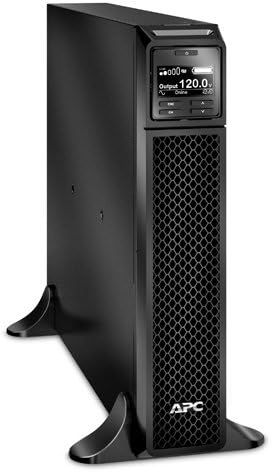
Figure 4.1: Angled front view of the APC Smart-UPS SRT1000XLA. This perspective highlights the unit's sleek, black design and its compact footprint, suitable for various environments.
4.2 Connecting to Power
- Connect the UPS power cord to a grounded 120V AC outlet.
- Allow the UPS batteries to charge for at least 24 hours before initial use to ensure maximum runtime. The UPS will charge the batteries whenever it is connected to AC power, regardless of whether the unit is turned on or off.
4.3 Connecting Equipment
Connect your critical electronic equipment (computers, monitors, network devices, etc.) to the outlets on the rear of the UPS. Ensure that the total load does not exceed the UPS's capacity (1000VA/900W for this model).
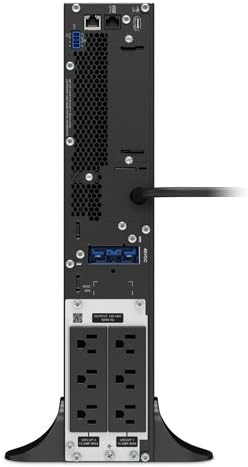
Figure 4.2: Rear view of the APC Smart-UPS SRT1000XLA. This image displays the various power outlets, communication ports (USB, serial, network), and battery connection points on the back of the unit.
4.4 Initial Startup
- After connecting the UPS to AC power and allowing initial battery charge, press the power button on the front panel to turn on the UPS.
- The UPS will perform a self-test and the display will show its status.
- Once the UPS is online, you can power on your connected equipment.
5. Operating the UPS
5.1 Front Panel Display
The front panel LCD provides real-time status information, configuration options, and alarm notifications. Use the navigation buttons (ESC, OK, Up, Down) to navigate through the menus.
5.2 Normal Operation
In normal operation, the UPS will display "Online" and provide conditioned power to your connected equipment. The battery charge level will be indicated on the display.
5.3 Battery Mode
During a power outage, the UPS will automatically switch to battery power. An audible alarm will sound, and the display will indicate "On Battery". The duration of battery operation depends on the load connected and the battery charge level.
5.4 Shutdown Procedures
- Graceful Shutdown: Use the included PowerChute software (downloadable from APC website) to perform a graceful shutdown of connected computers before the UPS battery is depleted.
- Manual Shutdown: To turn off the UPS, press and hold the power button until the unit powers down. Ensure all connected equipment is safely shut down first.
6. Maintenance
6.1 Battery Replacement
The batteries in your UPS are user-replaceable and hot-swappable, meaning they can be replaced without powering down the connected equipment. Refer to the specific battery replacement instructions provided with your replacement battery kit or on the APC website. Always use genuine APC replacement battery cartridges (RBCs) to ensure compatibility and optimal performance.
6.2 Cleaning
Clean the exterior of the UPS with a soft, dry cloth. Do not use liquid or aerosol cleaners. Ensure ventilation openings are free of dust and debris.
6.3 Environmental Considerations
Store the UPS in a cool, dry place. Prolonged exposure to high temperatures can shorten battery life. Recycle used batteries properly according to local regulations.
7. Troubleshooting
This section provides solutions to common issues you may encounter with your UPS. For more complex problems, contact APC technical support.
| Problem | Possible Cause | Solution |
|---|---|---|
| UPS does not turn on. | Not connected to AC power; low battery charge. | Ensure power cord is securely connected. Allow batteries to charge for 24 hours. |
| UPS beeps continuously. | On battery mode; overload; battery fault. | Check AC power. Reduce connected load. Perform a battery self-test. |
| Connected equipment loses power. | UPS battery depleted; UPS overloaded. | Allow UPS to recharge. Reduce connected load. |
| "Replace Battery" indicator is on. | Battery nearing end of life. | Order and replace the battery cartridge. |
8. Specifications
Key technical specifications for the APC Smart-UPS SRT1000XLA:
| Feature | Detail |
|---|---|
| Model | SRT1000XLA |
| Capacity | 1000VA / 900W |
| Input Voltage | 120 Volts AC |
| Output Voltage | 120 Volts AC (Nominal) |
| Battery Type | Sealed Lead Acid |
| Product Dimensions (H x W x D) | 20 x 3.4 x 17 inches |
| Item Weight | 48.5 pounds (22000 Grams) |
| Color | Black |
9. Warranty and Support
This product is covered by APC's standard warranty. For detailed warranty information, please refer to the warranty card included with your product or visit the official APC website. For technical support, troubleshooting assistance, or to inquire about replacement parts, please contact APC customer service through their official support channels. Online resources, including FAQs and software downloads, are also available on the APC website.
As this is a renewed product, specific warranty terms may vary. Please refer to the Amazon Renewed Guarantee for details regarding replacement or refund eligibility for renewed products.


