
1. Introduction
This manual provides essential information for the safe and efficient operation of your CRONY ES982 40000mAh Portable Power Bank. This device is designed for outdoor use, featuring a large capacity battery, solar charging capabilities, wireless charging, and multiple output ports to keep your mobile devices powered on the go. Please read this manual thoroughly before using the product.
2. Product Overview
The CRONY ES982 is a robust and versatile power bank built for durability and convenience. Key features include:
- High Capacity: 40000mAh lithium polymer battery for extended power supply.
- Wireless Charging: Conveniently charge compatible devices without cables.
- Solar Charging: Integrated solar panel for emergency or supplemental charging in outdoor environments.
- Multiple Output Ports: Equipped with 3 USB output ports for simultaneous charging of multiple devices.
- Integrated LED Light: Multi-mode flashlight function for illumination.
- Durable Design: Waterproof and designed for outdoor use.
2.1 Components and Indicators
Familiarize yourself with the different parts of your power bank:

Figure 2.1: Front (solar panel) and back (wireless charging pad) view of the CRONY ES982 power bank. The front shows the solar panel and LED power indicators. The back shows the wireless charging symbol and product information.
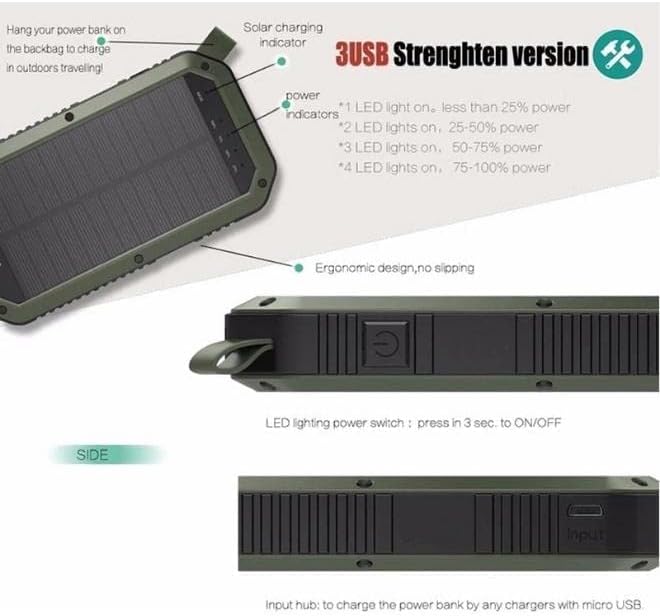
Figure 2.2: Side view of the CRONY ES982 power bank. This image highlights the power button, the input port for charging the power bank, and the strap for hanging. It also illustrates the power indicator lights: 1 LED light on indicates less than 25% power, 2 lights for 25-50%, 3 lights for 50-75%, and 4 lights for 75-100% power. The solar charging indicator is also visible.
- Solar Panel: Located on the front surface, used for solar charging.
- Power Indicators (LEDs): Four blue LED lights indicate the remaining battery capacity (25%, 50%, 75%, 100%). A green LED indicates solar charging activity.
- Power Button: Used to turn the device on/off and activate the LED light.
- USB Output Ports: Multiple ports for wired charging of external devices.
- Wireless Charging Pad: Located on the back surface for wireless charging.
- Input Port: For charging the power bank via a wall adapter or other power source.
- Strap/Hook: For easy carrying or hanging, especially useful for solar charging outdoors.
3. Setup
3.1 Initial Charging
Before first use, it is recommended to fully charge your CRONY ES982 power bank using a wall adapter. Solar charging is primarily for emergency or supplemental power and is significantly slower than wall charging.
- Connect a compatible USB cable to the power bank's input port.
- Connect the other end of the cable to a USB wall adapter (not included) and plug it into a power outlet.
- The LED power indicators will light up, showing the charging progress. All four lights will be solid when fully charged.
3.2 Solar Charging
For solar charging, place the power bank with the solar panel facing direct sunlight. The green solar charging indicator LED will illuminate when charging via solar power. Note that solar charging efficiency depends on sunlight intensity and may take a long time to fully charge the large capacity battery.
4. Operating Instructions
4.1 Charging External Devices (Wired)
- Connect your device's charging cable to one of the USB output ports on the power bank.
- Connect the other end of the cable to your device.
- The power bank should automatically begin charging your device. If not, press the power button once to activate output.

Figure 4.1: The CRONY ES982 power bank emphasizing its three USB output ports, allowing for simultaneous charging of multiple devices.
4.2 Charging External Devices (Wireless)
Ensure your device supports wireless charging (Qi standard).
- Place your wireless charging compatible device directly onto the wireless charging pad on the back of the power bank.
- Ensure the device is centered on the pad for optimal charging.
- The power bank should automatically begin wireless charging. If not, press the power button once to activate output.

Figure 4.2: The CRONY ES982 power bank shown next to a smartphone, illustrating the wireless charging capability by placing the phone on the power bank's back surface.
4.3 Using the LED Light
The power bank includes an integrated LED flashlight with multiple modes.
- To turn on/off: Press and hold the power button for approximately 3 seconds.
- To cycle modes: Once the light is on, short press the power button to switch between different lighting modes (e.g., steady on, flashing).
5. Maintenance
- Cleaning: Wipe the power bank with a soft, dry cloth. Do not use harsh chemicals or abrasive materials.
- Storage: Store the power bank in a cool, dry place away from direct sunlight and extreme temperatures. For long-term storage, it is recommended to keep the battery charged to about 50-75%.
- Water Resistance: While designed to be waterproof, avoid prolonged submersion in water. Ensure all ports are dry before charging or connecting devices.
- Avoid Drops: Despite its durable design, avoid dropping the power bank, as this can damage internal components.
6. Troubleshooting
| Problem | Possible Cause | Solution |
|---|---|---|
| Power bank not charging. | Cable or adapter issue; power bank fully charged; input port damage. | Try a different charging cable and adapter. Check if all indicator lights are solid (fully charged). Ensure the input port is clean and undamaged. |
| Device not charging from power bank. | Power bank low on battery; cable issue; device not compatible; power bank output not activated. | Check power bank's indicator lights. Try a different charging cable. Ensure your device is compatible (especially for wireless charging). Press the power button once to activate output. |
| Solar charging is very slow. | Insufficient sunlight; solar panel obstructed; inherent limitation of solar charging. | Ensure the solar panel is in direct, strong sunlight. Clean the solar panel. Solar charging is supplemental; use wall charging for faster, full charges. |
| Wireless charging not working. | Device not Qi-compatible; device not aligned; thick phone case. | Verify your device supports Qi wireless charging. Re-position the device on the charging pad. Remove thick phone cases. |
7. Specifications
| Feature | Specification |
|---|---|
| Brand | CRONY |
| Model | ES982 |
| Battery Capacity | 40000 Milliamp Hours (mAh) |
| Battery Cell Composition | Lithium Polymer |
| Special Features | Wireless Charging, Solar Charging, LED Light |
| Output Voltage | 5 Volts |
| Color | Black |
| Item Weight | 400 g |
| First Available Date | 2 June 2022 |
8. Warranty and Support
For warranty information and customer support, please refer to the product packaging or contact the retailer/manufacturer directly. Keep your purchase receipt as proof of purchase for any warranty claims.
