
1. Introduction
This manual provides instructions for the ALLIMITY DG11J1-99 replacement remote control, designed for use with various Hisense AC Air Conditioner models. Please read this manual carefully before using the remote control to ensure proper operation and longevity of the device.
2. Product Overview
The ALLIMITY DG11J1-99 is a direct replacement remote control for compatible Hisense AC Air Conditioner units. It offers essential functions for controlling your air conditioner without the need for complex programming.
2.1 Compatible Models
This remote control is compatible with numerous Hisense AC Air Conditioner models, including but not limited to: AP0522CR1W, AP1022CW1G, AP1419CR1G, AP1419CW1G, AP0819CR1W, AP1219CR1W, AP1319HR1G, AP0921CR1G, AP1021CW1G, AP0821CR1W, AP1019CW1G, AP1019CR1G, AP0621CR1W, AP1022HW1GD, AP1022TW1GD, AP0722CW1W, AP0822CW1W, AP1222CW1W.
2.2 Remote Control Layout

Figure 1: Front view of the remote control with various function buttons and LCD display.
The remote features an intuitive button layout for easy access to all functions. Key buttons include Power, Mode, Fan, Temperature Up/Down, Timer, Swing, Dimmer, and Sleep.
3. Setup
3.1 Battery Installation
The remote control requires two (2) AAA alkaline batteries (not included) for operation.
- Locate the battery compartment cover on the back of the remote control.
- Press down on the tab and slide the cover off.
- Insert two AAA batteries, ensuring the positive (+) and negative (-) terminals align correctly with the markings inside the compartment.
- Slide the battery compartment cover back into place until it clicks securely.
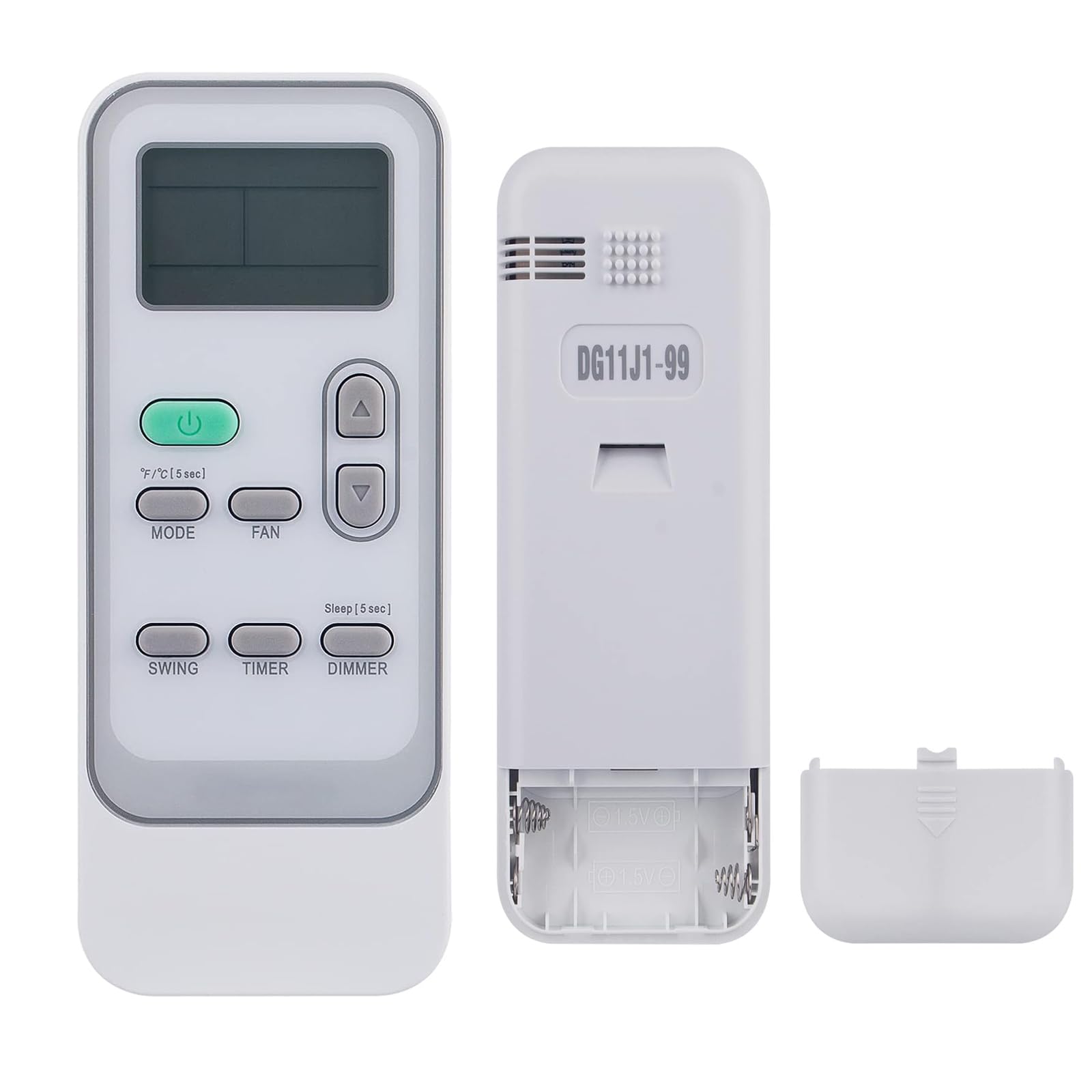
Figure 2: Back view of the remote control showing the battery compartment.
3.2 Initial Use
No programming is required for this replacement remote control. Once batteries are correctly installed, it is ready for immediate use with your compatible Hisense AC Air Conditioner.
4. Operating Instructions
Point the remote control directly at the air conditioner's receiver when operating.
- Power Button (⏻): Press to turn the air conditioner ON or OFF.
- Mode Button: Press to cycle through available operating modes (e.g., Cool, Heat, Fan, Dry, Auto).
- Fan Button: Press to adjust the fan speed (e.g., Low, Medium, High, Auto).
- Temperature Adjustment Buttons (▲ / ▼): Press to increase or decrease the desired temperature setting.
- F/°C (5 sec) Button: Press and hold for 5 seconds to switch the temperature display between Fahrenheit (°F) and Celsius (°C).
- Timer Button: Use to set the ON/OFF timer for the air conditioner. Refer to your air conditioner's manual for specific timer settings.
- Swing Button: Activates or deactivates the automatic louver swing function.
- Dimmer Button: Adjusts the brightness of the air conditioner's display panel.
- Sleep (5 sec) Button: Press and hold for 5 seconds to activate or deactivate the Sleep mode, which adjusts temperature and fan speed for comfortable sleep.
5. Maintenance
5.1 Battery Replacement
Replace batteries when the remote control's range decreases or if the display becomes dim or unresponsive. Always replace both batteries simultaneously with new AAA alkaline batteries.
5.2 Cleaning
Wipe the remote control with a soft, dry cloth. Do not use liquid cleaners or abrasive materials, as these can damage the surface or internal components.
6. Troubleshooting
- Remote not responding: Ensure batteries are correctly installed and not depleted. Replace batteries if necessary.
- Limited range: Check for obstructions between the remote and the air conditioner. Ensure the remote is pointed directly at the AC unit's receiver. Replace batteries if the issue persists.
- Incorrect function: Verify that the remote control model DG11J1-99 is compatible with your specific Hisense AC Air Conditioner model.
7. Specifications
- Brand: ALLIMITY
- Model Name: DG11J1-99
- Connectivity Technology: Infrared
- Maximum Range: 10 meters (approximately 33 feet)
- Power Supply: 2 x AAA Alkaline Batteries (not included)
- Item Weight: 2 ounces
- Item Dimensions (L x W x H): 6" x 2" x 0.5"
- Compatible Devices: Hisense AC Air Conditioners (specific models listed in Section 2.1)
- Special Feature: No Programming Required
8. Warranty and Support
For any concerns or issues regarding your ALLIMITY DG11J1-99 remote control, please contact the seller or manufacturer directly for assistance. Please refer to your purchase documentation for specific warranty details.