
Introduction
The Buffbee Sound Machine & Alarm Clock 2-in-1 is designed to enhance your sleep environment and provide reliable timekeeping. This integrated device combines 18 soothing sounds to block disruptive noises with a digital alarm clock featuring 5 wake-up sounds. It also includes a 7-color night light and a precise 30-level volume control, along with a 0-100% display dimmer for personalized comfort.
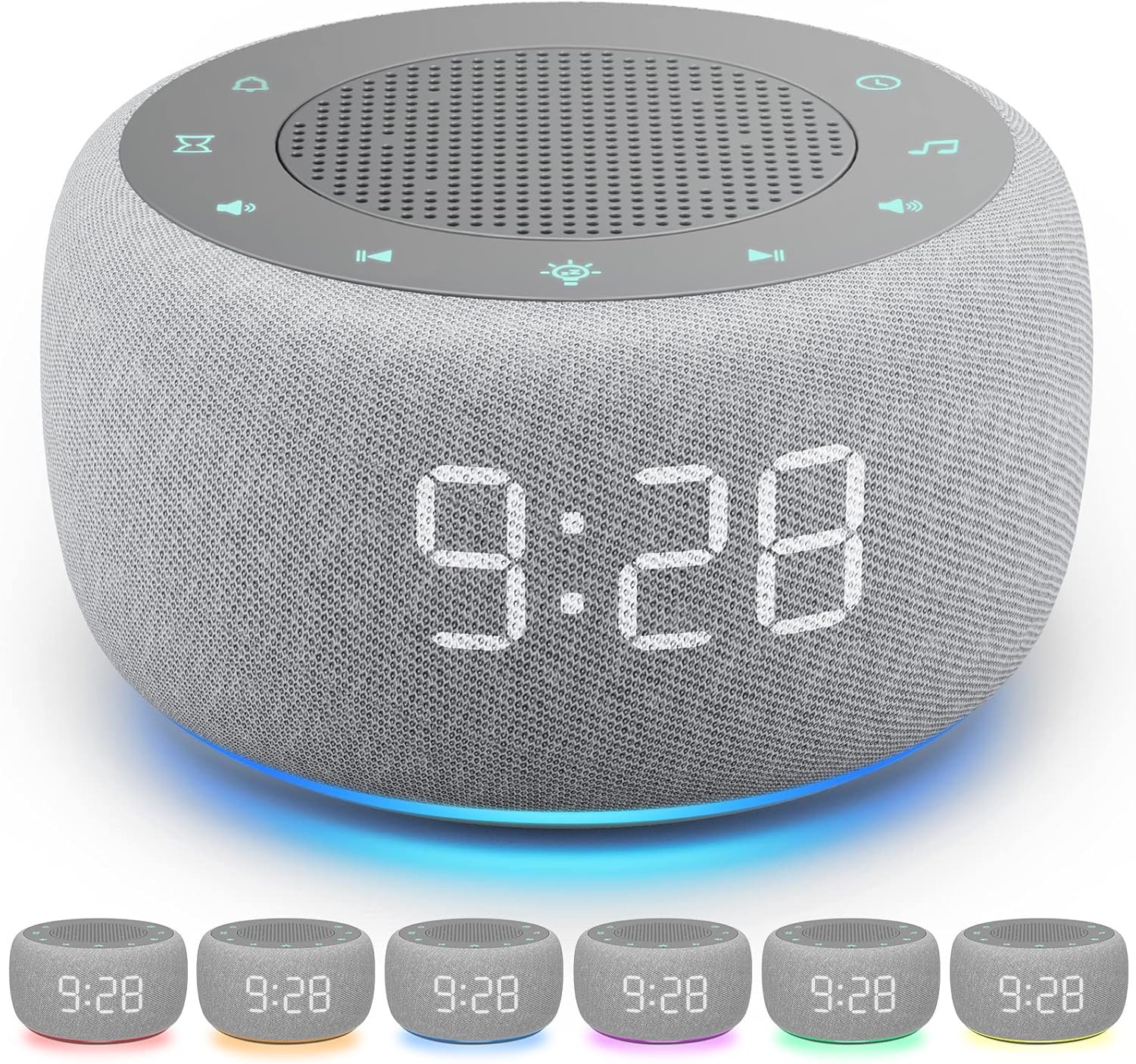
Image: Front view of the Buffbee Sound Machine and Alarm Clock, showcasing its digital time display and top-mounted controls.
Safety Information
Please read all safety instructions carefully before using the device. Failure to follow these instructions may result in electric shock, fire, or serious injury.
- Always unplug the device when not in use.
- Do not operate if the power cord is damaged.
- This product is not a toy and should not be used as such.
- To avoid potential hearing damage, do not use at high volumes for extended periods.
- Do not expose the device to liquids or moisture.
- Always follow the manufacturer's instructions for use and care.
Product Overview
The Buffbee Sound Machine & Alarm Clock features intuitive controls and a compact design. Key components include the digital display, top-mounted control buttons, and a rear power input.

Image: Diagram illustrating the control buttons (Alarm, Volume Control, Night Light, Sound Machine) and the adapter port on the Buffbee Sound Machine.
Controls:
- Alarm Button: Used to set and manage alarms.
- Sound Machine Button: Activates and cycles through soothing sounds.
- Volume Control Buttons: Adjusts the sound output level (30 precise levels).
- Night Light Button: Toggles and changes the night light colors (7 options).
- Display Dimmer Slider: Located at the back, allows adjustment of display brightness from 0-100%.
Setup
- Power Connection: Connect the provided power adapter to the DC 5V port on the back of the device and plug it into a standard wall outlet. The digital display will illuminate.
- Set Time: Refer to the detailed instructions in the "Operating Instructions" section for setting the current time.
- Adjust Display Brightness: Use the 0-100% display dimmer slider on the back to set your preferred brightness level for the time display.
Operating Instructions
Setting the Time:
Specific instructions for setting the time are typically found in the full manual. Generally, look for a "Time Set" or "Clock" button. Press and hold to enter time setting mode, then use volume or arrow buttons to adjust hours and minutes. Press the "Time Set" button again to confirm.
Using the Sound Machine:
The device offers 18 soothing sounds, including 5 white noise, 3 fan sounds, and 10 nature sounds (ocean, lullaby, waves, rain, thunderstorm, brook, shush, bird chirping, summer night, campfire).

Image: Visual representation of the 18 soothing sounds available on the Buffbee Sound Machine, categorized into White Noise, Fan Sounds, and Nature Sounds.
- Press the Sound Machine button (musical note icon) to turn on the sound.
- Press the Sound Machine button repeatedly to cycle through the 18 available sounds.
- Use the Volume Up (+) and Volume Down (-) buttons to adjust the sound level. There are 30 precise volume levels.
- To set a sleep timer for the sound, press the Timer button (hourglass icon). Options typically include 15, 30, 60, 90, or 120 minutes, or continuous play.
Using the Alarm Clock:
The digital alarm clock features 5 wake-up sounds: beep, bird chirping, piano, ocean, and brook.

Image: Icons depicting the 5 available wake-up sounds: Beep, Ocean, Piano, Bird, and Brook.
- Press and hold the Alarm button (bell icon) to enter alarm setting mode.
- Use the Volume Up (+) and Volume Down (-) buttons to adjust the alarm time (hours and minutes).
- Press the Alarm button again to confirm each setting (e.g., hour, minute, alarm sound).
- To select an alarm sound, press the Sound Machine button while in alarm setting mode to cycle through the 5 wake-up sounds.
- To activate/deactivate the alarm, short press the Alarm button outside of setting mode. An alarm icon will appear/disappear on the display.
- When the alarm sounds, press any button (except power) to snooze, or press the Power button to turn off the alarm for the day.
Using the Night Light:
Choose from 7 different night light color options to create a relaxing ambiance.

Image: The Buffbee Sound Machine displaying its various night light color options, including red, orange, yellow, green, blue, indigo, and violet.
- Press the Night Light button (sun icon) to turn on the light.
- Press the Night Light button repeatedly to cycle through the 7 color options.
- Press and hold the Night Light button to turn off the light.
Adjusting Display Dimmer:
The 0-100% display dimmer allows you to set the perfect brightness for the digital time display without disturbing your sleep.

Image: The Buffbee Sound Machine demonstrating different levels of display brightness, from fully dimmed to bright.
Locate the dimmer slider on the back of the device. Slide it to the left or right to decrease or increase the brightness of the digital time display.
Maintenance
To ensure the longevity and optimal performance of your Buffbee Sound Machine & Alarm Clock, follow these simple maintenance guidelines:
- Cleaning: Use a soft, dry cloth to wipe the exterior of the device. Do not use abrasive cleaners, waxes, or solvents as they may damage the finish.
- Storage: If storing the device for an extended period, unplug it from the power outlet and store it in a cool, dry place away from direct sunlight and extreme temperatures.
- Avoid Moisture: Keep the device away from water and high humidity.
Troubleshooting
If you encounter any issues with your Buffbee Sound Machine & Alarm Clock, please refer to the following common problems and solutions:
| Problem | Possible Cause | Solution |
|---|---|---|
| Device does not power on. | Power adapter not properly connected or power outlet is not working. | Ensure the power adapter is securely plugged into both the device and a working wall outlet. Try a different outlet. |
| No sound or low volume. | Volume is set too low or sound is off. | Increase the volume using the (+) button. Ensure a sound is selected and not paused. |
| Alarm does not sound. | Alarm is not set or is deactivated. | Verify that the alarm time is correctly set and the alarm is activated (alarm icon visible on display). |
| Display is too dim or off. | Display dimmer is set to minimum. | Adjust the display dimmer slider on the back of the device to increase brightness. |
Specifications
- Product Dimensions: 3.85 x 3.85 x 2.36 inches
- Item Weight: 10.24 ounces
- Model Number: BK11
- Manufacturer: BUFFBEE
- Power Source: Corded Electric
- Material: Plastic
- Color: Grey
- Sound Options: 18 Soothing Sounds (5 white noise, 3 fan, 10 nature)
- Alarm Sounds: 5 Wake Up Sounds (beep, bird chirping, piano, ocean, brook)
- Night Light Colors: 7 options
- Volume Control: Precise 30-level
- Display: 0-100% Dimmable LED
Warranty & Support
For warranty information and customer support, please refer to the contact details provided with your product packaging or visit the official BUFFBEE website. Keep your purchase receipt for warranty claims.
Manufacturer: BUFFBEE
Website: Visit the BUFFBEE Store on Amazon

