
1. Product Overview
The Kastar NP-F550 / NP-F570 LTD2 USB Battery Charger is designed to efficiently charge NP-F550 and NP-F570 type batteries. This dual charger features an intelligent LED display for monitoring charging status and battery capacity. It offers versatile charging options with both Micro-USB and Type-C input ports, making it suitable for various power sources.
This charger is compatible with batteries used in a wide range of on-camera field monitors, including but not limited to:
- AndyCine C5 5.5" Daylight-Viewable Touchscreen On-Camera Monitor
- AndyCine A6 5.7" IPS Full HD Camera Field Monitor
- AndyCine A6 Lite 5" IPS Full HD Camera Field Monitor
- AndyCine A6 Plus 5.5" 4K HDMI In/Out 1920 X 1080 3D LUT Touchscreen Monitor
- AndyCine C6S 6" 3G-SDI/HDMI Ultrabright Touchscreen Monitor
- AndyCine A7 7" IPS Full HD Camera Field Monitor
- AndyCine C7 7" Full HD HDMI Ultra-Bright Touchscreen Monitor
- AndyCine C7S 7" 3G-SDI/HDMI Ultra-Bright Touchscreen Monitor
- AndyCine T7 7" IPS Full HD Camera Field Monitor
- AndyCine X7 7" IPS Full HD Ultra Bright Camera Field Monitor
- AndyCine X7S 7" IPS Full HD Ultra Bright Camera Field Monitor
- Lilliput A5 5" FHD Camera Field Monitor
- Lilliput 5D-ii/O/P 7" LED HDMI Field Monitor
- Lilliput Q5 5.5" Full HD On-Camera Monitor
- Lilliput T5U 5" Live Streaming On-Camera Touch Monitor
- Lilliput A7S 7" Full HD HDMI Field LED Monitor
- Lilliput A7S-B 7" Full HD HDMI Field LED Monitor
- Lilliput H7 7" Full HD Field LED Monitor
- Lilliput H7S 7" Full HD Field LED Monitor
- Lilliput Q7 Full HD Monitor
- Lilliput A11 10.1" 4K Camera Monitor
- Lilliput A12 12.5" IPS 4K HDMI Monitor
- Lilliput 569/O 5" On-Camera Monitor
- Lilliput 663 7" LCD On-Camera HDMI Monitor
- Lilliput 663/S2 7" LCD On-Camera 3G-SDI / HDMI Monitor
- Lilliput 664/O 7" On-Camera Monitor
- Lilliput 665/O/P Peaking Focus Video Monitor
- Lilliput 667GL70NP/H/Y On-Camera Video Monitor
- Lilliput 969A/O/P 9.7" Field Monitor
- Lilliput 969B/O/P 9.7" LED Field Monitor
- Datavideo TLM-700K 7" Full HD LCD Portable 4K Field Monitor
- iKan 7" VXF7-V2 Tally 3G-SDI 4K HDMI On-Camera Field Monitor
- iKan VH7i-1 7" HDMI LCD Field Monitor
2. Setup
Follow these steps to set up your Kastar USB Battery Charger:
- Connect to Power: Use the provided Micro-USB cable or a Type-C cable (not included) to connect the charger to a 5V USB power source. This can be a laptop, AC adapter, car charger, or power bank. The charger supports 5V 2-3A 15W input.
- Insert Batteries: Align the NP-F550 or NP-F570 battery with the charging slot (CH1 or CH2) and gently slide it in until it clicks into place. The charger can accommodate one or two batteries simultaneously.

Image: The charger features both Micro-USB and Type-C input ports for power. Its ultra-slim design measures approximately 5.24 inches in length, 3.07 inches in width, and 0.79 inches in height, with a weight of 3 ounces.
3. Operating Instructions
Once connected to a power source and with batteries inserted, the charger will begin the charging process automatically.
- Charging Indication: The intelligent LED display will show the charging status for each channel (CH1 and CH2) and the current battery capacity.
- Monitoring Battery Capacity: Refer to the LED indicator status table below to understand the charge level of your batteries.
- Completion: When the battery is fully charged, all four LED segments for that channel will be illuminated.
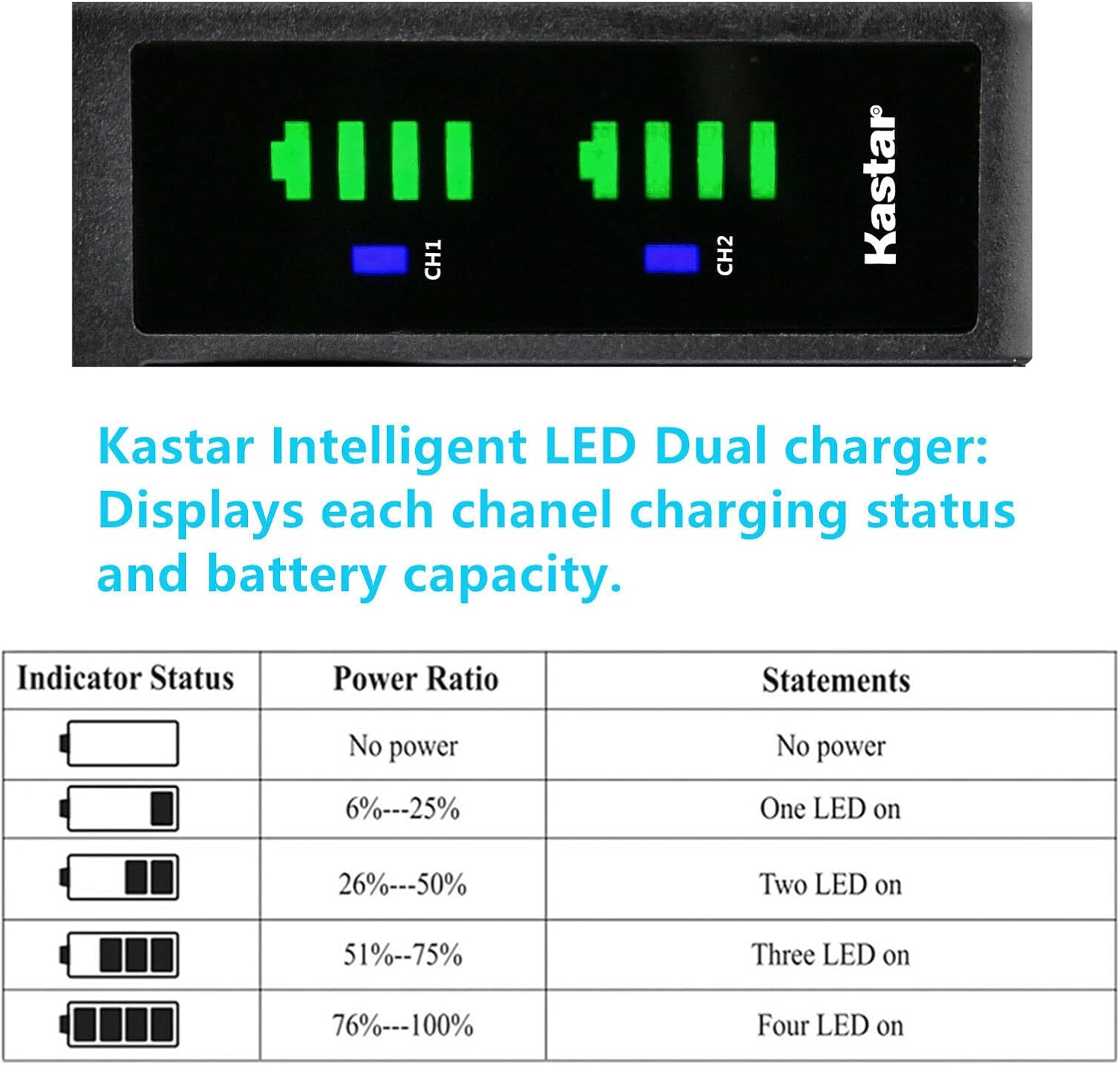
Image: The LED display on the Kastar charger provides real-time feedback on the charging status and battery capacity for each channel.
LED Indicator Status
| Indicator Status | Power Ratio | Statements |
|---|---|---|
| Empty battery icon | No power | No power |
| Battery icon with one segment filled | 6% - 25% | One LED on |
| Battery icon with two segments filled | 26% - 50% | Two LEDs on |
| Battery icon with three segments filled | 51% - 75% | Three LEDs on |
| Battery icon with four segments filled | 76% - 100% | Four LEDs on |
4. Maintenance
To ensure the longevity and optimal performance of your charger:
- Cleaning: Disconnect the charger from power and remove batteries before cleaning. Use a soft, dry cloth to wipe the exterior. Avoid using liquid cleaners or solvents.
- Storage: Store the charger in a cool, dry place away from direct sunlight and extreme temperatures.
- Handling: Avoid dropping the charger or subjecting it to strong impacts. Do not attempt to disassemble the unit.
5. Troubleshooting
If you encounter issues with your charger, refer to the following common problems and solutions:
- Charger not powering on / LEDs not lighting up:
- Ensure the USB cable is securely connected to both the charger and the power source.
- Verify that the power source (e.g., USB port, AC adapter) is functional and providing sufficient power (5V 2-3A).
- Try a different USB cable or power source.
- Battery not charging:
- Ensure the battery is correctly inserted into the charging slot and makes proper contact.
- Check if the battery itself is damaged or at the end of its lifespan. Try charging a different battery if available.
- Confirm the battery type is compatible (NP-F550 / NP-F570).
- Slow charging:
- Ensure your power source can provide the recommended input current (2-3A). Lower current sources (e.g., some laptop USB ports) may result in slower charging.
- Avoid using excessively long or low-quality USB cables, which can reduce charging efficiency.
If the problem persists after attempting these solutions, please contact customer support.
6. Specifications
| Model Number | CH-LTD2-0B-F570L-17 |
| Compatible Batteries | NP-F550, NP-F570 |
| Input | 5V 2-3A 15W (Micro-USB, Type-C) |
| Output | 8.4V 800mA (x1 battery), 8.4V 800mA (x2 batteries) |
| Dimensions | 3 x 1.5 x 4 inches (Product), 5.24 x 3.07 x 0.79 inches (Charger Unit) |
| Item Weight | 3 ounces |
| Certifications | CE, FCC |
| Manufacturer | Kastar |
7. Warranty and Support
This Kastar product comes with an 18-month warranty from the date of purchase. This warranty covers manufacturing defects and ensures the product functions as intended under normal use.

Image: The product packaging highlights key features including LED indicators, 100% compatibility, and an 18-month warranty.
For warranty claims, technical assistance, or any questions regarding the use of your Kastar charger, please contact Kastar customer support through their official website or the retailer where the product was purchased.
