
Introduction
This manual provides essential information for the safe and efficient operation, maintenance, and troubleshooting of your Fafrees F26-PRO Electric Bicycle. Please read this manual thoroughly before your first ride and retain it for future reference.
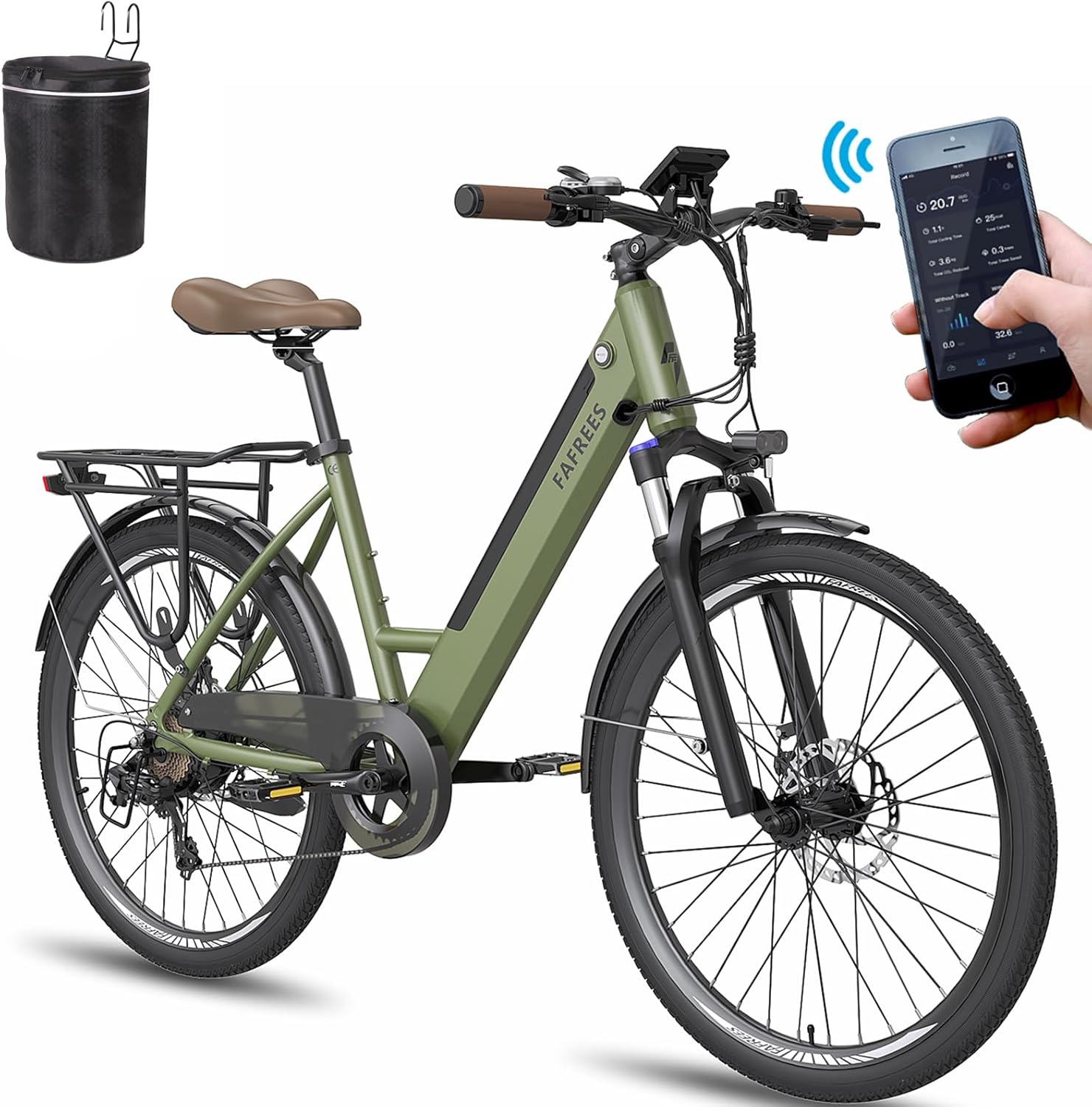
Figure 1: Fafrees F26-PRO Electric Bicycle. This image shows the complete bicycle with its step-through frame, front suspension, rear rack, and integrated battery design.
1. Setup and Initial Assembly
Your Fafrees F26-PRO Electric Bicycle comes partially assembled. Follow these steps to complete the setup:
- Unboxing: Carefully remove all components from the packaging. Inspect for any shipping damage.
- Handlebar Installation: Attach the handlebar to the stem, ensuring all bolts are securely tightened. Adjust the handlebar height for comfortable riding.
- Pedal Attachment: Identify the left (L) and right (R) pedals. The left pedal tightens counter-clockwise, and the right pedal tightens clockwise. Ensure they are fully threaded and tightened.
- Seat Post Adjustment: Insert the seat post into the frame and adjust the seat height to allow for a slight bend in your knee when the pedal is at its lowest point. Secure the quick-release lever or bolt.
- Battery Charging: Before first use, fully charge the 36V 14.5Ah lithium-ion battery. The charging time is approximately 6-8 hours. The battery can be removed for convenient charging indoors.
- Tire Inflation: Inflate the CST 26 x 1.75 inch tires to the recommended pressure indicated on the tire sidewall.
- Brake Check: Test both front and rear mechanical disc brakes to ensure they engage properly and stop the bicycle effectively.
A toolkit and a multi-language manual are included to assist with assembly.
2. Operating Instructions
The Fafrees F26-PRO offers three riding modes: Electric Mode, Pedal-Assist System (PAS) Mode, and Fitness Mode (manual pedaling).
2.1 Smart Color LCD Display and Mobile App
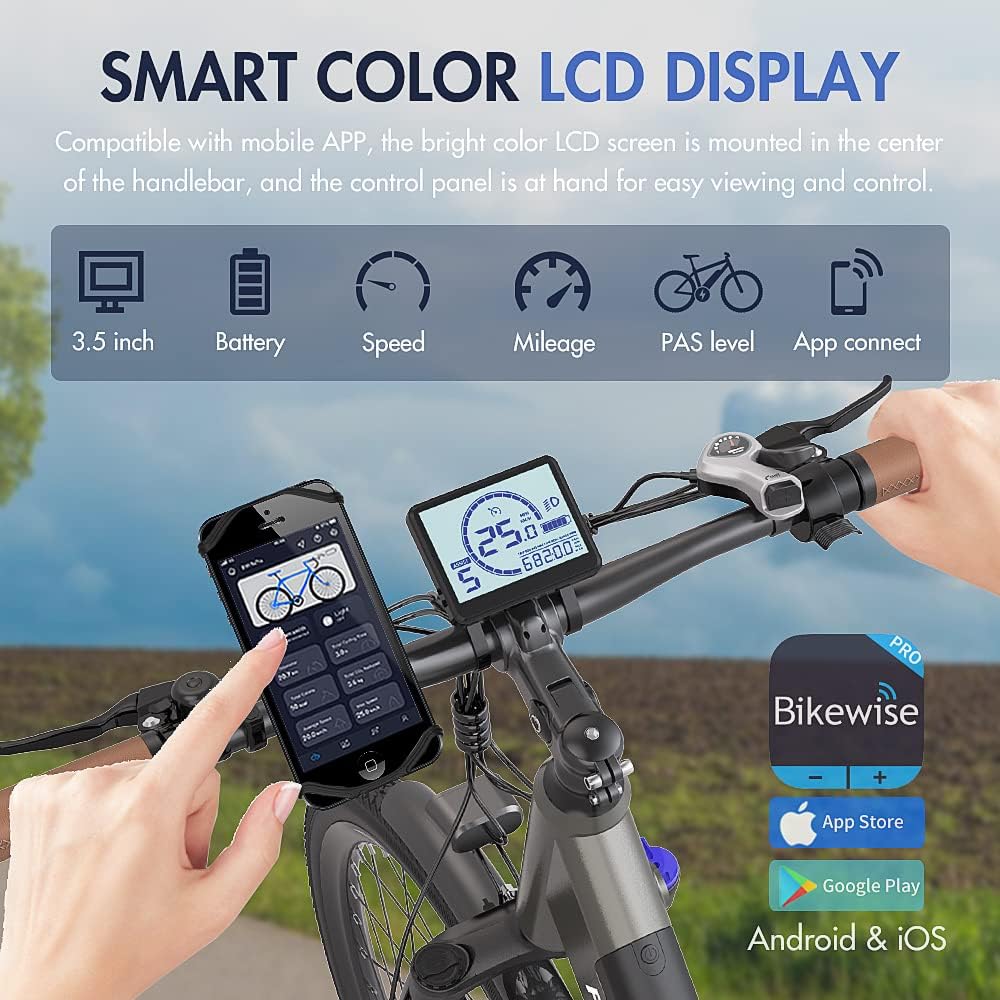
Figure 2: The 3.5-inch Smart Color LCD Display and mobile app connectivity. The display shows battery level, speed, mileage, PAS level, and allows app connection for ride data.
The 3.5-inch color LCD screen is centrally mounted on the handlebar for easy viewing. It displays key information such as speed, battery level, mileage, and PAS level. The bicycle is compatible with a mobile app, allowing you to monitor your ride data and settings via your smartphone.
- Power On/Off: Press and hold the power button on the display to turn the system on or off.
- PAS Level Adjustment: Use the '+' and '-' buttons on the control panel to select one of the 5 Pedal-Assist levels. Higher levels provide more motor assistance.
- 6 km/h Reverse Assist Mode: This feature provides low-speed assistance for maneuvering the bicycle.
- Cruise Control: Engage cruise control for maintaining a constant speed (refer to the detailed manual for activation steps).
2.2 Riding Modes
- Electric Mode: The motor provides power without pedaling. Use the throttle (if equipped and legal in your region) or select a high PAS level.
- Pedal-Assist System (PAS) Mode: The motor assists your pedaling effort. Choose from 5 PAS levels to control the amount of assistance. This mode offers a range of up to 110 km per charge.
- Fitness Mode: Ride the bicycle like a traditional bike, using only your pedaling power. The motor provides no assistance in this mode.
2.3 Gear Shifting and Braking
The F26-PRO features a 7-speed Shimano transmission for smooth gear changes. Use the shifters on the handlebar to select appropriate gears for different terrains and speeds. The mechanical 160mm disc brakes, combined with power-off brake levers, ensure effective and quick stopping power.
3. Maintenance
Regular maintenance ensures the longevity and safe operation of your Fafrees F26-PRO Electric Bicycle.
3.1 Battery Care
- Charge the battery fully after each ride, especially if it will be stored for an extended period.
- Avoid completely draining the battery.
- Store the battery in a cool, dry place, away from direct sunlight and extreme temperatures.
- The battery is a 36V 14.5Ah lithium-ion type.
3.2 General Bicycle Maintenance
- Tires: Regularly check tire pressure (CST 26 x 1.75 slim city tires) and inspect for wear or damage. Maintain proper inflation for optimal performance and safety.
- Brakes: Periodically check brake pads for wear and ensure brake levers operate smoothly. Adjust brake cable tension as needed.
- Chain and Drivetrain: Keep the chain clean and lubricated. Inspect the 7-speed Shimano gears for proper function and alignment. The chain cover helps protect clothing from the chain.
- Suspension Fork: The 26-inch front suspension fork has 80mm travel and a lockout function. Keep it clean and check for smooth operation.
- Fasteners: Periodically check all bolts and nuts for tightness, especially on the handlebars, seat post, wheels, and frame.
- Cleaning: Clean the bicycle regularly with a damp cloth. Avoid using high-pressure washers directly on electrical components. The IP54 waterproof rating provides protection against splashes.
- Wiring System: The plug-and-play wiring system simplifies maintenance and replacement of electrical parts. Ensure all connections are secure.
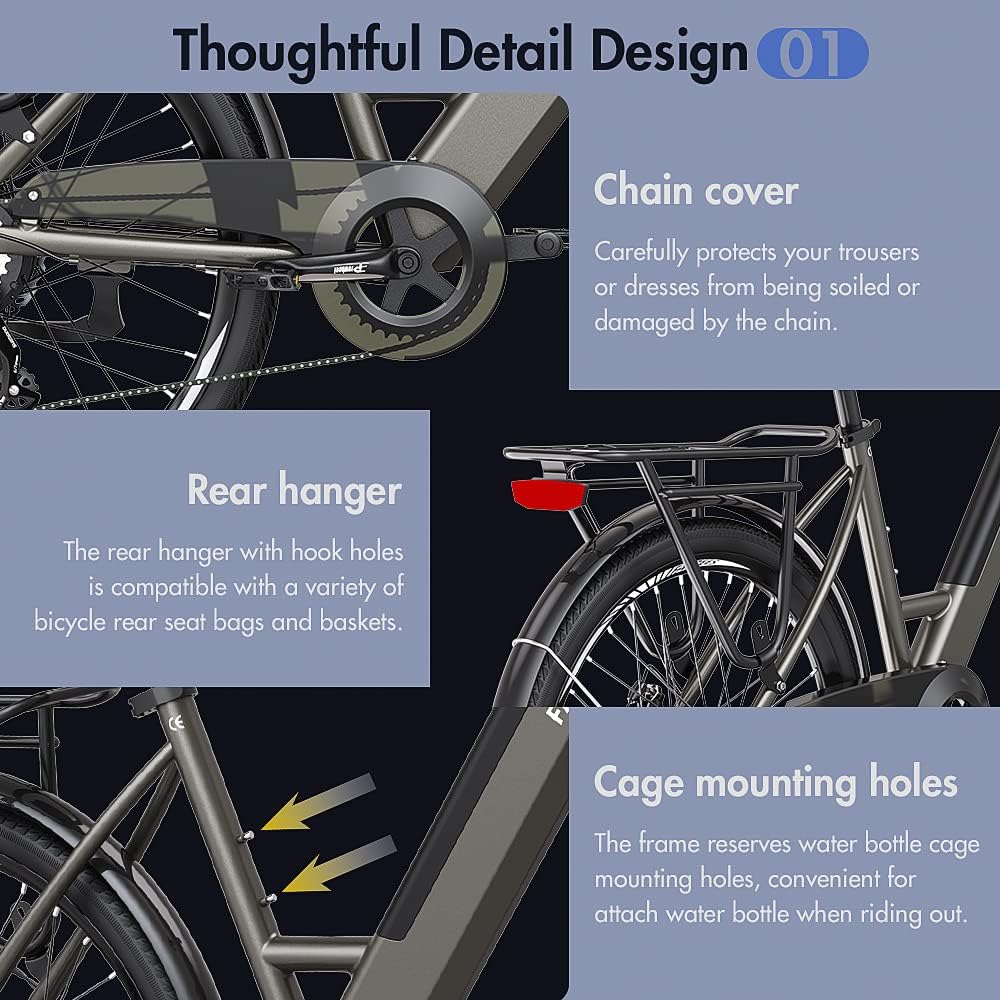
Figure 3: Details of CST slim city tires, adjustable handlebar, and the plug-and-play wiring system, highlighting components important for maintenance.
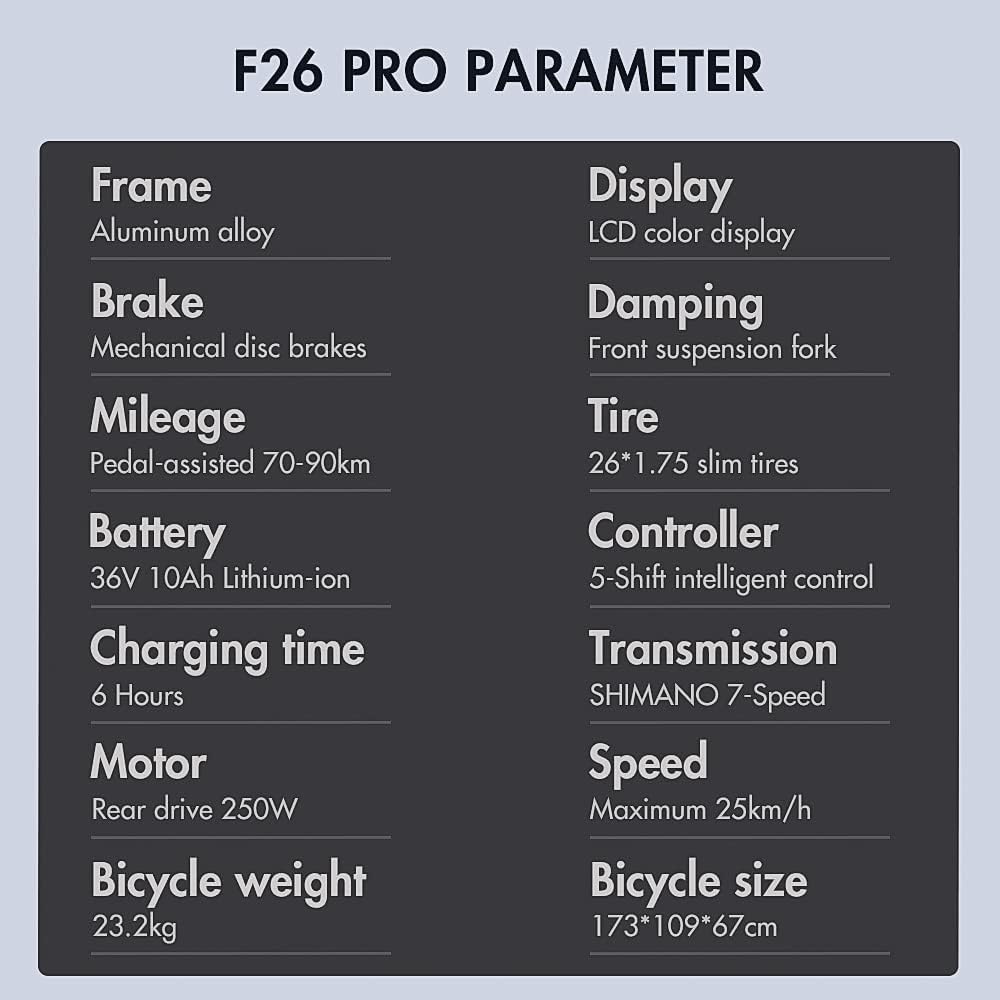
Figure 4: Close-up of the chain cover, rear hanger with hook holes for accessories, and water bottle cage mounting holes, all contributing to the bike's design and potential maintenance points.
4. Troubleshooting
If you encounter an issue with your Fafrees F26-PRO Electric Bicycle, consider the following general troubleshooting steps:
- No Power:
- Ensure the battery is fully charged and properly seated in its compartment.
- Check all electrical connections, especially the main power cable from the battery to the controller.
- Verify the display is securely connected and powered on.
- Motor Not Assisting:
- Check the PAS level on the display; ensure it's set to a level greater than 0.
- Confirm the brake levers are not engaged, as they typically cut motor power.
- Inspect the motor cable connection for any disconnections or damage.
- Brakes Not Effective:
- Check brake pad wear; replace if necessary.
- Adjust brake cable tension.
- Ensure brake calipers are properly aligned with the disc rotors.
- Unusual Noises:
- Inspect the chain and gears for debris or misalignment.
- Check for loose components or spokes.
- Lubricate the chain if it sounds dry.
For more complex issues, or if the problem persists, please contact customer support with a detailed description, including any photos or videos, for effective assistance.
5. Specifications
Below are the detailed specifications for the Fafrees F26-PRO Electric Bicycle:
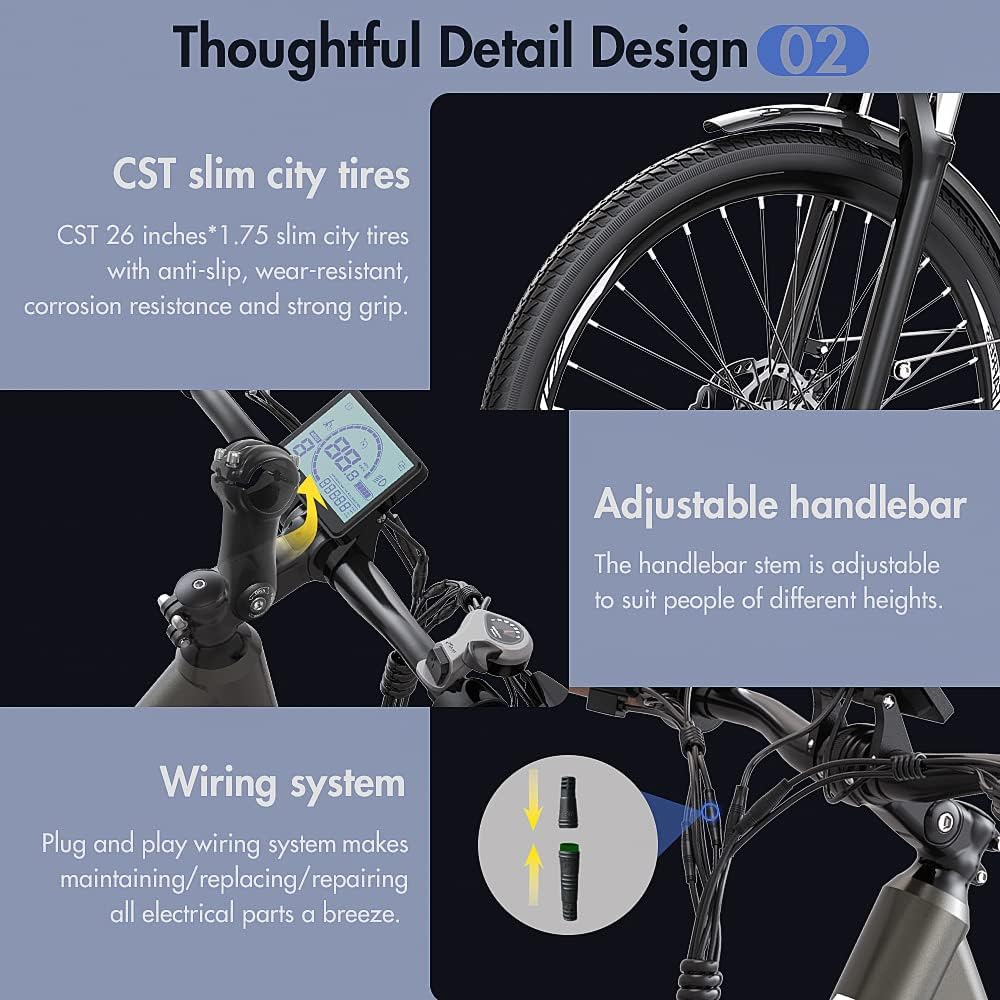
Figure 5: Key parameters of the Fafrees F26-PRO, including frame material, motor, battery, and dimensions.
| Model | F26-PRO |
| Frame Material | 6061 Aluminum Alloy |
| Bicycle Type | E-bike, City Bike, Urban Mountainbike |
| Color | Gold (goudkleurig) |
| Net Weight | 24.7 kg |
| Max Load Capacity | 120 kg |
| Waterproof Rating | IP54 |
| Recommended Rider Height | 160-198 cm |
| Motor | 36V 250W Brushless Rear Hub Motor |
| Max Torque | 42 N.m |
| Battery Type | 18650 Lithium-ion |
| Battery Capacity | 36V 14.5Ah (522Wh) |
| Charging Time | 6-8 hours |
| Max Speed | 25 km/h |
| Max Range (PAS Mode) | 90-110 km |
| Max Range (Pure Electric) | 55-65 km |
| Display | 3.5-inch Smart Color LCD |
| PAS Levels | 0-5 |
| Brakes | Mechanical Disc Brakes (Front & Rear) |
| Transmission | Shimano 7-Speed |
| Front Fork | Suspension Fork (80mm travel, with lockout) |
| Tires | CST 26 x 1.75 inch Slim City Tires |
| Saddle | SR SELLE ROYAL Silicone Saddle |
| Lights | Bright LED Headlight, Rear Brake Light |
| Unfolded Dimensions | 173 x 109 x 67 cm (Length x Height x Width) |
| Adjustable Handlebar Height | 100-112 cm |
| Adjustable Seat Height | 85-103 cm |
| Pedal-to-Ground Distance | 10 cm |
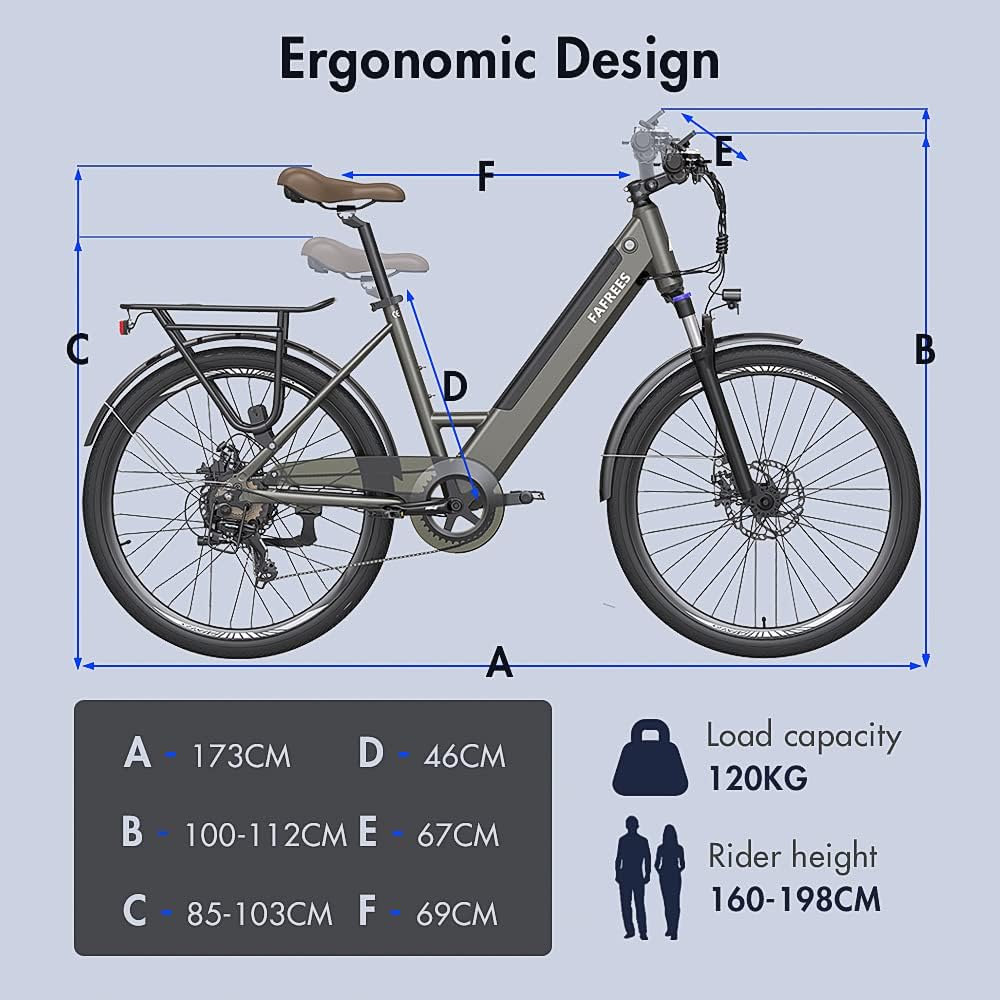
Figure 6: Ergonomic design and key dimensions of the Fafrees F26-PRO, illustrating the adjustable components and overall size.
6. Warranty Information
Specific warranty details are typically provided with your purchase documentation. Please refer to the warranty card or contact Fafrees customer support for comprehensive warranty terms and conditions.
7. Customer Support
For any questions, technical assistance, or issues not covered in this manual, please contact Fafrees customer service. Professional customer service is available to provide a response within 24 hours.
When contacting support, please provide:
- Your product model (Fafrees F26-PRO)
- Date of purchase
- A detailed description of the issue
- Any relevant photos or videos that can help diagnose the problem.


