
1. Introduction
Thank you for choosing the JESLED 108 LED Solar Motion Sensor Outdoor Wall Light. This product is designed to provide efficient and reliable outdoor lighting using solar power, featuring motion detection and multiple operating modes. Please read this manual carefully before installation and use to ensure optimal performance and longevity of your device.

Image 1.1: JESLED 108 LED Solar Motion Sensor Outdoor Wall Light. This image displays the main unit of the solar light, highlighting its solar panel and LED array.
2. Product Features
- High-Efficiency Solar Panel: Equipped with a high-power solar panel that can rotate and swing 180 degrees for optimal sunlight absorption.
- Bright LED Illumination: Features 108 high-power LED beads for superior brightness compared to similar products.
- Four Intelligent Lighting Modes: Offers Infrared Sensing Mode, Infrared Sensing and Dimming Mode, Dimming Mode, and Emergency Mode to suit various lighting needs.
- Advanced Motion Sensor: Enhanced sensitivity and wider detection range for effective security lighting.
- Dual Charging Capability: Supports both solar power and USB Type-C charging for versatile power options.
- Durable and Waterproof: Designed with IP65 waterproof rating for outdoor use in various weather conditions.
- Adjustable Design: Features an adjustable solar panel and base for flexible positioning and light direction.
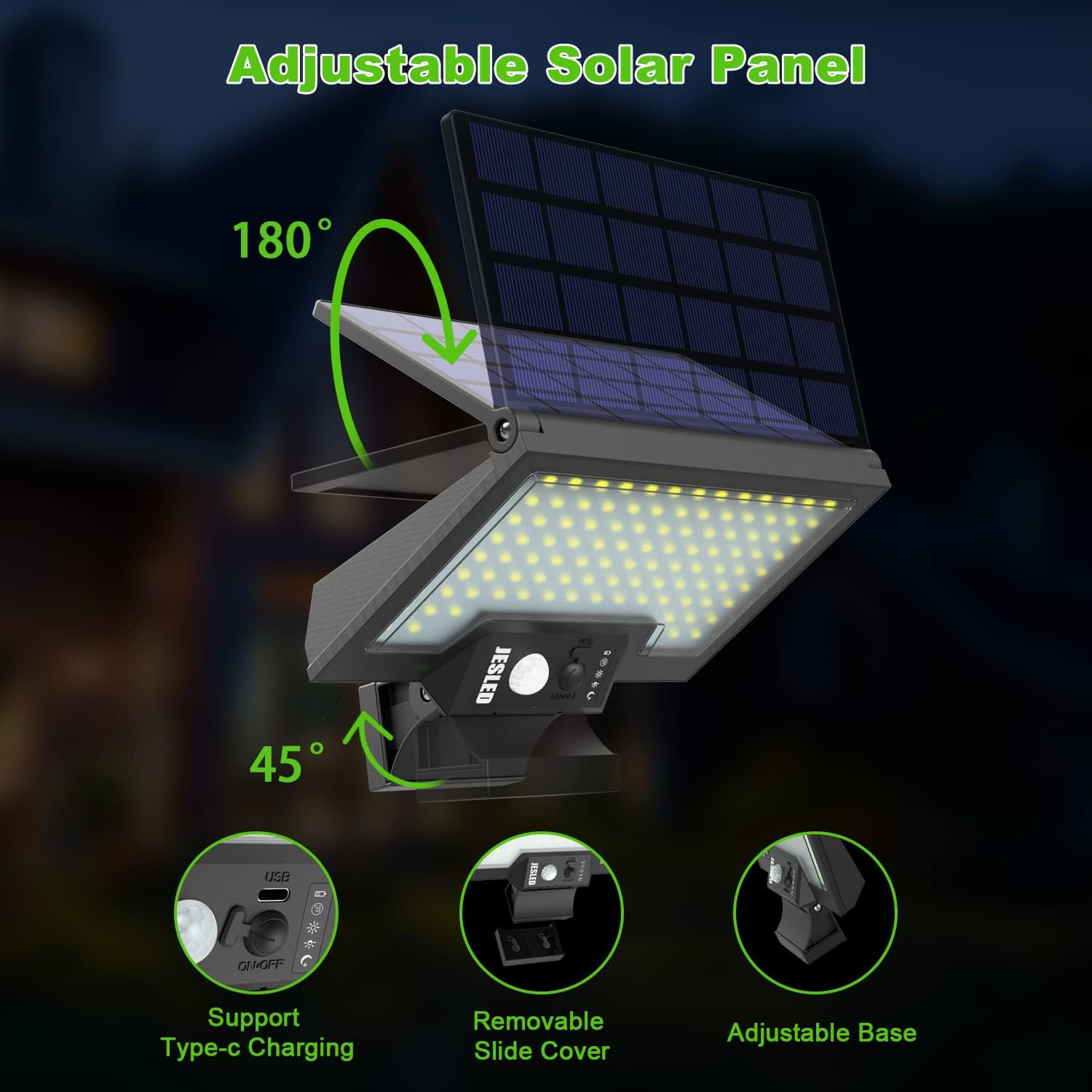
Image 2.1: Adjustable Solar Panel and Charging Options. This image illustrates the 180-degree adjustable solar panel, 45-degree adjustable base, USB Type-C charging port, and removable slide cover for battery access.
3. Package Contents
Please verify that all components are present in the package:
- JESLED 108 LED Solar Motion Sensor Outdoor Wall Light Unit
- Mounting Screws
- Wall Plugs
- Instruction Manual
4. Setup and Installation
4.1 Choosing an Installation Location
Select a location that receives direct sunlight for at least 6-8 hours daily to ensure the solar panel can fully charge the battery. Avoid areas under eaves, trees, or other obstructions that may block sunlight. The light is suitable for gardens, yards, pathways, garages, porches, fences, and RVs.
4.2 Mounting Instructions
- Mark the desired drilling points on the wall using the light's mounting holes as a template.
- Drill holes at the marked positions.
- Insert the wall plugs into the drilled holes.
- Align the light with the holes and secure it using the provided screws.
- Adjust the solar panel to face the direction with the most sunlight. The panel can rotate 180 degrees.
- Adjust the light head to the desired angle (up to 45 degrees) for optimal illumination coverage.

Image 4.1: Solar Light Charging and Lighting Cycle. This image demonstrates the solar light charging during the daytime and automatically lighting up at night.

Image 4.2: Solar Light Application Examples. This image shows the solar light installed in various outdoor settings such as a door entrance, pathway, and backyard.
5. Operating Modes
The JESLED solar light features four intelligent lighting modes. Use the switch button on the unit to cycle through the modes.
- Mode 1: Infrared Sensing Mode
The light remains off when no motion is detected and turns on to full brightness when motion is detected. - Mode 2: Infrared Sensing and Dimming Mode
The light stays on a dim setting when no motion is detected and switches to full brightness when motion is detected. - Mode 3: Dimming Mode
The solar light stays on a dim setting all night, automatically turning on at dusk and off at dawn. - Mode 4: Emergency Mode (Highlight Mode)
Press and hold the power button for 3 seconds to activate this mode. The light will stay on high brightness continuously. Press again for 3 seconds to turn off.

Image 5.1: Four Intelligent Lighting Modes. This diagram visually explains the behavior of the light in Sensor Mode, Sensor & Dim Mode, Dim Mode, and Highlight Mode.

Image 5.2: Solar Motion Sensor Light Components Diagram. This image labels the USB Connector, Motion Sensor, Switch Button, Indicator Lights (Turn Off, Mode 1, Mode 2, Mode 3, Charging), and the location of the replaceable battery.
6. Charging
The solar light is primarily powered by its integrated solar panel. Ensure the panel is exposed to direct sunlight for 6-8 hours daily for optimal charging. A full charge can provide up to 12 hours of lighting at night.
For situations with insufficient sunlight or if a quicker charge is needed, the light also supports USB Type-C charging. Connect a compatible USB-C cable to the USB connector on the unit (refer to Image 5.2 for location).
7. Maintenance
- Cleaning: Regularly wipe the solar panel with a soft, damp cloth to remove dust, dirt, or debris. A clean solar panel ensures efficient charging.
- Battery: The light uses a replaceable Lithium Polymer battery. If the light's performance significantly degrades over time, the battery may need replacement. Refer to Image 5.2 for the battery location, accessible via the removable slide cover. Use only compatible replacement batteries.
- Inspection: Periodically check the mounting screws and the light's position to ensure it remains securely installed and optimally angled for sunlight.
8. Troubleshooting
- Light does not turn on at night:
- Ensure the solar panel is receiving sufficient direct sunlight during the day.
- Check if the light is in the correct operating mode.
- Verify that the switch is in the 'ON' position.
- The battery might be depleted; try charging via USB-C or repositioning for more sunlight. - Light is dim or only stays on for a short time:
- The solar panel may be dirty; clean it thoroughly.
- Insufficient sunlight exposure for charging.
- The battery may be aging and require replacement. - Motion sensor is not working:
- Ensure the light is in a motion-sensing mode (Mode 1 or Mode 2).
- Check for obstructions blocking the sensor's field of view.
- The sensor's range might be affected by ambient temperature or installation height.
9. Specifications
| Feature | Specification |
|---|---|
| Brand | JESLED |
| Model | 108LED |
| LED Quantity | 108 LEDs |
| Battery | 1 Lithium Polymer battery (included) |
| Product Dimensions | 25.91 x 19.81 x 6.35 cm |
| Weight | 510 g |
| Material | Plastic |
| Waterproof Rating | IP65 |
| Power Source | Solar Powered, USB Type-C Charging |
| Room Type | Garage (also suitable for Garden, Yard, Pathway, Porch, Fence, RV) |
| Solar Panel Adjustability | 180 degrees |
| Light Head Adjustability | Up to 45 degrees |

Image 9.1: Solar Light Coverage Area. This image illustrates the effective illumination area of approximately 160 square feet provided by the solar light.
10. Warranty and Support
JESLED provides a 24-month after-sale service and a 6-month warranty for this product. If you encounter any issues or have questions regarding your solar light, please contact JESLED customer support for assistance.


