
Introduction
This manual provides comprehensive instructions for the assembly, operation, maintenance, and troubleshooting of your FLEXISPOT H7 Adjustable Overbed Bedside Table. Please read this manual carefully before use to ensure proper function and safety.
Safety Information
- Ensure the table is stable and cannot be easily tipped over, especially when in use or when adjusting the height.
- Avoid exposing the table to liquids. If liquids come into contact with the table, wipe them off immediately to prevent damage to the engineered wood surface.
- Do not exceed the maximum weight recommendation of 13.2 kilograms (approximately 29.1 pounds).
- When lowering the table, apply pressure near the support pillar side of the tabletop to ensure smooth and safe adjustment. Avoid pressing on the unsupported end.
Product Overview
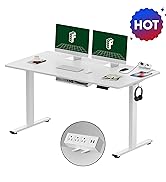
The FLEXISPOT H7 is a versatile, adjustable overbed table designed for various uses in home and hospital settings. It features a pneumatic lift system for easy height adjustment and hidden casters for smooth mobility.
Key Features:
- Gas Spring Pneumatic Lift System: Allows for smooth, one-hand height adjustment from 26 inches to 41.7 inches.
- Easy Mobility: Equipped with 4 hidden casters for effortless movement and positioning.
- Space-Saving Design: Low-profile base (minimum 1.2 inches high) slides easily under most furniture.
- Multi-functional: Suitable for use as a laptop desk, bedside table, standing desk, or for dining and reading.
- Ergonomic Design: Supports both sitting and standing workstyles.
- Integrated Coaster: A convenient cup holder is included for beverages.

Setup
Assembly Instructions:
The FLEXISPOT H7 table is designed for straightforward assembly. All necessary tools are included in the package, and the process can typically be completed within 10 minutes.
- Unpack all components and verify against the included assembly guide.
- Follow the step-by-step instructions provided in the assembly guide. A screwdriver is the primary tool recommended for assembly.
- Ensure all connections are secure before use.
Operating Instructions
Height Adjustment:
The table features a pneumatic lift system for easy height changes.
- To adjust the height, locate the pneumatic hand control lever, typically positioned on the underside of the tabletop near the main support column.
- To raise the table: Gently lift the lever while applying slight upward pressure on the tabletop. The gas spring will assist in raising the table smoothly.
- To lower the table: Gently lift the lever while applying slight downward pressure on the tabletop. For optimal control and stability, press down on the area of the tabletop directly above the support pillar.
- Release the lever once the desired height (between 26" and 41.7") is reached.

Mobility:
The table is equipped with hidden casters for easy movement.
- To move the table, simply push or pull it to your desired location. The low-profile base (1.2 inches high) allows it to slide under most beds, sofas, or chairs.
- The casters provide 360-degree rotation for smooth maneuvering on various floor surfaces.

Multi-functional Use:
The FLEXISPOT H7 can adapt to various needs:
- Overbed/Overside Table: Position it over your bed or alongside a sofa for convenient access to your laptop, books, or meals. The 90-degree lifting column design maximizes space.
- Standing Desk: Adjust to a standing height for an ergonomic workstation, promoting health benefits by reducing prolonged sitting.
- Portable Workstation: Easily move it between rooms for different tasks, such as a dressing table or a record player stand.


Maintenance
Cleaning:
- Wipe the table surfaces with a dry cloth.
- The tabletop is not stain-resistant. In case of spills, clean immediately with a dry or slightly damp cloth to prevent damage to the engineered wood.

General Care:
- Regularly check all screws and connections to ensure they remain tight and secure.
- Avoid placing excessively heavy items on the table, adhering to the maximum weight limit.
Troubleshooting
Table Stability Issues:
- If the table feels wobbly, re-check all assembly points to ensure screws are fully tightened.
- Ensure the table is placed on a flat, even surface.
- Avoid placing heavy items on the unsupported end of the tabletop; distribute weight evenly or closer to the main support pillar.
Height Adjustment Difficulties:
- If the pneumatic lift mechanism is stiff or difficult to operate, ensure the lever is fully engaged.
- When lowering, press down on the tabletop directly above the main support column for smoother operation. Applying pressure to the unsupported edges may cause the mechanism to bind or feel less responsive.
- Verify that no obstructions are preventing the column from moving freely.
Specifications
| Attribute | Detail |
|---|---|
| Brand | FLEXISPOT |
| Model Name | Overbed Bedside Table (H7 / H6) |
| Product Dimensions (D x W x H) | 15.7"D x 27.6"W x 41.7"H |
| Adjustable Height Range | 26" to 41.7" |
| Maximum Weight Recommendation | 13.2 Kilograms (approx. 29.1 lbs) |
| Color | White |
| Frame Material Type | Metal |
| Top Material Type | Engineered Wood |
| Is Stain Resistant | No |
| Tools Recommended For Assembly | Screw Driver |
| UPC | 810072806963 |
Warranty and Support
For specific warranty details, please refer to the documentation included with your product or visit the official FLEXISPOT website. FLEXISPOT is committed to customer satisfaction and offers support for any inquiries or issues you may encounter.
If you require assistance, FLEXISPOT customer support is available to help within 24 hours.
For further information, please visit the FLEXISPOT Store on Amazon.

