
1. Introduction
The RDINSCOS MT18 3-in-1 Pin-Type Moisture Meter is a versatile tool designed for accurate and rapid measurement of moisture content in various materials. It is ideal for detecting dampness in wood, paper, and building materials such as walls, plaster, and floors. This manual provides essential information for the safe and effective operation and maintenance of your device.

Image: The RDINSCOS MT18 3-in-1 Pin-Type Moisture Meter, orange in color, showing its digital display and measurement pins.
2. Product Features
- Accurate & Fast Measurement: Provides precise, rapid, and reliable readings with ±0.5% accuracy and 0.1% resolution.
- Wide Measurement Range: Wood: 4-75%, Paper: 4-90%, Wall: 0.2-24%.
- Professional Pin-type Detection: Sharp pins ensure full material contact for accurate internal moisture measurement.
- Multi-functional Modes: Easily switch between Wood (4 timber grades A/B/C/D), Paper, and Wall modes.
- Backlit LCD Display: Large, bright screen for clear, real-time readings in various lighting conditions.
- Data Hold Function: Freeze displayed values for easy recording.
- Auto Power-Off: Intelligent 5-minute auto power-off function to conserve battery life.
- Battery Alert: Monitors battery levels and provides alerts before depletion.
- Durable Design: Anti-slip, rugged construction for a firm, comfortable grip.
3. Package Contents
Upon unpacking, please ensure all items listed below are present and in good condition:
- 1 x RDINSCOS MT18 Moisture Meter
- 2 x AAA Batteries
- 1 x English User Manual

Image: The moisture meter shown with its included accessories: two AAA batteries and a small wrench.
4. Setup
4.1 Battery Installation
- Locate the battery compartment on the back of the device.
- Open the battery compartment cover.
- Insert two AAA batteries, ensuring correct polarity (+/-).
- Close the battery compartment cover securely.

Image: Rear view of the moisture meter, highlighting the battery compartment and its specifications.
4.2 Removing the Protective Cap
Before use, carefully remove the protective cap covering the measurement pins. Store the cap safely to protect the pins when the device is not in use.
5. Operating Instructions
5.1 Power On/Off
Press the POWER button to turn the device on. The backlit LCD display will illuminate. The device will automatically power off after 5 minutes of inactivity to save battery life.

Image: The moisture meter next to a clock showing 5 minutes, indicating its auto-off feature.
5.2 Mode Selection
The MT18 features three measurement modes: Wood, Paper, and Wall. Press the MODE button to cycle through these options. The selected mode will be indicated on the LCD display.

Image: The moisture meter's display showing the different measurement modes (Wood, Paper, Wall) and how to switch between them.
5.3 Taking a Measurement
To obtain an accurate reading, firmly insert the two measurement pins into the material you wish to test. Ensure both pins make full contact with the material. The moisture content will be displayed on the LCD screen.

Image: A diagram showing the proper insertion of pins into a material to ensure full contact for accurate moisture readings.
5.3.1 Wood Moisture Measurement
In Wood mode, the meter offers four timber grades (A, B, C, D) to accommodate various hardwood and softwood types. Refer to the device's label or the included manual for specific wood types corresponding to each grade. The measurement range for wood is 4-75%.

Image: The moisture meter being used to measure moisture in a tree trunk, displaying a reading of 63.0%.
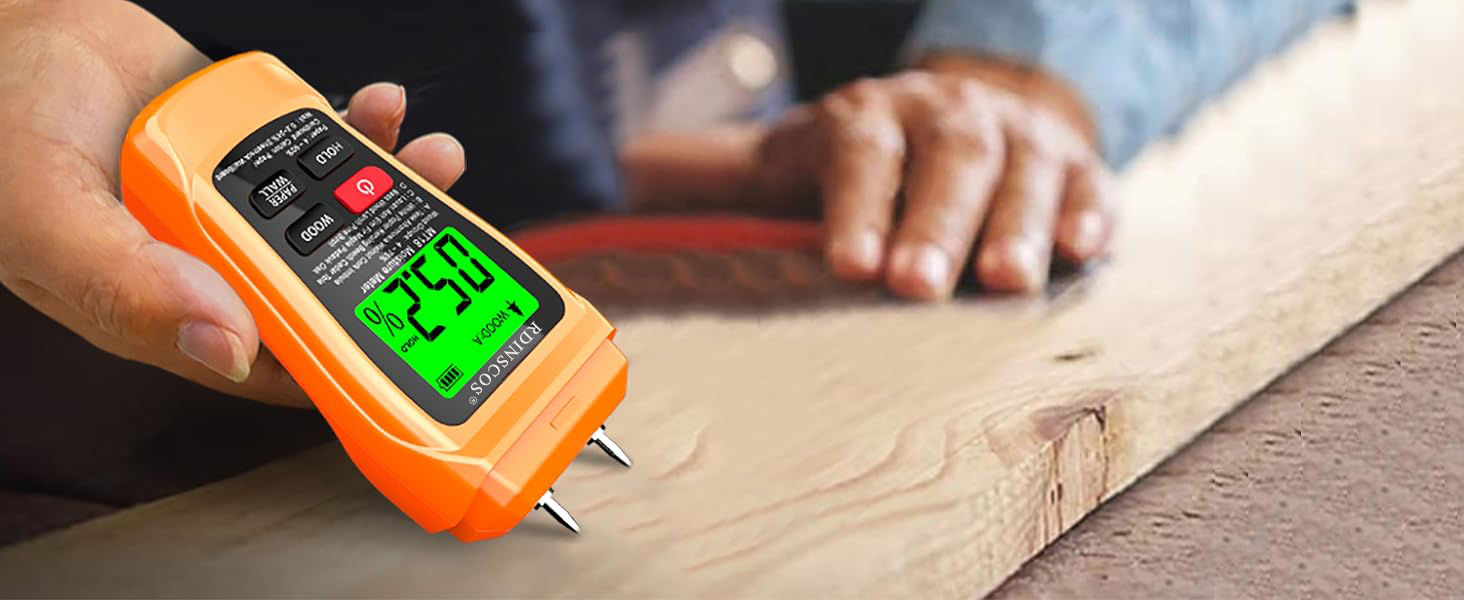
Image: A person using the moisture meter to check the moisture content of a piece of firewood.
5.3.2 Paper Moisture Measurement
For paper and cardboard, select the Paper mode. The measurement range for paper is 4-90%.
5.3.3 Wall Moisture Measurement
For building materials such as walls, plaster, and drywall, select the Wall mode. The measurement range for walls is 0.2-24%. The device can identify potential moisture problems up to 10 mm below the surface.

Image: The moisture meter being used to measure moisture in a wall, displaying a reading of 0.2%.

Image: A diagram illustrating the moisture meter's capability to measure moisture at a depth of up to 10mm within a material.

Image: The moisture meter being used to measure moisture in a piece of drywall.
5.4 Data Hold Function
Press the HOLD button to freeze the current reading on the display. This is useful for taking measurements in hard-to-reach areas or for recording values. Press the HOLD button again to release the reading.

Image: The moisture meter's display illustrating the 'HOLD' function, which freezes the current measurement on screen.
5.5 Backlit Display
The LCD screen features a backlight for improved visibility in low-light conditions. The backlight activates automatically when the device is turned on and can be toggled or will turn off after a period of inactivity to save power.

Image: The moisture meter's backlit display showing a reading, demonstrating its visibility in a dimly lit workshop.
5.6 Product Demonstration Video
Video: A demonstration of the RDINSCOS MT18 moisture meter, showcasing its ease of use and accuracy in measuring moisture content in wood.
6. Maintenance
6.1 Cleaning
Wipe the device with a soft, dry cloth. Do not use abrasive cleaners or solvents. Avoid exposing the device to excessive moisture or liquids.
6.2 Pin Care
The measurement pins are sharp. Handle with care. Please note that the pins of this damp tester are not designed to be replaced by the user.
6.3 Battery Replacement
When the battery alert appears on the display, replace the AAA batteries as described in the "Battery Installation" section (4.1). Remove batteries if the device will not be used for an extended period.
7. Troubleshooting
- No Display/Device Not Turning On: Check battery installation and ensure batteries are not depleted. Replace if necessary.
- Inaccurate Readings: Ensure pins are fully inserted into the material and making good contact. Verify that the correct material mode (Wood, Paper, Wall) is selected. For wood, ensure the correct timber grade is selected.
- Pins Not Penetrating Material: Apply firm, steady pressure. If the material is excessively hard, consider testing a different area or using an alternative method if pin penetration is not possible.
8. Specifications
| Specification | Value |
|---|---|
| Brand | RDINSCOS |
| Model Number | MT18 (also referred to as MT19B in some specifications) |
| Colour | Orange |
| Item Weight | 129 Grams |
| Battery Description | 2 x AAA batteries |
| Operating Humidity | 10-90% |
| Upper Temperature Rating | 50 Degrees Celsius |
| Temperature Reading Accuracy | ±0.5 Degrees Celsius |
| Wood Measurement Range | 4-75% |
| Paper Measurement Range | 4-90% |
| Wall Measurement Range | 0.2-24% |
| Manufacturer | SHENZHEN REDDRAGON INSTRUMENTS CO.,LTD |
| Country Of Origin | China |
9. Warranty and Support
For warranty information or technical support, please refer to the contact details provided with your purchase or visit the official RDINSCOS website. Keep your purchase receipt as proof of purchase.