
1. Introduction
This manual provides essential information for the safe and efficient operation of your Ingco CFALI2001 Cordless Portable Fan. Please read these instructions carefully before use and retain them for future reference. This fan is designed for both home and industrial use, offering versatile cooling with its cordless and plug-in capabilities.
The Ingco CFALI2001 fan features superior DC voltage efficiency for energy saving, multi-functional AC voltage compatibility (220-240V~50/60HZ), three adjustable speed settings, a compact and portable 12-inch design, and Lithium-ion battery technology for wireless operation.
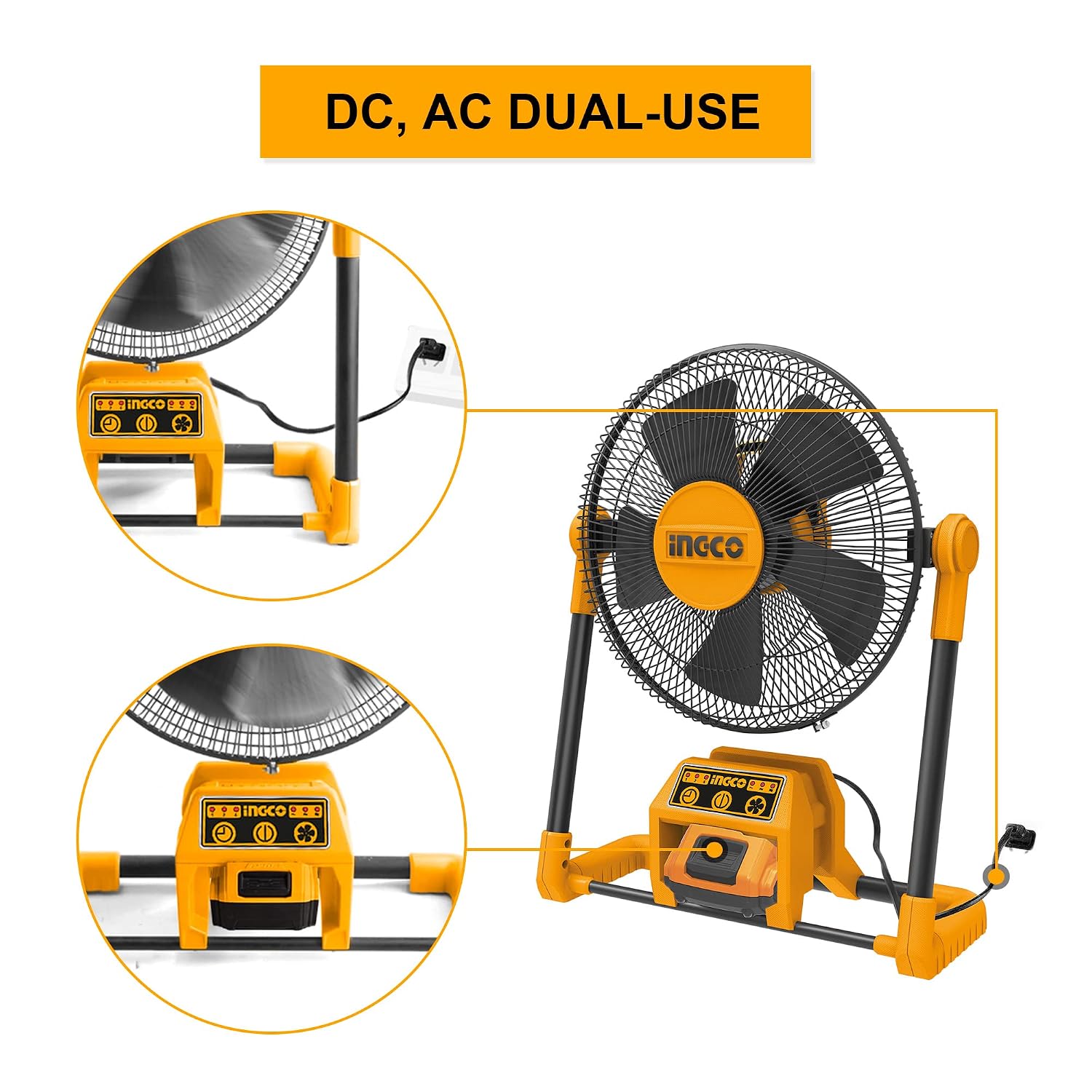
Figure 1: Ingco CFALI2001 Cordless Portable Fan
2. Important Safety Instructions
Always follow basic safety precautions when using electrical appliances to reduce the risk of fire, electric shock, and injury to persons.
- Read all instructions before using this fan.
- Do not operate any fan with a damaged cord or plug. Discard fan or return to an authorized service facility for examination and/or repair.
- Do not run cord under carpeting. Do not cover cord with throw rugs, runners, or similar coverings. Arrange cord away from traffic area and where it will not be tripped over.
- Never insert fingers or any other objects through the grille when the fan is operating.
- Unplug the fan from the outlet when not in use, when moving it from one location to another, and before cleaning.
- Do not use the fan in wet or damp locations such as bathrooms or laundry areas.
- This appliance is not intended for use by persons (including children) with reduced physical, sensory or mental capabilities, or lack of experience and knowledge, unless they have been given supervision or instruction concerning use of the appliance by a person responsible for their safety.
- Ensure the fan is placed on a stable, flat surface to prevent it from tipping over.
3. Package Contents
Carefully unpack your Ingco CFALI2001 fan and check that all items are present and in good condition. If any items are missing or damaged, contact your retailer.
- Ingco CFALI2001 Cordless Portable Fan
- Power Cord
- User Manual
Note: Battery and charger may be sold separately depending on the specific product package.
4. Product Overview
Familiarize yourself with the main components of your Ingco CFALI2001 fan:
- Fan Head with Grille and Blades
- Control Panel (Power, Speed, Timer Buttons)
- Battery Compartment (for Lithium-ion battery)
- AC Power Input Port
- Adjustable Stand/Frame

Figure 2: Fan with AC power connection and battery slot
5. Setup
5.1 Initial Placement
Place the fan on a firm, level surface. Ensure there is adequate space around the fan for proper airflow and to prevent obstruction of the grilles.
5.2 Powering the Fan
The Ingco CFALI2001 fan can be powered in two ways:
- AC Power: Connect the provided power cord to the AC power input port on the fan, then plug the other end into a standard 220-240V~50/60HZ electrical outlet.
- Battery Power: If using a Lithium-ion battery (sold separately or included in specific kits), insert the fully charged battery into the battery compartment located on the base of the fan. Ensure it clicks securely into place.
Figure 3: Dual power options: AC plug-in and battery slot
6. Operating Instructions
6.1 Power On/Off
Press the Power Button on the control panel to turn the fan on or off.
6.2 Adjusting Fan Speed
The fan features three-speed settings. Press the Speed Button repeatedly to cycle through Low, Medium, and High speeds. Indicator lights on the control panel will show the current speed setting.

Figure 4: Three wind speed adjustment indicators
6.3 Using the Timer Function
To set a timer for automatic shut-off, press the Timer Button. Each press will cycle through available timer settings (e.g., 1 hour, 2 hours, 4 hours). The corresponding indicator light will illuminate.

Figure 5: Timer function indicators (1H, 2H, 4H)
6.4 Adjusting Airflow Direction (360° Rotation)
The fan head can be manually rotated 360 degrees vertically to direct airflow precisely where needed. Gently adjust the fan head to your desired angle.

Figure 6: Fan head with 360° rotation capability
7. Maintenance
Regular cleaning and maintenance will ensure optimal performance and extend the lifespan of your fan.
7.1 Cleaning
- Always unplug the fan from the power source and remove the battery before cleaning.
- Use a soft, damp cloth to wipe the exterior surfaces of the fan. Do not use abrasive cleaners or solvents.
- To clean the fan blades, carefully remove the front grille (if detachable, refer to product diagram for specific instructions). Wipe the blades with a soft cloth. Ensure all parts are dry before reassembling and operating.
- Do not immerse the fan in water or allow water to drip into the motor housing.
7.2 Storage
When not in use for extended periods, store the fan in a cool, dry place, away from direct sunlight and extreme temperatures. If using battery power, ensure the battery is charged to approximately 50% before storage and recharge every 3-6 months to maintain battery health.
8. Troubleshooting
If you experience issues with your Ingco CFALI2001 fan, refer to the following common problems and solutions:
| Problem | Possible Cause | Solution |
|---|---|---|
| Fan does not turn on. |
|
|
| Weak or no airflow. |
|
|
| Unusual noise during operation. |
|
|
If the problem persists after attempting these solutions, please contact Ingco customer support.
9. Specifications
| Feature | Specification |
|---|---|
| Model Name | CFALI2001 |
| Brand | Ingco |
| Electric Fan Design | Table Fan |
| Power Source | Battery Powered / AC (220-240V~50/60HZ) |
| Product Dimensions (D x W x H) | 15D x 15W x 6H Centimeters |
| Item Weight | 1200 Grams |
| Special Feature | Portable, Cordless, 360° Airflow |
| Mounting Type | Free Standing |
| Controller Type | Button Control |
| Material | Iron (Frame), Plastic (Blades) |
| Number Of Speeds | 3 |
| Wattage | 5 Watts |
| Number of Blades | 3 |
| Switch Type | Push Button |
| Indoor Outdoor Usage | Indoor |
| Specification Met | CE |

Figure 7: Product Dimensions
10. Warranty and Support
For warranty information, please refer to the warranty card included with your purchase or contact your retailer. Ingco products are designed for durability and performance. If you require technical assistance or have questions not covered in this manual, please contact Ingco customer support through their official website or the contact information provided with your product.
You can visit the official Ingco store for more information: Ingco Store on Amazon