
Radiant RAS21004
Radiant Miami Black Smartwatch User Manual
Model: RAS21004
1. Introduction
Welcome to the user manual for your new Radiant Miami Black Smartwatch. This guide provides detailed instructions on how to set up, operate, and maintain your device, ensuring you get the most out of its advanced features. The Radiant Miami Smartwatch is designed to enhance your daily life with its modern design, health monitoring capabilities, and smart notifications.

Figure 1: Radiant Miami Black Smartwatch, showcasing its elegant design with a white band and gold-colored case.
2. Setup and Initial Use
2.1. Charging the Device
Before first use, fully charge your smartwatch. Connect the magnetic charging cable to the charging points on the back of the watch and plug the USB end into a standard USB power adapter (not included). A full charge typically takes about 2 hours and provides up to 10 days of battery life in standby mode.

Figure 2: Battery life indicators, showing 5-7 days working time, 7-15 days standby time, and 2 hours charging time.
2.2. App Installation and Pairing
To unlock the full potential of your Radiant Miami Smartwatch, download the companion app.
- Download the App: Scan the QR code provided in the watch's menu or search for "GloryFit" in the Apple App Store (for iOS) or Google Play Store (for Android).
- Create Your Profile: Open the app and follow the on-screen instructions to set up your personal profile.
- Pair Your Smartwatch: In the app, navigate to the device section, select "Add Device," and choose your Radiant Smartwatch from the list of available Bluetooth devices. Ensure Bluetooth is enabled on your smartphone.

Figure 3: Instructions for downloading and pairing the GloryFit app with the smartwatch.
3. Operating the Smartwatch
3.1. Navigation and Watch Faces
The smartwatch features a touch-sensitive screen for easy navigation. Swipe left, right, up, or down to access different functions and menus. You can customize your watch face through the companion app to match your style or display preferred information.

Figure 4: Customizing watch faces via the smartphone application.
3.2. Notifications and Calls
Receive real-time notifications for calls, messages (SMS, WhatsApp, Facebook, etc.), and app alerts directly on your wrist. You can view message text and reject incoming calls from the smartwatch. Vibration alerts are also available for sedentary reminders, alarms, and low battery warnings.

Figure 5: Smartwatch displaying a notification from a social media application.
3.3. Health Monitoring
The Radiant Miami Smartwatch is equipped with sensors to monitor various health metrics:
- Heart Rate: Continuously monitors your heart rate throughout the day.
- Blood Pressure: Provides estimates of your blood pressure.
- Blood Oxygen (SpO2): Measures your blood oxygen saturation levels.
- Sleep Monitoring: Automatically tracks your sleep patterns, including awake, light, and deep sleep stages, providing insights into your sleep quality.
Note: The health monitoring features are for reference only and should not be used for medical diagnosis or treatment. Consult a medical professional for any health concerns.

Figure 6: Health monitoring features on the smartwatch, including heart rate, blood oxygen, and blood pressure.
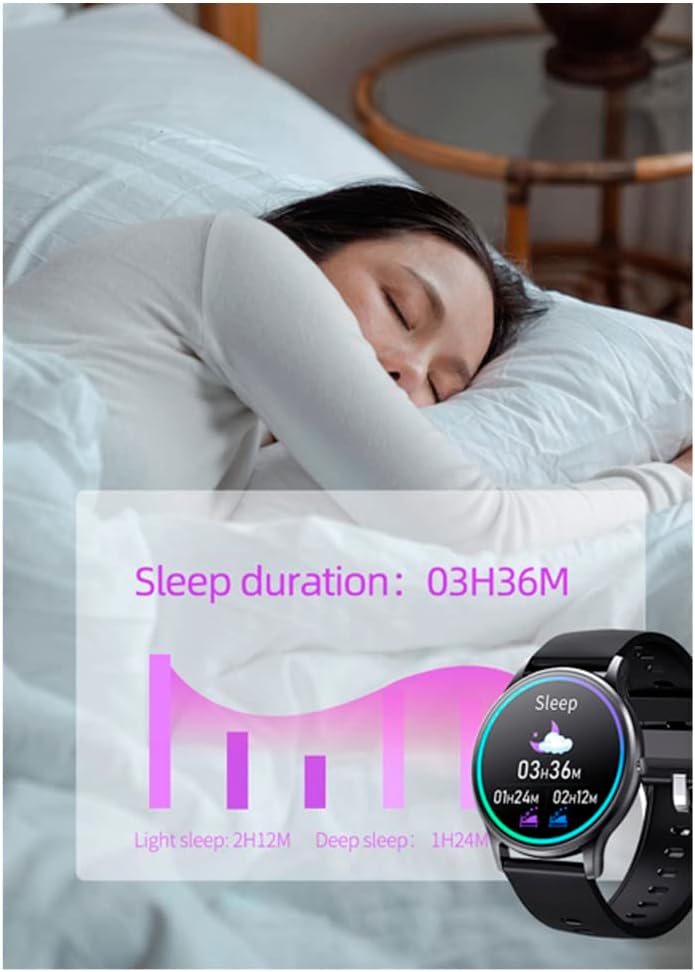
Figure 7: Sleep monitoring data displayed on the smartwatch, showing total sleep duration and breakdown of light and deep sleep.
3.4. Activity Tracking
Track your daily activities, including steps, distance, and calories burned. The smartwatch supports multiple sports modes such as running, walking, cycling, swimming, and more, providing detailed data for each activity.

Figure 8: Activity tracking interface showing data for different sports modes.
3.5. Music Control
Control music playback on your connected smartphone directly from your smartwatch. Play, pause, skip tracks, and adjust volume without needing to take out your phone.

Figure 9: Music control interface on the smartwatch, allowing remote management of smartphone audio.
3.6. Camera Remote
Use your smartwatch as a remote shutter for your smartphone's camera. Simply shake your wrist or tap the camera icon on the watch to capture photos.

Figure 10: Smartwatch camera remote function, enabling remote photo capture.
4. Maintenance and Care
- Cleaning: Regularly clean your smartwatch and strap with a soft, dry cloth. If necessary, use a slightly damp cloth and mild soap, then dry thoroughly. Avoid harsh chemicals or abrasive materials.
- Water Resistance: The watch is designed to be resistant to splashes and sweat, making it suitable for daily wear and light exercise. However, it is not recommended for swimming or showering. Avoid prolonged exposure to water.
- Storage: When not in use for extended periods, store the smartwatch in a cool, dry place.
- Temperature: Avoid exposing the device to extreme temperatures (very hot or very cold) as this can affect battery life and overall performance.
5. Troubleshooting
| Problem | Possible Solution |
|---|---|
| Smartwatch does not turn on. | Ensure the device is fully charged. Connect it to the charger for at least 30 minutes. |
| Cannot pair with smartphone. |
|
| Notifications are not received. |
|
| Inaccurate health data. | Ensure the watch is worn snugly on your wrist, about one finger's width from the wrist bone. Avoid excessive movement during measurements. Remember, data is for reference only. |
| App is incompatible with current Android version. | Ensure your phone's operating system meets the minimum requirements (Android 4.4+ / iOS 8.4+). If issues persist, contact Radiant customer support for potential app updates or alternative solutions. |
6. Specifications
| Feature | Detail |
|---|---|
| Model Number | RAS21004 |
| Battery Type | 1 Lithium-metal battery (required) |
| Battery Life (Working) | 5-7 days |
| Battery Life (Standby) | 7-15 days |
| Charging Time | Approximately 2 hours |
| Dimensions | 16.4 x 14.3 x 3.4 cm (Package); 190 g (Weight) |
| Compatibility | iOS 8.4+ / Android 4.4+ |
| Connectivity | Bluetooth 5.0 (for app pairing) |
| Manufacturer | RADIANT |
| Country of Origin | Spain |
7. Warranty and Support
Radiant products are manufactured with high-quality standards. For warranty information and customer support, please refer to the documentation included with your purchase or visit the official Radiant website.
For specific inquiries or technical assistance, you may contact the seller, Amazing Watches S.L., through the Amazon platform.

Figure 11: Radiant brand logo, signifying a long-standing reputation in the watch industry.
Ask a question about this manual
Ask about setup, troubleshooting, compatibility, parts, safety, or missing instructions. Manuals+ will review the question and use this page’s manual context to help answer it.