
Introduction
The AT&T DL72119 DECT 6.0 Cordless Phone System is designed to provide reliable communication for your home or office. Featuring Bluetooth Connect to Cell technology, a Smart Call Blocker, and an integrated digital answering system, this phone offers convenience and advanced call management. Its unsurpassed range and large backlit screen ensure clear communication and ease of use.

Figure 1: AT&T DL72119 DECT 6.0 Cordless Phone System with Handset and Base Unit.
Package Contents
Verify that your package contains the following items:
- Base unit
- Cordless handset
- Adaptor
- Battery pack
- Telephone line cord
- Quick start guide
Setup
1. Connecting the Base Unit
- Connect the small end of the AC adapter to the power jack on the back of the telephone base.
- Plug the large end of the AC adapter into a wall outlet not controlled by a wall switch.
- Plug one end of the telephone line cord into the TEL LINE jack on the back of the telephone base.
- Plug the other end of the telephone line cord into a telephone wall jack.
2. Battery Installation
- Open the battery compartment cover on the back of the cordless handset.
- Connect the battery pack plug into the jack inside the compartment, ensuring correct polarity.
- Place the battery pack with the label UP and tuck the wires neatly inside the battery compartment.
- Close the battery compartment cover.
- Place the handset in the telephone base to charge. The CHARGE light on the handset will illuminate. Allow at least 16 hours for the battery to fully charge before initial use.
3. Bluetooth Connect to Cell Setup
This phone system allows you to connect up to two cellular phones via Bluetooth. This enables you to make and receive cellular calls using your AT&T cordless handset.
- Ensure your cellular phone's Bluetooth feature is turned on and discoverable.
- On the AT&T phone base, press and hold the CELL 1 or CELL 2 button for a few seconds until the corresponding Bluetooth indicator light flashes.
- On your cellular phone, search for Bluetooth devices and select 'AT&T DL72119'.
- If prompted, enter the PIN (usually '0000') on your cellular phone to complete the pairing process.
- Once paired, the Bluetooth indicator light on the base will glow steadily.
Operating Instructions
Smart Call Blocker
The Smart Call Blocker feature automatically blocks robocalls from ringing through, even on the first attempt. You can also manually blacklist any unwanted number with a single touch.

Figure 2: The Smart Call Blocker feature helps screen and block unwanted calls.
To block a call during a ring or while on a call, press the CALL BLOCK button on the handset. The number will be added to your block list.

Figure 3: The dedicated Call Block button on the handset for easy blocking.
Connect to Cell Technology
Make and receive calls from your cellular plan while enjoying the comforts of a home phone. Pair up to 2 cell phones. For landline calls, you can connect 2 cell phones or one cell phone and one Bluetooth headset.

Figure 4: The Connect to Cell feature allows seamless integration with your mobile phone.

Figure 5: Illustration of simultaneous landline and cell phone usage within the home.
Digital Answering System
With up to 22 minutes of recording time, the digital answering system captures calls when you are unavailable. Messages can be played back from the base unit or any cordless handset.

Figure 6: The base unit features controls for the digital answering system.

Figure 7: The answering system provides voice guidance for message management.
Unsurpassed Range with DECT 6.0
Experience the best in long-range coverage and clarity, provided by a unique antenna design and advances in noise-filtering technology. DECT 6.0 digital technology provides superior sound quality, security, and range.

Figure 8: The phone system offers extended range for use throughout your home.

Figure 9: Visual representation of the phone's extended range capability.
Large White Backlit Screen, Big Text, Lighted Keypad
The large 1.8" backlit display on the cordless handsets features high contrast text for exceptional screen readability. The lighted handset keypad allows for easy dialing in low-light conditions.

Figure 10: The handset features a large, easy-to-read backlit screen and illuminated keypad.
Simulated Full-Duplex Handset Speakerphone
The built-in simulated full-duplex speakerphones in the handset allow both parties to speak and be heard simultaneously, providing a more natural conversation experience.

Figure 11: The handset's speakerphone allows for hands-free communication.
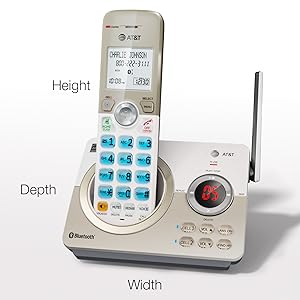
Figure 12: Example of a conversation using the full-duplex speakerphone.
Siri, S Voice and Google Now Access
Even if your cell phone is in another room, you can still access Siri, S Voice, or Google Now from your cordless handsets. This allows you to place calls, send texts, and perform other voice-activated commands through your phone system.
Download Cellphone Phonebook Contacts
Download up to 1,000 of your cell phone contacts to your DL72119 telephone via Bluetooth. Enjoy the convenience of having all your contacts readily available in your cordless phone system.

Figure 13: Easily transfer contacts from your mobile phone to the cordless system.
Expandable System
The DL72119 system is expandable up to 5 total handsets using accessory handsets (model DL70019, sold separately). This allows you to place handsets in multiple rooms throughout your home.

Figure 14: The system supports multiple accessory handsets for expanded coverage.
Troubleshooting
If you experience issues with your AT&T DL72119 phone system, try the following basic troubleshooting steps:
- No Power/No Dial Tone: Ensure the AC adapter is securely plugged into both the base unit and a working wall outlet. Check that the telephone line cord is properly connected to the base and the wall jack.
- Handset Out of Range: Move closer to the telephone base. Ensure there are no large metal objects or other electronic devices interfering with the signal.
- Poor Sound Quality: Check for interference from other electronic devices. Ensure the handset battery is fully charged.
- Handset Locator: If you misplace your handset, press the FIND HS button on the base unit. The handset will ring, allowing you to locate it.
For more detailed troubleshooting and advanced solutions, please refer to the official user manual PDF provided by AT&T.
Specifications
| Feature | Specification |
|---|---|
| Product Dimensions | 4.7 x 4 x 7 inches |
| Item Weight | 1.17 pounds |
| Item Model Number | DL72119 |
| Batteries | 1 Product Specific batteries required (included) |
| Brand | AT&T |
| Color | White |
| Telephone Type | Cordless |
| Material | Plastic |
| Power Source | Corded Electric |
| Dialer Type | Single Keypad |
| Answering System Type | Digital |
| Manufacturer | VTech |
| Country of Origin | Malaysia |
Warranty and Support
This AT&T product is manufactured by VTech Communications, Inc. For warranty information and technical support, please refer to the documentation included with your product or visit the official AT&T support website.
A comprehensive user guide in PDF format is available for download: AT&T DL72119 User Manual (PDF)


