
Introduction
The DAREU EM901 Sakura Pink Wireless Wired Gaming Mouse offers versatile connectivity and high-performance features for both gaming and productivity. This dual-mode mouse provides lag-free wireless operation and a reliable wired connection. It features 6 adjustable DPI settings up to 10,000 DPI, 6 programmable buttons, and dynamic RGB lighting. Designed for comfort and extended use, this mouse is an ideal peripheral for various computing needs.
Package Contents
- DAREU EM901 Sakura Pink Wireless Wired Gaming Mouse
- USB Receiver
- Type-C Data Cable
- English User Manual
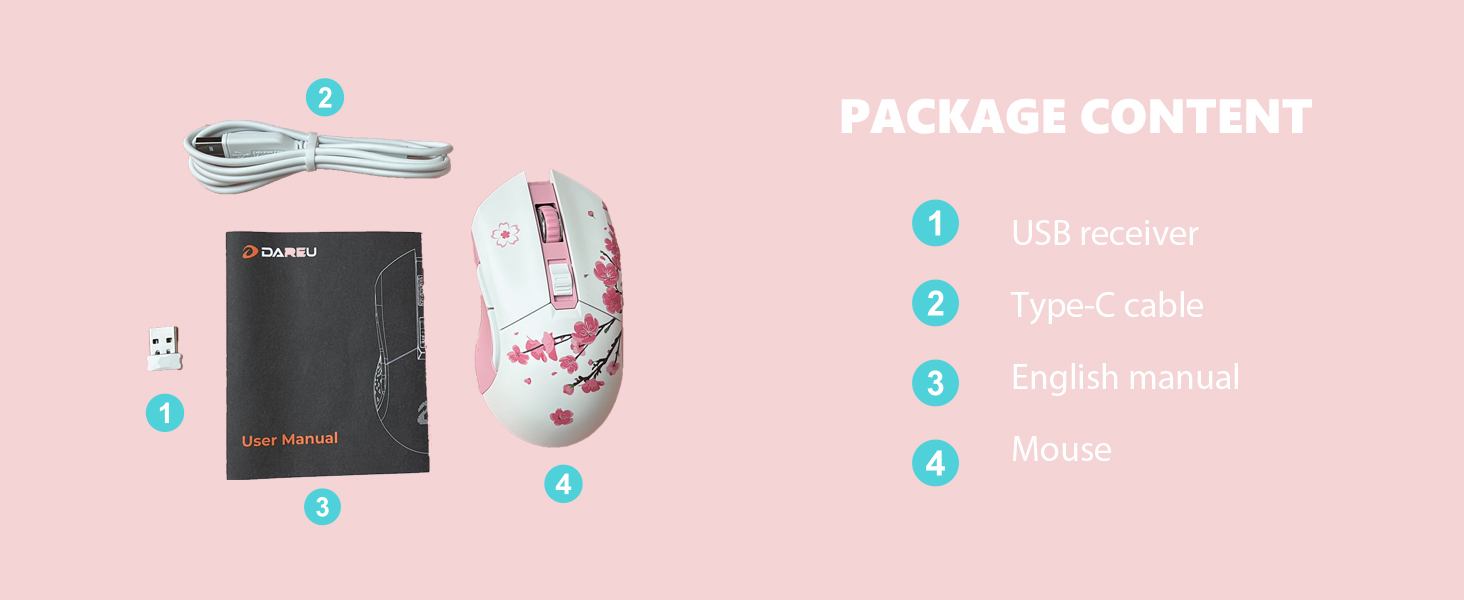
Image: Contents of the DAREU EM901 package, including the mouse, USB receiver, Type-C cable, and user manual.
Features
- RGB Cherry Blossom Limited Edition Design: Symmetrical body with fingerprint- and sweat-resistant coating, claw-grip shape for comfort, and dynamic rainbow RGB light bar with 6 lighting modes.
- Lag-Free Wireless Connectivity: Millisecond wireless transmission for stable signal, comparable to wired mice.
- 6 Adjustable DPI Settings: Customize sensitivity across 6 default stages (600/1200/2400/3600/4800/10000) or fine-tune via software for precise control.
- Ultra-Long Battery Life: Built-in 930mAh rechargeable battery provides up to 40 hours with RGB on, or 55 hours with RGB off. Play while charging using the included Type-C cable.
- 6 Programmable Buttons: Assign macros, shortcuts, or DPI controls for enhanced productivity and efficiency via DAREU software (Windows only).
- Portable & Universal Compatibility: Compact design with hidden receiver storage. Compatible with Windows 2000/XP/Vista/7/8/10, macOS (adapter required), Android, and iOS systems.

Image: The DAREU EM901 mouse showcasing its RGB lighting and Sakura Pink design.

Image: The ergonomic and symmetrical design of the DAREU EM901 mouse.
Setup
- Wireless Mode (2.4G):
- Locate the USB receiver stored in the compartment at the bottom of the mouse.
- Plug the USB receiver into an available USB port on your computer.
- Turn on the mouse using the power switch located on the bottom. The mouse should automatically connect to your computer.
- Wired Mode:
- Connect the provided Type-C data cable to the mouse's charging port and the other end to a USB port on your computer.
- The mouse will function as a wired mouse and charge simultaneously.

Image: The DAREU EM901 mouse illustrating its dual wired and wireless connectivity options.
Operating Instructions
- DPI Adjustment: Use the dedicated DPI button on the top of the mouse to cycle through the 6 preset DPI levels (600/1200/2400/3600/4800/10000). The RGB lighting may change color to indicate the current DPI level. For fine-tuning, use the DAREU software (Windows only).
- Programmable Buttons: The 6 programmable buttons can be customized using the DAREU software. Install the software on a Windows PC to assign macros, shortcuts, or specific functions to each button.
- RGB Lighting Modes: The dynamic RGB light bar at the bottom of the mouse offers 6 lighting modes. Use the dedicated RGB button (if available, or through software) to switch between modes.

Image: Screenshot of the DAREU software interface for customizing mouse settings and programmable buttons.
Charging and Battery
The DAREU EM901 mouse is equipped with a built-in 930mAh rechargeable battery. To charge the mouse, connect the provided Type-C data cable to the mouse's charging port and to a USB power source. You can continue to use the mouse in wired mode while it charges. A full charge provides up to 40 hours of use with RGB lighting enabled, or up to 55 hours with RGB lighting off.

Image: The DAREU EM901 mouse highlighting its long battery life with and without RGB lighting.
Compatibility
The DAREU EM901 mouse is compatible with a wide range of operating systems, including:
- Windows 2000/XP/Vista/7/8/10
- macOS (adapter may be required for USB-A receiver)
- Android
- iOS
Maintenance
- Cleaning: Use a soft, dry cloth to clean the mouse. For stubborn dirt, a slightly damp cloth can be used, ensuring no moisture enters the internal components.
- Storage: Store the mouse in a cool, dry place away from direct sunlight and extreme temperatures.
- Battery Care: To prolong battery life, avoid fully discharging the mouse frequently. Charge it regularly, especially if not in use for extended periods.
Troubleshooting
| Problem | Possible Solution |
|---|---|
| Mouse not responding in wireless mode. | Ensure the USB receiver is securely plugged into a working USB port. Check if the mouse is powered on. Verify battery level and charge if necessary. Try re-pairing the mouse with the receiver (refer to specific pairing instructions in the full manual if needed). |
| Mouse not responding in wired mode. | Ensure the Type-C cable is securely connected to both the mouse and the computer. Try a different USB port or cable. |
| DPI settings not changing. | Press the DPI button firmly. If using custom settings, ensure the DAREU software is installed and configured correctly. |
| RGB lighting not working or stuck. | Check the RGB lighting mode settings via the dedicated button or DAREU software. Ensure the battery has sufficient charge. |
| Programmable buttons not working. | Ensure DAREU software is installed and running on a Windows PC. Verify that the buttons have been correctly assigned functions within the software. |
Specifications
| Feature | Detail |
|---|---|
| Product Dimensions | 4.91 x 2.65 x 1.56 inches |
| Item Weight | 3 ounces |
| Item Model Number | EM901 |
| Batteries | 1 AAA batteries required (included) - Note: Product features state built-in rechargeable battery. Please refer to product packaging for exact battery type. |
| Brand | DAREU |
| Color | Sakura Pink |
| Connectivity Technology | USB (Wired & 2.4G Wireless via USB receiver) |
| Special Features | Ergonomic Design, LED Lights (RGB), Programmable Buttons, Rechargeable, Wireless |
| Movement Detection Technology | Optical |
| DPI Levels | 600/1200/2400/3600/4800/10000 (Adjustable) |
| Polling Rate | 1000Hz |
| IPS Tracking Speed | 150IPS |
Warranty and Support
For warranty information, technical support, or further assistance, please refer to the official DAREU website or contact DAREU customer service directly. Keep your purchase receipt for warranty claims.
Official Product Video
Video: Official DAREU product video showcasing the EM901 Wireless Wired Premium Gaming Mouse.


