1. Safety Information
Please read all instructions carefully before installation and operation. Keep this manual for future reference. Observe all local traffic laws and regulations. Do not operate the device in a way that distracts you from driving. Ensure proper wiring to prevent short circuits or damage to the vehicle's electrical system. Disconnect the vehicle's battery before installation to avoid electrical hazards.
2. Product Overview
The ATOTO A6G2A7PF is a versatile double-DIN Android car stereo designed to enhance your in-car entertainment and navigation experience. It features a responsive 7-inch touchscreen and runs on Android 10.0, powered by an 8-Core ARM Cortex A55 processor. Key functionalities include wireless CarPlay and Android Auto, MirrorLink, advanced audio processing with a Digital Signal Processor (DSP), and integrated GPS tracking.
Key Features:
- Versatile Android System: Android 10.0 with 8-Core ARM Cortex A55, supporting various apps and three internet access methods (Wi-Fi hotspot, USB, Bluetooth Tethering).
- Wireless Smartphone Integration: Supports Wireless CarPlay, Wireless Android Auto, and MirrorLink for seamless phone connectivity.
- Ultimate Audio Experience: Built-in DSP with 36-Band EQ, Time Correction, Speed Compensated Volume Control (SCVC), and adjustable crossover for superior sound quality.
- GPS Tracking and Dual Bluetooth: Features ATOTO's exclusive TrackHU app for real-time GPS tracking and dual Bluetooth for hands-free calls, audio streaming, and connecting third-party devices.
- HD Rear View (LRV): Supports HD 720P rear view camera input with Live Rear View feature.
- User-Friendly Interface: True 7-inch capacitive touchscreen with 178° wide viewing angle, multiple touch gestures, split-screen display, and convenient screen lock.
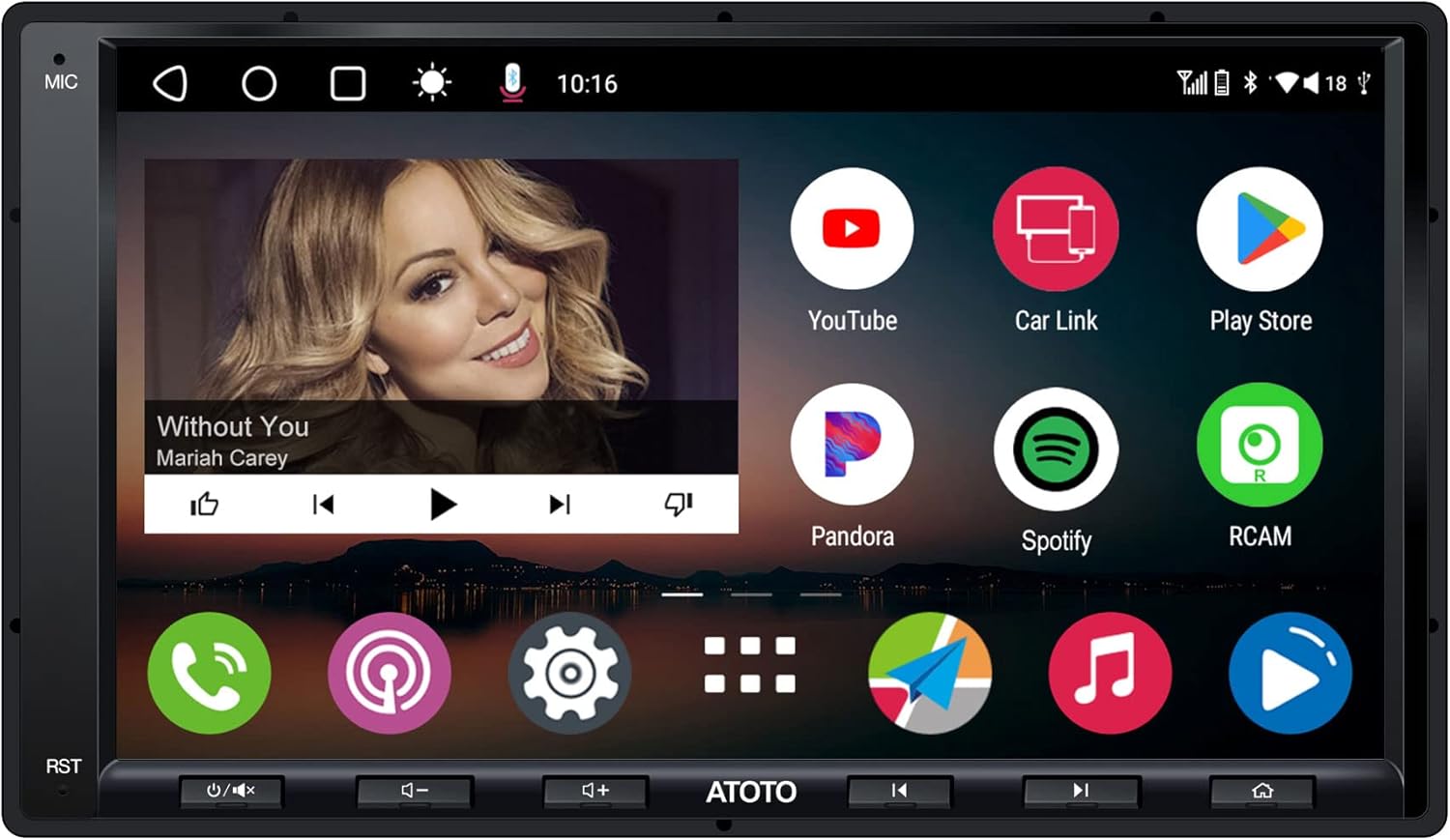
Figure 2.1: Front view of the ATOTO A6G2A7PF car stereo displaying its main interface with various application icons.
3. What's in the Box
The following items are included in your ATOTO A6G2A7PF package:
- Car Stereo Unit
- GPS Antenna
- Line Out Converter
- External Microphone
- Power Cable
- Rear Camera Input Cable
- RCA Connector Cables
- USB External Storage Cable
- USB Phone Link Cable
- Rear Audio Out Cable
- Double-DIN Brackets
- Mounting Brackets
- Mounting Screws
- Screen Protector
- Installation Frame

Figure 3.1: Overview of the ATOTO A6G2A7PF dimensions and included accessories for installation.
4. Setup
4.1 Physical Installation
The ATOTO A6G2A7PF is a double-DIN unit with a 172mm x 97mm front panel, making it compatible with a wide range of dash kits. Its shorter chassis provides more space for wiring and other add-ons. Professional installation is recommended.
- Prepare the Dashboard: Carefully remove your vehicle's existing stereo and trim panels.
- Connect Wiring: Use the provided power cable, RCA connectors, and other necessary cables. Refer to the wiring diagram for correct connections. If your package includes a Line Out Converter, refer to its manual for connection to an external amplifier.
- Mount the Unit: Secure the car stereo into the dashboard using the provided mounting brackets and screws.
- Connect Peripherals: Attach the GPS antenna, external microphone, and any optional accessories like a rear view camera.

Figure 4.1: Comprehensive wiring diagram illustrating all connection points for the ATOTO A6G2A7PF, including power, audio, and peripheral inputs.

Figure 4.2: Illustration of the compact double-DIN design, highlighting the true 7-inch display and shorter chassis for easier installation.
4.2 Initial Power On and Fast Boot
The A6G2A7PF is designed for fast boot-up, allowing access to the system in less than 2 seconds after the vehicle starts. If your unit does not start up within 2 seconds, please verify the wiring connections or contact customer support.

Figure 4.3: Visual representation of the fast boot capability, indicating the system is ready in under 2 seconds.
4.3 Steering Wheel Control (SWC) Setup
The ATOTO A6G2A7PF supports OEM steering wheel controls. You have three options for retaining this functionality:
- Direct Wiring: Connect to the SWC wires on your vehicle (analog signals).
- Dedicated 3.5mm Port: Use the dedicated 3.5mm port for SWC interfaces (e.g., Metra ASWC-1, PAC, Scosche).
- ATOTO AC-44F8 Wireless Remote: Use the optional ATOTO AC-44F8 Wireless Remote (sold separately) as an alternative.

Figure 4.4: Options for integrating existing steering wheel controls with the car stereo, including direct wiring, external interfaces, and a wireless remote.
4.4 Optional Accessories
Expand the functionality of your ATOTO A6G2A7PF with various compatible accessories available at the ATOTO store:
- ATOTO OBDⅡ AC-4450 (for vehicle diagnostics)
- ATOTO TPMS Device AC-UTP1 (for tire pressure monitoring)
- ATOTO AC-44P2 DVR (dash camera)
- ATOTO AC-HD02LR Rear Camera (HD rear view camera)
- Amplifiers (e.g., CA-AEC01/CA-AEC02)
- Speakers (e.g., CS-651DST/CS-651DC)
- Subwoofers (e.g., CS-101SW)
- Headrest Monitor Adapters (AC-AHV68/AC-AHV48)

Figure 4.5: A selection of compatible accessories that can be integrated with the ATOTO A6G2A7PF to expand its capabilities.
5. Operating Instructions
5.1 Android System Basics & Internet Access
The A6G2A7PF runs on Android 10.0, offering extensive customization and app compatibility. You can download various applications from the Play Store, ranging from navigation to entertainment and vehicle diagnostics.
Internet access is crucial for many Android features. You can connect to the internet via:
- 5G/2.4G Wi-Fi Hotspot: Connect to your phone's hotspot or a portable Wi-Fi device.
- USB Tethering: Connect your smartphone via USB for internet access, which can also provide a slight charge to your phone.
- Bluetooth Tethering: Share your phone's internet connection via Bluetooth for lower power consumption.

Figure 5.1: The Android interface of the car stereo, showcasing a variety of pre-installed and downloadable applications, along with the three internet connectivity options.

Figure 5.2: Visual representation of the three primary methods for connecting the car stereo to the internet: Wi-Fi, Bluetooth, and USB tethering.
5.2 Wireless CarPlay, Android Auto & MirrorLink
The A6G2A7PF offers seamless integration with your smartphone for safe and convenient use while driving.
- Wireless CarPlay/Android Auto: Connect your iPhone or Android phone wirelessly via Bluetooth and Wi-Fi. Once paired, it will automatically connect in the future. Access online maps, make calls, send texts, and stream music/podcasts directly from your phone's interface on the stereo screen.
- MirrorLink: Cast most apps not compatible with CarPlay or Android Auto to the A6G2A7PF's screen. This feature supports both wireless and wired connections for iOS and Android phones.

Figure 5.3: Demonstrates the wireless capabilities for CarPlay and Android Auto, alongside MirrorLink for casting phone content to the stereo display.

Figure 5.4: Illustrates the wireless connection between a smartphone and the car stereo for both Phone Integration Link (CarPlay) and Android Auto.

Figure 5.5: A compatibility guide detailing the minimum iOS and Android versions required for wireless and wired CarPlay, Android Auto, and MirrorLink functionalities.
5.3 Ultimate Audio Experience
The A6G2A7PF's built-in Digital Signal Processor (DSP) and Equalizer (EQ) transform your car's audio into a high-quality sonic environment. The maximum 4*45W (4*24W RMS) built-in amplifier ensures powerful sound without distortion.
- 36-Band EQ: Customize your audio output with a precise 36-band equalizer to tailor the sound to your preferences.
- Time Correction: Achieve harmonious sound by adjusting the timing of audio signals from each speaker, ensuring sound from all speakers hits your ears simultaneously.
- Speed Compensated Volume Control (SCVC): Automatically adjusts the volume of your sound system to counteract external noise as your vehicle's speed changes.
- Adjustable Crossover: Direct specific frequencies to tweeters and woofers for a smooth and natural transition between low and high tones.

Figure 5.6: Detailed explanation of the DSP features, including the 36-band equalizer, time alignment, and speed-compensated volume control for optimized audio.

Figure 5.7: The 36-Band EQ interface on the car stereo, allowing for precise audio customization across various frequency ranges.

Figure 5.8: Illustration of Time Alignment, demonstrating how sound from different speakers can be synchronized to reach the listener's ears simultaneously for a harmonious experience.
5.4 GPS Tracking with TrackHU App
Utilize TrackHU, ATOTO's exclusive GPS tracking application, for comprehensive vehicle monitoring. This app provides real-time tracking with an up-to-5s refresh rate, track playback with speed control, detailed reports, and instant online/offline status and geofence alerts.
TrackHU leverages OsmAnd's 4-satellite positioning (GPS, Galileo, GLONASS, Beidou) for accurate location data. The app icon can be hidden by default for privacy and will auto-run when the vehicle starts.
Video 5.1: An instructional video demonstrating the features and usage of the TrackHU GPS Tracking APP for ATOTO Android Systems, including setup and tracking capabilities.
Figure 5.9: The car stereo interface showing the TrackHU app icon, alongside other connectivity options like CarPlay and Android Auto.

Figure 5.10: The TrackHU app interface on a smartphone, detailing features such as flexible refresh rates, 4-satellite positioning, track playback, and instant alerts.
5.5 Dual Bluetooth
The A6G2A7PF features dual Bluetooth modules for enhanced connectivity:
- BT1: Handles hands-free calls and audio streaming from your smartphone. Connect your phone to BT1, and the A6G2A7PF will automatically unlock when you enter the car and lock when you walk away.
- BT2: Pairs with multiple third-party Bluetooth devices, such as OBDⅡ scanners or Bluetooth gamepads.

Figure 5.11: Demonstrates the dual Bluetooth capabilities, allowing for simultaneous phone calls/audio streaming (BT1) and connection to other Bluetooth devices (BT2).
5.6 HD Rear View Camera Input (LRV)
The unit supports HD 720P rear view camera input with a Live Rear View (LRV) feature. This allows you to check the live traffic condition behind your vehicle while driving forward, enhancing safety and awareness. An ATOTO AC-HD02LR backup camera is required and sold separately.

Figure 5.12: The car stereo screen displaying the live feed from a rear view camera, highlighting features such as HD resolution, night vision, and a 178° viewing angle.
5.7 Screen Features
The A6G2A7PF features a TRUE 7-inch IPS touchscreen with a resolution of 1024 x 600, offering visual brilliance from every angle with a 178° wide viewing angle.
- 5-touch Capacitive Touchscreen: Provides an intuitive and responsive user experience.
- Convenient Screen Lock: Secure your personal accounts (Google, Facebook, etc.) from unauthorized access. The screen can be unlocked with Bluetooth1, eliminating the need for manual password entry.
- Multiple Touch Gestures: Enhance user experience and driving safety through various intuitive gestures.
- Split Screen Display: Manage multiple tasks simultaneously without switching between apps.

Figure 5.13: Highlights the visual quality of the HD 7-inch IPS screen, emphasizing its wide viewing angle and responsive capacitive touch capabilities.

Figure 5.14: Demonstrates the convenient screen lock feature for privacy, which can be automatically unlocked using Bluetooth 1 without manual password entry.

Figure 5.15: Illustrates the support for multiple touch gestures and the split-screen display feature, allowing users to manage several applications simultaneously.
5.8 Voice Control
Stay hands-free and on track by utilizing voice assistants. The A6G2A7PF supports Google Assistant and Siri, allowing you to control various functions using voice commands.

Figure 5.16: Depicts the integration of voice assistants like Siri and Google Assistant, enabling hands-free operation for safer driving.
6. Maintenance
To ensure the longevity and optimal performance of your ATOTO A6G2A7PF, follow these maintenance guidelines:
- Cleaning: Use a soft, dry cloth to clean the screen and exterior. Avoid abrasive cleaners or solvents.
- Software Updates: Regularly check for and install system updates. ATOTO provides continuous software upgrades to improve performance and add new features. Updates can typically be performed over-the-air (OTA) via the FindApps store.
- Environmental Conditions: Avoid exposing the unit to extreme temperatures, direct sunlight for prolonged periods, or excessive moisture.

Figure 6.1: The car stereo displaying an update notification, emphasizing the importance of regular system updates for optimal performance.
7. Troubleshooting
This section addresses common issues you might encounter with your ATOTO A6G2A7PF. For more complex problems, please contact customer support.
| Problem | Possible Cause | Solution |
|---|---|---|
| Unit does not power on. | Incorrect wiring; Blown fuse. | Check all power connections and fuses. Ensure the ACC wire is connected correctly. |
| No sound output. | Incorrect speaker wiring; External amplifier not enabled. | Verify speaker connections. Check if the external amplifier signal is enabled in the unit's settings. |
| Wireless CarPlay/Android Auto disconnects or fails to connect. | Interference; Software glitch; Phone settings. | Ensure strong Wi-Fi and Bluetooth signals. Restart both the stereo and your phone. Check phone's CarPlay/Android Auto settings. Update stereo firmware. |
| System freezes or lags. | Too many apps running; Low memory; Software bug. | Close unused applications. Clear cache. Perform a system restart. Check for and install software updates. |
| GPS signal is weak or inaccurate. | GPS antenna placement; Environmental factors. | Ensure GPS antenna has a clear view of the sky. Avoid placing it near metal objects. |
8. Specifications
| Feature | Description |
|---|---|
| Model Number | A6PF-A5 |
| Product Dimensions | 8.9 x 5.7 x 5.7 inches (8.9"D x 5.7"W x 5.7"H) |
| Item Weight | 2.84 pounds |
| Operating System | Android 10.0 |
| Processor | 8-Core ARM Cortex A55 |
| Display | 7-inch IPS Touchscreen (1024 x 600 resolution) |
| Connectivity Technology | Dual Bluetooth, USB, 2.4G/5G Wi-Fi |
| Smartphone Integration | Wireless CarPlay, Wireless Android Auto, MirrorLink |
| Audio Output Mode | Mono, Stereo |
| Surround Sound Channel Configuration | 4.1 |
| Special Features | 3 Internet Accesses, 36-Band EQ (DSP), GPS Tracking (TrackHU APP), MirrorLink, Wireless CarPlay and Android Auto |
| Compatible Devices | ATOTO OBDⅡ AC-4450, ATOTO TPMS Device AC-UTP1, Amplifier, Speaker, iPhone and Android Phones |
| Connector Type | RCA, USB Type A |
| Video Encoding | H.263, H.264, DIVX4-6, XVID Decoder |
| Date First Available | May 31, 2022 |
9. Warranty and Support
ATOTO offers professional pre and post-sale services, coupled with continuous software upgrades and the SBV (Search By Vehicle) tool to assist with compatibility. Your ATOTO A6G2A7PF comes with an 18-month product care period.
For any inquiries or support, please feel free to contact ATOTO via seller support through your order center, or directly at support@myatoto.com. Responses are typically provided within 24 hours on workdays.

Figure 9.1: Visual representation of the 18-month product care and dedicated customer support provided by ATOTO.