
1. Introduction
The EMAY SleepO2 Wrist Pulse Oximeter is designed for continuous tracking of blood oxygen saturation (SpO2) and pulse rate, particularly during sleep. This device features built-in data storage, allowing for overnight recording without requiring a smartphone connection during the recording period. Data can be downloaded and reviewed via the EMAY application on compatible iOS and Android devices.
Please read this manual thoroughly before using the device to ensure proper operation and to understand all safety precautions.
2. Product Overview
2.1 Components
- Wrist Unit: The main device that records and stores data. It features a rechargeable battery and a display for real-time readings.
- Finger Probe: An ultra-soft silicone sensor that attaches to a finger to measure SpO2 and pulse rate.
- Wrist Strap: Secures the wrist unit comfortably.
- USB Charging Cable: For recharging the device.
2.2 Key Features
- Built-in data storage for continuous SpO2 and pulse rate recording.
- Rechargeable battery with approximately 10-12 hours of continuous recording life.
- Lightweight design (20g) for comfortable wear.
- Real-time data viewing on the EMAY app.
- Detailed sleep reports and raw data available through the EMAY app.
- Compatible with iOS and Android smartphones.
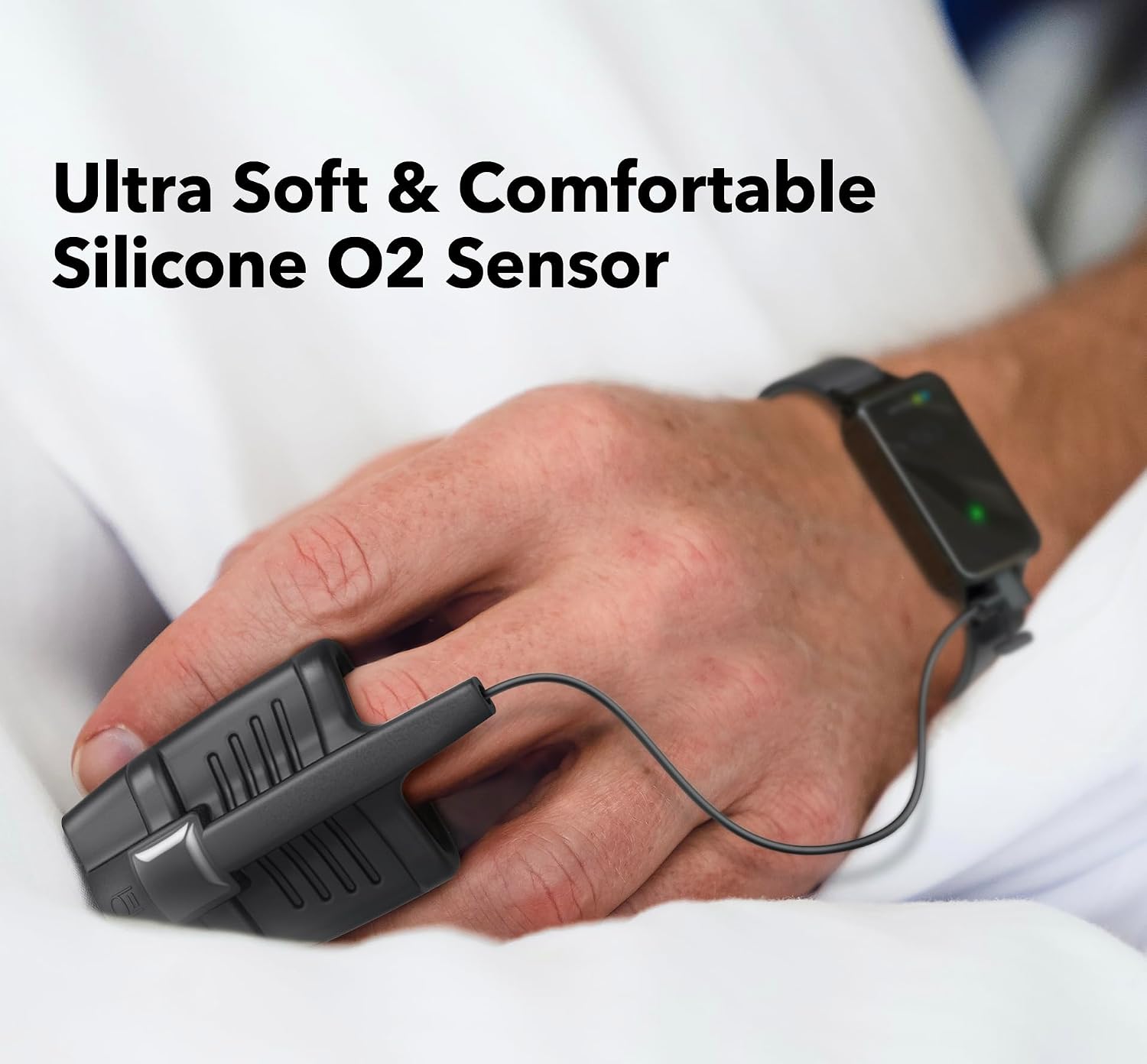
Image: The EMAY SleepO2 Wrist Pulse Oximeter showing the wrist unit and the attached finger probe.
3. Setup
3.1 Charging the Device
Before initial use, fully charge the EMAY SleepO2 device.
- Connect the provided USB charging cable to the device's charging port.
- Plug the other end of the USB cable into a compatible USB power adapter (DC 5V / 1000 mA output current recommended) or a computer USB port.
- The device's indicator light will show charging status (e.g., orange while charging, green when fully charged).
- A full charge typically provides 10-12 hours of continuous recording.

Image: The EMAY SleepO2 device connected to a wall adapter for charging.
3.2 Attaching the Finger Probe
The finger probe connects to the wrist unit. Ensure it is securely plugged in.
- Locate the port on the wrist unit for the finger probe.
- Insert the finger probe connector firmly until it clicks into place.
- Important: Ensure the finger probe is fully inserted to receive accurate readings.
3.3 Wearing the Device
Wear the wrist unit on your wrist like a watch and place the finger probe on a finger.
- Strap the wrist unit comfortably to your wrist.
- Place the finger probe onto your index finger. Ensure the finger is fully inserted into the probe and rests comfortably without excessive pressure.
- The device is designed to be lightweight and comfortable for overnight use.

Image: A user wearing the EMAY SleepO2 Wrist Pulse Oximeter during sleep, demonstrating proper placement.
4. Operating Instructions
4.1 Starting a Recording Session
The EMAY SleepO2 automatically begins recording when the finger probe is properly placed and the device is powered on.
- Ensure the device is charged and the finger probe is connected.
- Wear the wrist unit and place the finger probe as described in Section 3.3.
- The device will automatically power on and begin recording when it detects a pulse and SpO2 signal. A green indicator light on the wrist unit signifies active recording.
- The device can record continuously for up to 10-12 hours on a full charge.
4.2 Real-time Monitoring (Optional)
While the device is recording, you can view real-time SpO2 and pulse rate readings on the EMAY app.
- Ensure Bluetooth is enabled on your smartphone.
- Open the EMAY app and connect to your SleepO2 device.
- The app will display current SpO2 and pulse rate readings.

Image: Screenshot of the EMAY app showing real-time SpO2 and pulse rate data.
5. EMAY Application Usage
5.1 Downloading the App
The EMAY app is available for free on both iOS and Android platforms. Search for "EMAY" in your device's app store.
5.2 Connecting to the Device
To download recorded data or view real-time readings, connect the device to the app via Bluetooth.
- Ensure the SleepO2 device is powered on and not currently recording (remove finger from probe).
- Enable Bluetooth on your smartphone.
- Open the EMAY app and follow the on-screen instructions to pair with your device.
- Note: You may need to try syncing twice if connection issues occur.
5.3 Downloading and Reviewing Data
After a recording session, download the data to the app for detailed analysis.
- Connect the device to the EMAY app as described above.
- The app will prompt you to download new recorded sessions.
- Once downloaded, you can view detailed graphs, summary reports, and raw data.
- Reports can be shared or printed directly from the app.

Image: The EMAY app showing a detailed report with SpO2 and pulse rate trends over time.

Image: Example of a professional sleep report generated by the EMAY SleepO2 system.
6. Maintenance
6.1 Cleaning the Device
Regular cleaning helps maintain the device's performance and hygiene.
- Wipe the wrist unit and finger probe with a soft, dry cloth.
- For disinfection, use a cloth lightly dampened with isopropyl alcohol (70%).
- Do not immerse the device in water or any other liquid.
- Ensure the device is completely dry before storage or next use.
6.2 Battery Care
To prolong battery life:
- Charge the device fully before each use.
- Avoid completely draining the battery frequently.
- Store the device in a cool, dry place when not in use.
7. Troubleshooting
| Problem | Possible Cause | Solution |
|---|---|---|
| Device not charging |
|
|
| No readings or inaccurate readings |
|
|
| Cannot connect to EMAY app via Bluetooth |
|
|
8. Specifications
| Specification | Detail |
|---|---|
| Brand | EMAY |
| Model Number | SleepO2 |
| Material | Silicone |
| Color | Black |
| Item Weight | 20 g |
| Battery Life | Approximately 10-12 hours (continuous recording) |
| Sensor Type | Oximeter |
| Compatible Devices | Smartphones (iOS & Android) |
| Adapter Specification (Recommended) | Output voltage: DC 5V / Output current: 1000 mA |
9. Official Product Video
Video: An official product video demonstrating the features and usage of the EMAY SleepO2 Wrist Pulse Oximeter. This video provides a visual guide to setting up and operating the device, as well as reviewing data.
10. Warranty and Support
For warranty information, technical support, or any inquiries regarding your EMAY SleepO2 Wrist Pulse Oximeter, please refer to the contact information provided with your product packaging or visit the official EMAY website.
Note: This device is intended for spot-check of oxygen saturation and pulse rate. It is not intended for medical or diagnostic purposes. Consult a healthcare professional for any medical concerns.