
Baseus CCZX-160CO
Baseus 160W USB C Car Charger Instruction Manual
Model: CCZX-160CO
Product Overview
The Baseus 160W USB C Car Charger is designed for fast charging multiple devices simultaneously in a vehicle. It features three output ports: two USB Type-C ports and one USB-A port, supporting various fast charging protocols.

Image: The Baseus 160W USB C Car Charger, showcasing its compact design and three charging ports (two USB-C and one USB-A).
Package Contents
- 1 x Baseus 160W USB C Car Charger (Model: CCZX-160CO)
- 1 x USB Cable (Type-C to Type-C, 1m length, supports 100W charging)
- User Manual
Setup and Installation
- Ensure your vehicle's cigarette lighter socket is clean and free of debris.
- Insert the Baseus 160W USB C Car Charger firmly into the vehicle's 12V-24V cigarette lighter socket. The charger's LED light will illuminate, indicating it is powered on and ready for use.

Image: The car charger installed in a vehicle's power outlet, with cables connected to devices.
Operating Instructions
The charger features three independent fast charging ports:
- Type-C1 Output: Up to 100W (Max)
- Type-C2 Output: Up to 30W (Max)
- USB-A Output: Up to 30W (Max)
The total combined output for all three ports is 160W. The charger supports QC5.0, PD3.0, and PPS fast charging protocols.
- Connect your device's charging cable to the appropriate port on the car charger.
- Plug the other end of the cable into your device.
- The charger will automatically detect the device and deliver the optimal charging speed based on the device's requirements and the charger's capabilities.
- The soft LED light indicates the charger is active.

Image: Close-up view of the charger's ports, indicating the power output for each: 100W for Type-C1, 30W for Type-C2, and 30W for USB-A.
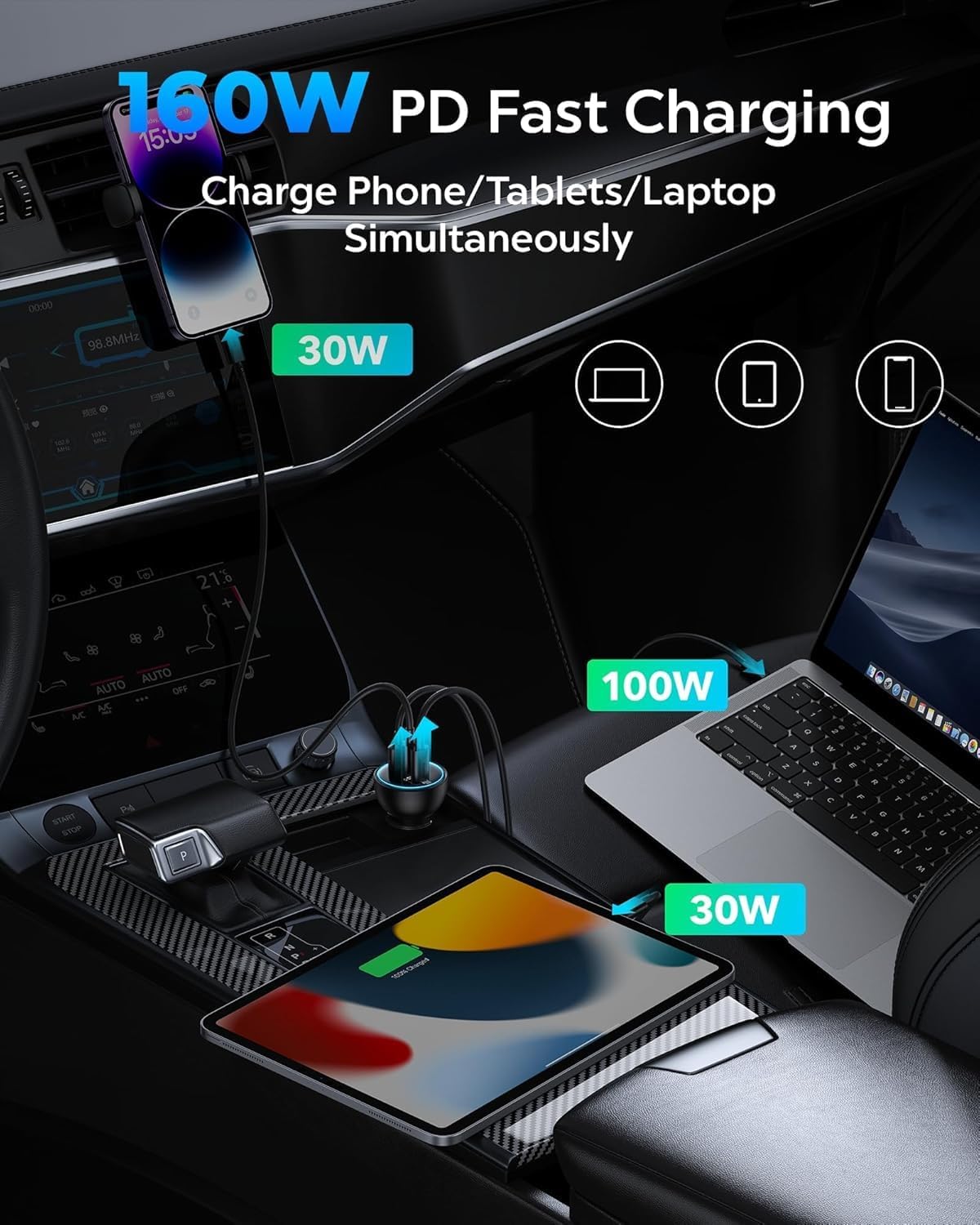
Image: The car charger simultaneously charging a laptop (100W), a tablet (30W), and a smartphone (30W).
Safety Features
The Baseus 160W USB C Car Charger incorporates intelligent circuit design to ensure safe charging:
- Protection against short circuiting.
- Protection against overheating.
- Protection against over-currents.
- Protection against overcharging.
- Automatic charging stop when the battery is full.

Image: An internal diagram illustrating the multi-layer safety protections built into the charger, including over-current, over-voltage, over-temperature, and short-circuit protection.
Compatibility
This charger is compatible with a wide range of devices and vehicles:
- Phones & Tablets: iPhone 15/15 Pro/15 Plus/15 Pro Max/14/14 Pro/14 Plus/14 Pro Max/13/13 Pro/13 Mini/13 Pro Max/12/12 Pro/12 mini/12 Pro Max/11/11 Pro/11 Pro Max/XS/8/7 Plus, Samsung Galaxy S23/S22/S21/S20 Ultra/Tab S9/S8, Google Pixelbook, HTC, LG, Nokia, Motorola, Sony, Kindle Fire HD 10, iPad Pro/iPad Air/mini, etc.
- Laptops: MacBook Pro 16'/15'/13', Air 13'/11', Dell XPS13, Chromebook, Lenovo, Dell, HP, etc.
- Gaming & Other Devices: Drone, Switch, Steam Deck, ASUS ROG Ally, AirPods, etc.
- Vehicles: Compatible with 12V-24V car models (cars, ORVs, trucks, SUVs).

Image: A visual guide to the wide compatibility of the charger, showing various phones, tablets, laptops, and gaming devices, as well as different vehicle types.
Maintenance and Care
- Keep the charger dry and away from moisture.
- Avoid exposing the charger to extreme temperatures.
- Do not disassemble or attempt to repair the charger yourself.
- Clean the charger's surface with a soft, dry cloth.
- Ensure the cigarette lighter socket is clean before inserting the charger to maintain optimal connection.
Troubleshooting
- Charger not powering on: Ensure the charger is fully inserted into the vehicle's cigarette lighter socket. Check if the vehicle's 12V-24V power outlet is functioning correctly.
- Slow charging: Verify that your device and charging cable support fast charging protocols (QC5.0, PD3.0, PPS). Using a high-quality cable, like the one provided, is essential for achieving maximum charging speeds. The charging speed may also vary depending on the device's battery level (trickle charge mode activates at higher battery percentages).
- Device not recognized: Try unplugging and re-plugging the device. Ensure the cable is securely connected to both the charger and the device.
Specifications
| Feature | Detail |
|---|---|
| Product Dimensions | 3.07 x 1.69 x 1.69 inches |
| Item Weight | 2.19 ounces |
| Item Model Number | CCZX-160CO |
| Brand | Baseus |
| Connector Type | USB Type C, USB Type A |
| Input Voltage | 12 Volts |
| Amperage | 18 Amps |
| Total USB Ports | 3 |
| Special Feature | Fast Charging (QC5.0, PD3.0, PPS) |
| Included Components | 1 x USB Cable (Type-C to Type-C, 1m) |
Warranty and Support
Baseus offers a lifetime warranty for this product. For any questions or support, please contact Baseus customer service via email. They provide 24/7 customer service and will respond promptly.
For more information, visit the official Baseus store: Baseus Store
Related documentsCCZX-160CO


Ask a question about this manual
Ask about setup, troubleshooting, compatibility, parts, safety, or missing instructions. Manuals+ will review the question and use this page’s manual context to help answer it.