
1. Introduction
Thank you for choosing the Mercury Elite 3000U Smart Uninterruptible Power Supply (UPS). This device is designed to provide reliable power backup and protection for your electronic equipment against power outages, surges, and fluctuations. Please read this manual thoroughly before installation and operation to ensure proper use and to maximize the lifespan of your UPS.
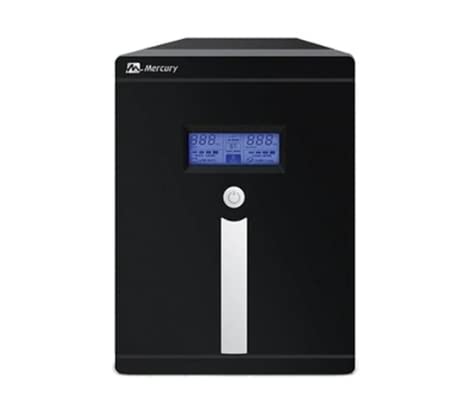
Image 1.1: Front view of the Mercury Elite 3000U Smart UPS, showing the LCD display and power outlets.
2. Safety Information
Observe the following safety precautions to prevent injury and damage to the UPS or connected equipment:
- Do not open the UPS casing. There are no user-serviceable parts inside. Refer all servicing to qualified service personnel.
- Do not install the UPS in direct sunlight, near heat sources, or in environments with excessive dust, humidity, or corrosive substances.
- Ensure the UPS is connected to a grounded power outlet.
- Do not connect appliances that draw high current, such as hair dryers or vacuum cleaners, to the UPS outlets.
- Battery replacement should only be performed by qualified personnel using the same type and number of batteries.
- In case of fire, use a dry chemical extinguisher. Water can cause electrical shock.
3. Package Contents
Verify that all items are present in the package:
- Mercury Elite 3000U Smart UPS Unit
- User Manual (this document)
- Power Input Cable
- USB Communication Cable
- 4 x 9Ah Internal Batteries (pre-installed)
4. Product Features
The Mercury Elite 3000U Smart UPS offers advanced features for optimal performance and protection:
- Automatic Restart: The UPS automatically restarts when AC power is restored after a complete discharge.
- Short Circuit Protection: Safeguards connected devices and the UPS from damage due to short circuits.
- Overcharge Protection: Prevents battery damage from excessive charging.
- Compact Design: An elegant and space-saving form factor suitable for various environments.
- CPU Control: Advanced microprocessor control for enhanced reliability and performance.
- Overload Recovery: Easy recovery from overload conditions without the need for fuse replacement.
- LCD Screen: Provides real-time status updates and operational information.
- USB Port: For communication with a computer to monitor UPS status and manage shutdowns.
- Universal Sockets: Four universal power outlets for broad compatibility.
5. Setup
Follow these steps to set up your UPS:
- Unpacking: Carefully remove the UPS from its packaging. Inspect for any shipping damage.
- Placement: Place the UPS in a cool, dry, and well-ventilated area, away from direct sunlight and heat sources. Ensure adequate clearance around the unit for airflow.
- Initial Charging: Connect the UPS to a standard wall outlet using the provided power input cable. Allow the UPS to charge for at least 8 hours before connecting any equipment to ensure optimal battery performance. The UPS will charge whether it is turned on or off.
- Connecting Equipment: After the initial charge, connect your electronic devices (e.g., computer, monitor, router) to the universal outlets on the back of the UPS. Do not overload the UPS beyond its rated capacity (1800W).
- USB Connection (Optional): For advanced monitoring and automatic shutdown features, connect the USB cable from the UPS to your computer. Install the appropriate UPS monitoring software (usually available from the manufacturer's website).
6. Operating Instructions
Understanding how to operate your UPS is crucial for effective power management.
6.1 Turning On the UPS
Press and hold the power button on the front panel for approximately 3 seconds until you hear a beep and the LCD screen illuminates. The UPS will perform a self-test and then enter AC mode (if utility power is present) or Battery mode (if utility power is absent).
6.2 Turning Off the UPS
To turn off the UPS, first ensure all connected equipment is safely shut down. Then, press and hold the power button for approximately 3 seconds until the UPS powers down. If the UPS is still connected to AC power, it will continue to charge its batteries.
6.3 LCD Display
The LCD screen provides important operational status. Common indicators include:
- Input Voltage: Displays the current utility power voltage.
- Output Voltage: Shows the voltage supplied by the UPS to connected devices.
- Battery Level: Indicates the remaining battery charge.
- Load Level: Shows the percentage of the UPS's capacity being used by connected devices.
- Operating Mode: Indicates if the UPS is in AC mode, Battery mode, or Bypass mode.
7. Maintenance
Regular maintenance ensures the longevity and optimal performance of your UPS.
- Battery Care: To prolong battery life, avoid frequent deep discharges. Perform a full discharge and recharge cycle every 3-6 months if the UPS is not frequently used on battery power.
- Cleaning: Keep the UPS clean and free of dust. Use a soft, dry cloth to wipe the exterior. Do not use liquid cleaners or solvents. Ensure ventilation openings are clear of obstructions.
- Storage: If storing the UPS for an extended period, ensure it is fully charged. Recharge the UPS every three months to prevent battery degradation. Store in a cool, dry place.
8. Troubleshooting
Refer to the following table for common issues and their solutions:
| Problem | Possible Cause | Solution |
|---|---|---|
| UPS does not turn on | No AC input power; Low battery; Power button not pressed correctly | Check power cord connection; Allow UPS to charge for 8 hours; Press and hold power button for 3 seconds. |
| UPS beeps continuously | Overload; Low battery in battery mode | Reduce connected load; Allow UPS to recharge or shut down connected devices. |
| Short backup time | Batteries not fully charged; Batteries reaching end of life | Allow UPS to charge for 8 hours; Consider battery replacement by qualified personnel. |
| UPS in Battery mode despite AC power | Input voltage out of range; Faulty AC input | Check utility power quality; Ensure proper AC input connection. |
If the problem persists after attempting these solutions, please contact customer support.
9. Specifications
Detailed technical specifications for the Mercury Elite 3000U Smart UPS:
- Brand: Mercury
- Model Number: Elite 3000U Smart
- Input Voltage Range (220V): 140V - 300V
- Output Rating (VA): 3000 VA
- Output Power (Watts): 1800 W
- Rated Voltage: 220 V
- Rated Frequency: 50 Hz
- Total Power Outlets: 4 Universal Sockets
- Battery Type: 4 x 9Ah (internal)
- Connector Type: IEC 320, USB
- Power Plug Type: Type C/EF Two-pin Plug (European/France-Denmark Hybrid)
- Color: Black
- Form Factor: Tower
- Manufacturer Country: China
10. Warranty and Support
The Mercury Elite 3000U Smart UPS comes with a one-year warranty from the date of purchase. This warranty covers manufacturing defects and faulty workmanship under normal operating conditions.
The warranty is provided by the authorized agent. Please retain your purchase receipt as proof of purchase for warranty claims.
For technical support, service, or warranty inquiries, please contact your local authorized Mercury service center or the retailer from whom you purchased the product. Do not attempt to repair the unit yourself, as this may void the warranty and pose safety risks.

