
Introduction
The Muddy Manifest 2.0 Trail Camera is a high-resolution cellular game camera designed for outdoor wildlife monitoring and hunting applications. It offers advanced features such as quick trigger speed, high-megapixel image capture, and remote access via a dedicated mobile application. This manual provides essential information for setting up, operating, maintaining, and troubleshooting your Manifest 2.0 camera.

Key Features
- Image Capture: 16 Megapixel high-resolution image capture.
- Trigger Speed: Updated 0.8-second trigger speed for quick capture.
- Image Resolutions: Supports 16MP, 8MP, and 4MP image resolutions.
- Upload Resolutions: Options for Low and High upload resolutions.
- Quick Scan QR Code Setup: Simplified setup process using a QR code.
- PIR Sensor: Features a matte finish Passive Infrared (PIR) sensor.
- LEDs: Equipped with 4 pieces of 850nm Power LEDs for illumination.
- Detection & IR Range: 80-foot detection and infrared flash range.
- Burst Mode: Captures 1-3 images per triggering event.
- Recovery Time: Adjustable recovery time from 2-59 seconds or 3-59 minutes.
- Image Data: Records Time, Date, Moon Phase, and Camera Name on images.
- Storage: SD Card slot supporting up to 32GB capacity.
- Security: Integrated Python lock latch for secure mounting.
- Power: Operates on 8 AA batteries.
- External Power: External power jack available for SOLPAK solar battery pack (Sold Separately).
- Mobile App: Utilizes the COMMAND App for remote access and control (Android and iOS compatible).
Setup
1. Battery Installation
The Muddy Manifest 2.0 camera requires 8 AA batteries for operation. Ensure batteries are inserted with correct polarity. For extended use, consider connecting an external SOLPAK solar battery pack (sold separately) via the external power jack.
2. SD Card Insertion
Insert an SD card (up to 32GB capacity) into the designated SD card slot. Ensure the card is properly formatted before first use to prevent data corruption.
3. Cellular Activation and App Setup
The camera utilizes cellular service (AT&T model) for remote image transmission. Download the Stealth Cam COMMAND App on your mobile device (Android or iOS). The app facilitates quick setup via a QR code scan. Follow the in-app instructions to activate your camera's cellular service and configure settings. The app also provides a dashboard to monitor signal strength and battery levels.

4. Mounting the Camera
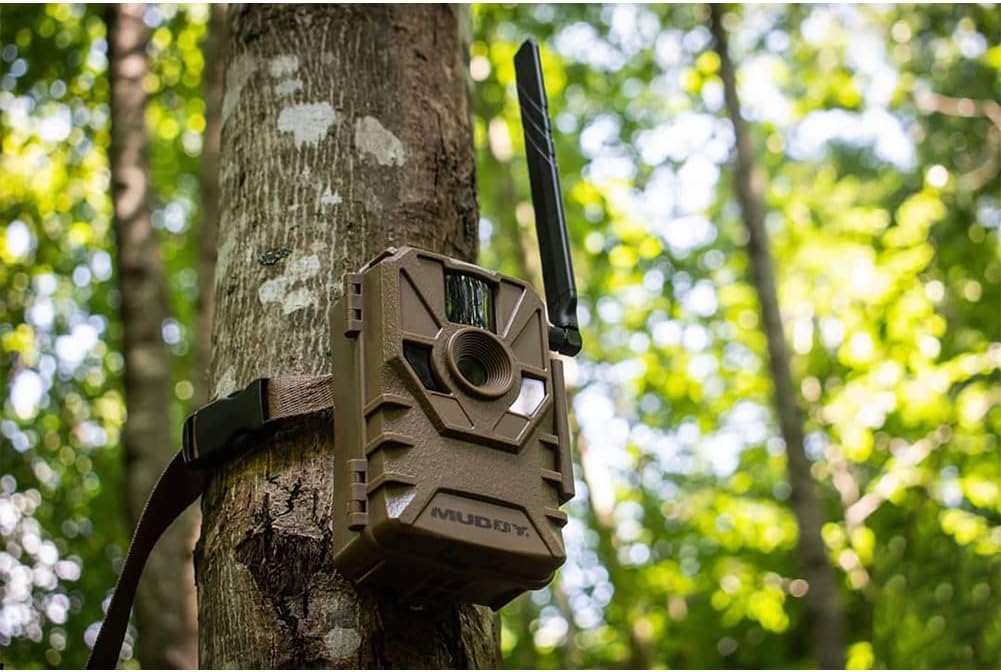
Use the included mounting strap to secure the camera to a vertical surface, such as a tree. Ensure the camera is positioned to capture the desired area within its 80-foot detection and IR range. The integrated Python lock latch provides additional security.
Operating Instructions
1. Camera Modes and Settings
Through the Stealth Cam COMMAND App, you can control and configure multiple cameras. Adjust settings such as image resolution (16MP/8MP/4MP), photo burst (1-3 images), and recovery time (2-59 seconds / 3-59 minutes). The app allows for comprehensive control over all camera and cellular settings.
2. Image and Video Capture
The camera captures high-resolution images with a quick 0.8-second trigger speed when motion is detected within its 80-foot range. Images are stamped with time, date, moon phase, and camera name for easy tracking.

3. Remote Monitoring and Notifications
Access your camera from any location using the COMMAND App. You can receive mobile device notifications when activity is detected or set the camera to upload images daily. The app also features an advanced photo tracker to view activity by day, week, month, or year, and provides weather data for camera locations.

Maintenance
Battery Replacement
The camera operates on 8 AA batteries. Battery life will vary depending on usage frequency and environmental conditions. It is recommended to check battery levels regularly via the COMMAND App and replace them as needed. Changing batteries is a straightforward process.
Cleaning and Care
The camera is waterproof, designed to withstand outdoor elements. Periodically clean the lens and PIR sensor with a soft, dry cloth to ensure optimal performance. Avoid using abrasive materials or harsh chemicals.
Troubleshooting
- No Images Captured:
- Check battery levels and replace if low.
- Ensure the SD card is properly inserted and has sufficient free space.
- Verify camera settings via the app, especially trigger sensitivity and detection range.
- Confirm the camera is powered on and in the correct operating mode.
- Poor Image Quality:
- Clean the camera lens and PIR sensor.
- Adjust image resolution settings in the app to a higher quality if needed.
- Ensure proper lighting conditions or adequate IR illumination for night shots.
- No Cellular Connection/Image Upload:
- Check cellular signal strength in the COMMAND App. Relocate the camera if signal is weak.
- Verify your cellular plan subscription is active.
- Ensure the camera's cellular settings are correctly configured in the app.
- App Connectivity Issues:
- Ensure your mobile device has a stable internet connection.
- Update the COMMAND App to the latest version.
- Restart both the camera and your mobile device.
Specifications
| Feature | Detail |
|---|---|
| Brand | MUDDY |
| Model Name | Muddy Manifest Cellular Camera - ATT |
| Model Number | MUD-ATW |
| Image Resolution | 16 MP (also 8 MP, 4 MP options) |
| Trigger Speed | 0.8 seconds |
| Detection & Flash Range | 80 feet |
| PIR Sensor | Matte Finish |
| LEDs | 4 pcs 850nm Power LEDs |
| Burst Mode | 1-3 images per triggering |
| Recovery Time | 2-59 seconds / 3-59 minutes |
| SD Card Support | Up to 32GB |
| Power Source | 8 AA batteries (not included), External power jack for SOLPAK solar battery back (Sold Separately) |
| Connectivity | Cellular (AT&T), Wi-Fi (for app communication) |
| App Compatibility | Android, iOS (Stealth Cam COMMAND App) |
| Waterproof Rating | IP54 |
| Color | Brown |
| Material | Plastic |
| Item Dimensions (LxWxH) | 10.5 x 8.3 x 6.7 inches |
| Item Weight | 8.78 ounces |
Warranty and Support
The Muddy Manifest 2.0 Trail Camera comes with a 1 Year Limited Warranty from the manufacturer. For support, please refer to the Stealth Cam COMMAND App or visit the official MUDDY website for further assistance and contact information.
Note: The product includes a 30-day free trial for cellular service. Continued service requires a paid subscription through the COMMAND App.
Important Safety Information
California Proposition 65 Warning: This product contains chemicals known to the State of California to cause cancer and birth defects or other reproductive harm.
Official Product Videos
No official product videos from the seller were found for this product. Please refer to the instruction manual and app for setup and operation details.


