
1. Product Overview
The ODK 55-inch Home Office Computer Desk is designed to provide a functional and organized workspace. It features a sturdy monitor stand, two-tier reversible storage shelves, and a side storage bag, offering ample space for your computer, peripherals, and office supplies.

Image 1.1: ODK 55-inch Home Office Computer Desk in a modern setting.
Key Features:
- Sturdy Monitor Stand: Elevates monitors to a comfortable eye level, reducing neck and eye strain.
- Ample Space: 55-inch desktop provides generous work area.
- Reversible 2-Tier Storage Shelves: Can be installed on either the left or right side, with an adjustable middle board for larger items like a computer chassis.
- Side Storage Bag: Offers convenient additional storage for documents or small items.
- Durable Construction: Made with P2 grade wooden board and a powder-coated metal frame.
2. Safety Information
Warning: This desk requires assembly. Always follow the assembly instructions carefully to avoid injury. Do not attempt to assemble the desk without proper tools and knowledge. Additionally, always unplug electrical devices from the power source before moving or adjusting the desk to prevent electrical shock.
- Ensure all screws and fasteners are tightened securely before use.
- Do not overload the desk or shelves beyond their recommended weight capacity.
- Keep small parts away from children during assembly.
- Place the desk on a level surface to prevent wobbling.
3. Setup and Assembly
Assembly of the ODK computer desk is required. Please refer to the detailed assembly instructions included in your product packaging for step-by-step guidance. The following points highlight key aspects of the setup:
3.1 Unpacking and Part Identification
- Carefully unpack all components from the packaging.
- Verify that all parts listed in the instruction manual are present and undamaged.
- Separate hardware components to ensure easy access during assembly.
3.2 Reversible Shelf Installation
The 2-tier storage shelves can be positioned on either the left or right side of the desk to suit your preference and room layout. When installing the shelves, ensure the desktop side with the five pre-drilled holes is positioned outwards if the shelves are on the left side.
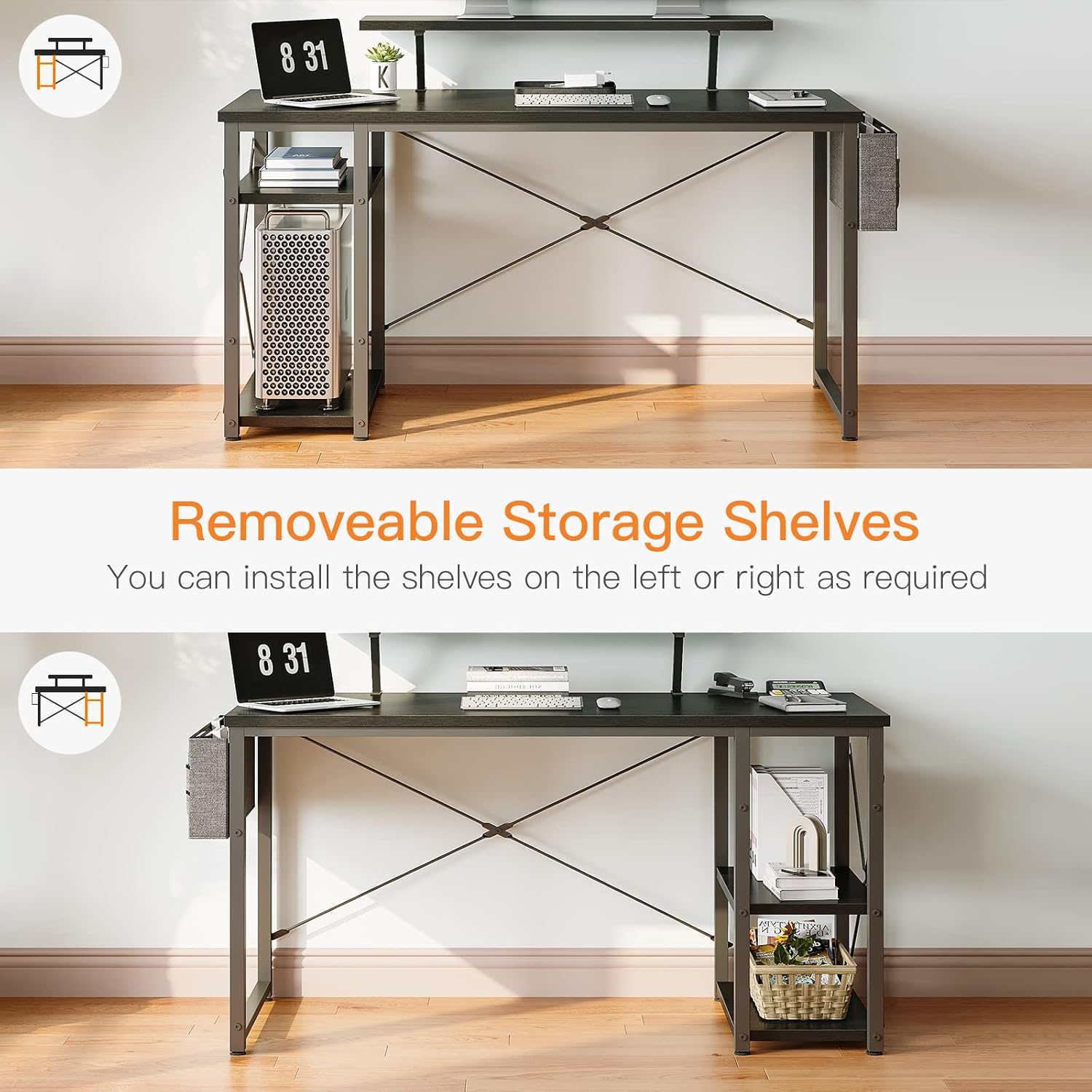
Image 3.1: Illustration of the reversible storage shelf design.
3.3 Adjustable Shelf for PC Tower
The middle board of the 2-tier storage shelves is adjustable. This feature allows you to create additional vertical space, accommodating larger computer chassis or other tall items.
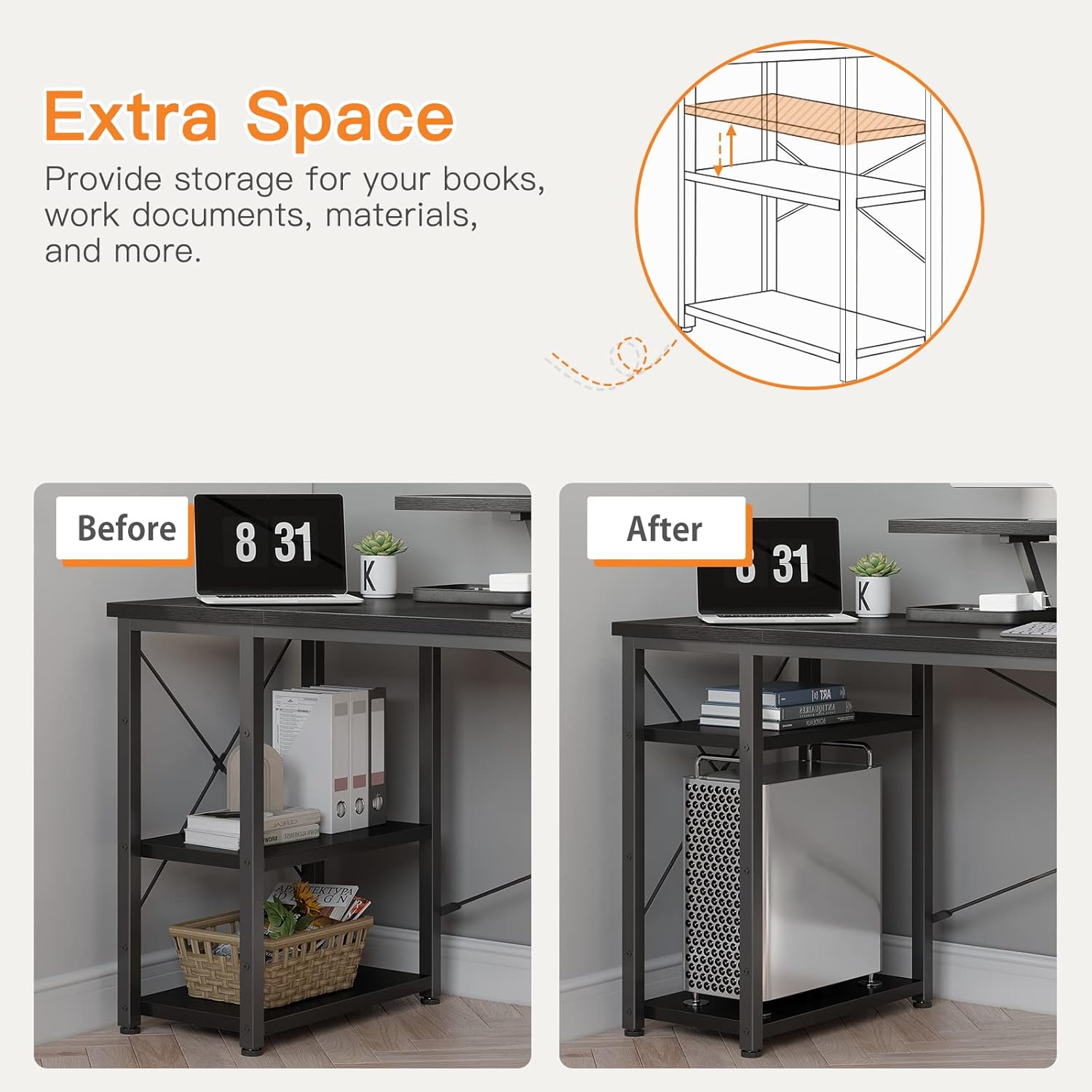
Image 3.2: The adjustable middle shelf for increased storage flexibility.
4. Operating Instructions
Once assembled, the ODK computer desk is ready for use. Its design focuses on ergonomic comfort and efficient organization.
4.1 Utilizing the Monitor Stand
The integrated monitor stand is designed to position your screens at an optimal height, promoting a healthy sitting posture and reducing strain on your neck and eyes. Place your monitor(s) directly on the stand. The 55-inch desk can comfortably accommodate two 27-inch monitors on the stand.

Image 4.1: Desk with monitors positioned on the elevated stand.
4.2 Storage Management
- 2-Tier Shelves: Use these shelves for books, binders, computer towers, or other office essentials. Adjust the middle shelf as needed for taller items.
- Side Storage Bag: Attach the included storage bag to the side of the desk for quick access to documents, pens, or small accessories.

Image 4.2: Detailed view of the monitor stand, 2-layer shelves, and storage bag.
4.3 Product Overview Video
For a visual demonstration of the ODK Home Office Computer Desk and its features, please watch the following video:
Video 4.3: ODK Home Office Computer Desk with Monitor Stand and Reversible 2-Tier Storage Shelves.
5. Maintenance
To ensure the longevity and appearance of your ODK computer desk, follow these simple maintenance guidelines:
- Cleaning: Wipe the desk surfaces with a soft, damp cloth. Avoid harsh chemicals or abrasive cleaners that may damage the finish.
- Spills: Clean up spills immediately to prevent staining or damage to the wood surface.
- Fasteners: Periodically check all screws and fasteners to ensure they remain tight. Retighten if necessary to maintain stability.
- Avoid Extreme Conditions: Do not expose the desk to excessive moisture, direct sunlight for prolonged periods, or extreme temperature changes, as this may cause warping or discoloration.
6. Troubleshooting
If you encounter any issues with your ODK computer desk, refer to the following common troubleshooting tips:
6.1 Desk Wobbles or Instability
- Check Level Surface: Ensure the desk is placed on a completely flat and level floor.
- Tighten Fasteners: Re-check and tighten all assembly screws, especially those connecting the legs and crossbars. Loose fasteners are a common cause of wobbling.
- Adjust Leveling Feet: If your desk includes adjustable leveling feet, use them to compensate for uneven floors.
6.2 Difficulty During Assembly
- Review Instructions: Double-check the assembly manual to ensure each step is followed correctly.
- Part Orientation: Verify that all parts are oriented in the correct direction as shown in the diagrams. Some parts may appear similar but have subtle differences.
- Pre-drilled Holes: If screws are not fitting into pre-drilled holes, ensure you are using the correct screw type and that the holes are clear of debris.
6.3 Missing or Damaged Parts
If you find any parts missing or damaged upon unboxing, do not proceed with assembly. Contact ODK customer service immediately for assistance. Provide your purchase details and a description of the issue.
7. Specifications
| Attribute | Detail |
|---|---|
| Brand | ODK |
| Model Number | B0B2LSJ6FJ |
| Product Dimensions | 19.7"D x 55"W x 33.6"H |
| Color | Black |
| Style | Minimalist |
| Base Material | Engineered Wood |
| Top Material Type | Engineered Wood |
| Finish Type | Powder Coated |
| Special Feature | Reversible |
| Room Type | Bedroom, Dormitory, Living Room, Office, Study Room |
| Recommended Uses | Drafting, Gaming, Working, Writing |
| Included Components | Desk Organizer |
| Required Assembly | Yes |
| Shape | Rectangular |
| Desk Design | Computer Desk |
| Number Of Shelves | 2 |
| Working Surface Diagonal Length | 55 Inches |
| Mounting Type | Floor Mount |
| Storage Options | 2 shelves |
8. Warranty and Support
8.1 Warranty Information
ODK provides a one-year warranty for this product, covering manufacturing defects and material flaws under normal use. Please retain your proof of purchase for warranty claims.
8.2 Customer Service
For any questions, concerns, or assistance with your ODK computer desk, including assembly, missing parts, or warranty claims, please contact ODK customer service. We offer 24-hour online professional pre-sale and after-sale service to ensure your satisfaction.
Contact information can typically be found on the ODK official website or through your purchase platform.


