
1. Introduction
Thank you for purchasing the WZYBUTA ZQ02238 60W Bee Eye Moving Head Stage Light. This device is designed to create dynamic and colorful lighting effects for various events and venues. This manual provides essential information for safe operation, setup, and maintenance of your new stage light.
2. Safety Instructions
Please read and understand all safety instructions before installation and operation. Failure to follow these instructions may result in electric shock, fire, or personal injury.
- This product is for indoor use only. Do not expose to rain or moisture.
- Ensure the power supply voltage matches the device's requirements (AC 90-220V, 50-60Hz).
- Always disconnect the device from the power source before cleaning, servicing, or installation.
- Do not operate the device if the power cord is damaged.
- Ensure proper ventilation. Do not block ventilation openings.
- Avoid direct eye exposure to the light source.
- Installation should be performed by qualified personnel. Ensure the mounting surface or structure can support the weight of the fixture.
- Keep the device away from flammable materials.
3. Package Contents
Verify that all items listed below are included in your package:
- 1 x WZYBUTA Moving Head Stage Light
- 1 x Power Cord (approx. 67 inches / 1.7 meters)
- 1 x Mounting Bracket
- 2 x Screws
- 1 x Instruction Manual
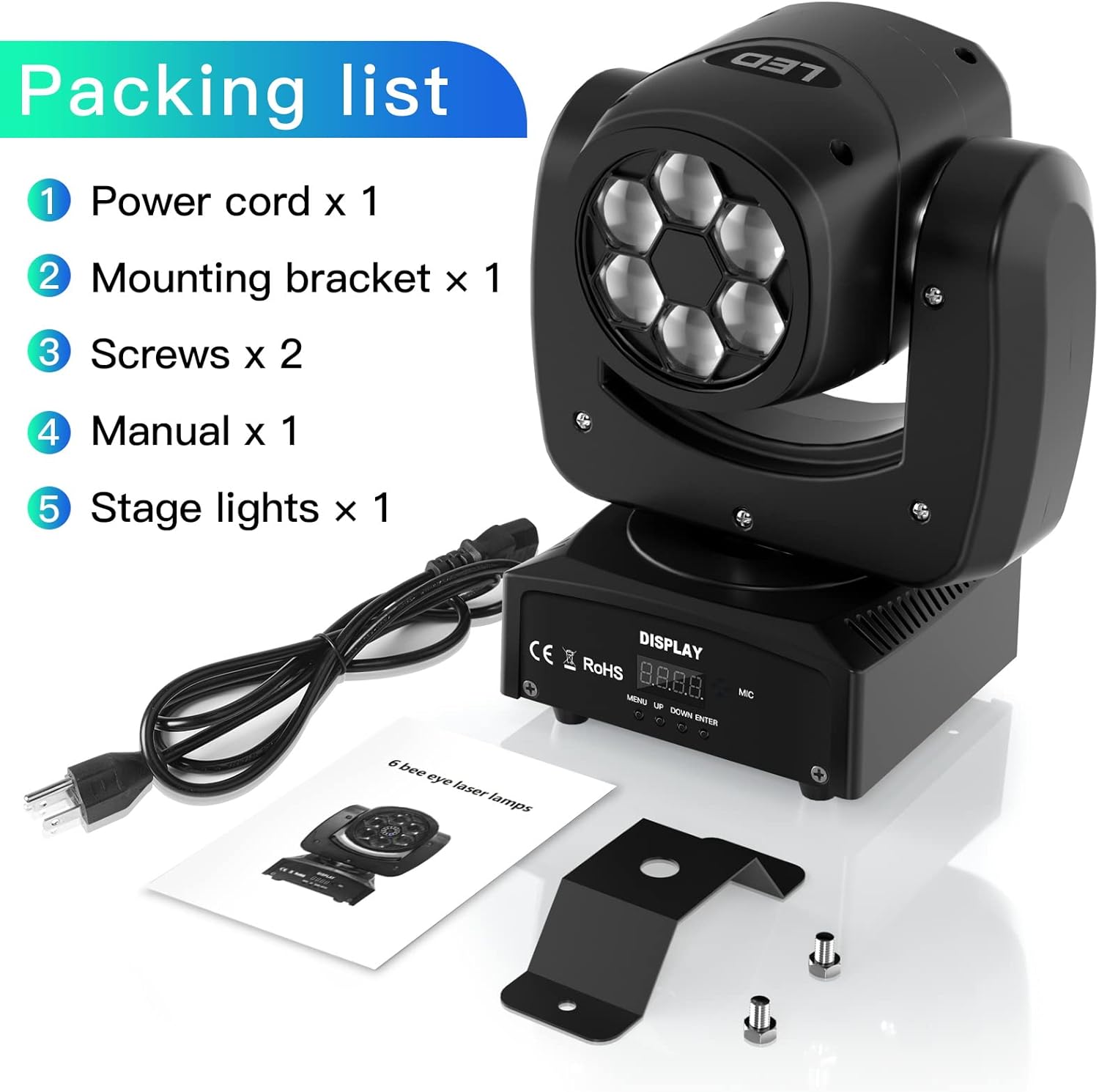
Figure 3.1: Package Contents
4. Product Features
The WZYBUTA ZQ02238 Moving Head Stage Light offers a range of features for versatile lighting effects:
- High Brightness LEDs: Equipped with 6 x 10W high-brightness RGBW LED lamp beads.
- Bee Eye Effect: Unique straight bee eye pattern effect for dynamic visuals.
- Multiple Control Modes: Supports DMX512, Automatic, Sound Control, and Master/Slave modes.
- Wide Scan Angle: X-axis (Pan) movement of 540 degrees and Y-axis (Tilt) movement of 270 degrees for broad coverage.
- Fast Strobe: Strobe effect up to 25 times per second.
- Efficient Cooling: Built-in fan and air cooling system for optimal heat dissipation and extended lifespan.
- Durable Construction: Made from lightweight and wear-resistant aluminum.

Figure 4.1: Dynamic Light Patterns
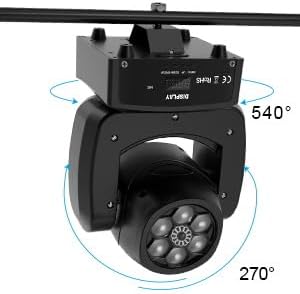
Figure 4.2: Pan and Tilt Movement
5. Setup
Follow these steps to set up your WZYBUTA Moving Head Stage Light:
- Unpacking: Carefully remove the light fixture and all accessories from the packaging. Inspect for any damage during transit.
- Mounting: Attach the included mounting bracket to the bottom of the light fixture using the provided screws. Ensure the screws are tightened securely.
- Placement: Mount the fixture to a truss, ceiling, or a stable surface using appropriate clamps or hardware (not included). Ensure the mounting point can safely support the weight of the light. Alternatively, the light can be placed on a flat, stable surface.
- Power Connection: Connect the power cord to the power input on the rear of the fixture and then plug it into a compatible AC 90-220V, 50-60Hz power outlet.
- DMX Connection (Optional): If using DMX control, connect a DMX cable from your DMX controller to the DMX IN port on the fixture. For multiple fixtures, daisy-chain them by connecting DMX OUT of the first fixture to DMX IN of the next.
6. Operating Modes
The WZYBUTA Moving Head Stage Light supports several operating modes:
- Automatic Mode: The light will cycle through pre-programmed patterns and color changes automatically. This mode is ideal for quick setup without external control.
- Sound Control Mode: The light's patterns and movements will react to ambient sound or music detected by the built-in microphone.
- Master/Slave Mode: Connect multiple fixtures together. One fixture acts as the 'Master' (set to Automatic or Sound Control mode), and the others act as 'Slaves' (set to Slave mode). The slave units will synchronize their effects with the master unit.
- DMX512 Control Mode: For professional control, connect the fixture to a DMX controller. This allows precise control over individual parameters such as pan, tilt, color, strobe, and dimming. The fixture uses 16 DMX channels.
Use the 'MENU', 'UP', 'DOWN', and 'ENTER' buttons on the display panel to navigate and select operating modes and settings.

Figure 6.1: Control Panel and Connections
7. DMX512 Control
The WZYBUTA ZQ02238 supports universal DMX512 protocol, utilizing 16 control channels. To operate in DMX mode, connect a DMX controller to the fixture's DMX IN port. Set the DMX address for each fixture using the control panel. Refer to your DMX controller's manual for specific programming instructions. A detailed DMX channel map is typically provided in a separate DMX guide or can be found on the manufacturer's website.
8. Maintenance
Regular maintenance ensures optimal performance and extends the lifespan of your stage light.
- Cleaning: Periodically clean the lens and exterior housing with a soft, lint-free cloth. Do not use abrasive cleaners or solvents.
- Ventilation: Ensure the cooling fan and ventilation openings are free from dust and debris. Blocked vents can lead to overheating.
- Inspection: Regularly check power cables, DMX cables, and mounting hardware for any signs of wear or damage. Replace damaged components immediately.
- Storage: When not in use, store the fixture in a dry, dust-free environment.
9. Troubleshooting
If you encounter issues with your WZYBUTA Moving Head Stage Light, refer to the table below for common problems and solutions:
| Problem | Possible Cause | Solution |
|---|---|---|
| Light does not power on. | No power supply; faulty power cord; internal fuse blown. | Check power connection and outlet. Test with a different power cord. If fuse is accessible, check and replace. Contact support if issue persists. |
| No light output. | Dimmer at 0%; fixture in blackout mode; LED failure. | Check DMX settings if applicable. Ensure dimmer is not at minimum. Cycle power. |
| No movement (Pan/Tilt). | Movement locked; DMX channel for movement at 0; motor issue. | Check DMX settings. Ensure no physical obstruction. Cycle power. |
| Light not responding to DMX. | Incorrect DMX address; faulty DMX cable; DMX controller issue; incorrect DMX mode. | Verify DMX address. Check DMX cable connections. Ensure fixture is in DMX mode. Test with a different DMX controller if possible. |
| Light not reacting to sound. | Sound control mode not selected; microphone sensitivity too low; no sound input. | Ensure Sound Control mode is active. Increase microphone sensitivity if adjustable. Provide clear sound input. |
If the problem persists after trying these solutions, please contact customer support.
10. Specifications
| Feature | Detail |
|---|---|
| Brand | WZYBUTA |
| Model Number | ZQ02238 |
| Manufacturer | Dongguan Tong Global Industrial Co., Ltd. |
| Product Dimensions | 31.24 x 28.7 x 21.08 cm |
| Item Weight | 3.43 Kilograms |
| Power Source | Corded Electric |
| Operating Voltage | AC 90-220V, 50-60Hz |
| Light Source Type | LED (6 x 10W RGBW) |
| Lighting Effect | Colorful Bee Eye Effect |
| Control Modes | Sound Activation, Master/Slave, Automatic, DMX512 |
| DMX Channels | 16 Channels |
| X-axis (Pan) Movement | 540 degrees |
| Y-axis (Tilt) Movement | 270 degrees |
| Strobe Rate | 25 times/second |
| Cooling Method | Fan, Air Cooling |
| Material | Aluminum, Plastic |
| Finish Type | Powder Coated |
| Style | Modern |
11. Warranty and Support
WZYBUTA is committed to improving the shopping experience and product quality for all customers. This product comes with:
- 30-Day Free Return and Replacement: If you are not satisfied with your purchase, you may return it for a free replacement or refund within 30 days.
- 365-Day Warranty Service: The product is covered by a 365-day warranty against manufacturing defects.
Our professional after-sales service team is available to assist you with any issues within 24 hours. For support, please refer to the contact information provided with your purchase or on the official WZYBUTA website.