
ODK B0B2L5QS54
ODK Small L Shaped Desk Instruction Manual
Brand: ODK | Model: B0B2L5QS54
1. Introduction
Welcome to the instruction manual for your new ODK Small L Shaped Desk. This guide provides detailed information on assembly, features, usage, maintenance, and troubleshooting to ensure you get the most out of your product.
Important Safety Reminder: For ease and safety, we recommend two people for assembly.
2. Product Overview
The ODK Small L Shaped Desk is designed for home office, gaming, and general computer work, offering an ergonomic setup with ample storage and a reversible design.
Key Features:
- Ergonomic design with an elevated monitor stand shelf (4.5'' height) to reduce neck strain.
- Reversible L-shaped design allows side storage shelves to be installed on the left or right.
- Integrated PC stand for convenient computer tower placement.
- Ample workspace with main top (48''W x 19.7''D) and side top (31.5''D x 10.2''W).
- Durable construction with solid particle board and a thick metal frame, scratch-resistant, anti-collision, and waterproof.
- Includes two headphone hooks for organized storage.
Product Dimensions:
Overall Dimensions: 31.5"D x 58"W x 34.5"H

Figure 2.1: Overview of the ODK Small L Shaped Desk in a typical setup.

Figure 2.2: Detailed dimensions of the desk components.
3. Setup & Assembly
Assembly of your ODK desk is designed to be straightforward. Please ensure you have all parts before beginning and follow the steps carefully. Two people are recommended for easier and safer assembly.
Assembly Video Guide:
Video 3.1: Official assembly guide for the ODK Small L Shaped Desk, demonstrating each step of the construction process.
Step-by-Step Assembly:
For a complete parts list and detailed visual instructions, please refer to the included PDF Installation Manual or the assembly video above. Below are key steps and visual aids:
Step 1: Assemble the Main Frame
Begin by connecting the main metal frame components. Ensure all screws are tightened securely but do not overtighten until the entire frame is assembled.

Figure 3.1: The assembled desk frame, ready for desktop installation.
Step 2: Attach Desktop Panels
Carefully place the main desktop and the L-shaped extension onto the assembled frame. Align the pre-drilled holes with the frame and secure using the provided screws. Note the orientation for the reversible L-shape.

Figure 3.2: Top-down view illustrating the L-shaped desktop layout.
Step 3: Install Monitor Stand
Position the elevated monitor stand on the main desktop. Secure it using the designated screws. This stand is designed to improve your sitting posture.
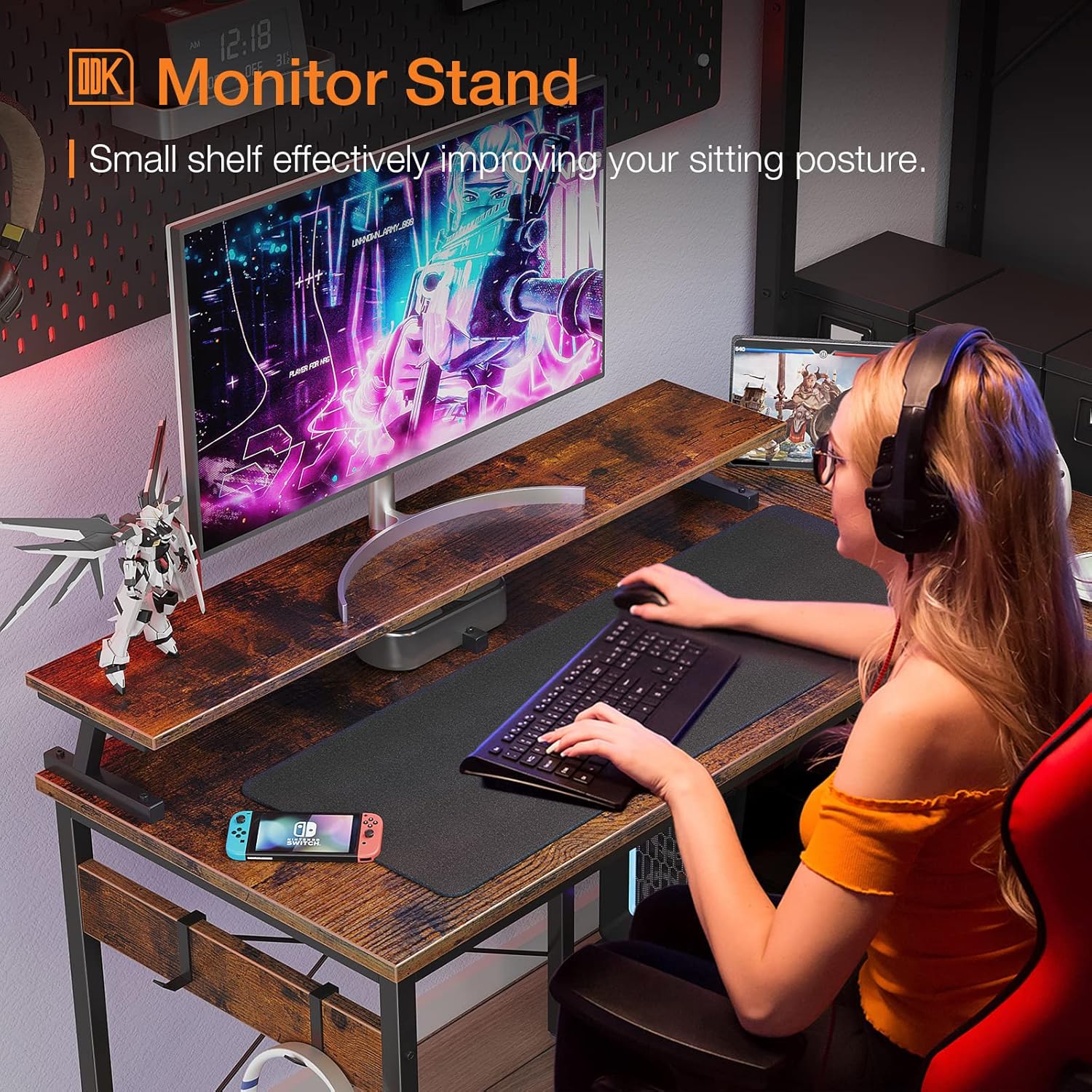
Figure 3.3: Detail of the monitor stand installation.
Step 4: Assemble Storage Shelves and PC Stand
Attach the side storage shelves and the dedicated PC stand according to your preferred reversible orientation. These provide convenient storage for books, peripherals, and your computer tower.

Figure 3.4: The PC stand area with a computer tower in place.
Step 5: Attach Headphone Hooks
Install the two headphone hooks on the designated locations under the main desktop. These hooks help keep your headphones organized and within reach.

Figure 3.5: Headphone hooks for convenient storage.
4. Operating Instructions
Your ODK L Shaped Desk is designed for versatile use in various settings, including home offices, gaming rooms, and study areas.
Optimizing Your Workspace:
- Monitor Placement: Utilize the elevated monitor stand to position your screens at eye level, promoting a comfortable and ergonomic viewing experience.
- Reversible Configuration: Adjust the L-shape to fit your room layout by installing the storage shelves on either the left or right side during assembly.
- Cable Management: Use the integrated cable hole on the side tabletop to keep your wires organized and your workspace clutter-free.
- Storage Utilization: The two-tier storage shelves and PC stand offer ample space for books, documents, gaming consoles, and your computer tower.
Video 4.1: Demonstration of the ODK L shaped desk features, including the monitor stand and CPU tower placement, in various room settings.
5. Maintenance
Proper care and maintenance will extend the lifespan of your ODK L Shaped Desk.
Care Guidelines:
- Cleaning: Wipe surfaces with a soft, damp cloth. Avoid harsh chemicals or abrasive cleaners that could damage the laminated finish.
- Spills: Clean up spills immediately to prevent water damage to the particle board.
- Protection: While the tabletop is scratch-resistant and waterproof, using coasters for drinks and mouse pads for computer peripherals is recommended to further protect the surface.
- Stability: Periodically check and tighten all screws to ensure the desk remains stable and sturdy.
- Floor Protection: The desk foot pads are designed to protect your wood floor from scratching; ensure they are intact and properly positioned.
6. Troubleshooting
If you encounter any issues with your ODK L Shaped Desk, please refer to the following common solutions:
- Desk Wobbles: Ensure all screws are fully tightened. Check that the adjustable feet are properly installed and adjusted to compensate for uneven floors.
- Parts Missing or Damaged: If you find any product problems such as damaged issues or missing parts upon arrival, please contact customer service immediately.
- Assembly Difficulty: Review the step-by-step instructions in this manual and the assembly video (Video 3.1). Ensure you are following the correct instructions for your desired L-shape orientation (left or right).
For further assistance, please contact ODK customer support.
7. Specifications
| Attribute | Value |
|---|---|
| Brand | ODK |
| Product Dimensions | 31.5"D x 58"W x 34.5"H |
| Color | Vintage |
| Style | Modern |
| Base Material | Engineered Wood |
| Top Material Type | Engineered Wood |
| Finish Type | Laminated |
| Special Feature | Reversible |
| Maximum Weight Recommendation | 220 Pounds |
| Required Assembly | Yes |
| Includes All Assembly Tools | Yes |
8. Warranty and Support
ODK is committed to providing quality products and excellent customer service. If you have any questions or concerns regarding your desk, please do not hesitate to contact us.
We guarantee a reply for solution within 24 hours for any product problems.
For the complete and official installation manual, please refer to the PDF document available at: ODK Small L Shaped Desk Installation Manual (PDF)
Related documentsB0B2L5QS54

Ask a question about this manual
Ask about setup, troubleshooting, compatibility, parts, safety, or missing instructions. Manuals+ will review the question and use this page’s manual context to help answer it.