
1. Introduction
This manual provides essential instructions for the safe assembly, operation, and maintenance of your BlessReach Economy Knee Scooter, Model WB-2111. This steerable knee walker is designed to offer a comfortable and stable mobility solution for individuals recovering from foot, ankle, or lower leg injuries, serving as an effective alternative to traditional crutches.
2. Safety Information
Always prioritize your safety when using the knee scooter. Ensure all components are securely fastened before each use. Do not exceed the maximum weight capacity of 300 lbs. Avoid using the scooter on uneven or slippery surfaces. Always engage the parking brake when stationary.
Legal Disclaimer: Statements regarding medical devices have not been evaluated by the FDA and are not intended to diagnose, treat, cure, or prevent any disease or health condition. Consult with a healthcare professional for appropriate medical advice.
3. Package Contents
Before assembly, verify that all parts are present and undamaged. The package should include:
- Main Frame Assembly
- Front Wheel Crossbar with Wheels
- Steering Column with Handlebars and Brake Levers
- Knee Pad Assembly
- Detachable Canvas Storage Bag
- Assembly Hardware (screws, washers, Allen wrench)
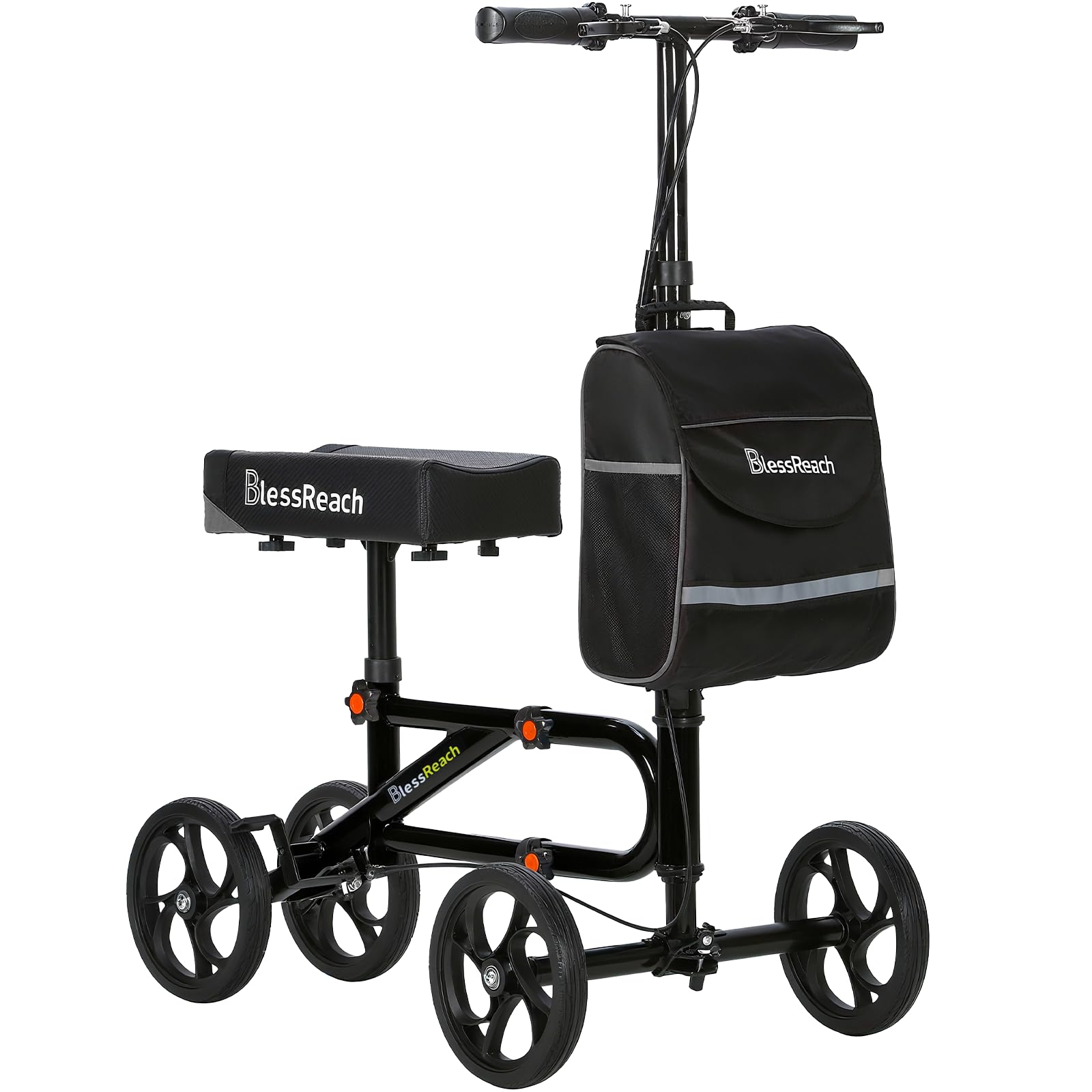
4. Setup and Assembly
Follow these steps to assemble your knee scooter. Refer to the accompanying videos for visual guidance.
- Install the Front Wheels: Attach the 8-inch front wheels to the front wheel crossbar using the provided screws and Allen wrench. Ensure the gaskets are placed between the crossbar and the wheels for proper fit.
- Assemble the Main Frame: Connect the main frame sections. Secure them using the designated fasteners.
- Install the Front Wheel Crossbar: Attach the front wheel crossbar assembly to the main frame. Ensure the buckle is fastened tightly to prevent movement.
- Install the Steering Column: Insert the steering column into the main frame. Align the hex screws with the hex holes and tighten them securely.
- Install the Knee Pad: Attach the knee pad to its support post. Secure it with the provided knobs, ensuring it is stable.
- Install the Storage Bag: Attach the detachable canvas storage bag to the steering column using the integrated straps.
Video 1: Step-by-step assembly guide for the BlessReach Knee Scooter.
Video 2: Detailed installation video for Model 2111.
Video 3: Instructions for installing the front wheel crossbar buckle.
5. Operation
To use the knee scooter:
- Adjust Height: Adjust the handlebar height and knee pad height to ensure a comfortable and ergonomic position. The knee pad should support your injured leg at a comfortable angle, and the handlebars should be at waist level for proper steering.
- Positioning: Place your injured leg on the knee pad, ensuring a secure fit. Use your uninjured leg to propel the scooter forward.
- Steering: Steer the scooter using the handlebars. The steerable design allows for easy maneuverability.
- Braking: The scooter features a dual braking system. Squeeze the handbrakes to slow down or stop. To engage the parking brake, squeeze the brake levers and press the small button on the lever to lock the brakes. To release, simply squeeze the levers again.
Video 4: Guide on adjusting brake tightness for optimal performance.
6. Key Features
- Sturdy Frame: Constructed with a scientific double tube structure for enhanced strength and support, capable of bearing up to 300 lbs.
- 8-inch Wheels: Equipped with comfortable 8-inch wheels for easy maneuverability across various smooth indoor and outdoor surfaces.
- Dual Braking System: Features an ergonomic adjustable locking handbrake for improved safety and control.
- Detachable Storage Bag: Includes a double-layer canvas bag for convenient storage of personal items, easily detachable.
- Adjustable Design: Offers 5-position seat adjustment and 6-position handlebar adjustment to accommodate various user heights (4' - 6').
- Foldable Design: The main frame is removable, and the steering lever folds to reduce space, allowing for easy transport and storage in a car.


7. Maintenance
- Cleaning: Wipe down the frame and knee pad with a damp cloth and mild soap. Avoid abrasive cleaners.
- Wheel Inspection: Regularly check the wheels for wear and tear. Ensure they spin freely and are securely attached.
- Brake Check: Periodically test the brakes to ensure they are responsive and engage properly. Adjust brake tightness as needed (refer to operation section).
- Fastener Check: Ensure all screws, bolts, and knobs are tight. Re-tighten if any looseness is detected.
8. Troubleshooting
- Loose Handlebar: If the handlebar feels wobbly, ensure the hex screws are fully sunk into their holes and tightened.
- Brakes Not Engaging: Check the brake line adjustment. If the brakes feel too loose, adjust the brake line tension at the lever.
- Difficulty Steering: Ensure the steering column is properly installed and secured.
- Unstable Ride: Verify that all frame connections are tight and the knee pad is securely fastened.
9. Specifications
| Feature | Detail |
|---|---|
| Model | WB-2111 |
| Brand | BlessReach |
| Material | Aluminum |
| Color | Black |
| Item Weight | 22 Pounds |
| Package Dimensions | 20.75 x 14.75 x 10.25 inches |
| Wheel Size | 8-inch |
| Knee Pad Adjustment | 5-position |
| Handlebar Adjustment | 6-position |
| Max User Weight | 300 lbs |
10. Warranty and Support
For warranty information or customer support, please refer to the product packaging or contact BlessReach customer service directly. Keep your purchase receipt for any warranty claims.