Introduction
This manual provides essential information for the safe and effective use of your BlessReach Knee Scooter Model WB-2111. Please read all instructions carefully before assembly and operation. This knee scooter is designed as a mobility aid for individuals recovering from foot, ankle, or lower leg injuries, offering a comfortable and stable alternative to crutches.
Safety Information
- Always ensure all locking mechanisms are securely fastened before use.
- Do not exceed the maximum weight capacity of 300 lbs.
- Maintain a safe speed, typically less than 3 mph, to ensure stability and prevent falls.
- Use the ergonomic adjustable locking handbrake for controlled stopping and parking.
- Avoid uneven surfaces, steep inclines, or obstacles that may cause instability.
- Regularly inspect the wheels, brakes, and frame for any signs of wear or damage.
Package Contents
Verify that all components are present before beginning assembly:
- Knee Scooter Main Frame (with seat post)
- Front Wheel Assembly
- T-Handlebar Frame (with brake levers)
- Knee Cushion
- Detachable Storage Bag
- Assembly Tools (Allen wrench, wrench)
- Instruction Manual
Assembly Instructions
Step 1: Install the Front Wheel
Attach the front wheel assembly to the main frame. Ensure the buckle is fastened tightly. Tighten the screws using the provided Allen wrench.
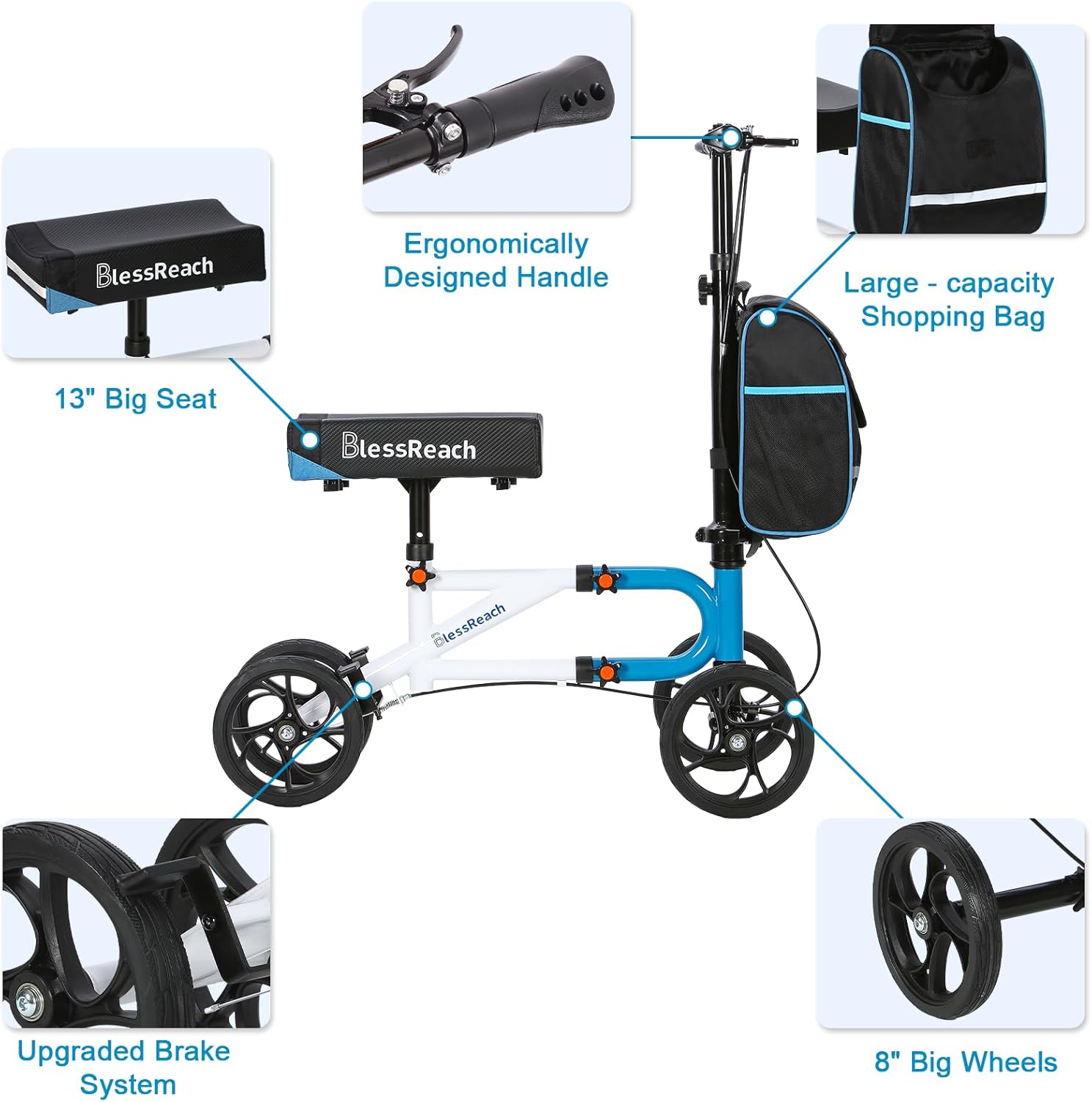
Image: Exploded view of the knee scooter components, highlighting the front wheel assembly.
Video: Demonstrates the installation of the front wheel onto the knee scooter frame, including tightening the buckle and screws.
Step 2: Install the Main Frame
Connect the main frame components, ensuring all bolts and knobs are securely tightened. The scientific double tube structure provides enhanced support.
Video: Full installation guide for the BlessReach Knee Scooter Model 2111, covering all major assembly steps.
Step 3: Install the T-Handlebar Frame
Insert the T-handlebar frame into the main frame's steering column. Secure it with the quick-release mechanism and ensure it is firm.
Step 4: Install the Knee Cushion
Place the knee cushion onto the seat post and secure it using the provided fasteners. Ensure it is stable and does not wobble.

Image: Close-up of the wide ergonomic knee cushion, emphasizing its comfortable and supportive features.
Step 5: Attach the Storage Bag
Secure the detachable canvas storage bag to the front of the knee scooter using its straps. The bag features a double-layer structure for durability.
Image: The BlessReach Knee Scooter with its detachable storage bag, illustrating its capacity and convenient placement.
Adjustments
Adjusting Handlebar Height
Loosen the quick-release clamp on the handlebar stem. Adjust the handlebar to a comfortable height where your arms are slightly bent. Secure the clamp firmly.
Adjusting Knee Cushion Height
Loosen the knob on the seat post. Adjust the knee cushion to a height that allows your injured leg to be comfortably bent at a 90-degree angle while your foot is off the ground. Tighten the knob securely.
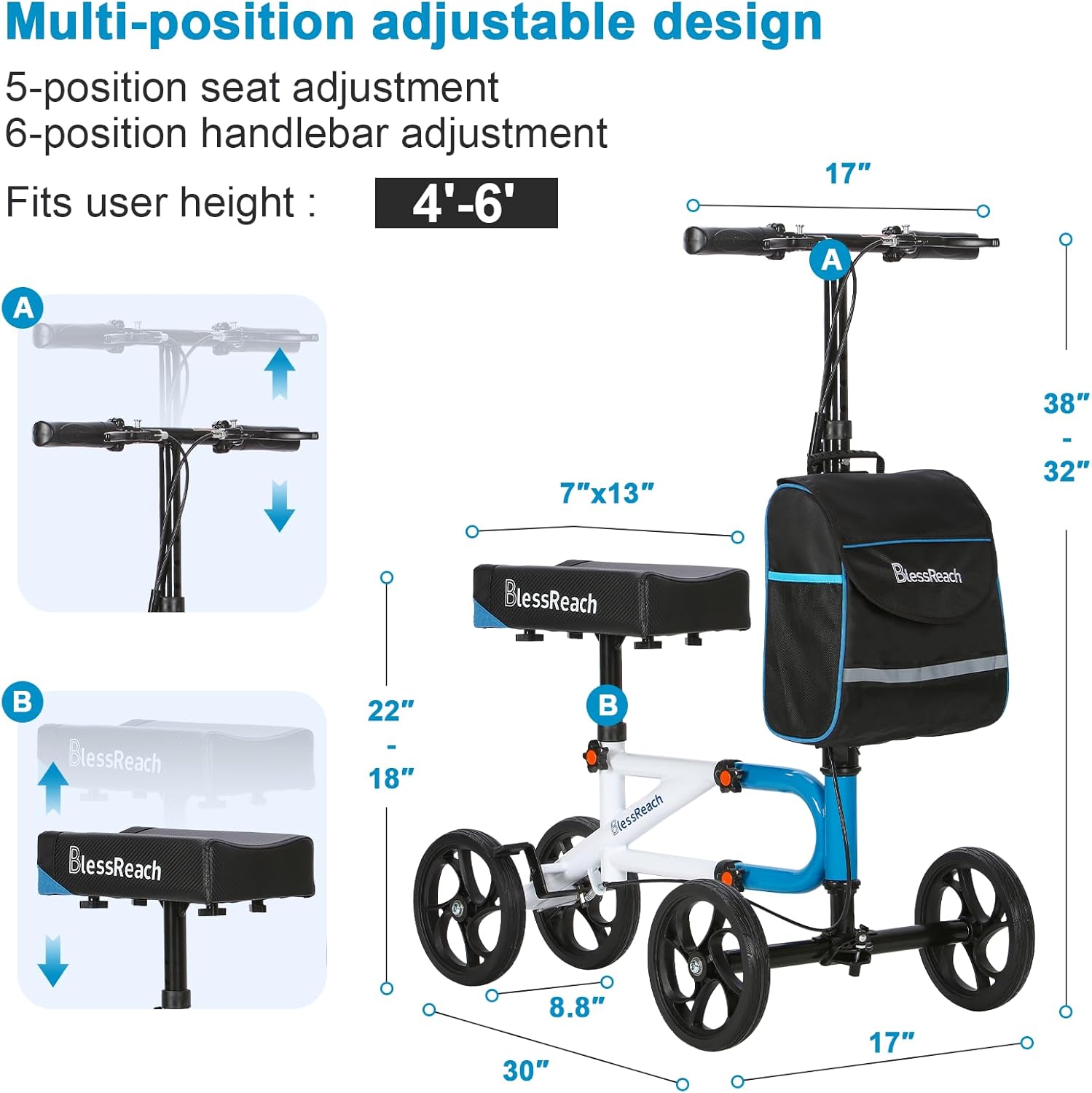
Image: Diagram showing the adjustable handlebar and knee cushion heights, with measurements for various user heights.
Adjusting Steering Looseness
If the steering feels too loose or too tight, use an Allen wrench to adjust the bolt at the base of the T-handlebar stem. Tighten or loosen as needed for smooth steering.
Video: Instructions on how to adjust the T-handle steering for optimal tightness and control.
Adjusting Brake Tightness
The dual braking system can be adjusted for optimal performance. If the brakes feel too loose or too tight, adjust the barrel adjuster located near the brake levers on the handlebar. Turn clockwise to tighten, counter-clockwise to loosen.

Image: Detail of the ergonomic non-slip grip and brake lever, illustrating the parking brake mechanism.
Video: Guide on how to adjust the brake line tension for effective braking.
Operating Instructions
- Positioning: Place your injured leg with the knee bent onto the knee cushion. Keep your foot elevated and off the ground.
- Balance: Use your uninjured leg to propel the scooter forward. Maintain a firm grip on the handlebars for balance and control.
- Steering: Gently turn the handlebars in the desired direction. The steerable design allows for easy maneuverability.
- Braking: Squeeze the handbrakes to slow down or stop. For parking, engage the locking mechanism on the handbrake levers.
- Folding for Transport: The knee scooter features a foldable design. Loosen the clasp on the steering column to fold the handlebar down, reducing its size for easy transport and storage in a car.
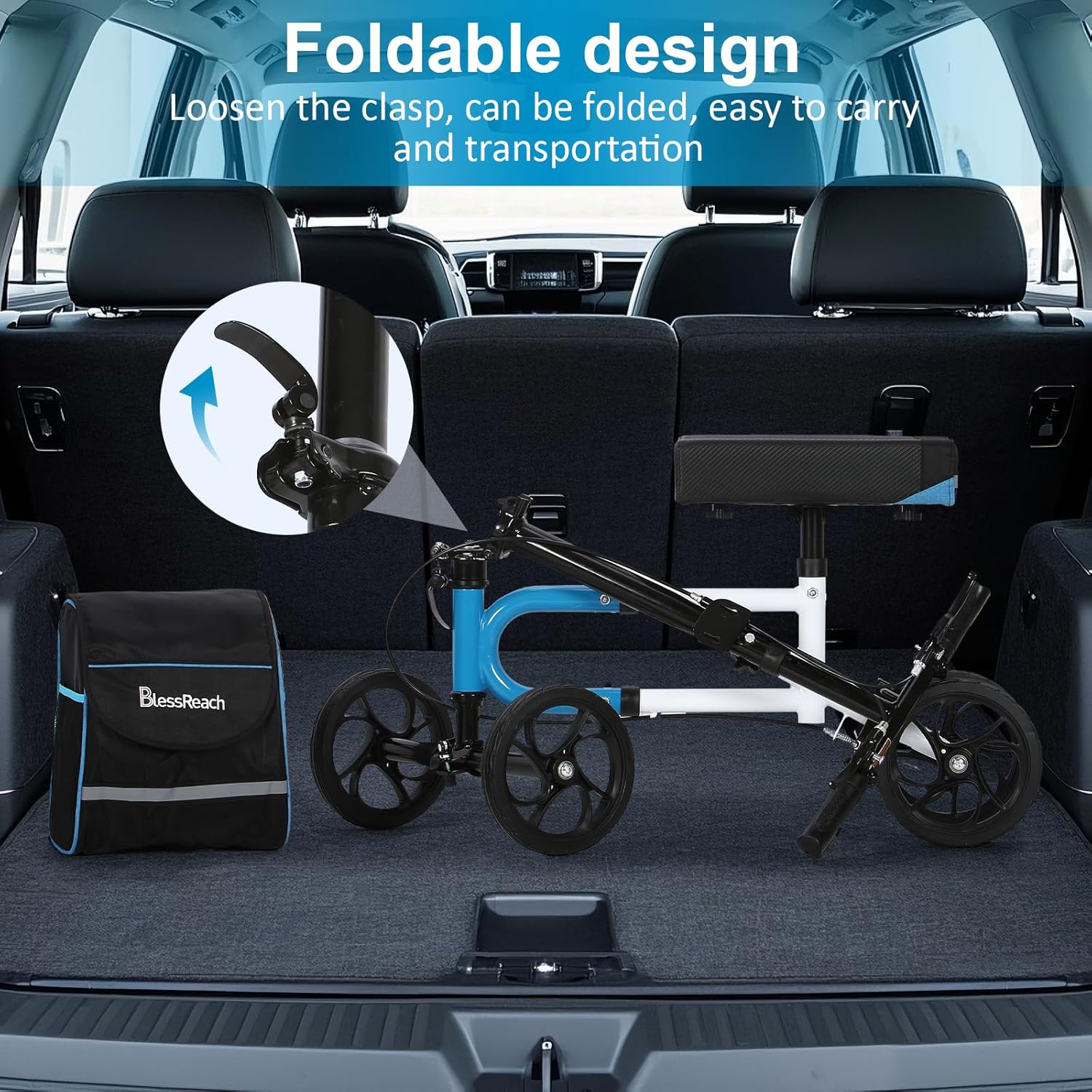
Image: The knee scooter in a folded position, stored in a car trunk, illustrating its portability.
Maintenance
- Cleaning: Wipe down the frame and knee cushion with a damp cloth and mild soap. Avoid abrasive cleaners.
- Wheel Inspection: Periodically check the 8-inch wheels for wear and tear. Ensure they rotate freely and are securely attached.
- Brake Check: Test the brakes regularly to ensure they are responsive and effectively stop the scooter. Adjust brake lines if necessary.
- Fastener Check: Ensure all bolts, knobs, and quick-release mechanisms are tight and secure.

Image: Detail of the 8-inch all-terrain wheels, designed for various surfaces.
Troubleshooting
- Scooter feels unstable: Ensure all frame connections are tight, especially the quick-release mechanisms and adjustment knobs. Verify that the handlebar and knee cushion are at appropriate heights for your body.
- Brakes are not working effectively: Check the brake line tension and adjust using the barrel adjusters. Ensure the brake pads are making proper contact with the wheels.
- Difficulty steering: Adjust the T-handle steering looseness as described in the 'Adjustments' section. Ensure no debris is obstructing the steering mechanism.
- Wheels are not rolling smoothly: Inspect wheels for any obstructions, damage, or excessive wear. Clean wheels if necessary.
Specifications
| Feature | Detail |
|---|---|
| Brand | BlessReach |
| Model | WB-2111 |
| Color | Blue |
| Material | Metal |
| Item Weight | 22 Pounds |
| Package Dimensions | 21.1 x 14.5 x 10 inches |
| Style | Compact |
| Wheel Size | 8-inch |
| Weight Capacity | Up to 300 lbs |
Warranty and Support
For warranty information or technical support, please refer to the product packaging or contact BlessReach customer service directly. Keep your purchase receipt for warranty claims.


