
INSE S6T
INSE S6T Cordless Vacuum Cleaner User Manual
Model: S6T | Brand: INSE
1. Introduction
Thank you for choosing the INSE S6T Cordless Vacuum Cleaner. This manual provides essential information for the safe and efficient operation, maintenance, and troubleshooting of your new vacuum cleaner. Please read it thoroughly before first use and keep it for future reference.

Figure 1.1: The INSE S6T Cordless Vacuum Cleaner and its included accessories.
Key Features:
- Powerful Suction: Equipped with a 265W brushless digital motor, offering up to 23K PA suction force for effective cleaning on various surfaces.
- Long Runtime: Features an 8-cell 2500 mAh rechargeable battery providing up to 45 minutes of runtime on standard mode.
- Advanced Filtration: 5-stage high-efficiency filtration system with HEPA filter, ensuring clean air expulsion.
- Versatile Design: Lightweight main body, easily converts to a handheld vacuum, and includes 10 combinations of attachments for diverse cleaning needs.
- Flexible Floor Head: Motorized LED floor head with 150° swivel and 90° tilt for easy maneuverability under furniture.
2. Safety Instructions
To reduce the risk of fire, electric shock, or injury, please observe the following safety precautions:
- Read all instructions before using the appliance.
- Do not use outdoors or on wet surfaces.
- Do not allow to be used as a toy. Close attention is necessary when used by or near children.
- Use only as described in this manual. Use only manufacturer's recommended attachments.
- Do not use with damaged cord or plug. If appliance is not working as it should, has been dropped, damaged, left outdoors, or dropped into water, return it to a service center.
- Do not pull or carry by cord, use cord as a handle, close a door on cord, or pull cord around sharp edges or corners. Do not run appliance over cord. Keep cord away from heated surfaces.
- Do not unplug by pulling on cord. To unplug, grasp the plug, not the cord.
- Do not handle plug or appliance with wet hands.
- Do not put any object into openings. Do not use with any opening blocked; keep free of dust, lint, hair, and anything that may reduce air flow.
- Keep hair, loose clothing, fingers, and all parts of body away from openings and moving parts.
- Do not pick up anything that is burning or smoking, such as cigarettes, matches, or hot ashes.
- Use extra care when cleaning on stairs.
- Do not use to pick up flammable or combustible liquids, such as gasoline, or use in areas where they may be present.
- Disconnect the battery pack from the appliance before making any adjustments, changing accessories, or storing appliance.
- Use only the charger supplied by the manufacturer to recharge.
- When the battery pack is not in use, keep it away from other metal objects, like paper clips, coins, keys, nails, screws or other small metal objects, that can make a connection from one terminal to another.
- Under abusive conditions, liquid may be ejected from the battery; avoid contact. If contact accidentally occurs, flush with water. If liquid contacts eyes, additionally seek medical help.
- Do not use an appliance that is damaged or modified. Damaged or modified batteries may exhibit unpredictable behavior resulting in fire, explosion or risk of injury.
- Do not expose a battery pack or appliance to fire or excessive temperature. Exposure to fire or temperature above 130°C (265°F) may cause explosion.
- Follow all charging instructions and do not charge the battery pack or the appliance outside of the temperature range specified in the instructions.
- Servicing must be performed by a qualified repair person using only identical replacement parts.
3. Package Contents
Carefully unpack your INSE S6T Cordless Vacuum Cleaner and check that all items are present and in good condition. If any items are missing or damaged, please contact customer support.

Figure 3.1: All components included in the INSE S6T package.
- Retractable Metal Tube
- Flexible Hose
- Main Motor (Handheld Unit)
- Motorized Brush Head
- Long Crevice Tool
- Wall Mount Bracket
- Soft Roller Brush (for hard floors)
- Stiff Roller Brush (for carpets)
- 2-in-1 Brush
- Mini Motorized Brush
- Mounting Screws and Wall Plugs
- Rechargeable Battery Pack
- HEPA Filter
- Power Adapter/Charger
- Cleaning Tool
- User Manual
- Quick Start Guide
4. Product Overview
Familiarize yourself with the main components of your INSE S6T Cordless Vacuum Cleaner.
Main Unit (Handheld)
- Dustbin: Collects dirt and debris. Features a 0.5-liter capacity and one-button easy empty design.
- Filter System: Multi-stage filtration including HEPA filter, mesh filter, stainless steel strainer, and strong cyclone separation.
- Battery Pack: Detachable 2500 mAh battery for flexible charging.
- Power Button: On/Off control.
- Mode Button: Switches between standard and max suction modes.
- Battery Indicators: LED lights showing remaining battery life.

Figure 4.1: The 1.2L extra large dustbin with one-button easy empty feature.
Attachments and Their Uses
The INSE S6T comes with various attachments for different cleaning scenarios, offering up to 10 combinations.
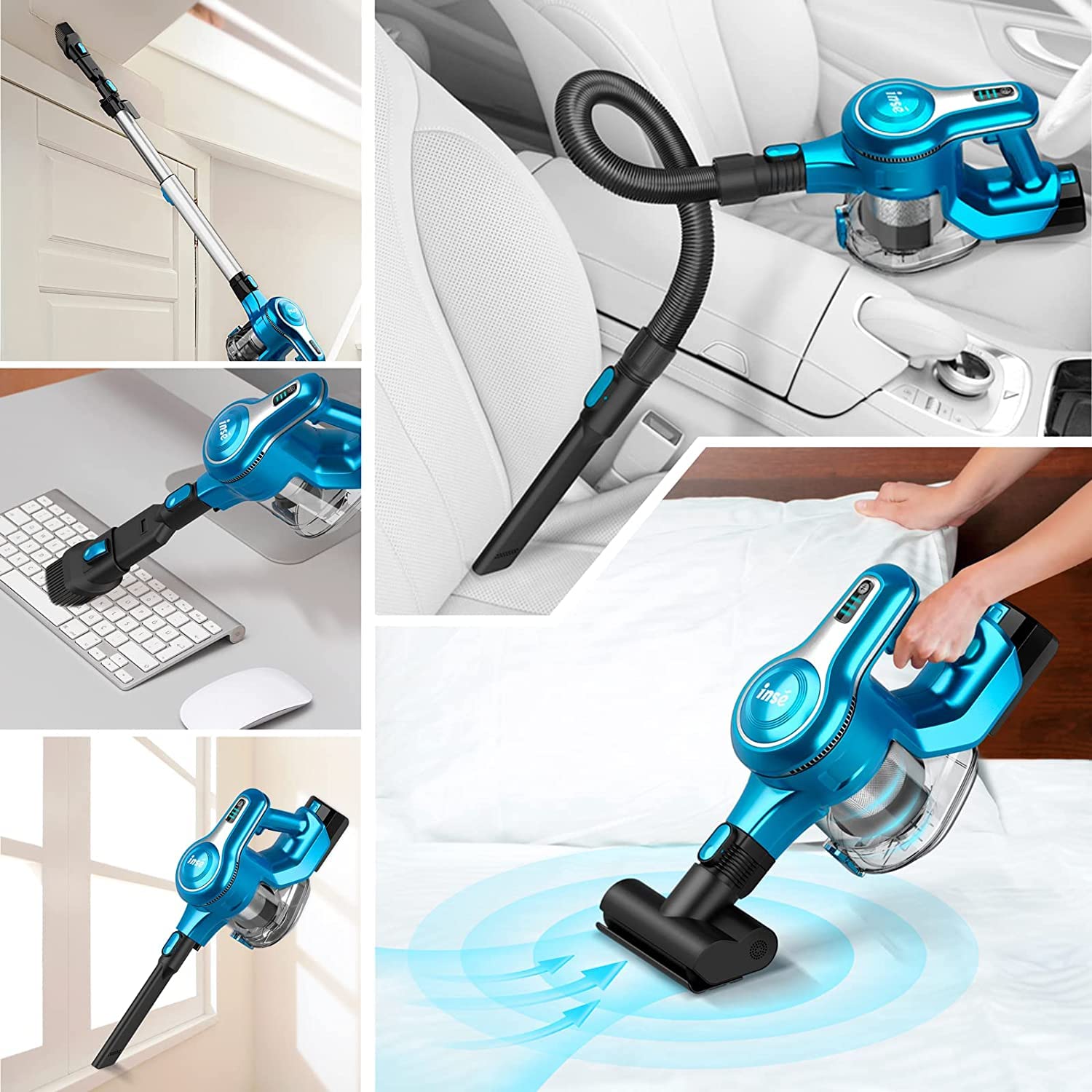
Figure 4.2: Examples of the vacuum's versatility with different attachments.
- Motorized Brush Head: Ideal for floors (hardwood, tile, carpet). Features LED lights to illuminate dark areas.
- Retractable Metal Tube: Extends reach for floor cleaning or high areas.
- Flexible Hose: Provides flexibility for cleaning tight spaces, car interiors, or upholstery.
- Long Crevice Tool: Perfect for narrow gaps, corners, and edges.
- 2-in-1 Brush: Combines a wide nozzle and a brush for versatile cleaning of surfaces, furniture, and keyboards.
- Mini Motorized Brush: Designed for pet hair, upholstery, and bedding.
5. Setup
5.1 Assembly
- Attach the Battery: Slide the rechargeable battery pack into the slot on the main motor unit until it clicks into place.
- Assemble for Floor Cleaning:
- Connect the retractable metal tube to the main motor unit.
- Attach the motorized brush head to the other end of the metal tube. Ensure both connections click securely.
- Assemble for Handheld Use:
- Directly attach desired accessory (e.g., long crevice tool, 2-in-1 brush, mini motorized brush, or flexible hose) to the main motor unit.
5.2 Charging the Battery
Before first use, fully charge the battery for optimal performance.
- The battery can be charged while attached to the vacuum or detached.
- Connect the power adapter to the charging port on the battery pack or the main unit.
- Plug the adapter into a wall outlet.
- The battery indicator lights will show charging status. All lights illuminated indicate a full charge.


Figure 5.1: Detachable battery and battery indicator lights.
5.3 Wall Mount Installation
The convenient wall mount allows for easy storage and charging.
- Choose a suitable location near a power outlet.
- Mark the drilling points using the wall mount bracket as a template.
- Drill holes and insert wall plugs.
- Secure the wall mount bracket with the provided screws.
- Hang the vacuum cleaner on the wall mount.

Figure 5.2: Easy storage options: in a cabinet or on the wall mount.
6. Operation
6.1 Powering On/Off and Suction Modes
- Press the Power Button to turn the vacuum cleaner ON. It will start in Standard mode.
- Press the Mode Button to switch to Max mode for stronger suction.
- Press the Mode Button again to return to Standard mode.
- Press the Power Button again to turn the vacuum cleaner OFF.

Figure 6.1: The vacuum's powerful suction for deep cleaning.
6.2 Cleaning Different Surfaces
- Hard Floors & Low-Pile Carpets: Use the motorized brush head. The soft roller brush is ideal for hard floors, while the stiff roller brush is better for carpets.
- Under Furniture: The flexible motorized LED floor head can swivel 150° sideways and 90° up and down, allowing easy access under furniture and beds (over 2 inches clearance).
- Corners & Crevices: Use the long crevice tool.
- Upholstery & Pet Hair: The mini motorized brush is effective for removing pet hair from sofas and beds.
- High Areas & Curtains: Attach the retractable metal tube with a suitable accessory like the 2-in-1 brush.
- Car Interiors: Use the flexible hose with the long crevice tool or 2-in-1 brush for tight spots.

Figure 6.2: The flexible motorized floor head for easy maneuvering.
7. Maintenance
Regular maintenance ensures optimal performance and extends the lifespan of your vacuum cleaner.
7.1 Emptying the Dustbin
- Press the dustbin release button to open the bottom flap and empty contents into a trash bin.
- It is recommended to empty the dustbin after each use or when it reaches the MAX fill line.
7.2 Cleaning the Filters
The 5-stage filtration system requires regular cleaning to maintain suction power.

Figure 7.1: Components of the 5-stage high-efficiency filtration system.
- Twist and pull to remove the dustbin from the main unit.
- Remove the HEPA filter, mesh filter, and stainless steel strainer.
- Tap off loose dirt from all filter components.
- Rinse the HEPA filter, mesh filter, and stainless steel strainer under cold running water. Do NOT wash the main motor unit.
- Allow all filter components to air dry completely for at least 24 hours before reassembling. Ensure they are completely dry to prevent mold or damage.
- Reassemble the filters and dustbin in reverse order.
7.3 Cleaning the Roller Brushes
- Press the release button on the motorized brush head to remove the roller brush.
- Use the provided cleaning tool or scissors to cut and remove any tangled hair or debris from the roller brush.
- Rinse the roller brush if necessary and allow it to air dry completely before reinserting.
8. Troubleshooting
If you encounter any issues with your INSE S6T Cordless Vacuum Cleaner, please refer to the following table before contacting customer support.
| Problem | Possible Cause | Solution |
|---|---|---|
| Vacuum does not turn on. | Battery is not charged or not properly installed. | Ensure battery is fully charged and securely clicked into place. |
| Low suction power. | Dustbin is full; Filters are clogged; Roller brush is tangled; Blockage in tube/hose. | Empty dustbin. Clean/wash filters and allow to dry. Remove tangled hair from roller brush. Check for and clear any blockages. |
| Motorized brush head stops rotating. | Roller brush is jammed by debris or hair; Overheat protection activated. | Clear any obstructions from the roller brush. Turn off the vacuum and let it cool down for 30 minutes before restarting. |
| Battery runtime is short. | Battery not fully charged; Using Max mode excessively; Battery life degradation. | Ensure battery is fully charged. Use Standard mode for longer runtime. If battery life is significantly reduced, consider replacing the battery. |
| Unusual noise. | Blockage in air path; Damaged component. | Check for and remove any blockages. If noise persists, contact customer support. |
9. Specifications
| Feature | Detail |
|---|---|
| Model | S6T |
| Brand | INSE |
| Motor Power | 265W Brushless Digital Motor |
| Suction Power (Max) | 23K PA |
| Battery Capacity | 2500 mAh (8-Cell) |
| Runtime | Up to 45 minutes (Standard Mode), 20 minutes (Max Mode) |
| Dustbin Capacity | 0.5 Liters |
| Filtration System | 5-Stage Sealed Filtration with HEPA Filter |
| Noise Level | 65 dB |
| Item Weight | 1 kg 500 g |
| Special Features | Lightweight, Cordless, LED Floor Head, Wall Mountable |
10. Warranty & Support
INSE products are designed for reliability and performance. For any assistance, please contact our customer support team.
After Sales Support:
- Contact Email: support@cambiumretail.com
- Contact Number: 6366920571
- Our support team is active from 09:00 AM to 05:30 PM.
PAN INDIA SERVICING NETWORK:
Service centers are available in major cities across India, including:
Mumbai, Bangalore, Hyderabad, Delhi, Pune, Ahmedabad, Chennai, Kolkata, Goa, Chandigarh, Jaipur, Lucknow, Trivandrum, Bhopal, Coimbatore, Cochin, Vijayawada, Madurai, Vizag, and Patna. More cities to be added soon.

Figure 10.1: PAN India service network and contact details.
Related documentsS6T


Ask a question about this manual
Ask about setup, troubleshooting, compatibility, parts, safety, or missing instructions. Manuals+ will review the question and use this page’s manual context to help answer it.