
1. Introduction
This manual provides detailed instructions for the assembly, operation, and maintenance of your TECHTONGDA 6 Color 6 Station Silk Screen Printing Machine. Designed for versatility and efficiency, this equipment is suitable for printing on various flat substrates including clothing (especially T-shirts), woven fabric, metal, paper, plastic, circuit boards, wood, glass, ceramic tiles, and leather. It is an ideal solution for small businesses and individual printing shops.
The machine features a micro-registration function for precise color alignment, a positioning device for stable printing, and an adjustable stand for ergonomic operation.
2. Safety Information
- Always wear appropriate personal protective equipment (PPE), such as gloves and safety glasses, when operating the machine or handling inks and chemicals.
- Ensure the machine is placed on a stable, level surface to prevent tipping.
- Keep hands and loose clothing away from moving parts during operation.
- Do not attempt to modify the machine. Use only original replacement parts.
- Disconnect power before performing any maintenance or adjustments.
- Keep children and unauthorized personnel away from the machine during operation.
3. What's in the Box
Upon unpacking, verify that all components are present:
- Screen Printing Machine (Main Unit)
- 6 Color 6 Station Screen Frame Holders
- Pallets (22x18 inch)
- Adjustable Stand
- Micro-registration Knobs
- Positioning Device Components
- Screen Frame Clamps
- Instruction Booklet (This Manual)
4. Specifications
| Feature | Specification |
|---|---|
| Type | 6 Color 6 Station |
| Pallet Size | 22 × 18 × 0.7 inches (thickness) |
| Screen Frame Clamp Width | 10 inches |
| Suitable Screen Frame Thickness | Up to 1.6 inches |
| Suitable Screen Frame Width | Up to 24 inches |
| Stand Height Range | 23-29 inches, 26-32 inches, 30-36 inches, 33-39 inches, 37-43 inches (5 adjustable ranges) |
| Pallet Movement | 4 inches (front to back) |
| Micro-registration Adjustment | 0.59 inches (front to back, left to right) |
| Screen Frame Rotation | 360 degrees |
5. Setup Instructions
5.1 Assemble the Stand
Assemble the adjustable stand according to the included diagrams. Ensure all bolts are securely tightened. The stand offers five height ranges (23-29in, 26-32in, 30-36in, 33-39in, 37-43in) to accommodate different working preferences (standing or sitting).

Figure 5.1: Adjustable stand height ranges.
5.2 Mount the Printing Unit
Attach the main printing unit to the assembled stand. Secure it firmly using the provided hardware. Ensure the unit is level and stable.
5.3 Install Pallets
Fix the 22x18 inch pallets to the arms using the brackets. The pallets can move 4 inches from front to back for optimal positioning.

Figure 5.2: Pallet fixed to arms, showing 4-inch front-to-back movement.
5.4 Attach Screen Frame Clamps
Install the screen frame clamps, which are 10 inches in width. These clamps are suitable for screen frames up to 1.6 inches thick and 24 inches wide. The height of the screen frame can be adjusted within 2 inches.
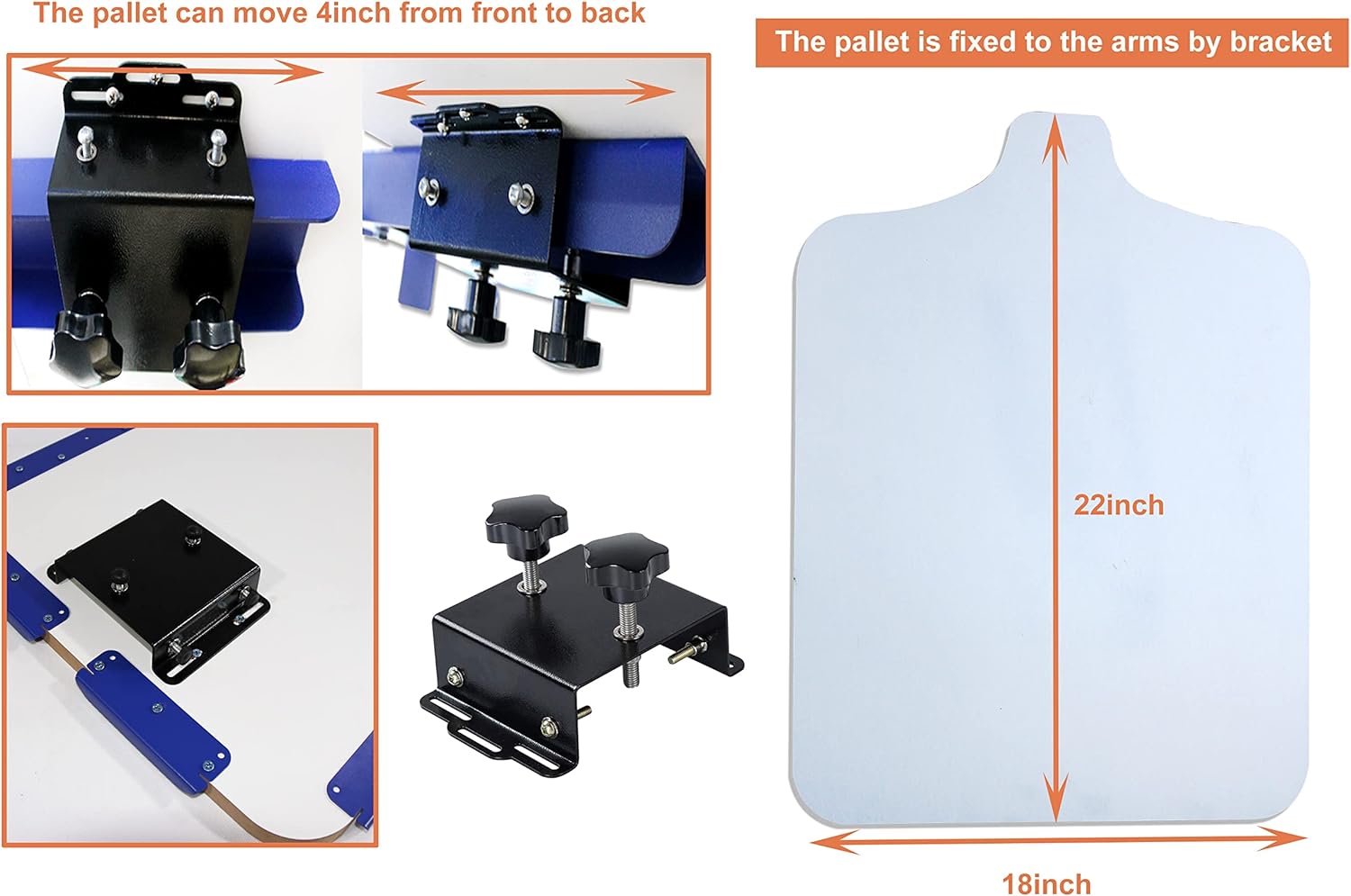
Figure 5.3: Screen frame clamp, showing 10-inch width and height adjustment.
5.5 Adjust Spring Tension
The machine includes springs to hold the screen frame in place when lifted. Adjust the tension of these springs according to the weight of your screen frames to ensure smooth lifting and stable positioning.

Figure 5.4: Detail of the adjustable spring tension mechanism.
6. Operating Instructions
6.1 General Operation Overview
The 6 Color 6 Station design allows for simultaneous printing of multiple colors or multiple items. The machine's rotary design enables efficient workflow by allowing you to prepare one station while another is being printed.

Figure 6.1: The TECHTONGDA 6 Color 6 Station Screen Printing Machine.
6.2 Micro-Registration for Color Matching
For multi-color prints, use the three micro-adjustment knobs located on the screen frame arms. These allow you to fine-tune the screen's position by 0.59 inches (front-to-back and left-to-right) to achieve perfect color registration. After adjustment, tighten the screws to secure the position.

Figure 6.2: Micro-adjustment knobs for precise screen positioning.
6.3 Using the Positioning Device
The machine features a positioning device with a locating dent and wheels on the pallet arm. This allows the screen frame to rotate 360 degrees and be fixed firmly at each station, ensuring consistent and precise printing for each color or item.

Figure 6.3: Lock wheels ensuring screen arm stability for precise printing.
6.4 Printing Process
- Prepare your screen frames with the desired designs and inks.
- Mount the screen frame onto a clamp at one of the stations.
- Place the substrate (e.g., T-shirt) onto the pallet.
- Lower the screen frame onto the substrate.
- Apply ink and use a squeegee to transfer the design.
- Lift the screen frame. The spring mechanism will hold it up.
- Rotate the printing unit to the next station or remove the printed item and place a new one.
- Repeat the process for subsequent colors or items.
6.5 Instructional Video
Watch this official video for a visual guide on the operation of a similar TECHTONGDA screen printing machine, demonstrating the printing process and key features.
Video 6.1: Demonstration of a TECHTONGDA screen printing machine in operation.
7. Maintenance
- Cleaning: After each use, clean all ink residues from screens, squeegees, and pallets. Use appropriate cleaning solutions for your ink type.
- Lubrication: Periodically lubricate moving parts, such as the rotary mechanism and adjustment screws, to ensure smooth operation.
- Inspection: Regularly inspect all bolts and fasteners for tightness. Tighten any loose components to maintain stability and precision.
- Storage: Store the machine in a clean, dry environment when not in use to prevent rust and damage.
8. Troubleshooting
- Problem: Inconsistent print quality.
Solution: Check screen tension, squeegee pressure, and ink consistency. Ensure micro-registration is correctly set and tightened. - Problem: Screen frame not staying up.
Solution: Adjust the tension of the springs on the screen frame arms. - Problem: Difficulty rotating the printing unit.
Solution: Inspect the positioning device and ensure no obstructions. Lubricate the rotary mechanism if necessary. - Problem: Pallet movement is stiff.
Solution: Clean any debris from the pallet tracks and apply a light lubricant.
9. Warranty and Support
For warranty information, technical support, or to order replacement parts, please refer to the contact details provided with your purchase documentation or visit the official TECHTONGDA website. Keep your purchase receipt as proof of purchase for warranty claims.