
Introduction
The 3Plus Vibe Pro Smartwatch is designed to enhance your daily life and fitness journey. Featuring a 1.78-inch AMOLED color touchscreen, built-in GPS, and comprehensive health monitoring capabilities, this device helps you track your activities, monitor your well-being, and stay connected. This manual provides essential information for setting up, operating, and maintaining your smartwatch.
Getting Started
Package Contents
- 3Plus Vibe Pro Smartwatch
- Charging Cable
- User Manual
Charging the Smartwatch
Before first use, fully charge your 3Plus Vibe Pro Smartwatch. Connect the charging cable to the charging port on the back of the watch and plug the USB end into a power adapter (not included) or a computer's USB port. The watch display will indicate charging status.
Downloading the Companion App
To unlock the full potential of your smartwatch, download the official 3Plus companion app from the Apple App Store (for iPhone) or Google Play Store (for Android). Search for "3Plus" to find the correct application.
Pairing with Your Smartphone
- Ensure Bluetooth is enabled on your smartphone.
- Open the 3Plus companion app and follow the on-screen instructions to create an account or log in.
- Select "Add Device" or a similar option within the app.
- The app will search for your 3Plus Vibe Pro. Select it from the list of available devices.
- Confirm the pairing request on both your phone and the smartwatch.
Operating Instructions
Display and Navigation
The 3Plus Vibe Pro features a 1.78-inch AMOLED color touchscreen. Swipe left, right, up, or down to navigate through menus, widgets, and notifications. Tap to select an option. The side button typically serves as a back button or to access the main menu.

Image: The 3Plus Vibe Pro Smartwatch displaying its 1.78-inch AMOLED screen.
Customizing Watch Faces
You can personalize your smartwatch by changing the watch face. This can typically be done directly on the watch by long-pressing the home screen or through the 3Plus companion app, which offers a wider selection of designs.
Health Monitoring
The Vibe Pro Smartwatch offers several health tracking features:
- Heart Rate Monitoring: The watch continuously monitors your heart rate throughout the day. Access your heart rate data on the watch or in the app for detailed insights.
- Blood Oxygen (SpO2) Monitoring: Track your blood oxygen levels. For accurate readings, ensure the watch is worn snugly on your wrist and remain still during measurement.
- Sleep Tracking: The smartwatch automatically monitors your sleep patterns, including deep sleep, light sleep, and awake times. Review your sleep data in the app to understand your sleep quality.

Image: Close-up of the 3Plus Vibe Pro Smartwatch's rear sensor measuring heart rate.

Image: The 3Plus Vibe Pro Smartwatch screen showing a blood oxygen measurement in progress.
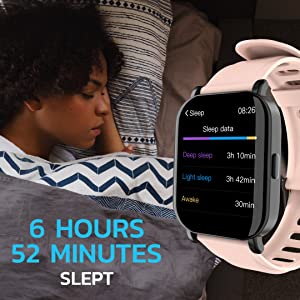
Image: A 3Plus Vibe Pro Smartwatch on a nightstand next to a sleeping person, showing sleep data on its screen.
Activity and Fitness Tracking
The Vibe Pro tracks various fitness metrics:
- Steps, Calories, and Distance: Automatically records your daily steps, estimated calories burned, and distance traveled.
- Built-in GPS: Provides accurate tracking of your outdoor activities, mapping your routes directly.
- Multiple Sports Modes: Select from various sports modes (e.g., running, cycling, swimming, basketball, soccer) to get specific data for your workouts.
Smart Notifications
Receive notifications from your smartphone directly on your wrist. This includes calls, text messages, and alerts from various apps. Manage which notifications appear through the 3Plus companion app settings.
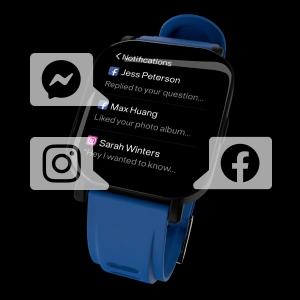
Image: The 3Plus Vibe Pro Smartwatch screen showing incoming notifications from various social media apps.
Water Resistance
The 3Plus Vibe Pro Smartwatch is 5 ATM professional water-resistant, making it suitable for swimming, showering, snorkeling, and exposure to rain. Avoid hot water or steam, as this can compromise the seal.

Image: The 3Plus Vibe Pro Smartwatch covered in water droplets, highlighting its 5 ATM water resistance.
Maintenance
Cleaning Your Smartwatch
Regularly clean your smartwatch and band to prevent skin irritation and maintain device functionality. Use a soft, lint-free cloth. If necessary, slightly dampen the cloth with water. Avoid harsh chemicals or abrasive materials.
Band Care
Ensure the band is dry before wearing, especially after swimming or showering. If you experience skin irritation, loosen the band or discontinue use and consult a doctor.
Troubleshooting
Common Issues and Solutions
- Watch not turning on: Ensure the watch is fully charged.
- Cannot pair with phone: Check that Bluetooth is on, the app is open, and the watch is in pairing mode. Restart both devices if necessary.
- Inaccurate heart rate/SpO2 readings: Ensure the watch is worn snugly on the wrist, not too tight or too loose. Clean the sensor on the back of the watch.
- Notifications not appearing: Check app settings on your phone to ensure notifications are enabled for the 3Plus app and individual applications.
If you encounter persistent issues, refer to the support section of the 3Plus companion app or contact customer support.
Specifications
| Feature | Specification |
|---|---|
| Model Name | Vibe Pro Smart Watch |
| Brand | 3Plus |
| Screen Size | 1.78 Inches |
| Display Type | AMOLED Color Touchscreen |
| GPS | True (Built-in) |
| Water Resistance | 5 ATM |
| Connectivity Technology | Bluetooth, GPS |
| Operating System | Android (Compatible with iPhone & Android) |
| Battery | 1 Lithium Ion battery (included) |
| Item Weight | 10.6 ounces |
Product Overview Video
Video: An official overview of the 3Plus Vibe Pro Smartwatch, showcasing its 1.78-inch AMOLED display and various features.
Warranty and Support
The 3Plus Vibe Pro Smartwatch comes with a one-year after-sales service. For any issues or support inquiries, please contact 3Plus customer service. Our company headquarters is located in California, ensuring accessible support for our customers.
For further assistance, please visit the official 3Plus website or refer to the support section within the 3Plus companion app.


