

1. Introduction and Overview
The ZEBRONICS Cozy is a 6-button vertical USB gaming mouse designed for comfort and high-precision gaming. It features a maximum DPI of 3200, a durable 1.8m braided cable, vibrant LED lights, a high-resolution sensor, and a smooth rubber finish. Its ergonomic design promotes natural hand posture, reducing strain during extended use. This plug-and-play device is ready for immediate use with your computer or laptop.
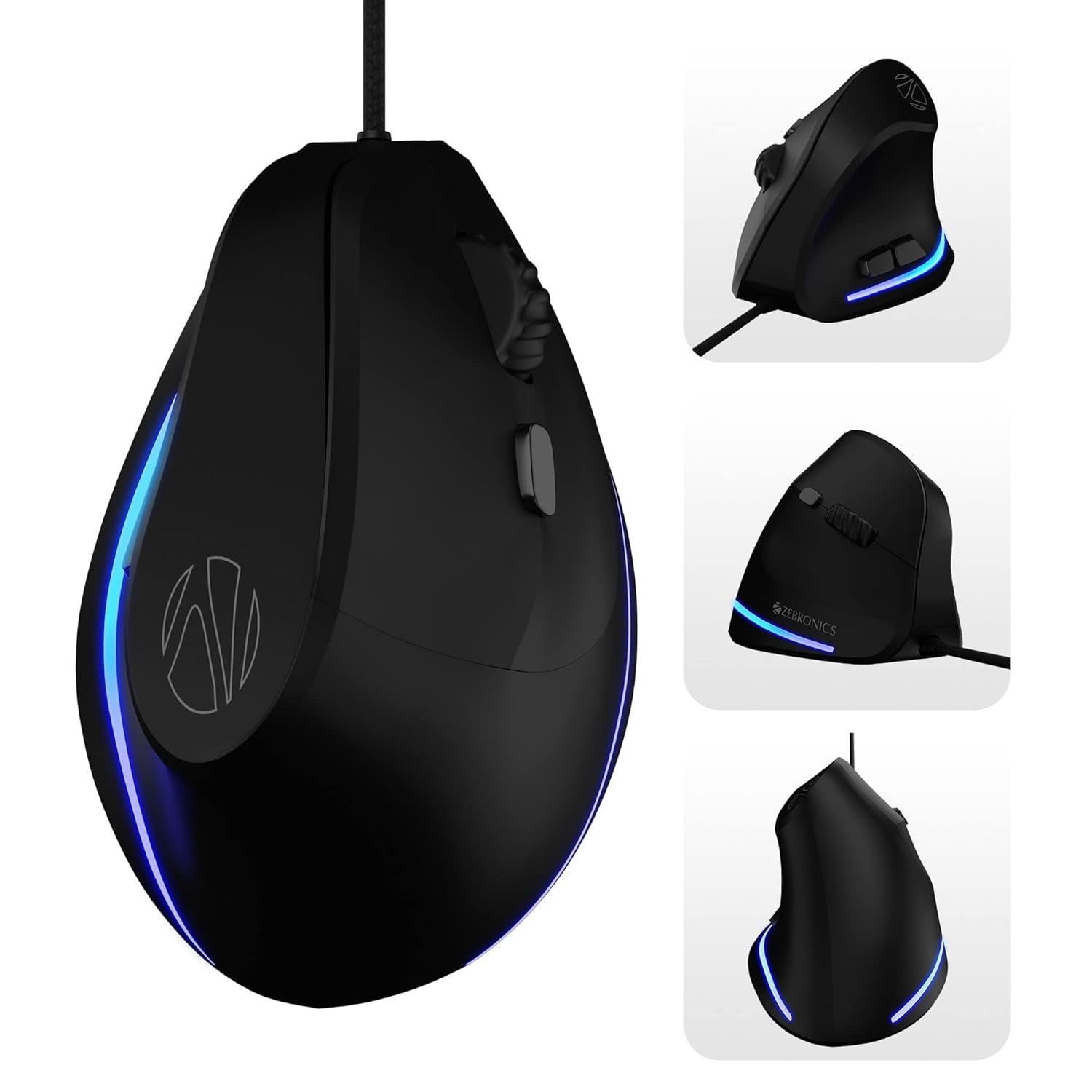
Image: Various angles of the ZEBRONICS Cozy mouse, highlighting its unique vertical shape.
2. Key Features
- Ergonomic Vertical Design: Redefines comfort with a high-precision gaming-grade sensor, promoting a natural handshake grip to reduce wrist strain.
- Adjustable DPI: Supports up to 3600 DPI, with four preset levels (1200 / 1600 / 2400 / 3200 DPI) for customizable sensitivity.
- 6 Programmable Buttons: Includes dedicated buttons for forward, backward, and DPI adjustment, offering versatile control.
- Durable Build: Designed for hardcore gaming with a 5 million click cycle lifespan.
- Braided Cable: Features a 1.8-meter high-quality braided cable with a USB connector for reliable, uninterrupted gaming.
- Rubber Finish: A smooth rubber finish ensures easy handling and comfort during long hours of use.
- LED Lights: Stunning LED lights enhance your gaming station's aesthetics.
- Plug and Play: Simple USB connection for immediate use with computers and laptops.

Image: Visual representation of the mouse's ergonomic design, DPI settings, USB interface, LED lights, braided cable, button count, high-resolution sensor, DPI switch, and rubber finish.

Image: A comparison illustrating the ergonomic benefits of a vertical mouse over a standard mouse, showing natural wrist alignment.

Image: Close-up view of the ZEB-COZY mouse highlighting its vibrant LED lighting.
3. Setup
System Requirements:
- Compatible with most computers and laptops.
- USB port available.
Connecting the Mouse:
- Locate an available USB port on your computer or laptop.
- Insert the USB connector of the ZEB-COZY mouse firmly into the USB port.
- The mouse is plug-and-play, meaning it should be automatically recognized by your operating system without requiring additional driver installation.
- The LED lights on the mouse will illuminate upon successful connection.

Image: Illustration of the USB interface, indicating simple plug-and-play connectivity.

Image: The ZEB-COZY mouse positioned between a Mac and Windows computer, signifying broad compatibility.
4. Operating Instructions
Basic Usage:
Once connected, the ZEB-COZY mouse functions like a standard mouse. Move the mouse to control the cursor on your screen. Use the left and right click buttons for primary and secondary actions, respectively. The scroll wheel allows for vertical scrolling through documents and web pages.
DPI Adjustment:
The ZEB-COZY mouse features a dedicated DPI button, typically located near the scroll wheel. Press this button to cycle through the four available DPI settings:
- 1200 DPI (Default)
- 1600 DPI
- 2400 DPI
- 3200 DPI (Maximum)
Adjusting the DPI changes the cursor speed and sensitivity, allowing you to optimize performance for different tasks, from precise graphic design to fast-paced gaming.

Image: Close-up of the mouse indicating its maximum 3200 DPI capability.
Button Functions:
In addition to the standard left, right, and scroll wheel click, the ZEB-COZY mouse includes dedicated forward and backward buttons, usually located on the side for thumb access. These buttons are commonly used for navigation in web browsers and file explorers.
5. Maintenance
To ensure the longevity and optimal performance of your ZEB-COZY mouse, follow these simple maintenance guidelines:
- Cleaning: Regularly wipe the mouse surface with a soft, dry, lint-free cloth. For stubborn dirt, slightly dampen the cloth with water or a mild cleaning solution. Avoid harsh chemicals or abrasive materials.
- Sensor Care: Keep the optical sensor on the bottom of the mouse clean and free from dust or debris. Use a cotton swab or compressed air if necessary.
- Cable Management: Avoid sharp bends or excessive pulling on the braided cable to prevent internal damage. Store the cable neatly when not in use.
- Storage: Store the mouse in a cool, dry place away from direct sunlight and extreme temperatures.
6. Troubleshooting
If you encounter any issues with your ZEB-COZY mouse, please refer to the following common problems and their solutions:
| Problem | Possible Cause | Solution |
|---|---|---|
| Mouse not responding / Cursor not moving. | Loose USB connection, faulty USB port, driver issue. | Ensure the USB cable is securely plugged in. Try a different USB port. Restart your computer. |
| Erratic or jumpy cursor movement. | Dirty optical sensor, unsuitable surface, software interference. | Clean the optical sensor on the bottom of the mouse. Use the mouse on a clean, non-reflective surface or a mouse pad. Check for conflicting software. |
| DPI button not changing sensitivity. | Software conflict, temporary glitch. | Ensure no other mouse software is interfering. Restart your computer. |
| LED lights not working. | Power issue, internal fault. | Check USB connection. Try a different USB port. If the mouse functions otherwise, this might be a minor cosmetic issue. |
If the problem persists after trying these solutions, please contact ZEBRONICS customer support for further assistance.
7. Specifications
| Feature | Detail |
|---|---|
| Brand | ZEBRONICS |
| Model Name | ZEB-COZY |
| Colour | Black |
| Connectivity Technology | USB (Wired) |
| Movement Detection Technology | Optical |
| DPI Levels | 1200 / 1600 / 2400 / 3200 DPI (Max) |
| Number of Buttons | 6 |
| Cable Length | 1.8 meters (Braided) |
| Item Dimensions (LxWxH) | 7.5 x 12 x 9 cm |
| Item Weight | 157 g |
| Included Components | Mouse - 1 unit |
| Operating System Compatibility | Computers, Laptops (Mac and Windows compatible) |
| Special Features | Dedicated buttons for DPI, Forward & Backward, Works on most surfaces, Rubber finish, High Precision, LED Lights, Comfortable and Ergonomic design. |
8. Warranty and Support
The ZEBRONICS Cozy 6 Button Vertical USB Gaming Mouse comes with a 1 Year Warranty from the date of purchase. Please retain your purchase receipt for warranty claims.
For technical support, warranty claims, or any product-related inquiries, please contact ZEBRONICS customer service. Refer to the official ZEBRONICS website or product packaging for the most up-to-date contact information.
Manufacturer: Zebronics India Private Limited, 13/7, Smith Road, Royapettah CHENNAI-600002
9. Product Video Overview
Video: An official overview of the ZEBRONICS Cozy 6 Button Vertical USB Gaming Mouse, highlighting its features and design.