
1. Introduction
This manual provides essential information for the safe and effective use of your EagleStone Kids Arcade Basketball Game, Model ES35. Please read these instructions carefully before assembly and operation to ensure proper functionality and user safety. This product is designed for children aged 3 years and up.

Image: A child actively playing with the EagleStone Kids Arcade Basketball Game, demonstrating the product in use with multiple basketballs.
2. Safety Information
- Adult Supervision: Always ensure adult supervision during play, especially for younger children.
- Age Recommendation: Suitable for children aged 3 years and up. Keep small parts away from children under 3 to prevent choking hazards.
- Stable Placement: Ensure the basketball game is placed on a flat, stable surface to prevent tipping.
- Material Safety: The product is constructed from durable plastic. Inspect all components regularly for damage or wear. Discontinue use if any part is broken.
- Indoor/Outdoor Use: The game is suitable for both indoor and outdoor environments. When used outdoors, protect from prolonged exposure to harsh weather conditions.
3. Package Contents
Verify that all the following components are included in your package:
- Basketball Backboard with Electronic Scoreboard (x1)
- Basketball Hoop and Net (x1)
- Frame Pipes (various sizes and colors: red, blue)
- Connectors (yellow, various shapes)
- Ball Return Netting (x1)
- Storage Bin Fabric (x1)
- Rubber Basketballs (x4)
- Air Pump with Needle (x1)
- Assembly Instructions (x1)
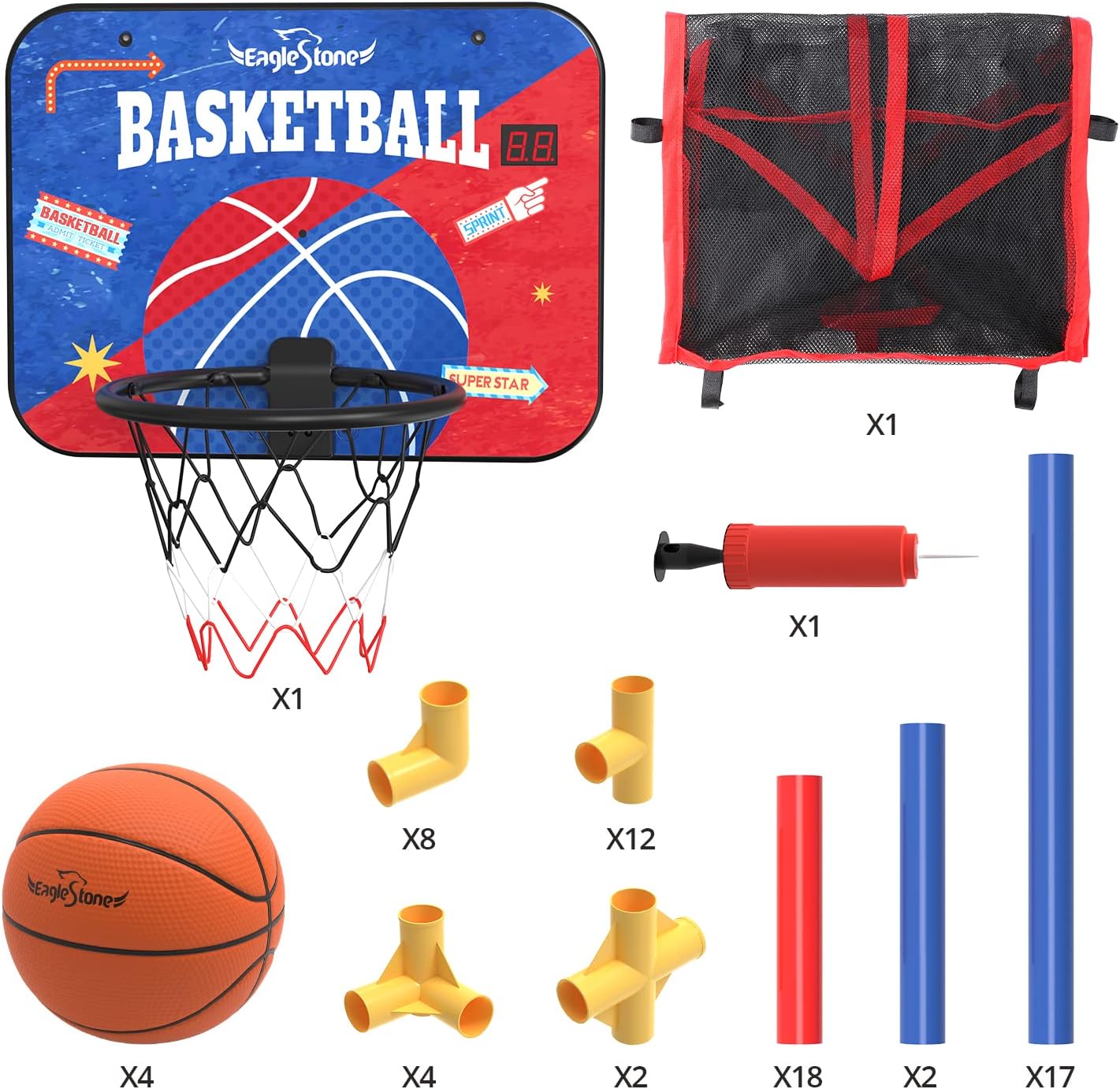
Image: All parts of the basketball game laid out for inspection before assembly.
4. Setup Instructions
Follow these steps for quick and easy assembly:
- Unpack Components: Carefully remove all parts from the packaging and verify against the package contents list.
- Assemble Base Frame: Connect the blue and red pipes using the yellow connectors to form the base structure. Ensure all connections are secure.
- Install Ball Return Netting: Attach the ball return netting to the designated frame sections.
- Attach Backboard: Secure the basketball backboard to the top frame. Ensure the electronic scoreboard is facing forward.
- Install Hoop and Net: Attach the hoop and net to the backboard.
- Insert Batteries: Locate the battery compartment on the back of the electronic scoreboard. Insert the required batteries (not included).
- Inflate Basketballs: Use the provided air pump to inflate the four rubber basketballs to the recommended firmness.

Image: Key components including the basketball, net, and reinforced hoop, highlighting their quality.
5. Operating Instructions
- Powering On/Off: Use the switch on the back of the electronic scoreboard to turn the unit on or off.
- Electronic Scoring: The infrared sensing system will automatically detect successful shots and display the score on the LCD screen. Cheer sounds will activate upon scoring.
- Reset Score: A reset button is available on the back of the scoreboard to clear the current score.
- Adjusting Height: The basketball stand height can be adjusted to accommodate different age groups and player heights. Refer to the assembly instructions for specific adjustment mechanisms.
- Ball Return: Balls that go through the hoop will roll down the netting into the integrated storage area at the bottom for easy retrieval.

Image: Electronic scoreboard in action, showing score and sound effects.

Image: Illustrates the adjustable height feature, allowing children of various ages to play comfortably.
6. Maintenance
- Cleaning: Wipe down plastic surfaces with a damp cloth and mild soap. Avoid abrasive cleaners.
- Storage: When not in use, store the game in a dry place away from direct sunlight to prolong its lifespan. The integrated storage bin can hold the basketballs.
- Battery Replacement: Replace batteries in the scoreboard when the display dims or sounds become faint.
- Inspection: Periodically check all connections and components to ensure they are secure and undamaged.
7. Troubleshooting
- Scoreboard Not Working:
- Check if the power switch is in the "ON" position.
- Ensure batteries are correctly inserted and not depleted. Replace if necessary.
- Verify the infrared sensor is clear of obstructions.
- Unstable Frame:
- Ensure all pipe connections are fully inserted into the connectors.
- Confirm the game is on a flat, level surface.
- Balls Not Returning:
- Check that the ball return netting is properly installed and free of kinks or obstructions.
8. Specifications
| Feature | Detail |
|---|---|
| Product Dimensions | 38" L x 20" W x 63" H |
| Item Weight | 6.3 pounds |
| Model Number | ES35 |
| Recommended Age | 3 years and up |
| Material | Premium plastic pipes (66% thicker), high-density polyester net |
| Scoring System | Digital LED with infrared sensor and cheer sounds |

Image: Product dimensions for planning placement.
9. Warranty and Support
For warranty information, product support, or to purchase replacement parts, please contact EagleStone customer service through the retailer where the product was purchased or visit the official EagleStone website.
Contact Information: Refer to your product packaging or the retailer's website for the most current contact details.
