
XTRONS B0B28RJNZM
XTRONS Android 13 Car Stereo User Manual
Model: B0B28RJNZM
Product Overview
The XTRONS Android 13 Car Stereo is a 9-inch IPS touch screen head unit designed for Jeep Renegade (2015-2020) models. It features built-in DSP, GPS navigation, Bluetooth, Wireless CarPlay, and Wireless/Wired Android Auto. This unit offers global 4G LTE connectivity and a responsive Android 13 operating system for an enhanced in-car entertainment experience.

Figure 1: Front view of the XTRONS Android 13 Car Stereo, showcasing its 9-inch IPS touch screen with Android OS, 4G LTE, 1280x720 HD screen, DSP, and IPS display capabilities.
Package Contents
Verify that all components listed below are included in your package. If any items are missing or damaged, please contact XTRONS customer support.

Figure 2: Image displaying the dimensions of the head unit and a comprehensive list of included accessories.
- 1 x ISO Wiring Harness
- 1 x RCA Cables
- 1 x GPS Antenna
- 1 x 4G Antenna
- 2 x USB Cable
- 1 x CANbus Cable
- 1 x Original USB Connection Cable
- 1 x Radio Antenna Adapter Cable
- 1 x Camera Cable
- 1 x Speaker
- 1 x CANbus Box
- 1 x Holder
- 1 x User Manual (this document)
Setup and Installation
This section provides general guidance for installing the XTRONS car stereo. Professional installation is recommended for optimal performance and safety.
Applicable Models
This head unit is specifically designed for:
- Jeep Renegade (2015-2020)

Figure 3: Comparison showing the vehicle's dashboard before and after the installation of the XTRONS car stereo, demonstrating a seamless fit.
Wiring Diagram
Refer to the detailed wiring diagram for proper connection of all components. Ensure all connections are secure before powering on the unit.

Figure 4: Comprehensive wiring diagram illustrating all connection points and corresponding labels for the XTRONS car stereo system.
- GPS Antenna
- USB Port 1
- USB Port 2
- CarAutoPlay Port
- Radio Antenna Port
- ANT-12V, Radio Antenna Control
- 4G Antenna
- Coaxial out, Coaxial Audio Output
- F CCD+12V, Not Available
- REAR OUT L, Rear Left Audio Output
- REAR OUT R, Rear Right Audio Output
- CAMERA-IN, Camera Video Input
- CAM 12V, Reverse Camera Power Cable
- Bluetooth Antenna
- BRAKE, Brake-in Cable
- Bluetooth Antenna
- AUX IN R, Audio Input Right
- AUX IN L, Audio Input Left
- CAM IN, Reversing Camera Input
- CD Audio L, CD Audio Input Left
- CD Audio R, CD Audio Input Right
- ANT, Automatic Antenna Control
- BRAKE-IN, Brake-in Cable
- KEY2-5V, Steering Wheel Control Key2
- AUX-DET
- KEY1-5V, Steering Wheel Control Key1
- CANbus Box
- ISO Wiring Harness
- Mini Speaker
- 4G SIM Card Slot
- SUB WOOFER, Subwoofer Output
- F CAM IN, Front Camera Input
- AUX IN L, Audio Input Left
- AUX IN R, Audio Input Right
- FRONT OUT L, Front Left Audio Output
- FRONT OUT R, Front Right Audio Output
- MIC, External Microphone Port
- AMP-CONT, Amplifier Control Cable
- AUX CVBS-IN-1, Video Input1
Operating Instructions
System Features
The XTRONS Android 13 Car Stereo offers a range of advanced features for an intuitive user experience.
- Android 13 OS: Fast and responsive operating system with Octa Core CPU, 2GB RAM, and 32GB ROM.
- 9-inch IPS Touch Screen: High-resolution 1280x720 display supporting 1080P video playback.
- Global 4G LTE: Supports Micro-SIM card for mobile broadband connection up to 300Mbps. Compatible with 99% of carriers worldwide.
- Dual Band Wi-Fi: Built-in 2.4GHz and 5GHz Wi-Fi module for stable internet connectivity.
- Built-in DSP: Professional sound quality with a customized DSP chip, 30-band graphic equalizer, and superior coaxial audio output.
- Bluetooth 5.0: Supports hands-free calls, A2DP audio streaming, and phone book synchronization.
- Optimized CANbus Decoding: Designed for perfect fitting and integration with Jeep Renegade.
- GPS Navigation: Supports various navigation software compatible with Android OS.

Figure 5: Overview of key features including the 9" HD Capacitive Touch Screen, Built-in CarPlay and Android Auto, Built-in Dual Band Wi-Fi, and Built-in 4G Module.

Figure 6: Detailed view of advanced features such as Built-in DSP for professional sound, Bluetooth 5.0 for connectivity, Optimized CANbus Decoding for vehicle integration, and GPS Navigation capabilities.
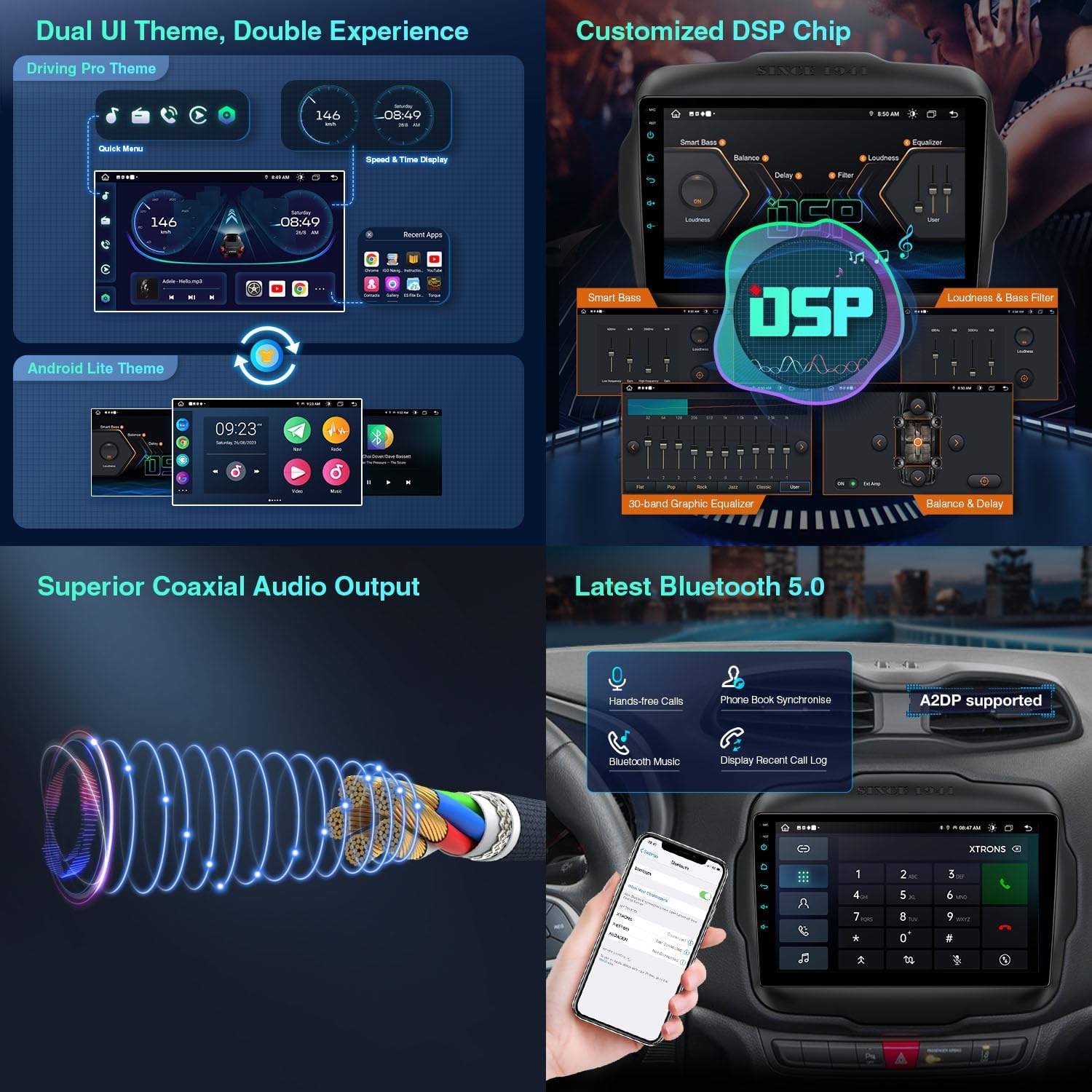
Figure 7: Illustration of the Dual UI Theme options (Driving Pro and Android Lite), the Customized DSP Chip with 30-band graphic equalizer, Superior Coaxial Audio Output, and Latest Bluetooth 5.0 functionality.

Figure 8: Visual representation of Global 4G LTE connectivity with SIM card slot details and Dual Band WiFi Module (2.4 GHz and 5 GHz) for internet access.
Smartphone Connection
The unit supports seamless integration with your smartphone for navigation, communication, and entertainment.
- Wireless CarPlay: Connect wirelessly via Bluetooth for Apple CarPlay features.
- Wireless/Wired Android Auto: Connect wirelessly via Bluetooth or wired via USB for Android Auto features.
- Screen Mirroring: Wireless connection via Wi-Fi to mirror your smartphone screen.
- Voice Commands: Access voice commands directly from the head unit by saying "Hey Siri" or "Hey Google".

Figure 9: Demonstrates various smartphone connection options including CarAutoPlay (Wireless Connection via Bluetooth), Android Auto (Wireless & Cable Connection via Bluetooth/USB), and Screen Mirroring (Wireless Connection via WiFi).
Maintenance
To ensure the longevity and optimal performance of your XTRONS car stereo, follow these maintenance guidelines:
- Screen Cleaning: Use a soft, lint-free cloth to gently wipe the touchscreen. Avoid abrasive cleaners or solvents that may damage the screen.
- Software Updates: Periodically check for and install software updates provided by XTRONS to ensure the system runs efficiently and has the latest features and security patches.
- Environmental Conditions: Avoid exposing the unit to extreme temperatures, direct sunlight for prolonged periods, or excessive moisture.
- Cable Connections: Ensure all cables are securely connected and free from damage. Loose connections can lead to intermittent issues.
Troubleshooting
This section provides solutions to common issues you might encounter. If the problem persists, please contact XTRONS customer support.
| Problem | Possible Cause | Solution |
|---|---|---|
| Unit does not power on. | Loose power connection, blown fuse, vehicle battery issue. | Check power wiring harness connections. Inspect vehicle fuses. Ensure vehicle battery is charged. |
| No sound from speakers. | Speaker wires disconnected, volume too low, incorrect audio settings. | Verify speaker wire connections. Increase volume. Check audio output settings in the system menu. |
| GPS signal lost or inaccurate. | GPS antenna not properly installed or obstructed, outdated map data. | Ensure GPS antenna is mounted in a clear location with an unobstructed view of the sky. Update map software if available. |
| Bluetooth connection issues. | Device not in pairing mode, interference, incorrect pairing procedure. | Ensure your phone's Bluetooth is on and in pairing mode. Delete previous pairings and re-pair. Move away from other wireless devices. |
| CarPlay/Android Auto not connecting. | Incorrect USB cable, app not updated, phone settings. | Use a high-quality USB cable (if wired). Ensure CarPlay/Android Auto apps are updated on your phone. Check phone's permissions for the head unit. |
Specifications
| Feature | Detail |
|---|---|
| Model | B0B28RJNZM |
| Brand | XTRONS |
| Operating System | Android 13 |
| CPU | Octa Core |
| RAM | 2GB |
| ROM | 32GB |
| Screen Size | 9 Inches |
| Display Type | IPS Touch Screen |
| Resolution | 1280 x 720 |
| Connectivity | Wi-Fi (2.4GHz & 5GHz), Bluetooth 5.0, 4G LTE |
| Special Features | Built-in DSP, CarPlay, Android Auto, GPS Navigation, Optimized CANbus Decoding |
| Audio Output Mode | Stereo, Speaker |
| Mounting Type | Panel Mount |
| Vehicle Service Type | Car (Jeep Renegade 2015-2020) |
Warranty and Support
XTRONS provides a 1-year warranty for this unit, ensuring quality and reliability. For any technical assistance, product inquiries, or warranty claims, please contact XTRONS customer support.
You can reach XTRONS support via Amazon email. They are committed to providing professional technical support and will respond promptly to ensure your rights and interests are protected.
For more information, visit the official XTRONS store on Amazon: XTRONS Amazon Store
Ask a question about this manual
Ask about setup, troubleshooting, compatibility, parts, safety, or missing instructions. Manuals+ will review the question and use this page’s manual context to help answer it.