
HOUHUI US-6x50cm
HOUHUI LED Strip Lights User Manual
Model: US-6x50cm
1. Product Overview
The HOUHUI LED Strip Lights are a versatile lighting solution designed to enhance your living space with vibrant RGB illumination. This 10ft set includes 6 pre-cut 1.64ft RGB LED light segments, perfect for backlighting 43-65 inch TVs, or for use in bedrooms, PC setups, mirror cabinets, and more. Control your lighting experience through a dedicated mobile app, an RF remote, or the integrated 3-button controller. Enjoy dynamic lighting effects that sync with music, and reduce eye strain during screen time.
Key Features:
- Pre-cut Design: 6 individual 1.64ft (50cm) LED strips for easy customization and installation.
- RGB Colors: Offers a wide spectrum of colors and 28 dynamic modes.
- Triple Control Methods: Manage lights via the 'duoCo Strip' app, 24-key RF remote, or the 3-button controller.
- Music Sync: Built-in microphone allows lights to change color and mode with music beats.
- USB Powered: Conveniently powered by any 5V USB port (TV, PC, power bank).
- Easy Installation: Features self-adhesive tape for simple application on dry, flat surfaces.
- Eye Strain Reduction: Provides bias lighting to reduce visual fatigue when viewing screens.
2. Package Contents
Please verify that all items listed below are included in your package:
- 1 x 1.64ft USB Powered LED strip light with 3 buttons controller
- 5 x 1.64ft 4-PIN RGB LED strip lights
- 1 x 24-key RF Remote
- 5 x LED strip connector cables
- 1 x User Manual (this document)

Figure 2.1: Overview of all included components in the HOUHUI LED Strip Lights package.
3. Setup and Installation
3.1 Preparation
- Test the Lights: Before installation, unroll all LED strips and connect them to the USB power source to ensure they function correctly.
- Clean Surface: Ensure the surface where you plan to install the LED strips is clean, dry, and smooth. Dust, dirt, or moisture can affect the adhesive.
3.2 Connecting the LED Strips
The LED strips are pre-cut into 1.64ft segments. Use the provided 4-PIN connector cables to link them together to achieve the desired length and configuration.
- Identify the connection points on the LED strips. These are typically marked with arrows or symbols indicating polarity.
- Align the 4-PIN connector cable with the connection points on two LED strips, ensuring the pins are correctly inserted.
- Gently push the connector until it is securely seated.
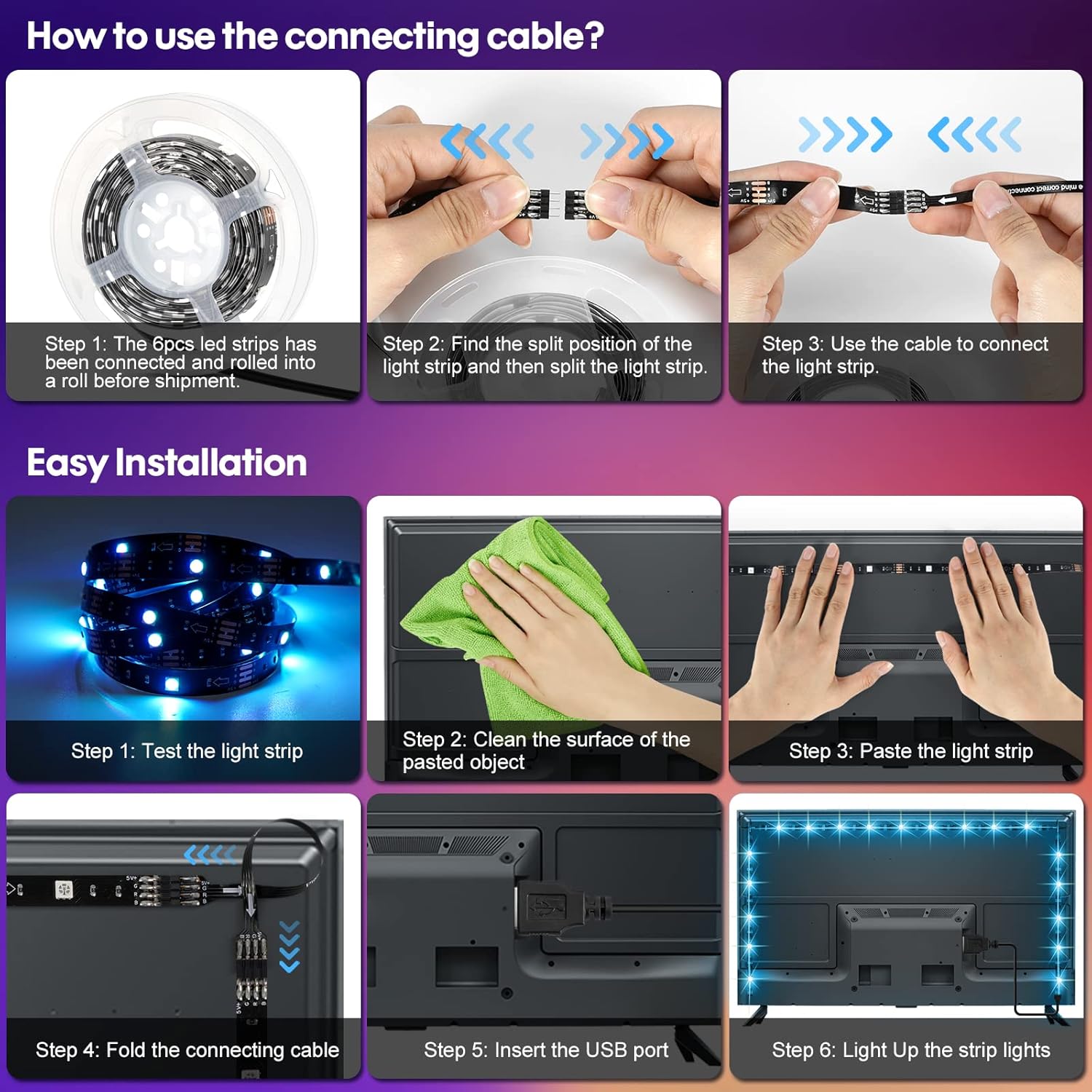
Figure 3.1: Instructions for connecting LED strip segments and general installation steps.
3.3 Mounting the LED Strips
The LED strips feature self-adhesive backing for easy mounting.
- Carefully peel off the protective film from the adhesive backing of the LED strip.
- Press the LED strip firmly onto the cleaned surface, ensuring good contact along the entire length.
- For TV backlighting, measure your TV size and refer to the recommended installation patterns for 43-50 inch, 50-60 inch, and 60-75 inch TVs to achieve optimal bias lighting.
- Once all strips are adhered, connect the main USB controller to a 5V USB power source (e.g., TV USB port, PC, USB wall adapter).

Figure 3.2: Recommended TV LED backlight installation methods based on TV screen size.

Figure 3.3: Visual comparison of a TV setup before and after installing LED bias lighting, demonstrating improved ambiance and reduced eye strain.
4. Operating Instructions
4.1 Control Methods
Your HOUHUI LED Strip Lights offer three convenient ways to control them:
- 'duoCo Strip' App Control: Download the 'duoCo Strip' app from your smartphone's app store. Once installed, connect to the LED lights via Bluetooth. The app provides full control over colors (16 million options), brightness, dynamic modes, and music sync features.
- 24-Key RF Remote Control: The included RF remote allows for wireless control of the lights from a distance of 40-50 feet, even through walls. It offers direct access to various colors, brightness levels, and dynamic modes.
- 3-Button Controller: A small controller integrated into the USB cable provides basic control: power On/Off, mode switching, and music mode activation.

Figure 4.1: Overview of the three available control methods and brightness adjustment capabilities.
4.2 Music Sync Feature
The LED strip lights feature a built-in sensitive microphone that allows them to synchronize with music. In Music Sync mode, the lights will change color and pattern in rhythm with the sound detected.
- Activate Music Sync mode via the 'duoCo Strip' app or the 3-button controller.
- Ensure the microphone on the controller is not obstructed for optimal performance.

Figure 4.2: The music synchronization feature, highlighting the built-in microphone and app interface.
4.3 Brightness Adjustment
You can adjust the brightness of the LED lights from 0% to 100% using either the 'duoCo Strip' app or the RF remote control. This allows you to set the perfect ambiance for any occasion.
5. Care and Maintenance
- Cleaning: To clean the LED strips, gently wipe them with a dry, soft cloth. Do not use liquid cleaners or abrasive materials.
- Adhesive: If the adhesive weakens over time, you may reinforce it with additional double-sided tape or clips (not included).
- Storage: When not in use for extended periods, store the LED strips in a cool, dry place, away from direct sunlight and extreme temperatures.
- Water Resistance: These LED strips are designed for indoor use only and are not water resistant. Avoid exposure to water or high humidity.
6. Troubleshooting
If you encounter any issues with your HOUHUI LED Strip Lights, please refer to the following common problems and solutions:
| Problem | Possible Cause | Solution |
|---|---|---|
| Lights do not turn on. | No power, loose connection, faulty USB port. | Ensure USB cable is securely plugged in. Try a different USB port or power adapter. Check all strip connections. |
| Remote control not working. | Battery depleted, remote out of range, signal obstruction. | Replace the remote battery. Ensure you are within the 40-50ft range. Remove any obstructions between the remote and the controller. |
| Lights show incorrect colors or segments are off. | Incorrect connection polarity, damaged strip segment. | Check that all 4-PIN connectors are inserted with correct polarity (align arrows/symbols). If a segment is damaged, it may need replacement. |
| Adhesive is not holding. | Surface not clean/dry, improper pressure during installation. | Ensure surface is thoroughly cleaned and dry before application. Apply firm, even pressure during installation. Use additional adhesive tape or mounting clips if necessary. |
| Music Sync not responsive. | Microphone obstructed, low music volume. | Ensure the microphone on the controller is not covered. Increase music volume for better detection. |
7. Technical Specifications
| Feature | Specification |
|---|---|
| Model Number | US-6x50cm |
| Brand | HOUHUI |
| Color | RGB (Red, Green, Blue) |
| Light Source Type | LED (5050 LED beads) |
| Total Length | 10ft (6 x 1.64ft pre-cut segments) |
| Power Source | USB Powered (5 Volts) |
| Wattage | 10 watts |
| Control Methods | App Control ('duoCo Strip'), 24-key RF Remote, 3-button Controller |
| Connectivity Protocol | Bluetooth |
| Indoor/Outdoor Usage | Indoor Only |
| Water Resistance Level | Not Water Resistant |
| Average Life | 50,000 Hours |
| Item Weight | 3.2 ounces |
| Product Dimensions | 5.71 x 3.35 x 6.1 inches (packaged) |
| UPC | 760701142644 |
8. Warranty and Support
For warranty information, technical support, or any inquiries regarding your HOUHUI LED Strip Lights, please contact the manufacturer directly through their official channels or the retailer from whom you purchased the product. Keep your purchase receipt as proof of purchase.
Note: No official product videos from the seller were available for embedding in this manual.
Ask a question about this manual
Ask about setup, troubleshooting, compatibility, parts, safety, or missing instructions. Manuals+ will review the question and use this page’s manual context to help answer it.