
1. Important Safety Instructions
Please read all instructions carefully before using your Octrot Electric Heated Blanket. Failure to follow these instructions may result in fire, electric shock, or injury.
- Do not use with an infant, child, incapacitated person, or anyone insensitive to heat.
- Do not use with or on an animal.
- Do not use if the blanket is wet.
- Never use the blanket folded, bunched, or crumpled. This can cause localized overheating.
- Do not insert pins or other metallic objects into the blanket.
- Do not use if the power cord or controller is damaged.
- Always unplug the blanket from the power outlet when not in use.
- Keep the control unit away from open windows or sources of moisture.
- Do not dry clean this product. Dry cleaning solvents may damage the insulation of the heating element.
- Do not use with generators, power converters, or inverters.
- Ensure the blanket is used on a flat surface and not tucked under a mattress.
2. Product Overview
The Octrot Sherpa Electric Heated Blanket, Model YZH-6284B, is designed to provide warmth and comfort. It features 10 adjustable heat settings and a programmable auto-shutoff timer with options from 1 to 8 hours. Constructed from soft flannel and Sherpa materials, the blanket includes integrated heating wires for even heat distribution and overheat protection for user safety. The detachable digital controller allows for easy temperature and time management, and the blanket is machine washable for convenient care.

Figure 2.1: Octrot Sherpa Electric Heated Blanket providing warmth on a bed.
3. Package Contents
- 1 x Octrot Sherpa Electric Heated Blanket (62"x84")
- 1 x Detachable Digital Controller
- 1 x User Manual
4. Setup Instructions
Follow these steps to set up your electric heated blanket for the first time:
- Unpack the Blanket: Carefully remove the blanket and controller from its packaging.
- Lay Flat: Spread the blanket flat on your bed or sofa, ensuring there are no folds or creases.
- Connect the Coupler: Locate the coupler on the blanket and the corresponding connector on the detachable digital controller. Firmly push the controller's connector into the blanket's coupler until it clicks securely into place.
- Plug into Power: Insert the power plug of the controller into a standard electrical outlet.

Figure 4.1: Visual guide for connecting the power and controller to the blanket.
Note: If the controller is not connected or improperly connected, or if there is an internal contact fault, the blanket may not operate correctly.
5. Operating Instructions
Your Octrot Electric Heated Blanket features a user-friendly digital controller for adjusting heat and timer settings.
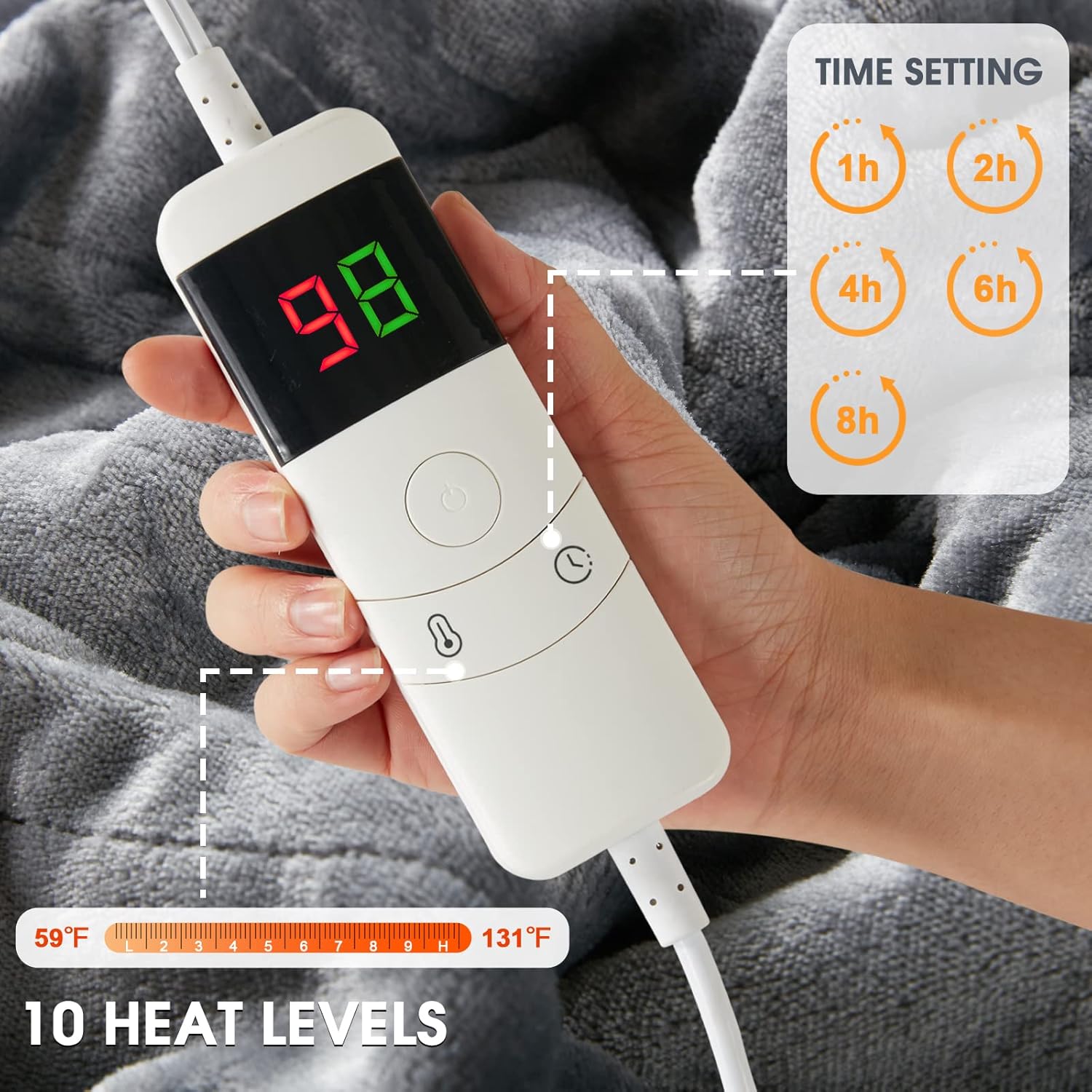
Figure 5.1: Digital controller for heat and time settings.
5.1 Power On/Off
- Press the Power button (usually a circular button in the center) to turn the blanket on or off.
5.2 Adjusting Heat Levels
- The blanket offers 10 heat levels, ranging from approximately 86°F (30°C) to 112°F (44°C).
- Press the Temperature button (often indicated by a thermometer icon) to cycle through the available heat settings. The current heat level will be displayed on the digital screen.
5.3 Setting the Timer
- The automatic shut-off timer can be set for 1, 2, 4, 6, or 8 hours.
- Press the Timer button (often indicated by a clock icon) to select your desired operating duration. The remaining time will be shown on the digital display.
- The blanket will automatically turn off once the selected time has elapsed, providing safety and energy efficiency.
6. Maintenance and Care
Proper care ensures the longevity and performance of your electric heated blanket.
6.1 Before Cleaning
- Always ensure the blanket is unplugged from the power outlet.
- Detach the Controller: Disconnect the digital controller from the blanket by firmly pulling the connector out of the coupler.
- Allow the blanket to cool completely before cleaning.

Figure 6.1: The electric blanket is machine washable after detaching the control panel.
6.2 Machine Washing
- Wash on a gentle cycle with cold water (maximum 30°C / 86°F).
- Use a mild detergent.
- Do not bleach.
- Do not iron.
- Do not dry clean.
6.3 Drying
- Tumble dry on low heat or line dry.
- Ensure the blanket is completely dry before reconnecting the controller and using it again.
- Do not wring or twist the blanket.
7. Troubleshooting
If you encounter issues with your electric heated blanket, refer to the following common problems and solutions:
| Problem | Possible Cause | Solution |
|---|---|---|
| Blanket does not heat. |
|
|
| Controller display is off or flashing. |
|
|
| Blanket heats unevenly. |
|
|
8. Specifications
| Feature | Detail |
|---|---|
| Brand | Octrot |
| Model Number | YZH-6284B |
| Size | 62 inches x 84 inches |
| Material | Flannel (200 GSM) and Sherpa (180 GSM) |
| Color | Grey |
| Heat Settings | 10 levels (approx. 86°F - 112°F / 30°C - 44°C) |
| Timer Settings | 1, 2, 4, 6, 8 hours auto shut-off |
| Safety Features | Automatic shut-off, Overheat protection |
| Care Instructions | Machine washable (detachable controller) |
| Recommended Use | Indoor Lounging, Therapeutic Use |
9. Warranty and Support
For warranty information or technical support, please refer to the product packaging or contact Octrot customer service. Keep your purchase receipt for warranty claims.