Introduction
This manual provides comprehensive instructions for setting up, operating, maintaining, and troubleshooting your VIZIO 32-inch D-Series Full HD 1080p Smart TV. Please read this manual thoroughly before using your TV to ensure proper operation and to maximize your viewing experience.
The VIZIO D-Series Smart TV offers a Full HD 1080p picture, integrated Apple AirPlay and Chromecast Built-in, and Alexa compatibility, providing a seamless and connected entertainment experience.

Figure 1: Front view of the VIZIO 32-inch D-Series Full HD Smart TV, highlighting its thin frame and Full HD display capabilities.
What's in the Box
Upon unpacking your VIZIO D32fM-K01 TV, ensure all components listed below are present:
- VIZIO 32-inch D-Series Full HD 1080p Smart TV
- XRT260 Voice Remote
- 2 x AAA Batteries (for remote)
- Power Cable
- TV Stand (2 pieces)

Figure 2: Illustration of the VIZIO 32-inch Full HD Smart TV and its included accessories, such as the VIZIO Voice Remote and stand components.
Setup Guide
1. Attaching the TV Stand
- Carefully place the TV screen-down on a soft, clean surface to prevent scratches.
- Align each stand piece with the corresponding slots on the bottom of the TV.
- Secure the stands using the provided screws.
2. Connecting Power and Devices
- Connect the power cable to the TV's power input and then to a wall outlet.
- Connect your external devices (e.g., cable box, gaming console, Blu-ray player) to the HDMI ports on the back of the TV. This model includes HDMI 1 (ARC) for audio return channel functionality.
- For wired internet, connect an Ethernet cable to the LAN port. For wireless, ensure your Wi-Fi network is available during initial setup.
- If using an antenna for local channels, connect it to the ANTENNA input.

Figure 3: Rear view of the VIZIO TV displaying available ports including HDMI, USB, Ethernet, Audio Out (SPDIF), and Antenna input.
3. Initial Setup and VIZIO Account
Follow the on-screen prompts to complete the initial setup. This will guide you through network connection, channel scanning, and VIZIO Account creation/login. A VIZIO Account is required for Smart TV functionality and product updates.
Operating Instructions
Smart TV Features (VIZIO Home)
Your VIZIO Smart TV provides instant access to a vast library of content through VIZIO Home. This platform allows you to stream shows, movies, news, sports, music, and more from your favorite apps.
Video 1: A comprehensive overview of the VIZIO Home interface, demonstrating its features and ease of navigation.
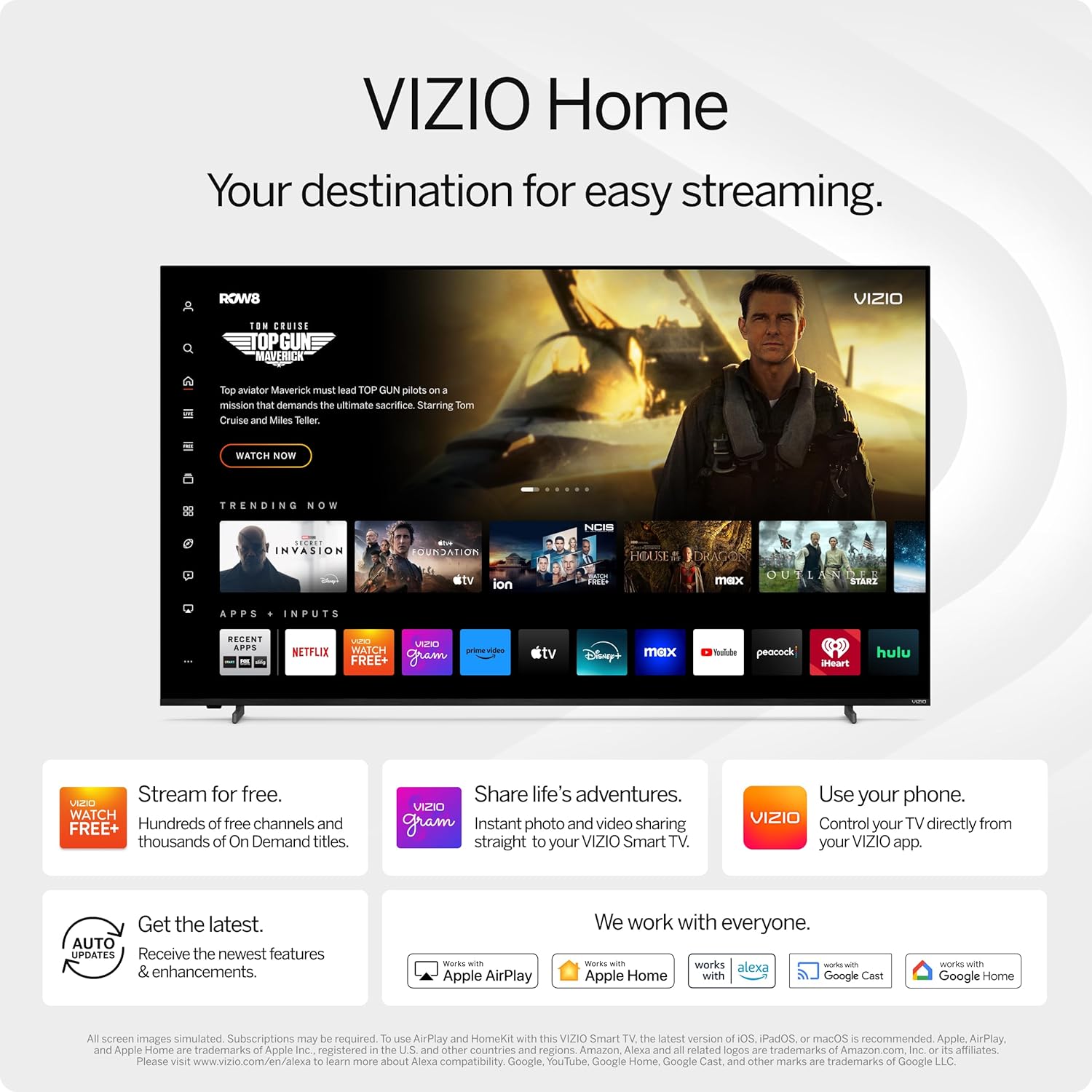
Figure 4: The VIZIO Home interface, showcasing popular streaming applications and integrated features like WatchFree+, VIZIOgram, and compatibility with Apple AirPlay, Chromecast, and Alexa.
VIZIO WatchFree+
Enjoy over 250 free live streaming channels and more than 5,000 on-demand titles with VIZIO WatchFree+. No subscriptions, logins, or fees are required.
Video 2: An overview of VIZIO WatchFree+, demonstrating its features and extensive free content library.
Voice Remote and Mobile App Control
Control your TV using the included XRT260 Voice Remote or the free VIZIO Mobile app on your smartphone. The voice remote allows for quick searches and commands, while the mobile app offers comprehensive control and navigation.

Figure 5: The VIZIO Voice Remote and screenshots of the VIZIO Mobile App, illustrating how to control the TV using voice commands or a smartphone.
Gaming Features
The VIZIO D-Series TV supports AMD FreeSync, providing ultra-low input lag for smoother gameplay, enhancing your gaming experience.

Figure 6: Visual representation of gaming on the VIZIO TV, highlighting the benefits of AMD FreeSync for reduced input lag.
Bluetooth Headphone Capability
Pair your favorite Bluetooth headphones directly with the TV for private listening, allowing you to enjoy content without disturbing others.
Maintenance
- Cleaning the Screen: Gently wipe the screen with a soft, lint-free cloth. For stubborn marks, slightly dampen the cloth with water or a screen-specific cleaner. Avoid harsh chemicals.
- Cleaning the TV Body: Use a soft, dry cloth to wipe down the TV's frame and stand.
- Ventilation: Ensure the TV's ventilation openings are not blocked to prevent overheating. Maintain adequate space around the TV for airflow.
- Power Management: Unplug the TV from the power outlet during lightning storms or when it will be left unattended for long periods.
Troubleshooting
| Problem | Possible Cause / Solution |
|---|---|
| No Power / TV won't turn on |
|
| No Picture / Poor Picture Quality |
|
| No Sound / Poor Sound Quality |
|
| Remote Control Not Working |
|
| Network Connection Issues |
|
Specifications
| Feature | Detail |
|---|---|
| Brand | VIZIO |
| Model Number | D32fM-K01 |
| Screen Size | 32 Inches |
| Display Technology | LED |
| Resolution | 1080p (Full HD) |
| Refresh Rate | 60 Hz |
| Aspect Ratio | 16:9 |
| Connectivity Technology | Bluetooth, Wi-Fi, USB, Ethernet, HDMI |
| Special Features | Bluetooth Headphone Capable, 260+ Free Channels, AMD FreeSync |
| Item Weight | 8.9 Pounds |
| Product Dimensions | 7.07 x 28.09 x 18.87 inches |
| Power Consumption | 28.89 W (Operating), <0.5W (Standby) |
Warranty and Support
For detailed warranty information, please refer to the documentation included with your product or visit the official VIZIO support website.
Additional support resources, including the full User Guide and User Manual in PDF format, are available:
For technical assistance or customer service, please visit the VIZIO support website or contact their customer service line.


