1. Introduction
Thank you for choosing the NineLeaf Bicycle Tail Light. This innovative device integrates multiple essential functions for cyclists, including a bright tail light, smart brake light, anti-theft alarm, remote control, and a bike bell. Designed for enhanced safety and security, this manual provides detailed instructions for setup, operation, and maintenance to ensure optimal performance and longevity of your product.

Figure 1.1: NineLeaf Bicycle Tail Light with Remote Control and USB-C Cables
2. Package Contents
Please verify that all items are present in your package:
- 1 x NineLeaf Bicycle Tail Light
- 1 x Remote Control
- 1 x USB-C Charging Cable
- 1 x Mounting Bracket
- 2 x Zip Ties
- 1 x Double-Sided Adhesive Tape
- 1 x Hex Key
- User Manual
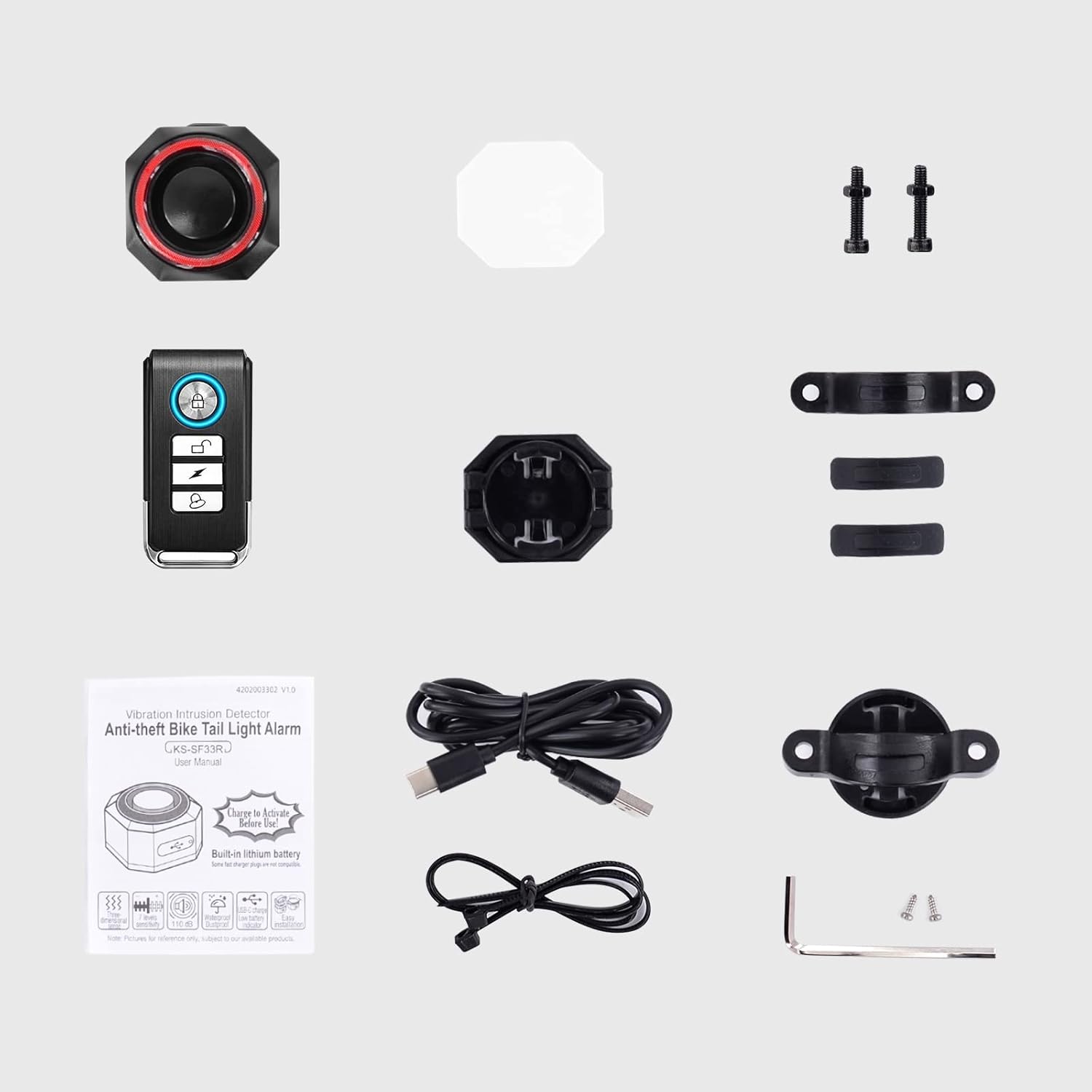
Figure 2.1: All components included in the package.
3. Specifications
| Feature | Specification |
|---|---|
| Brand | NineLeaf |
| Model Name | KS-SF33R |
| Color | Black |
| Material | Polycarbonate |
| Power Source | Battery Powered (700mAh rechargeable) |
| Water Resistance Level | IP65 Waterproof |
| Item Weight | 0.17 Kilograms |
| Mounting Type | Seatpost Mount |
| Number of Settings | 7 (Sensitivity Levels) |
| Alarm Volume | 113dB (3 adjustable levels) |
| Remote Battery Life | Up to 2 years (27A replaceable battery) |

Figure 3.1: Product dimensions for the tail light and remote.
4. Setup and Installation
The NineLeaf Bicycle Tail Light offers three primary installation methods to suit various bicycle designs and user preferences. It is designed to fit seat posts between 0.98-1.38 inches (2.5-3.5 cm) in diameter.
4.1. Mounting the Tail Light
- Bracket Installation: Attach the provided mounting bracket to your bicycle's seat post using the hex key and screws. Ensure it is securely fastened. The tail light can then be slid onto the bracket until it clicks into place.
- Zip Ties Installation: For alternative mounting, use the included zip ties to secure the tail light directly to the seat post or other suitable frame part. Thread the zip ties through the designated slots on the tail light and around the bike frame, then tighten them.
- Double-Sided Tape: For a more permanent or discreet installation on flat surfaces, apply the double-sided adhesive tape to the back of the tail light and firmly press it onto the desired location. Ensure the surface is clean and dry before application.

Figure 4.1: Visual guide for bracket, zip tie, and double-sided tape installation methods.
5. Charging the Device
The NineLeaf Bicycle Tail Light is equipped with a built-in 700mAh rechargeable battery, providing extended usage time. The remote control uses a replaceable 27A battery.
5.1. Tail Light Charging
To charge the tail light, connect the provided USB-C cable to the charging port on the device and plug the other end into a standard USB power adapter (not included) or a computer's USB port. The light will indicate charging status (e.g., light up while charging, turn off when fully charged). A full charge typically provides 1-3 months of daily use, depending on the selected light mode.
5.2. Remote Control Battery Replacement
The remote control uses a 27A battery, which can last up to 2 years with typical daily use. Refer to the remote's specific instructions for battery replacement when needed.

Figure 5.1: Illustration of the tail light being charged via USB-C.
6. Operating Instructions
Your NineLeaf Bicycle Tail Light offers various modes and functions for optimal visibility and security.
6.1. Light Modes
The tail light features four distinct lighting modes, which can be cycled through using the remote control:
- Slow Flashing (Auto ON/OFF): The light flashes slowly. In Smart Mode, it automatically turns off in daylight or after 30 seconds of inactivity and wakes up with motion.
- Breathing (Auto ON/OFF): The light gently fades in and out. In Smart Mode, it automatically turns off in daylight or after 30 seconds of inactivity and wakes up with motion.
- Blinking: The light blinks continuously.
- Steady Light: The light remains constantly on.
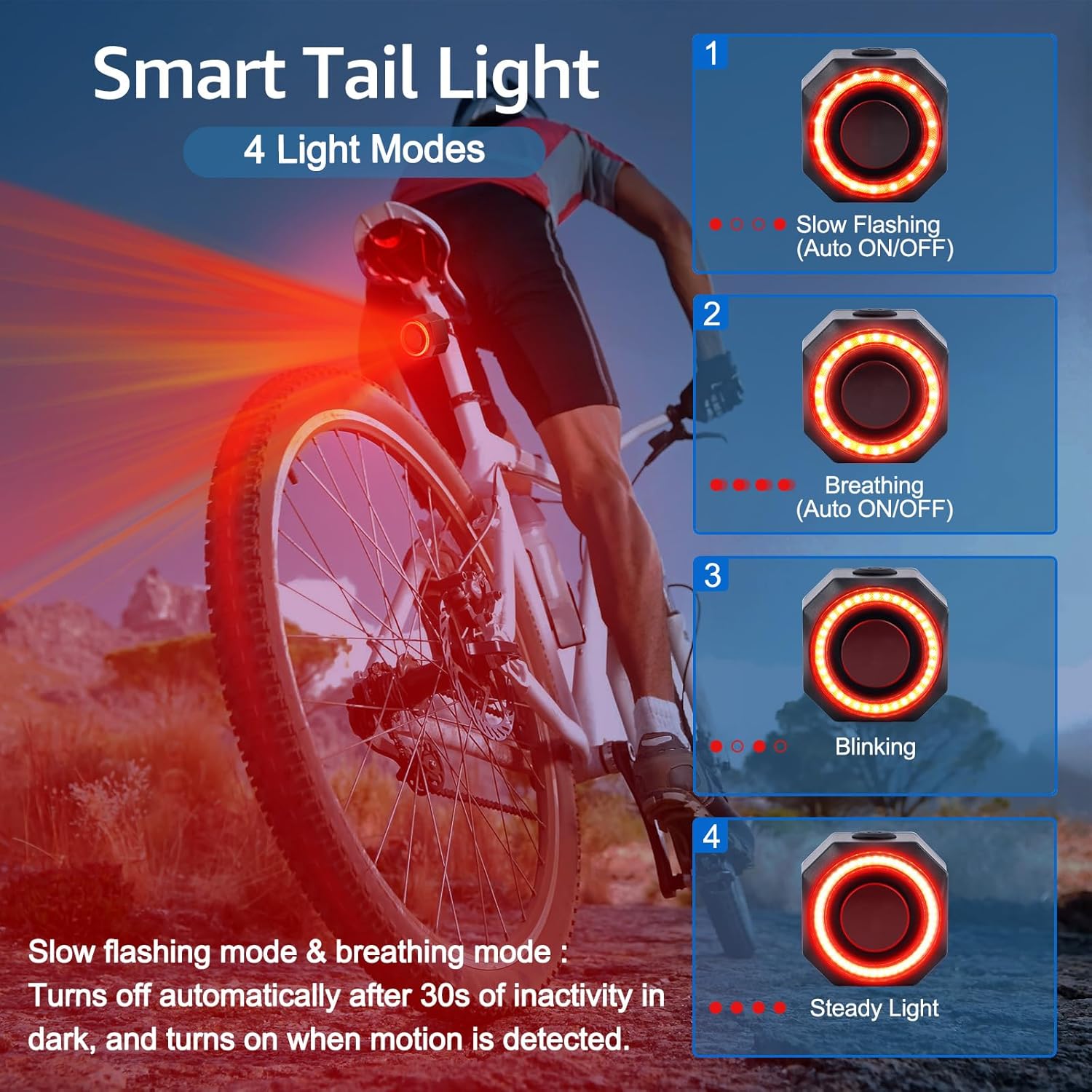
Figure 6.1: Visual representation of the four available light modes.
6.2. Smart Brake Light Function
Equipped with a 3D displacement sensor and advanced smart chip, the tail light automatically switches to high-brightness mode for 2 seconds when it detects braking or significant deceleration. This feature enhances safety by alerting vehicles behind you.

Figure 6.2: The smart brake light automatically activates with high brightness.
6.3. Anti-Theft Alarm System
The tail light doubles as an anti-theft alarm, featuring a motion-sensitive sensor and a loud 113dB siren. To arm the alarm, press the lock button on the remote control. A single vibration will trigger the alarm. To disarm, press the unlock button.
6.3.1. Adjustable Sensitivity and Volume
The alarm offers 7 adjustable sensitivity levels, allowing you to customize its responsiveness to movement. It also has 3 adjustable volume levels to suit different environments, from quiet alerts to loud warnings.

Figure 6.3: Overview of the anti-theft alarm's features.
6.4. Remote Control Functions
The remote control provides convenient access to the tail light's features:
- Lock Button: Arms the anti-theft alarm.
- Unlock Button: Disarms the anti-theft alarm.
- Lighting Mode Button: Cycles through the four light modes (Slow Flashing, Breathing, Blinking, Steady Light).
- Bell/Search Function Button: Activates the bike bell or the vehicle search function.
6.4.1. Vehicle Search Function
When your bike is parked among many others, use the remote's search function to easily locate it. The tail light will sound and light up, guiding you to your bike.

Figure 6.4: Using the remote's search function to find your bike.
Video 6.1: Demonstration of the NineLeaf Bicycle Alarm Tail Light's automatic brake light and vehicle search function. This video shows the tail light activating its bright brake light when the bike slows down, and also demonstrates how to use the remote to make the light flash and sound to help locate the bike in a crowded area.
7. Maintenance and Care
To ensure the longevity and optimal performance of your NineLeaf Bicycle Tail Light, follow these maintenance guidelines:
- Cleaning: Wipe the device with a soft, damp cloth to remove dirt and debris. Avoid using harsh chemicals or abrasive cleaners.
- Water Resistance: The tail light has an IP65 waterproof rating, meaning it is protected against dust and low-pressure water jets. It can withstand rain and splashes but should not be submerged in water.
- Storage: When not in use for extended periods, store the tail light in a cool, dry place. Ensure it is fully charged before storage to preserve battery health.
- Battery Care: Recharge the tail light regularly, even if not fully depleted, to maintain battery capacity.

Figure 7.1: The tail light is designed with IP65 water resistance for durability in various weather conditions.
8. Troubleshooting
If you encounter any issues with your NineLeaf Bicycle Tail Light, please refer to the following common troubleshooting steps:
- Device Not Turning On: Ensure the battery is charged. Connect the USB-C cable and allow it to charge for at least 30 minutes before attempting to turn it on again.
- Remote Control Not Responding: Check the remote control's battery (27A). Replace if necessary. Ensure you are within the wireless range (98–196 ft).
- Alarm Not Activating/Too Sensitive: Adjust the sensitivity level using the remote control as described in Section 6.3. If the alarm is not activating, ensure it is armed.
- Brake Light Not Working: Ensure the device is charged. The smart brake light relies on motion detection; ensure the device is securely mounted and not obstructed.
- Short Battery Life: Ensure the device is fully charged. Battery life can vary based on usage mode (e.g., constant light modes consume more power than flashing modes).
If the problem persists after trying these steps, please contact customer support.
9. Warranty and Support
NineLeaf products are manufactured with high-quality standards. This product comes with a standard manufacturer's warranty. For detailed warranty information, product support, or to report any issues, please contact NineLeaf customer service through the retailer's platform or the official NineLeaf website. Please have your purchase details and model number (KS-SF33R) ready when contacting support.


