
1. Product Overview
The Krisdonia PD 100W USB C Power Bank (Model NJF-9X) is a high-capacity 64000mAh / 236.8Wh portable charging device designed to keep your electronic devices powered on the go. Featuring multiple output ports, including dual USB-C Power Delivery (PD) ports and four USB-A Quick Charge (QC) ports, it offers versatile and fast charging for a wide range of devices, from laptops and tablets to smartphones and drones. Its compact design and robust aluminum housing make it an ideal companion for travel, remote work, or outdoor activities.

Figure 1: Krisdonia PD 100W USB C Power Bank.
2. Important Safety Instructions
Please observe the following safety precautions to ensure safe and optimal use of your Krisdonia Power Bank:
- Do NOT disassemble, repair, or modify the unit or the battery.
- Do NOT touch the unit or the plug-in ports with wet hands.
- Do NOT use the unit with power supplies other than the one provided.
- Do NOT expose the unit to extreme temperatures or direct sunlight.
- Do NOT use or store the unit in dusty or dirty environments.
- Keep the unit away from high temperature and direct sunlight.
- Recharge the unit every three months when it is not used for extended periods.
- Check the unit prior to every use.
3. Package Contents
Verify that all items are present in your package:
- 1 x Krisdonia PD Power Bank (64000mAh)
- 1 x 19V Charger (Wall Adapter)
- 1 x USB-C to USB-C Cable
- 1 x USB-A to USB-C Cable
- 1 x Protection Bag
- 1 x User Manual

Figure 2: Package contents including power bank, charger, cables, and protective bag.
4. Setup and First Use
4.1 Initial Charge
Before first use, it is recommended to fully charge your Krisdonia Power Bank. This helps calibrate the battery and ensures optimal performance.
- Connect the provided 19V wall charger to the DC-IN port on the power bank.
- Plug the wall charger into a power outlet.
- Alternatively, connect the USB-C to USB-C cable to the Type-C1 port and a compatible USB-C PD wall adapter (not included) to a power outlet.
- The digital display will show "IN" and the battery percentage increasing.
- Charging is complete when the display shows 100% and "IN" disappears.
4.2 Understanding the Display
The integrated LED digital display shows the current battery percentage. When charging, "IN" will be displayed. When discharging, "OUT" will be displayed. Press the power button briefly to activate the display.

Figure 3: Front panel with DC-IN, Type-C1, USB-A ports, Type-C2, power button, and digital display.
5. Operating Instructions
5.1 Powering On/Off
- To power on: Press and hold the power button for 2 seconds. The display will light up, showing the battery percentage and "OUT".
- To power off: Press and hold the power button for 2 seconds. The display will turn off.
5.2 Charging Devices
The power bank features multiple output ports for various devices:
- Type-C1 Port (PD 100W): This bidirectional port supports both input and output. Use a USB-C to USB-C cable to charge compatible laptops (e.g., MacBook Pro, Chromebook, Dell XPS), tablets, or other USB-C PD devices.
- Type-C2 Port (PD 65W): This port is output-only. Use a USB-C to USB-C cable to charge compatible USB-C PD devices.
- USB-A Ports (QC3.0 18W): The four USB-A ports support Quick Charge 3.0 for fast charging of smartphones, tablets, and other USB-A powered devices.
Connect your device to the appropriate port using a compatible cable. The power bank will automatically detect the device and begin charging. The display will show "OUT" and the battery percentage.

Figure 4: Charging multiple devices simultaneously using various ports.
5.3 Pass-Through Charging
The Krisdonia Power Bank supports pass-through charging, allowing it to be recharged while simultaneously charging up to 6 connected devices. This feature is ideal for situations where you have limited power outlets but need to keep all your devices and the power bank charged.

Figure 5: Illustrates the power bank being recharged while also charging external devices.
6. Maintenance
- Keep the power bank clean and dry. Use a soft, dry cloth to wipe the surface.
- Avoid dropping or subjecting the power bank to strong impacts.
- Store the power bank in a cool, dry place away from direct sunlight and extreme temperatures.
- If not used for an extended period, recharge the power bank every three months to maintain battery health.
- Ensure the ventilation vents on the side of the power bank are not obstructed to allow for efficient heat dissipation.
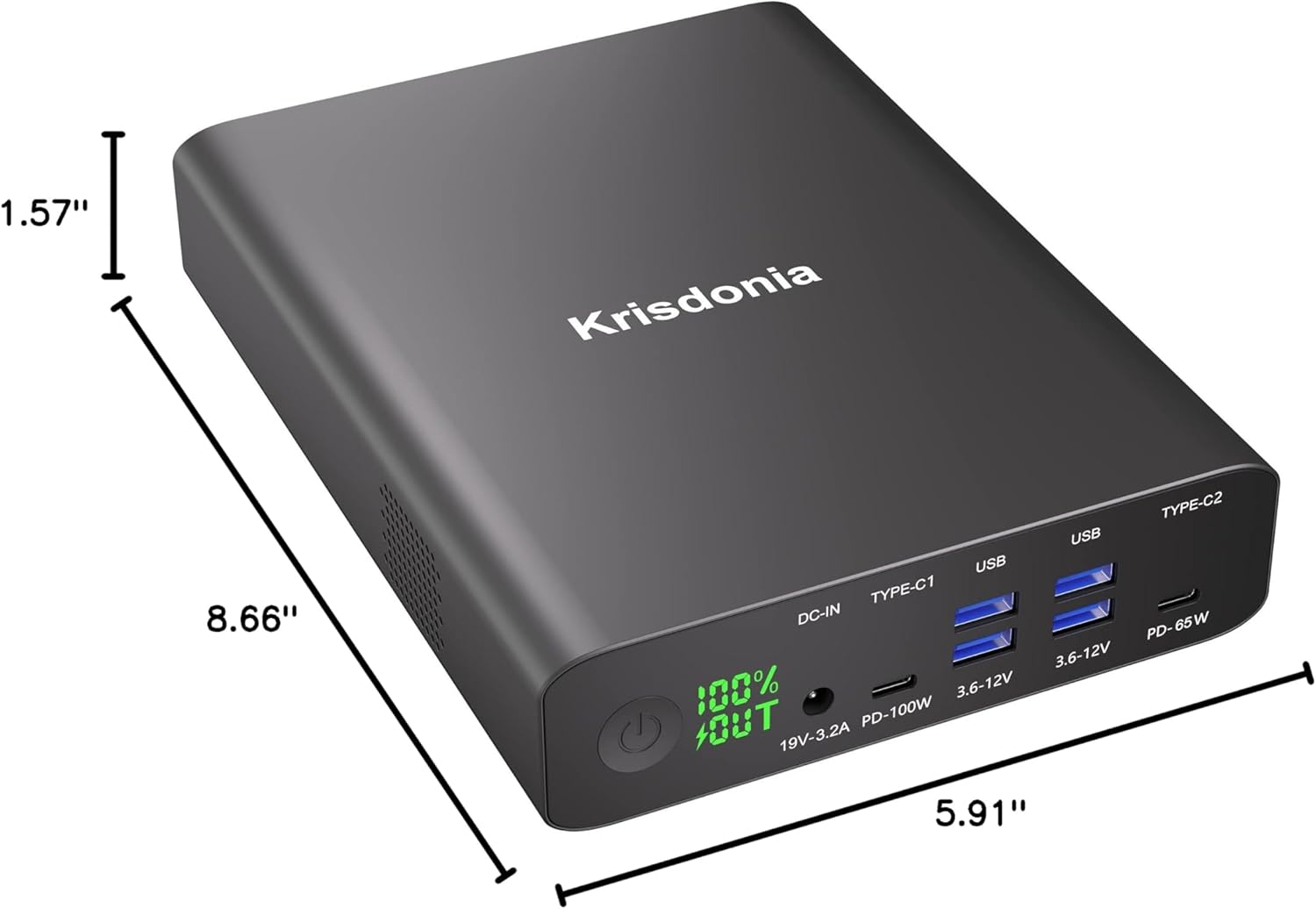
Figure 6: Dimensions of the power bank, highlighting its compact form factor.
7. Troubleshooting
- Power bank not charging:
- Ensure the charging cable and wall adapter are securely connected.
- Verify that the wall outlet is functional.
- Try using a different charging cable or adapter if available.
- Ensure the Type-C1 port is used for USB-C input, or the DC-IN port with the provided 19V charger.
- Devices not charging:
- Ensure the power bank is powered on (display shows "OUT").
- Check if the charging cable is securely connected to both the power bank and the device.
- Verify that the device is compatible with the power bank's output specifications.
- Try a different port or cable.
- If the power bank's battery is very low, it may not be able to charge devices effectively. Recharge the power bank.
- Inaccurate battery percentage display:
- For optimal accuracy, fully discharge the power bank and then fully recharge it. This can help recalibrate the battery indicator.
- Overheating:
- Ensure the power bank's ventilation vents are not blocked.
- Avoid using the power bank in direct sunlight or confined spaces.
- If overheating persists, discontinue use and contact customer support.
8. Specifications
| Model Name | NJF-9X |
| Battery Capacity | 64000mAh / 236.8Wh |
| Battery Cell Type | Lithium Polymer |
| DC-IN Input | 19V-3.2A |
| Type-C1 Port (Input/Output) | PD 100W (5V/9V/12V/15V 3A, 20V 5A) |
| Type-C2 Port (Output) | PD 65W (5V/9V/12V/15V 3A, 20V 3.25A) |
| USB-A Ports (x4) | QC3.0 18W (3.6-12V) |
| Total Number of Ports | 6 |
| Battery Charge Time | Approx. 4.5 hours (via DC-IN or Type-C1) |
| Dimensions (L x W x Th) | 8.66" x 5.91" x 1.57" |
| Item Weight | 1.8 Kilograms (approx. 4 pounds) |
| Compatible Devices | USB-C Laptops (MacBook Pro, Chromebook, Surface Book, Dell XPS, HP), Tablet PCs, Smartphones, Game Players, Projectors, Drones, Cameras, etc. |
9. Warranty and Support
9.1 Product Warranty
The Krisdonia PD 100W USB C Power Bank (Model NJF-9X) comes with a 12-month warranty from the date of purchase. This warranty covers manufacturing defects and ensures the product functions as intended under normal use. Please retain your proof of purchase for warranty claims.
9.2 Customer Support
For any questions, technical assistance, or warranty claims, please contact Krisdonia customer service. You can reach us through the Amazon messaging system on our seller page. Our support team is dedicated to providing prompt and helpful solutions.
Contact Method:
- Via Amazon messaging system on the "Krisdonia service" seller page.
