
1. Introduction
Thank you for choosing the RAZEAK RM-X18 Wired Gaming Mouse. This manual provides detailed instructions to help you set up, operate, and customize your new gaming mouse. Please read this manual thoroughly before use to ensure optimal performance and longevity of your device.
2. Product Overview
The RAZEAK RM-X18 is a high-performance wired gaming mouse designed for PC gamers, featuring programmable buttons, adjustable DPI, and customizable RGB lighting.
2.1 Package Contents
- RAZEAK RM-X18 Wired Gaming Mouse
- User Manual
2.2 Mouse Features
- 8 Programmable Buttons: Customize functions, DPI settings, RGB lighting, and record macros via software.
- 2 Using Modes: Switch between Gaming and Office modes by pressing the middle and right buttons simultaneously.
- 9 RGB Backlight Modes: Enhance gaming atmosphere with 16 million customizable colors.
- 6 Adjustable DPI Levels: Default settings of 500/1000/1500/2000/3000/4000 DPI, with software customization for numerical values and indicator colors.
- Ergonomic Design: Provides a comfortable grip for extended use.
2.3 Button Layout
Refer to the image below for the button identification on your RAZEAK RM-X18 mouse.
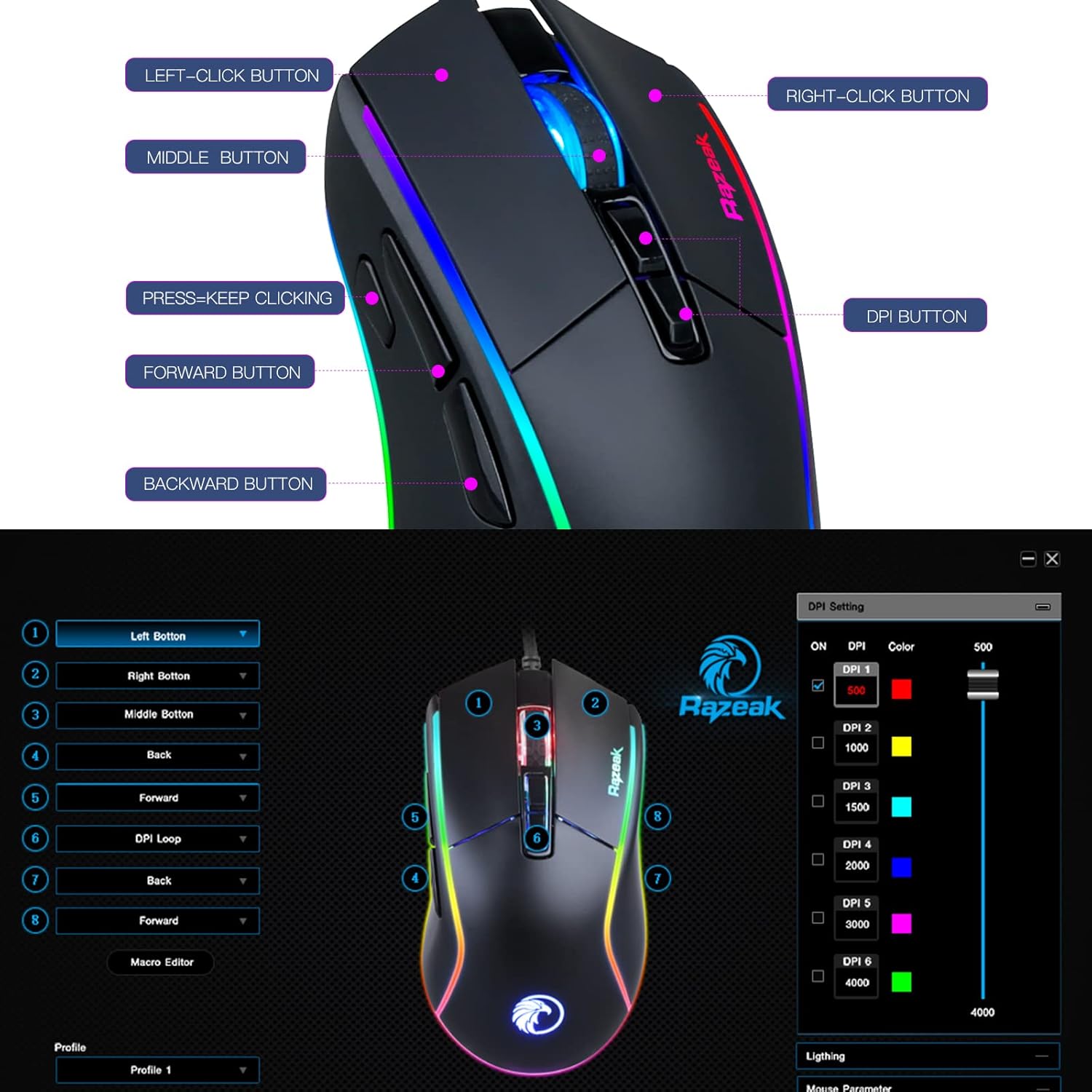
Image: RAZEAK RM-X18 Gaming Mouse with labels for Left-Click, Right-Click, Middle Button, Press-Keep Clicking, Forward Button, Backward Button, and DPI Button.
3. Setup
The RAZEAK RM-X18 mouse is a plug-and-play device for basic functionality. For advanced customization, software installation is required.
3.1 Connecting the Mouse
- Locate an available USB port on your computer.
- Plug the USB connector of the RAZEAK RM-X18 mouse into the USB port.
- The mouse will be automatically recognized by your operating system. Basic functions will be immediately available.
3.2 Software Installation (Optional, for advanced features)
To unlock the full potential of your RAZEAK RM-X18, including programmable buttons, macro recording, and advanced RGB customization, download and install the official RAZEAK software from the manufacturer's website. A link to the software can typically be found on the product page or by searching for "RAZEAK RM-X18 software".

Image: Screenshot of the RAZEAK RM-X18 software interface showing DPI settings and button assignments.
4. Operating Instructions
4.1 Adjusting DPI (Dots Per Inch)
The RAZEAK RM-X18 features 6 default DPI levels for quick sensitivity adjustments. The DPI button is located on the top of the mouse, behind the scroll wheel.
- Press the DPI button to cycle through the preset DPI levels: 500, 1000, 1500, 2000, 3000, and 4000.
- Each DPI level is typically indicated by a different color on the mouse logo or lighting strip.
- For precise DPI customization and to assign specific indicator colors, use the RAZEAK software.
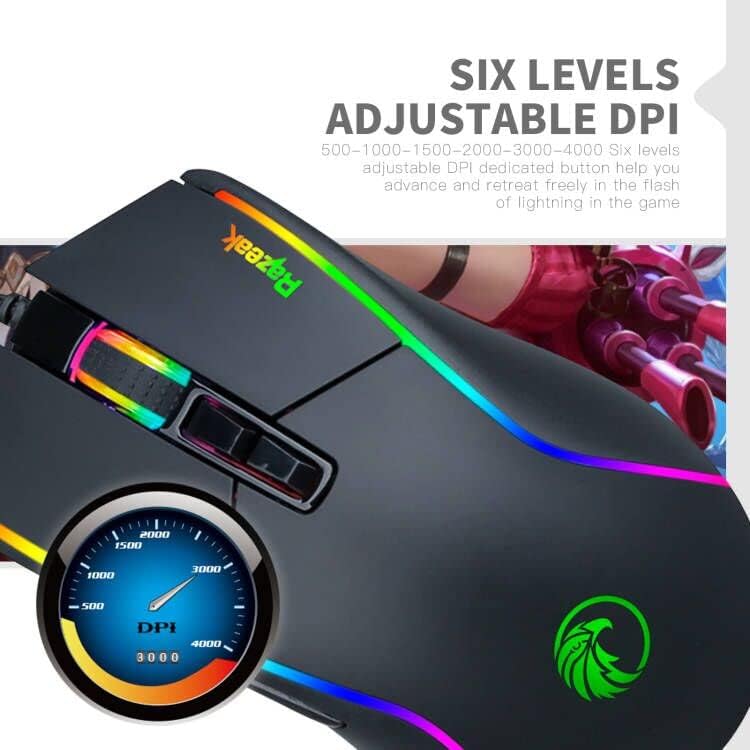
Image: Close-up of the RAZEAK RM-X18 mouse highlighting the DPI button and a graphic showing DPI levels from 500 to 4000.
4.2 Customizing RGB Backlight
The mouse features 9 cool RGB backlight modes and 16 million colors to personalize your gaming setup.
- To adjust the lighting effect, press the Left-Click button and the DPI button simultaneously. This action cycles through various preset lighting modes.
- Alternatively, use the scroll wheel key and the back key simultaneously to change the light effect.
- For full customization of colors, effects, and speed, use the RAZEAK software.
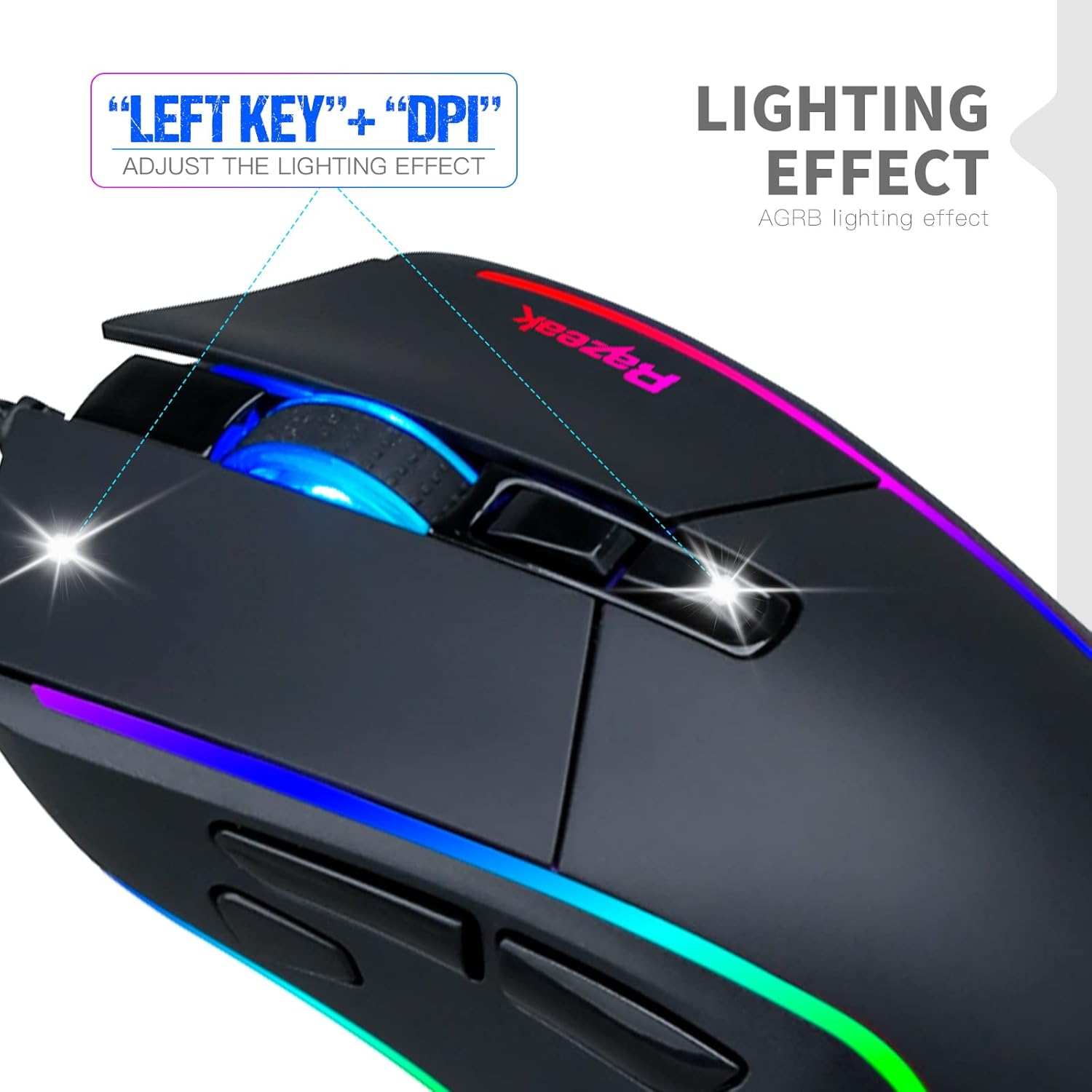
Image: A hand demonstrating how to adjust the lighting effect on the RAZEAK RM-X18 mouse by pressing the Left-Click and DPI buttons.

Image: Screenshot of the RAZEAK RM-X18 software interface showing lighting effect customization options.
4.3 Programmable Buttons and Macros
The RAZEAK RM-X18 features 8 buttons that can be customized for various functions, including macro recording, through the dedicated software.
- Download and install the RAZEAK software (refer to Section 3.2).
- Open the software to access the button assignment interface.
- Select each button and assign desired functions, keyboard shortcuts, or complex macros.
- Save your profiles for different games or applications.

Image: Screenshot of the RAZEAK RM-X18 software interface displaying options for programming the 8 mouse buttons.
4.4 Switching Between Gaming and Office Modes
The mouse supports two distinct usage modes: Gaming and Office. These modes can be switched quickly without software.
- To switch modes, press the Middle button (scroll wheel click) and the Right-Click button simultaneously.
- This allows for quick adaptation of mouse settings to different tasks.
4.5 Product Demonstration Video
Watch this official product video for a visual guide on the features and functionality of the RAZEAK RM-X18 Wired Gaming Mouse.
Video: An official demonstration of the RAZEAK RM-X18 Wired Gaming Mouse, showcasing its RGB lighting, DPI settings, and programmable buttons.
5. Maintenance
Proper maintenance ensures the longevity and performance of your RAZEAK RM-X18 mouse.
- Cleaning: Use a soft, dry cloth to wipe the surface of the mouse. For stubborn dirt, slightly dampen the cloth with water or a mild cleaning solution. Avoid harsh chemicals.
- Sensor Cleaning: Occasionally clean the optical sensor on the bottom of the mouse with a cotton swab to ensure accurate tracking.
- Cable Care: Avoid sharp bends or excessive pulling on the USB cable to prevent damage.
- Storage: Store the mouse in a clean, dry environment when not in use.
6. Troubleshooting
If you encounter issues with your RAZEAK RM-X18 mouse, refer to the following common solutions:
| Problem | Solution |
|---|---|
| Mouse is not responding. |
|
| DPI or RGB lighting is not changing. |
|
| Programmable buttons are not working. |
|
| Mouse cursor movement is erratic or inaccurate. |
|
7. Specifications
| Feature | Detail |
|---|---|
| Brand | RAZEAK |
| Model Name | RM-X18 |
| Connectivity Technology | USB (Wired) |
| Movement Detection Technology | Optical |
| DPI Levels | Adjustable 6 levels: 500/1000/1500/2000/3000/4000 |
| Number of Buttons | 8 (Programmable) |
| Hand Orientation | Right |
| RGB Backlight | 9 modes, 16 million colors |
| Compatible Devices | Personal Computer (PC) |
| Item Weight | 137 Grams |
| Power Source | Corded Electric |
8. Warranty and Support
RAZEAK offers a comprehensive warranty and customer support for your RM-X18 Wired Gaming Mouse.
- Warranty: This product comes with a 2-YEAR manufacturer warranty.
- Customer Service: For any questions, technical support, or warranty claims, please contact RAZEAK customer service. Messages are typically replied to within 24 hours.
- Contact Information: Refer to the RAZEAK official website or your purchase documentation for the most up-to-date contact details.


