
Introduction
This manual provides detailed instructions for the installation, use, and maintenance of your Spigen Glas.tR EZ FIT Tempered Glass Screen Protector for iPhone 14 Pro Max. Designed for seamless protection and ease of application, this screen protector ensures your device's display remains pristine.
Key features include:
- Uniquely designed to protect the Dynamic Island and crafted for seamless protection.
- Tempered glass durability rated at 9H hardness.
- Includes an innovative, auto-alignment installation kit for effortless application.
- Extreme clarity preserves the original screen brightness.
- Case compatible with every Spigen iPhone 14 Pro Max case.
What's in the Box
Your Spigen Glas.tR EZ FIT package includes:
- 2x Spigen Glas.tR EZ FIT Tempered Glass Screen Protectors
- 1x Auto Alignment Installation Kit (EZ Fit Tray)
- 1x Cleaning Wipe (Alcohol Pad)
- 1x Microfiber Cloth
- Dust Removal Stickers
- Squeegee (for bubble removal)

Image: Package contents including two screen protectors and installation tools.
Setup and Installation
The Spigen Glas.tR EZ FIT is designed for a quick and fail-proof installation using the included auto-alignment tray. Follow these steps for a perfect, bubble-free application:
- Clean the Screen: Thoroughly clean your iPhone 14 Pro Max screen using the provided alcohol wipe. Ensure all smudges and fingerprints are removed.
- Dry the Screen: Use the microfiber cloth to dry the screen completely.
- Remove Dust: Use the dust removal stickers to pick up any remaining dust particles from the screen. Ensure the screen is completely dust-free before proceeding.
- Position the EZ Fit Tray: Place your iPhone into the EZ Fit auto-alignment installation tray. The tray is designed to perfectly align the screen protector with your device.
- Remove Protective Film: Carefully remove the protective film from the screen protector.
- Apply the Protector: Align the screen protector with the tray and gently press down on the center to activate the adhesive. The tray will guide the screen protector into the correct position.
- Wait and Remove Tray: Wait approximately 30 seconds for the adhesive to spread. Then, carefully remove the EZ Fit tray from your phone.
- Remove Air Bubbles: Use the provided squeegee to gently push out any remaining air bubbles towards the nearest edge of the screen.
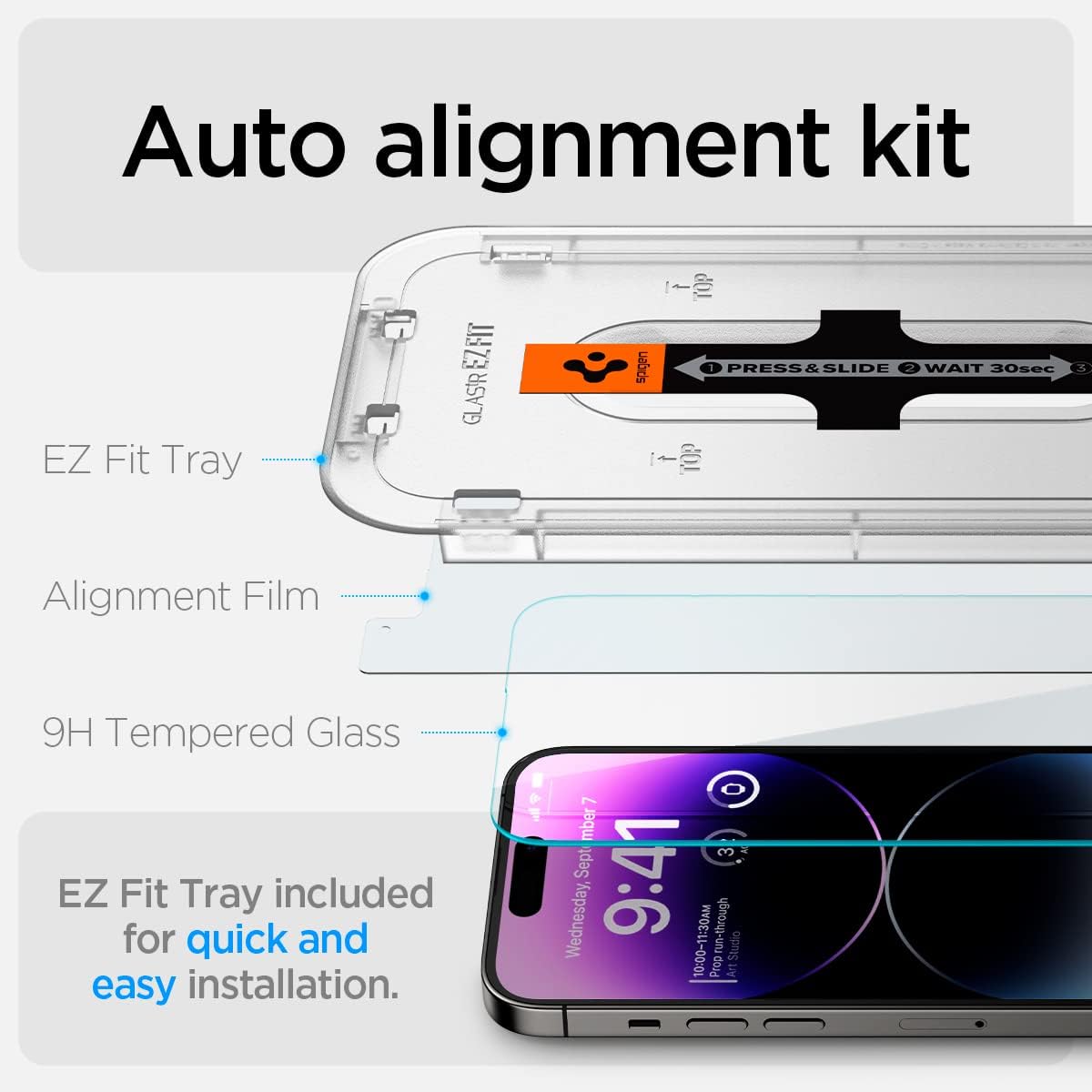
Image: The auto-alignment kit simplifies screen protector installation.
Video: Official Spigen installation guide for the iPhone 14 Pro Series Glas.tR EZ Fit Screen Protector.
Video: A short demonstration of the easy installation process and bubble removal. (Note: This is a short preview video.)
Operating Instructions
Once installed, your Spigen Glas.tR EZ FIT screen protector provides an unhindered user experience:
- Touch Sensitivity: The screen protector maintains the original touch sensitivity of your iPhone 14 Pro Max, ensuring smooth and responsive interactions.
- Clarity: Enjoy extreme clarity that preserves the original screen brightness and vibrant colors of your device's display.
- Case Compatibility: The design is case-friendly, ensuring it fits perfectly with all Spigen iPhone 14 Pro Max cases without lifting or interference.
- Sensor Protection: The precise cutout protects the Dynamic Island and other sensors, ensuring full functionality.

Image: Demonstrating responsive touch functionality with the screen protector.

Image: High clarity of the screen protector, preserving original screen brightness.
Maintenance
To keep your screen protector in optimal condition:
- Wipe the screen regularly with a soft, lint-free cloth to remove fingerprints and smudges.
- For stubborn marks, use a screen cleaner specifically designed for electronics, applied to a cloth, not directly to the screen.
- Avoid using harsh chemicals or abrasive materials, as these can damage the oleophobic coating.
Troubleshooting
Air Bubbles After Installation:
If small air bubbles remain after installation, they often disappear naturally within 24-48 hours. For persistent bubbles:
- Use the provided squeegee or a credit card wrapped in a microfiber cloth.
- Gently push the bubbles towards the nearest edge of the screen.
- Avoid excessive force to prevent damage to the screen protector or device.
Screen Protector Lifting at Edges:
Ensure your phone case is compatible and not pushing against the screen protector's edges. The Spigen Glas.tR EZ FIT is designed to be case-friendly with Spigen cases.
Reduced Touch Sensitivity:
Verify that the screen protector is clean and free from moisture or debris. If the issue persists, re-installation might be necessary, ensuring proper alignment and adhesion.
Specifications
| Feature | Detail |
|---|---|
| Brand | Spigen |
| Model Number | AGL05202 |
| Compatible Devices | iPhone 14 Pro Max |
| Material | Tempered Glass |
| Item Hardness | 9H |
| Special Features | 9H+ Surface Hardness / High Definition Clarity / High Sensitivity Touch / Scratch Resistant |
| Product Dimensions | 6.18 x 2.91 x 0.5 inches |
| Item Weight | 1.06 ounces |
| Unit Count | 2.0 Count |
| Water Resistance Level | Water Resistant |
| Finish Type | Glossy |
Warranty and Support
For warranty information, product support, or any inquiries regarding your Spigen Glas.tR EZ FIT screen protector, please visit the official Spigen website or contact Spigen customer service directly. Keep your purchase receipt for warranty claims.
You can find more information and support at the Spigen Store on Amazon.
