
1. Product Overview
This manual provides essential instructions for the Dieffematic TNA1, a replacement part specifically designed for integration with NICE NLKCE and TN2030L automation systems. Adherence to these instructions is crucial for correct installation, safe operation, and optimal performance of the replacement part within your existing setup.
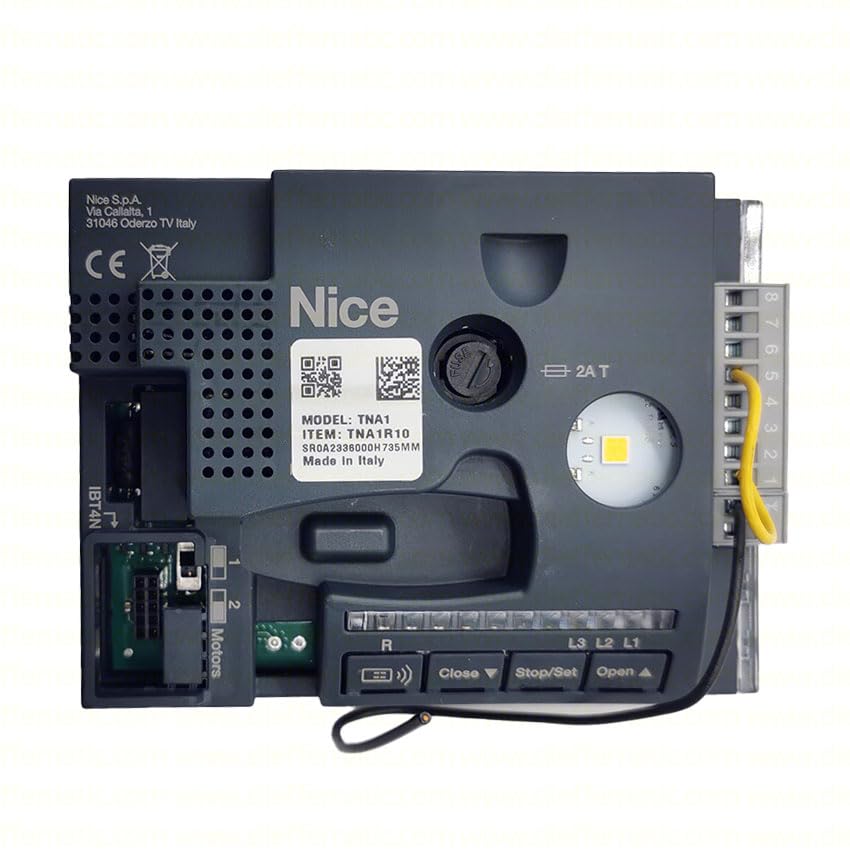
Image of the Dieffematic TNA1 replacement part. This component is designed to replace a faulty or worn part in compatible NICE systems.
2. Safety Information
Always observe the following safety precautions to prevent injury, damage to the product, or damage to the existing system.
- Disconnect Power: Before any installation, maintenance, or troubleshooting, ensure that the main power supply to the NICE NLKCE or TN2030L system is completely disconnected.
- Professional Installation: Installation should ideally be performed by qualified personnel with experience in automation systems.
- Original Parts: Use only original Dieffematic or NICE approved components for any repairs or replacements.
- Environmental Conditions: Ensure the installation environment is dry and free from excessive dust or extreme temperatures.
- Keep Away from Children: This product is not a toy. Keep it and its components out of reach of children.
3. Package Contents
Please verify that all items listed below are present in the package before proceeding with the installation.
- 1x Dieffematic TNA1 Replacement Part
- 1x Instruction Manual (this document)
- Any specific mounting hardware (if applicable and included by manufacturer)
4. Setup and Installation
4.1. Before Installation
- Read this entire manual carefully before beginning.
- Ensure the power supply to the automation system is disconnected.
- Identify the specific component within your NICE NLKCE or TN2030L system that the TNA1 is intended to replace.
- Gather necessary tools (e.g., screwdrivers, pliers, multimeter).
4.2. Installation Steps
- Access the System: Carefully open the housing of your NICE NLKCE or TN2030L system to access the internal components.
- Remove Old Part: Disconnect any wiring or fasteners securing the old component. Note the orientation and wiring connections before removal. Take photos if necessary for reference.
- Install TNA1: Position the Dieffematic TNA1 replacement part in the exact location of the removed component. Secure it using the appropriate fasteners.
- Connect Wiring: Reconnect all wiring to the TNA1, ensuring correct polarity and secure connections as per the original setup. Refer to the wiring diagram of your NICE system if available.
- Close Housing: Once the TNA1 is securely installed and wired, carefully close and secure the system housing.
- Power On and Test: Reconnect the main power supply to the system. Perform functional tests to ensure the TNA1 is operating correctly within the NICE NLKCE or TN2030L system.
5. Operation
The Dieffematic TNA1 functions as a direct replacement part and does not introduce new operational features to your NICE NLKCE or TN2030L system. Its operation is integrated with and controlled by the existing system's logic. Refer to your original NICE system manual for specific operational instructions.
- The TNA1 will respond to commands and signals from the main control unit of your NICE system.
- Ensure all system parameters and settings are correctly configured after installation, as per your NICE system's requirements.
6. Maintenance
Regular, simple maintenance can help prolong the life of your TNA1 replacement part and ensure reliable system operation.
- Periodic Inspection: Periodically inspect the TNA1 and its connections for any signs of wear, corrosion, or loose wiring.
- Cleaning: If accessible, gently clean any dust or debris from the TNA1 using a soft, dry cloth. Do not use liquid cleaners directly on the component.
- Professional Check: Consider having your entire automation system, including the TNA1, inspected by a qualified technician annually.
7. Troubleshooting
If you encounter issues after installing the TNA1, refer to the table below for common problems and potential solutions. Always disconnect power before attempting any internal checks.
| Problem | Possible Cause | Solution |
|---|---|---|
| System not responding after TNA1 installation. | Incorrect wiring; loose connection; power not reconnected. | Verify all wiring connections are secure and correct. Ensure main power is restored. |
| Intermittent operation. | Loose connection; environmental interference; faulty component. | Check all connections. Ensure the environment is stable. If issues persist, consult a technician. |
| TNA1 appears damaged. | Physical impact; electrical surge. | Disconnect power immediately. Do not attempt to repair. Contact support for replacement. |
8. Specifications
Key technical specifications for the Dieffematic TNA1 replacement part.
| Specification | Detail |
|---|---|
| Product Code | TNA1 |
| Manufacturer Reference | TNA1 |
| ASIN | B0B21G2GDT |
| Compatibility | NICE NLKCE, NICE TN2030L systems |
| First Available on Amazon.it | May 20, 2022 |
9. Warranty and Support
The Dieffematic TNA1 replacement part is covered by a standard manufacturer's warranty. For specific warranty terms and conditions, please refer to the documentation provided with your purchase or contact the seller directly.
For technical support, troubleshooting assistance beyond this manual, or to inquire about warranty claims, please contact the authorized Dieffematic distributor or the seller from whom you purchased the product. Provide your product model (TNA1) and ASIN (B0B21G2GDT) when seeking support.