
VICTAGEN rechargeable battery charger
VICTAGEN Universal Smart Battery Charger User Manual
Model: rechargeable battery charger
1. Safety Information
Please read all safety instructions carefully before using the VICTAGEN Universal Smart Battery Charger. Failure to follow these instructions may result in electric shock, fire, or serious injury.
- Use only with compatible battery types as specified in this manual.
- Do not attempt to charge non-rechargeable batteries.
- Do not disassemble, modify, or repair the charger. Contact customer support if service is required.
- Keep the charger away from water, moisture, and high temperatures.
- Ensure proper ventilation during charging. Do not cover the charger.
- Unplug the charger from the power source when not in use or before cleaning.
- Keep out of reach of children and pets.
- If the charger or batteries become excessively hot during charging, immediately unplug the charger and remove the batteries.

Figure 1: The VICTAGEN charger features multiple protection technologies including over-charge, over-discharge, short circuit, over-voltage, and reverse polarity protection, ensuring safe operation.
2. Product Overview
The VICTAGEN Universal Smart Battery Charger is designed for efficient and safe charging of a wide range of rechargeable batteries. It features four independent charging slots and an LCD display for real-time monitoring.
2.1 Key Features
- Wide Compatibility: Supports 3.7V Li-ion (e.g., 18650, 26650, 21700) and 1.2V Ni-MH/Ni-Cd (AA, AAA, C) batteries.
- Independent Charging: Each of the four slots charges independently, allowing for simultaneous charging of different battery types and sizes.
- Smart Detection: Automatically identifies battery type and voltage.
- Real-time LCD Display: Monitors charging status, battery type, and voltage for each slot.
- Multi-Protection: Built-in safeguards against over-charge, over-discharge, short circuit, over-voltage, and reverse polarity.
- Dual Input Ports: Equipped with Micro-USB and Type-C ports for versatile power input.
2.2 Compatible Battery Types
The charger supports a broad spectrum of rechargeable batteries, including both button top and flat top variants:
- 3.7V Li-ion / IMR / INR / ICR: 26650, 26500, 25500, 22650, 2500, 21700, 20700, 18700, 18650, 18500, 18490, 18350, 17670, 17650, 17500, 17350, 16650, 16340 (RCR123), 16500, 14650, 14500, 14430, 14350, 13650, 13500, 13450, 12650, 12500, 12340, 10500, 10440, 10350, 10340.
- 1.2V Ni-MH / Ni-Cd: A, AA, AAA, AAAA, C, SC.

Figure 2: The charger's wide compatibility allows it to charge numerous Li-ion and Ni-MH/Ni-Cd battery sizes, including both button top and flat top designs.

Figure 3: The charger supports batteries used in a variety of common devices such as alarm clocks, video doorbells, LED flashlights, headlights, radios, control toys, vapes, and cameras.
3. Setup
Setting up your VICTAGEN charger is straightforward. Follow these steps to prepare for charging:
- Unpack the Charger: Carefully remove the charger and any included accessories from the packaging.
- Connect Power: Connect the charger to a 5V 2A power source using either the Micro-USB or Type-C input port. Compatible power sources include USB wall chargers, power banks, computer USB ports, or car chargers.
- Power On: Once connected, the LCD display will illuminate, indicating the charger is ready for use.
Note: A wall plug adapter is not included with the charger. Ensure your power source provides 5V 2A for optimal charging performance.

Figure 4: The charger can be powered via Micro-USB or Type-C from various sources like wall sockets, car chargers, power banks, or PCs, offering flexibility for charging anywhere.
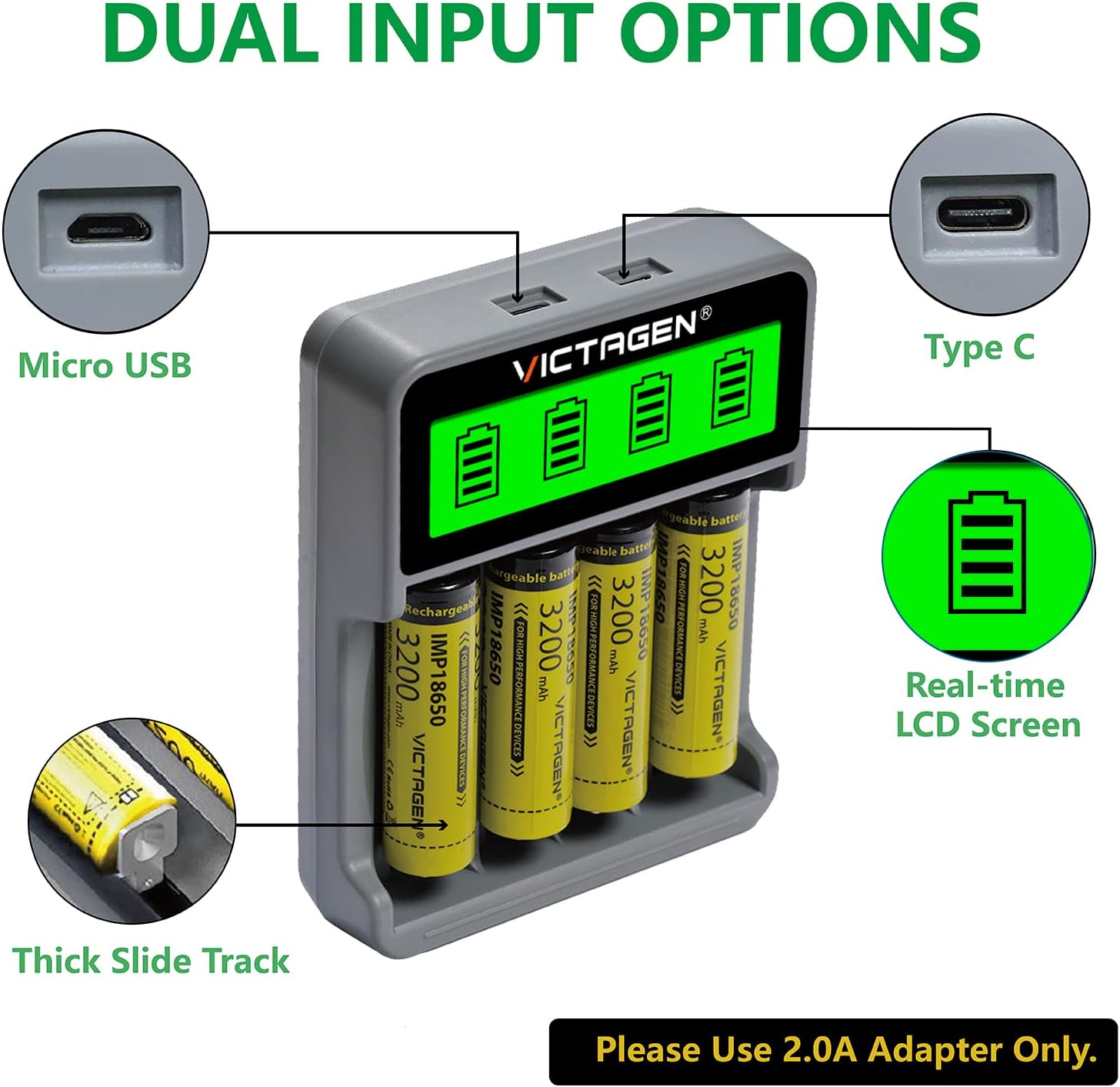
Figure 5: The charger features both Micro USB and Type C input ports for power, along with a real-time LCD screen to display charging status.
4. Operating Instructions
The VICTAGEN charger is designed for ease of use. Follow these steps to charge your batteries:
- Insert Batteries: Carefully insert one or more rechargeable batteries into the charging slots. Ensure the positive (+) and negative (-) ends of the battery align correctly with the markings in the charger slot. The charger features a thick slide track for smooth insertion.
- Automatic Detection: The charger will automatically detect the battery type (Li-ion or Ni-MH/Ni-Cd) and begin the charging process.
- Monitor Charging: The real-time LCD display will show the charging status for each individual slot. A blinking battery icon indicates charging in progress, while a solid icon indicates a full charge.
- Charging Speed: Each slot provides a maximum current of 1000mA for 3.7V Li-ion batteries and 500mA for 1.2V Ni-MH/Ni-Cd batteries. The total charging time depends on the battery capacity and its initial charge level.
- Remove Batteries: Once the batteries are fully charged (indicated by a solid battery icon on the LCD), carefully remove them from the charger.

Figure 6: The VICTAGEN charger with four 18650 batteries fully inserted, showing the LCD display indicating full charge for all slots.

Figure 7: This image illustrates the dual input options (Micro USB and Type-C) and a table detailing the maximum slot current for Li-ion (1000mA) and Ni-MH/Ni-Cd (450mA) batteries.
5. Maintenance
Proper maintenance ensures the longevity and optimal performance of your VICTAGEN battery charger.
- Cleaning: Disconnect the charger from the power source before cleaning. Use a soft, dry cloth to wipe the surface of the charger. Do not use abrasive cleaners or solvents.
- Storage: Store the charger in a cool, dry place away from direct sunlight and extreme temperatures.
- Avoid Obstructions: Ensure the charging slots are free from dust and debris to maintain good contact with batteries.
6. Troubleshooting
If you encounter issues with your VICTAGEN charger, refer to the following common problems and solutions:
| Problem | Possible Cause | Solution |
|---|---|---|
| Charger not powering on. | No power connection or faulty cable/adapter. | Ensure the USB cable is securely connected to both the charger and a 5V 2A power source. Try a different USB cable or power adapter. |
| Battery not charging (LCD not showing progress). | Incorrect battery insertion, incompatible battery type, or faulty battery. | Re-insert the battery, ensuring correct polarity (+/-). Verify the battery type is compatible with the charger. Test with a different battery. |
| Charger or battery becomes excessively hot. | Overheating due to faulty battery or environmental factors. | Immediately unplug the charger and remove the battery. Allow to cool down. Do not use the battery or charger if overheating persists. Ensure adequate ventilation. |
| 21700 batteries do not fit or charge properly. | Physical size incompatibility with certain 21700 battery variants (e.g., button top vs. flat top, protected cells). | While the charger is listed as compatible with 21700, some specific variants (especially longer or wider protected button-top 21700s) may not fit perfectly or make proper contact. Ensure the battery fits without force and makes contact. If issues persist, consider using 21700 batteries that are known to be compatible with universal chargers or consult the battery manufacturer's specifications. |
If the problem persists after trying these solutions, please contact VICTAGEN customer support for further assistance.
7. Specifications
| Feature | Detail |
|---|---|
| Product Dimensions | 1.1 x 4 x 5.4 inches (2.8 x 10.2 x 13.7 cm) |
| Item Weight | 13.8 ounces (391 grams) |
| Model Number | rechargeable battery charger |
| ASIN | B0B21FX773 |
| Brand | VICTAGEN |
| Color | 4 Slot |
| Output Voltage | 3.70V (Li-ion) / 1.2V (Ni-MH/Ni-Cd) |
| Input Ports | Micro-USB, Type-C |
| Max Slot Current (Li-ion) | 1000mA |
| Max Slot Current (Ni-MH/Ni-Cd) | 500mA |
8. Warranty and Support
VICTAGEN stands behind the quality of its products. This universal 4-slot battery charger comes with the following warranty and support:
- Warranty: 1-year warranty from the date of purchase.
- Replacements: 60 days free replacement for manufacturing defects.
- Returns: 30 days free return policy.
For any questions, technical support, or warranty claims, please contact VICTAGEN customer service through the retailer where you purchased the product or visit the official VICTAGEN store:
Ask a question about this manual
Ask about setup, troubleshooting, compatibility, parts, safety, or missing instructions. Manuals+ will review the question and use this page’s manual context to help answer it.