
Introduction
This manual provides detailed instructions for the setup, operation, and maintenance of your StarSat SR-1110HD Extreme Full HD Receiver. Please read this manual thoroughly before using the device to ensure proper functionality and to maximize your viewing experience. The StarSat SR-1110HD Extreme is a high-definition satellite receiver designed for optimal performance, supporting DVB-S/DVB-S2 standards, and offering features like USB connectivity, HDMI output, and internet capabilities via Wi-Fi.
What's in the Box
Upon opening the package, please verify that all the following items are included:
- StarSat SR-1110HD Extreme Satellite Receiver
- 2x Remote Control units
- USB WiFi Dongle
- HDMI Cable
- User Manual (this document)
- Warranty Card
- AAA Batteries (for remote controls)

Image: Contents of the StarSat SR-1110HD Extreme package.
Video: A brief overview of the StarSat SR-1110HD Extreme receiver and its key features, including compatibility and package contents.
Product Overview
Front Panel

Image: Front view of the receiver.
- Power Button: Turns the receiver on or off.
- Display: Shows channel number or time.
- USB 2.0 Ports (Front): For connecting USB storage devices or the WiFi dongle.
Rear Panel

Image: Rear view of the receiver.
- LNB IN: Connects to the satellite dish LNB.
- RS232: Serial port for service or firmware updates.
- USB 2.0 Port (Rear): Additional USB port for storage or WiFi dongle.
- AV OUT: Analog audio/video output (RCA).
- HDMI OUT: High-Definition Multimedia Interface output for connecting to a TV.
- Power Input: Connects to the AC power adapter.
- Power Switch: Main power switch for the device.
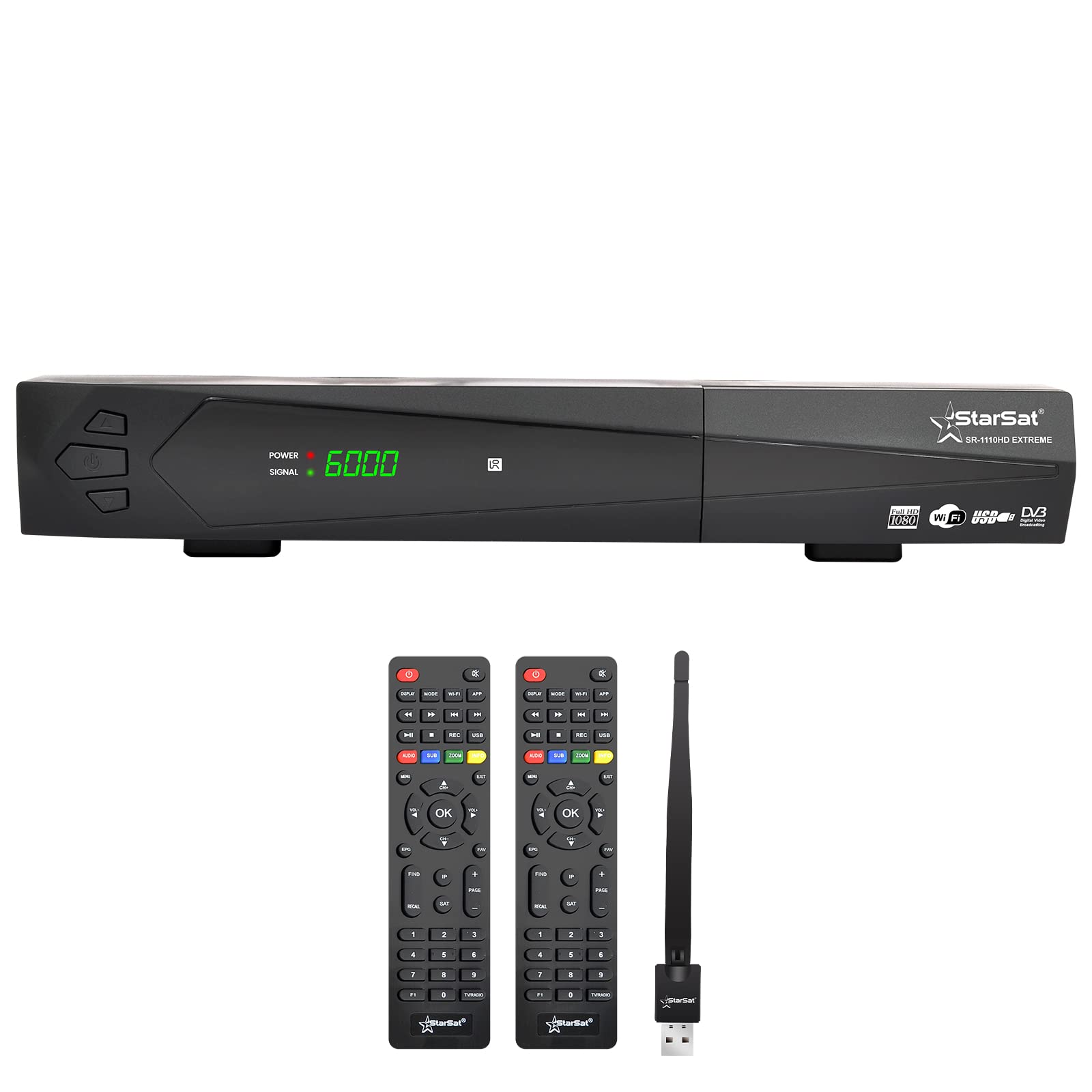
Image: Connection diagram for the receiver.
Setup Guide
- Connect to TV:
- For High Definition: Connect one end of the provided HDMI cable to the HDMI OUT port on the receiver and the other end to an available HDMI input on your television.
- For Standard Definition: Connect RCA cables (not included) from the AV OUT ports on the receiver to the corresponding AV input ports on your television.
- Connect to Satellite Dish: Connect the coaxial cable from your satellite dish LNB to the LNB IN port on the rear panel of the receiver.
- Connect USB Devices:
- Insert the USB WiFi Dongle into any available USB 2.0 port on the receiver (front or rear).
- For PVR functions or media playback, connect a USB storage device (e.g., USB flash drive or external hard drive) to an available USB 2.0 port.
- Power Connection: Connect the power adapter to the receiver's power input and then plug it into a wall outlet. Ensure the main power switch on the rear panel is in the "ON" position.
- Initial Power On: Press the Power button on the front panel or the remote control to turn on the receiver. Follow the on-screen instructions for initial setup, including language selection and satellite configuration.
Operating Instructions
Basic Operation
- Power On/Off: Use the power button on the remote control or the front panel.
- Channel Selection: Use the CH+/CH- buttons or enter the channel number directly using the numeric keypad on the remote.
- Volume Control: Use the VOL+/VOL- buttons on the remote.
- Menu Navigation: Press the MENU button to access the main menu. Use arrow keys to navigate and OK to confirm. Press EXIT to return to live TV.
Channel Search and Management
The receiver supports various search methods to find satellite channels.
- Blind Search: Scans all available frequencies on a selected satellite without requiring transponder information. This is useful for finding new or unlisted channels.
- Multi Satellite Search: Scans multiple pre-configured satellites.
- Network Search: Uses network information from a transponder to find other transponders and channels.
- Manual Search: Allows you to input specific transponder frequencies and parameters to search for channels.
- Favorite Groups: Organize your preferred channels into custom favorite lists for quick access.
- Parental Lock: Set a password to restrict access to certain channels or menu functions.
Electronic Program Guide (EPG)
Press the EPG button on your remote control to view the Electronic Program Guide. This displays program schedules for current and upcoming broadcasts. The receiver supports MultiEPG, offering detailed program information.
PVR (Personal Video Recorder) Functionality
With a connected USB storage device, you can record live TV programs.
- Recording: Press the REC button on the remote to start recording the current program. Press STOP to end recording.
- Playback: Access recorded programs through the Media Player menu.
- Time Shift: Pause live TV and resume watching later.
Internet Features (YouTube, Wi-Fi)
Ensure the USB WiFi Dongle is connected and configured for your network. Once connected to the internet, you can access applications like YouTube directly from the receiver's menu.
Maintenance
Software and Data Upgrade
The receiver's software and additional data can be updated via the USB 2.0 interface.
- Download the latest firmware or data file from the official StarSat website.
- Copy the file to the root directory of a USB flash drive.
- Insert the USB flash drive into a USB port on the receiver.
- Navigate to the "System" or "Tools" menu, then select "USB Upgrade" or "Software Update".
- Follow the on-screen prompts to complete the upgrade. Do not power off the device during the upgrade process.
Cleaning
To clean the receiver, disconnect it from the power supply. Use a soft, dry cloth to wipe the exterior. Do not use liquid cleaners or abrasive materials.
Troubleshooting
| Problem | Possible Cause | Solution |
|---|---|---|
| No picture or sound | Incorrect TV input selected; loose HDMI/AV cable; receiver not powered on. | Select the correct HDMI/AV input on your TV. Check all cable connections. Ensure the receiver is powered on. |
| "No Signal" message | LNB cable disconnected; incorrect satellite settings; dish misalignment. | Check LNB cable connection. Verify satellite settings in the menu. Adjust satellite dish if necessary (professional assistance may be required). |
| Remote control not working | Dead batteries; obstruction; remote not pointed at receiver. | Replace batteries. Remove any obstructions between remote and receiver. Point remote directly at the receiver's front panel. |
| Cannot connect to Wi-Fi | WiFi dongle not inserted; incorrect password; network issues. | Ensure WiFi dongle is securely inserted. Double-check Wi-Fi password. Restart your router and receiver. |
Specifications
- Model: SR-1110HD Extreme
- Brand: Star Sat
- Color: Black
- Connectivity Technology: Wi-Fi
- DVB Standards: DVB-S, DVB-S2
- Video Decoding: MPEG-II, MPEG-IV, H.264
- Channels Capacity: Up to 8000 channels
- LNB Compatibility: Universal, Single, Single S & C Band Wideband LNB Compatible
- DiSEqC Support: 1.0/1.1/1.2/1.3 (USALS), Unicable Supported
- Search Modes: Blind Search, Multi Satellite Search, Network Search, Manual Search
- Aspect Ratio: 4:3, 16:9 (with PAN&SCAN vector or letter BOX option)
- Output Resolution: 480p60Hz, 480i60Hz, 576p50Hz, 576i50Hz, 720p50&60HZ, 1080i50&60HZ, 1080P50&60Hz
- OSD: True full Colour (32 bits), 720x576/1280x720 (configurable)
- Memory: More than 100 satellites, 1000 transponders, 5000 channels
- USB: 2x USB 2.0 Interface
- Audio Output Mode: Stereo, Surround, Dolby Digital
- Supported Audio Formats: Dolby Digital, DTS, AAC, MP3, PCM
- EPG: Electronic Program Guide (Now/Next Daily, Weekly), MultiEPG
- Teletext and Subtitle: Supported via OSD
- Multi-language Menu: English, French, Russian, Greek, Italian, Arabic, Farsi, Ukrainian, Swedish, Spanish, Turkish, German, etc.
- Software Upgrade: Via USB
- Item Weight: 0.82 Kilograms
- Power Supply: AC 100-240V~ 50/60Hz, Max 30W
Warranty and Support
The StarSat SR-1110HD Extreme Full HD Receiver comes with a standard brand warranty. Please refer to the included Warranty Card for specific terms and conditions, including warranty period and coverage details.
For technical support, service, or further inquiries, please contact StarSat customer service or visit their official website. Keep your purchase receipt and warranty card handy when seeking support.