Introduction
Welcome to the world of Nerf Elite Junior! The Nerf Elite Junior Rookie Pack is specifically designed for new Nerf enthusiasts, offering an easy-to-use and fun experience. This manual provides essential information on how to set up, operate, maintain, and troubleshoot your blaster and targets, ensuring a safe and enjoyable play experience.
Safety Information
WARNING: Small parts may be generated. Not for children under 3 years.
To prevent eye injury:
- Do not aim at eyes or face.
- Use only official NERF darts. Other darts may not meet safety standards.
- Do not modify darts or blaster.
- Eyewear is recommended (not included) for all users and people within range.
What's in the Box
Your Nerf Elite Junior Rookie Pack includes the following components:
- 1 x Nerf Elite Junior Blaster
- 32 x Nerf Elite Darts
- 4 x Targets

Image: The complete Nerf Elite Junior Rookie Pack, showing the blaster, 32 blue darts, and 4 green and blue targets.
Setup
1. Unpacking
Carefully remove all components from the packaging. Ensure all items listed in the 'What's in the Box' section are present.
2. Loading Darts
The Nerf Elite Junior blaster features a front-loading design for easy dart insertion. Insert one Nerf Elite dart into each of the 8 chambers at the front of the blaster's drum until it is fully seated.

Image: A child demonstrating how to load a dart into the blaster's front drum.
3. Setting Up Targets
The Rookie Pack includes 4 targets. These can be set up on any flat surface, such as a table, shelf, or steps, to practice your aiming skills. The targets are designed to be easily knocked over when hit.
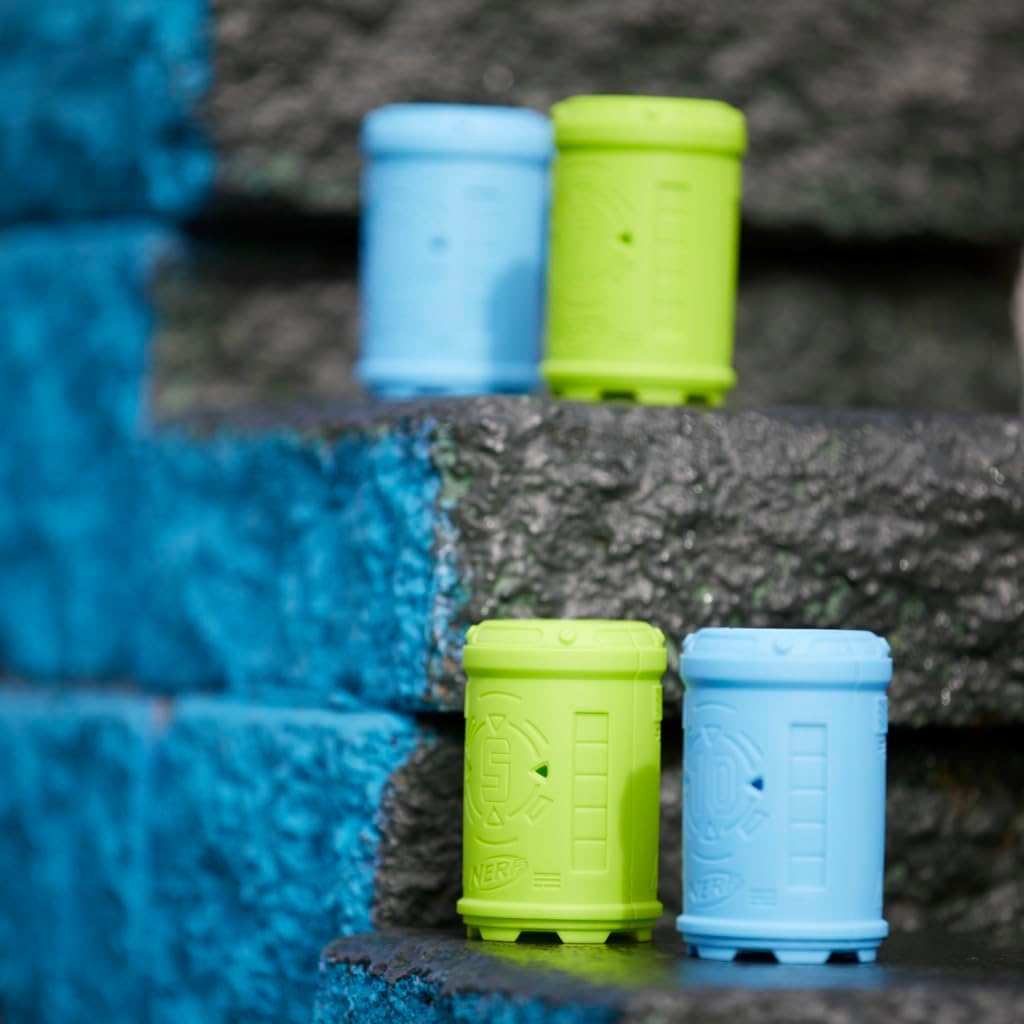
Image: The included targets arranged on steps, ready for aiming practice.
Operating
1. Holding the Blaster
The Nerf Elite Junior blaster is lightweight and sized to fit comfortably in small hands. Grip the handle firmly with one hand, ensuring your fingers are clear of the dart exit point.

Image: A child holding the blaster, demonstrating its comfortable fit for smaller hands.
2. Priming the Blaster
To prime the blaster, pull the priming handle located on top of the blaster all the way back until it clicks into place. This action prepares the blaster to fire a dart. The handle has the lowest pull force of any Nerf dart blaster, making it easy for kids to operate independently.
3. Blasting Darts
Once primed, press the trigger to launch a dart. The blaster can fire 8 darts in a row from its drum before needing a reload.
4. Aiming
The blaster features an oversized aimer to assist with targeting. Align the aimer with your target before pressing the trigger for improved accuracy.

Image: A child aiming the blaster, focusing on the targets.
5. Dart Retrieval
After blasting, collect all fired darts for reuse. Ensure darts are not damaged or bent, as this can affect performance.
Maintenance
Cleaning the Blaster
To clean your blaster, wipe it down with a soft, slightly damp cloth. Do not submerge the blaster in water or use harsh chemicals, as this can damage the internal mechanisms.
Dart Care
Keep your Nerf Elite darts clean and free from debris. Avoid bending or crushing darts, as damaged darts can affect blaster performance and accuracy. Store darts in a dry place away from direct sunlight.
Troubleshooting
- Darts not firing: Ensure the blaster is fully primed by pulling the priming handle all the way back until it clicks. Check that darts are properly loaded into the drum.
- Darts not flying straight or far: Inspect darts for damage (bends, tears). Replace any damaged darts with new, official Nerf Elite darts. Ensure the blaster is fully primed.
- Blaster mechanism stuck: Do not force the priming handle or trigger. Check for any jammed darts or foreign objects in the dart path. If the issue persists, contact customer support.
Specifications
| Feature | Detail |
|---|---|
| Product Dimensions | 3.3 x 17.7 x 11.2 inches |
| Item Weight | 1.04 pounds |
| Item Model Number | F6752 |
| Manufacturer Recommended Age | 6 years and up |
| Dart Capacity | 8 darts (drum) |
| Darts Included | 32 Nerf Elite Darts |
| Targets Included | 4 Targets |
Warranty and Support
This product is manufactured by Hasbro. For information regarding warranty, product support, or to purchase replacement parts, please visit the official Nerf website or contact Hasbro customer service directly. Contact details can typically be found on the product packaging or the manufacturer's official website.
You can also visit the official Nerf Store for more products and information: Nerf Store on Amazon


