1. Introduction
This instruction manual provides essential information for the assembly, operation, and maintenance of your Beyblade Burst QuadStrike Stellar Hyperion H8 spinning top starter pack. The QuadStrike system introduces enhanced Armor Tips, allowing for advanced customization and intensified battle performance. Please read this manual thoroughly before use to ensure proper handling and to maximize your battling experience.
2. Safety Information
WARNING: Small parts may be generated. Not for children under 3 years.
- Always use the product in an open, clear area, away from obstacles and other people.
- Do not aim the spinning top at eyes or face.
- Do not modify the top or launcher in any way, as this may compromise safety and performance.
- Keep away from pets and infants to prevent accidental ingestion of small parts.
- Adult supervision is recommended during play.
3. What's in the Box
Your Beyblade Burst QuadStrike Stellar Hyperion H8 Starter Pack includes the following components:
- 1 Beyblade Burst QuadStrike Stellar Hyperion H8 spinning top
- 1 Beyblade Burst QuadStrike launcher
- Instruction sheet (this manual)

Image: The Stellar Hyperion H8 spinning top (red and gold) and the green QuadStrike launcher, ready for assembly.
4. Setup and Assembly
The Beyblade Burst QuadStrike system allows for 4 different configurations to optimize your battling strategy. Follow these steps to assemble your top and prepare for launch:
- Assemble the Spinning Top: Your Stellar Hyperion H8 top consists of multiple parts. Carefully align and snap the components together. Refer to the diagrams on the product packaging for visual guidance on assembling the G16, QD07, TD18-Q, and A12 parts.
- Configure for Battle: The QuadStrike top can be configured in four modes:
- Core Mode (Defense Type): Standard configuration for balanced defense.
- Apex Mode (Defense Type): Enhanced defense configuration.
- Core+ Mode (Attack Type): Standard configuration for balanced attack.
- Apex+ Mode (Attack Type): Enhanced attack configuration.
- Attach Top to Launcher: Insert the ripcord into the launcher. Align the top with the launcher's prongs and twist until it locks securely into place. Ensure the top is firmly attached before launching.
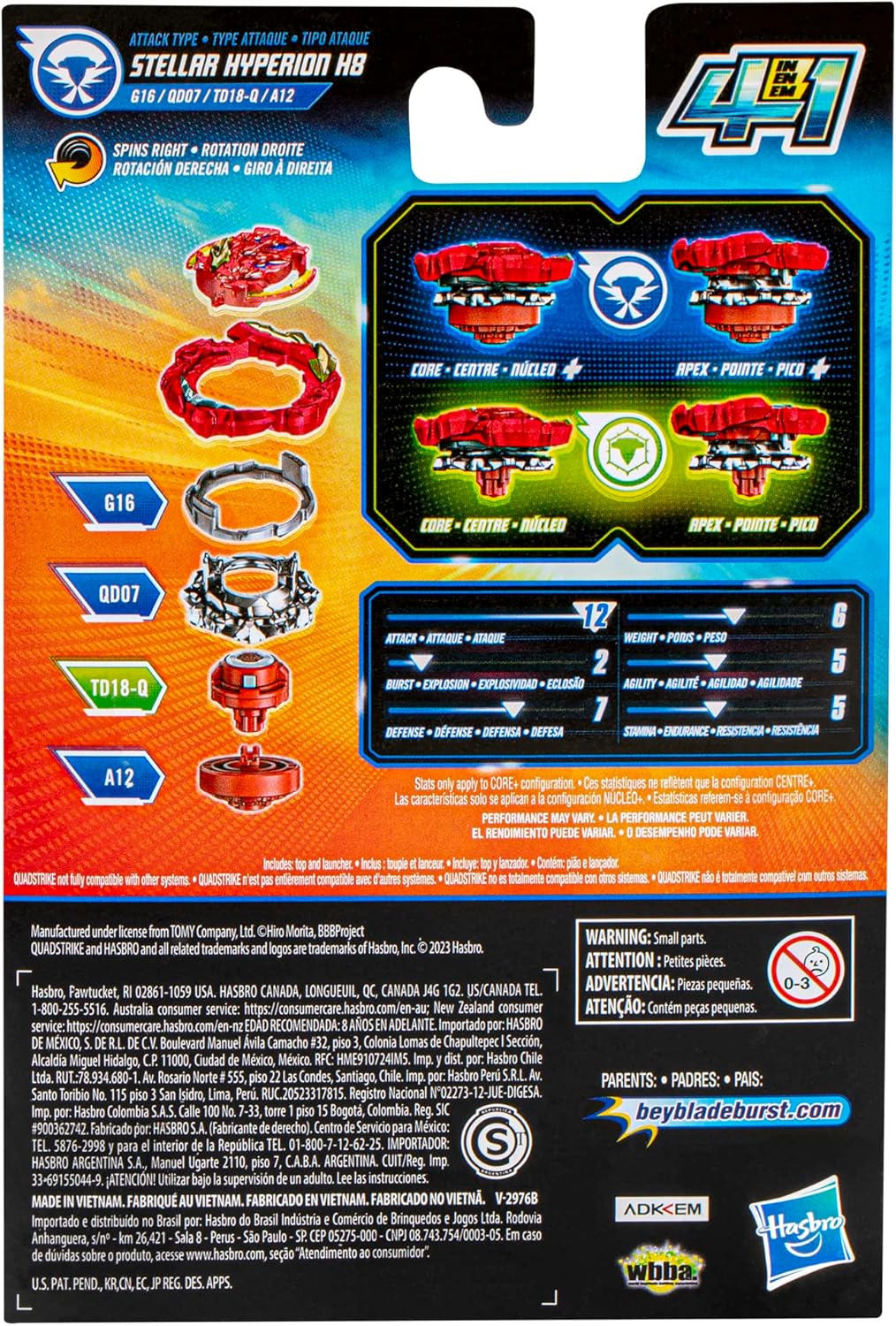
Image: Detailed diagrams on the back of the product packaging illustrating the assembly of the Beyblade top and how to switch between Core, Apex, Core+, and Apex+ modes for different battle types.
5. Operating Instructions
To engage in Beyblade battles, you will need a Beyblade Burst Beystadium (sold separately).
- Load the Launcher: With the top attached to the launcher, pull the ripcord all the way back until you hear a click. Do not over-pull.
- Launch the Top: Hold the launcher over the Beystadium. Aim for the center of the stadium. With a swift, firm motion, pull the ripcord to launch your Beyblade top into battle.
- Digital Battles (Beyblade Burst App): Scan the code located on your QuadStrike top using the Beyblade Burst app on your mobile device. This allows you to unleash your top in virtual battles and compete with other Bladers worldwide.
6. Maintenance
Proper care will extend the life of your Beyblade Burst QuadStrike Stellar Hyperion H8:
- Cleaning: Wipe the top and launcher with a dry, soft cloth after use to remove dust and debris. Do not use water or cleaning solutions, as this may damage the components.
- Storage: Store the top and launcher in a cool, dry place, away from direct sunlight and extreme temperatures. Keep components organized to prevent loss of small parts.
- Inspection: Periodically inspect the top and launcher for any signs of wear or damage. Discontinue use if any parts are broken or cracked.
7. Troubleshooting
If you encounter issues with your Beyblade Burst QuadStrike Stellar Hyperion H8, consider the following:
- Top not spinning correctly:
- Ensure the top is fully assembled and all parts are securely snapped into place.
- Verify the top is correctly attached to the launcher and the ripcord is pulled with sufficient force.
- Check the Performance Tip for any debris or damage that might impede smooth rotation.
- Launcher not engaging:
- Make sure the ripcord is inserted correctly and fully into the launcher.
- Ensure the top is properly locked onto the launcher.
If problems persist, please contact customer support as detailed in the "Warranty and Support" section.
8. Specifications
| Feature | Detail |
|---|---|
| Product Dimensions | 1.31 x 5 x 7.5 inches |
| Item Weight | 4.2 ounces |
| ASIN | B0B1VSSVR5 |
| Item Model Number | F6809 |
| Manufacturer Recommended Age | 8 years and up |
| Release Date | April 1, 2023 |
| Manufacturer | Hasbro |
9. Warranty and Support
For product support, inquiries, or information regarding warranty, please contact the manufacturer, Hasbro. You can often find contact details on the product packaging or by visiting the official Hasbro website.
For more information about Beyblade products, you may also visit the official Beyblade store: Beyblade Store on Amazon.