
1. Introduction
Thank you for choosing the ciciglow Bluetooth 5.0 2-in-1 Transmitter Receiver Adapter. This device allows you to easily add Bluetooth functionality to your audio systems, enabling wireless audio streaming in both transmit and receive modes. It also features fast charging capabilities and supports various media playback options.
Package Contents:
- 1 x Bluetooth Adapter
- 1 x User Manual
- 1 x 3.5mm Audio Cable (1m / 3.3 ft)
- 1 x Remote Control (CR2025/150mAh battery included)
2. Safety Information
Please observe general safety guidelines for handling electrical devices. Do not expose the device to moisture or extreme temperatures. Do not attempt to disassemble or repair the device yourself. Keep out of reach of children.
3. Product Overview
The ciciglow Bluetooth adapter is a versatile device featuring Bluetooth 5.0 technology, supporting both audio transmission and reception. It includes dual USB 2.1A fast charging ports and multiple audio input/output options.

Figure 3.1: Device interfaces and functions. Features include DC 5V-2.1A USB charging ports, U-DISK (USB drive) input, TF-CARD (memory card) input, AUDIO OUT (RCA and 3.5mm), and AUDIO IN (3.5mm).
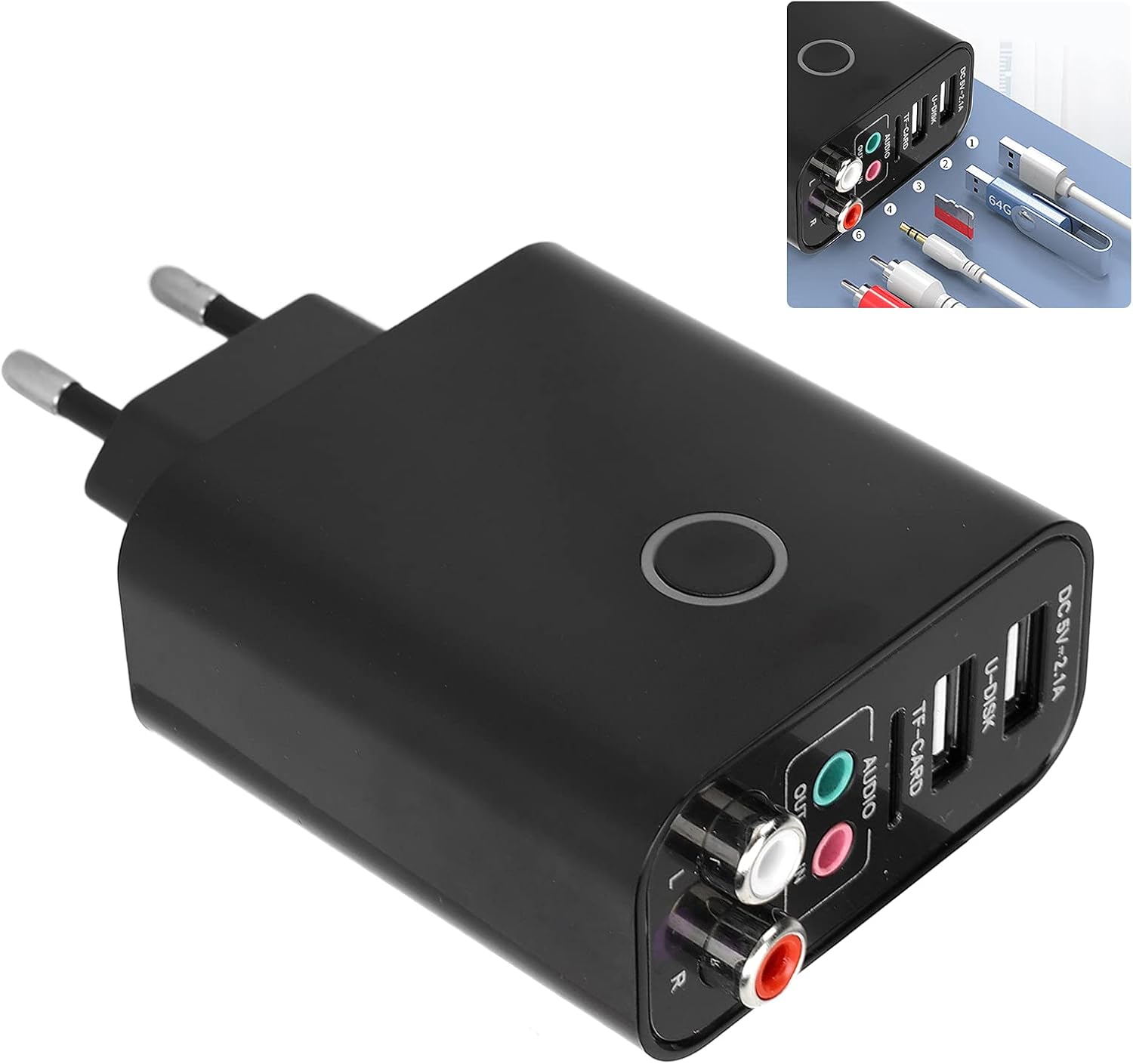
Figure 3.2: The Bluetooth adapter with an inset showing various connection cables (USB, 3.5mm audio, RCA) and a TF card, highlighting its rich functionality and clear interface identification.
Key Features:
- Bluetooth 5.0 chip for stable connection.
- 2-in-1 functionality: Bluetooth Receiver and Transmitter.
- Supports AUX + RCA dual audio output.
- Integrated QC2.0 fast charging module with dual USB 2.1A ports.
- Supports U-disk/memory card playback (MP3, FLAC, WAV, WMA, APE formats).
- Mobile app control for song/volume adjustment, sound effects, and playback source switching.
- High-quality decoding chip for high-definition stereo sound.
4. Setup
4.1. Transmitter Mode (TX)
Use this mode to transmit audio from non-Bluetooth devices (e.g., TV, PC, projector, amplifier) to Bluetooth headphones or speakers.
- Plug the adapter into a power source (110-240V). The device will automatically power on, and the blue indicator light will flash.
- Connect one end of the 3.5mm audio cable to the adapter's "IN" interface and the other end to the audio output (e.g., headphone jack) of your computer or TV. The indicator light will turn red and flash, indicating Transmitter Mode.
- Ensure your Bluetooth receiving device (headphones, speaker) is in pairing mode.
- The adapter will automatically search for and connect to nearby Bluetooth devices. Once connected, the red indicator light will remain solid.

Figure 4.1: Illustration of the adapter operating in Receive mode (left) and Transmit mode (right).
4.2. Receiver Mode (RX)
Use this mode to receive audio from Bluetooth-enabled devices (e.g., smartphone, tablet) and play it through non-Bluetooth audio systems (e.g., home stereo, wired speakers).
- Plug the adapter into a power source. The device will automatically power on, and the blue indicator light will flash.
- Connect one end of the 3.5mm audio cable to the adapter's "OUT" interface and the other end to the audio input (e.g., AUX-in) of your wired speaker or home stereo system. The indicator light will remain blue, indicating Receiver Mode.
- On your Bluetooth-enabled device (smartphone, tablet), search for Bluetooth devices and select "ciciglow adapter" (or similar name) to pair.
- Once paired, the blue indicator light will remain solid, and you can stream audio wirelessly to your connected audio system.
5. Operating Instructions
5.1. Bluetooth Pairing
In both TX and RX modes, the adapter will automatically enter pairing mode when powered on. Ensure your target Bluetooth device is also in pairing mode for successful connection.
5.2. App Control
The device supports mobile application control. Download the dedicated app (refer to the product packaging or manufacturer's website for app details) to manage various functions:
- Adjust volume up/down.
- Switch songs (previous/next).
- Apply sound effects.
- Switch playback sources (Bluetooth, U-disk, TF card).
5.3. Media Playback (U-disk / TF Card)
Insert a U-disk (USB drive) into the "U-DISK" port or a TF card (memory card) into the "TF-CARD" slot. The adapter supports playback of MP3, FLAC, WAV, WMA, and APE audio formats. Use the remote control or mobile app to manage playback.

Figure 5.1: The adapter supporting AUX+RCA dual output and featuring dual USB fast charging ports, with a USB drive inserted for media playback.
5.4. Remote Control Operation
The included remote control provides convenient access to various functions:
- Power On/Off
- Mode Switching (Bluetooth, USB, TF, Line In)
- Volume Control (VOL+, VOL-)
- Track Navigation (Previous, Next, Play/Pause)
- Timer Functions (30', 60' Power Off)
- Mute

Figure 5.2: The remote control for the ciciglow Bluetooth adapter, showing buttons for power, mode selection, volume, track control, and timer functions.
5.5. Fast Charging
The adapter features an integrated QC2.0 fast charging module with dual USB 2.1A output ports. Use these ports to conveniently charge your mobile phones, tablets, and other USB-powered devices.
6. Maintenance
To ensure optimal performance and longevity of your device:
- Clean the device with a soft, dry cloth. Do not use liquid cleaners or aerosols.
- Keep the device away from dust, moisture, and direct sunlight.
- Avoid dropping or subjecting the device to strong impacts.
- Store in a cool, dry place when not in use.
7. Troubleshooting
7.1. No Power
- Ensure the adapter is securely plugged into a working power outlet.
- Check if the power indicator light is on.
7.2. No Sound / Poor Audio Quality
- Verify that all audio cables are correctly connected to the appropriate input/output ports.
- Check the volume levels on both the adapter and the connected audio device.
- Ensure the adapter is in the correct mode (TX for transmitting, RX for receiving).
- For Bluetooth connections, ensure the devices are paired and within the 10-meter transmission range.
- If playing from U-disk/TF card, ensure the audio files are in a supported format and not corrupted.
7.3. Bluetooth Pairing Issues
- Make sure the adapter and the target Bluetooth device are in pairing mode.
- Move the devices closer to each other to reduce interference.
- Turn off and restart both devices, then attempt pairing again.
- Clear previous Bluetooth connections on your device if necessary.
8. Specifications
| Feature | Specification |
|---|---|
| Model Number | MSG4skvygrc2wig51634011 |
| Bluetooth Version | V5.0 |
| Transmission Distance | 10 meters |
| Material | ABS Plastic |
| Color | Black |
| Input Voltage | 110-240V |
| USB Output | Dual USB 2.1A (QC2.0 Fast Charging) |
| Audio Output Type | 3.5mm AUX, RCA |
| Audio Input Type | 3.5mm AUX |
| Supported Media | U-disk, TF Card |
| Supported Audio Formats | MP3, FLAC, WAV, WMA, APE |
| Remote Control Battery | CR2025/150mAh (included) |
| Compatible Devices | Devices with AUX, USB, or Bluetooth interfaces |
9. Warranty and Support
For warranty information and technical support, please refer to the documentation provided with your purchase or contact the seller directly. Keep your purchase receipt as proof of purchase.