
Introduction
This manual provides essential information for the safe and efficient operation of your Acekool PAC Portable Air Conditioner. Please read it thoroughly before use and retain it for future reference.
The Acekool PAC is a versatile 3-in-1 unit, offering cooling, dehumidification, and fan functions, designed for rooms up to 750 sq. ft. It features a 14,000 BTU cooling capacity and operates with an R-32 eco-friendly refrigerant.
Package Contents
Upon unpacking, ensure all the following components are present:
- Portable Air Conditioner Unit
- LED Remote Control
- Exhaust Hose
- Window Vent Installation Kit (Window Slider Kit)
- Drain Hose
- Unit Adaptor
- Instruction Manual

Image: All components included with the Acekool PAC Portable Air Conditioner, laid out for inspection.
Setup and Installation
The Acekool PAC Portable Air Conditioner is designed for easy setup. Follow these steps to prepare your unit for operation:
- Positioning: Place the unit on a level surface. Ensure there is at least 19 inches of space between the unit's intake vent (rear) and any walls or furniture to allow for proper airflow. The unit is equipped with four rotatable wheels for easy movement.
- Exhaust Hose Assembly:
- Connect the hose connector to one end of the exhaust hose by rotating it counter-clockwise.
- Attach the other end of the hose connector to the exhaust air outlet on the back of the AC unit.
- Extend the adjustable exhaust hose to fit your window in place.
- Window Kit Installation:
- Adjust the window slider kit to fit your window opening (suitable for double-hung or sliding windows).
- Insert the exhaust hose adapter into the opening of the window kit.
- Ensure a tight seal around the window kit and hose to prevent air leakage. Foam sealing strips are provided for this purpose.
- Power Connection: Plug the 3-prong grounded power cord into a suitable electrical outlet. The power cord features a reset button for safety in case of power overload.

Image: The Acekool PAC Portable Air Conditioner with its exhaust hose and window kit, demonstrating how the components connect for window installation.
Video: This video demonstrates the setup process for the Acekool PAC Portable Air Conditioner, including connecting the exhaust hose and installing the window kit.
Operating Instructions
Your Acekool PAC Portable Air Conditioner can be controlled via the LED touch panel on the unit or the included remote control.
Control Panel & Remote Control
The unit features an intuitive LED control panel with touch-sensitive buttons and a digital display. A remote control is also provided for convenient operation from a distance.

Image: Close-up view of the Acekool PAC Portable Air Conditioner's LED touch panel and the remote control, highlighting the various buttons and display.
- Power Button: Turns the unit ON or OFF.
- Mode Button: Cycles through available modes: Cool, Fan, Dry, Sleep.
- Fan Speed Button: Adjusts fan speed (Low, Medium, High, Auto).
- Temperature Adjustment Buttons (Up/Down Arrows): Sets the desired temperature (61-89°F).
- Timer Button: Sets a timer for automatic ON/OFF operation (up to 24 hours).
- Swing Button: Activates or deactivates the automatic oscillation of the air outlet louvers.
- Sleep Mode: Optimizes settings for quiet, energy-efficient operation during sleep.
- °C/°F Button (on remote): Toggles between Celsius and Fahrenheit temperature display.
Operating Modes
- Cool Mode: Provides powerful cooling for spaces up to 750 sq. ft. Set your desired temperature between 61-89°F.
- Fan Mode: Circulates air without cooling, functioning as a regular fan.
- Dry Mode (Dehumidifier): Removes up to 90 pints of moisture per day from the air, reducing humidity. The self-evaporation system minimizes the need for manual draining.
- Sleep Mode: Adjusts settings for quieter operation and energy saving during nighttime hours.

Image: Visual representation of the Acekool PAC Portable Air Conditioner operating in Cooling, Dry, Fan, and Sleep modes, illustrating its multi-functional capabilities.
Maintenance
Regular maintenance ensures optimal performance and longevity of your Acekool PAC Portable Air Conditioner.
- Filter Cleaning: The unit features a slide-out filter for easy access. Regularly clean the filter to maintain air quality and unit efficiency. The filter is washable and reusable.
- Drainage: The unit has a self-evaporation system that reduces the need for frequent draining. However, in high humidity conditions or when using the Dry mode, you may need to drain accumulated water.
- The unit has a mid-level drain plug and a bottom-level drain plug.
- A drain hose is included for continuous draining if desired, by connecting it to the bottom drain port and directing it to a suitable drainage area.
- The unit will indicate when the water tank is full and requires draining.
- Storage: When not in use for extended periods, ensure the unit is completely drained and cleaned before storing.

Image: Detailed view of the Acekool PAC Portable Air Conditioner's HyperFilter Technology, illustrating the multi-layer filtration system for air purification.
Specifications
| Feature | Specification |
|---|---|
| Product Dimensions | 15.5 x 18.2 x 30 inches |
| Item Weight | 64 pounds |
| Item Model Number | PAC |
| Capacity | 90 Pints (Dehumidification) |
| Floor Area Coverage | 750 Square Feet |
| Voltage | 115 Volts |
| Noise Level | 50 Decibels |
| Cooling Power | 14000 British Thermal Units |
| Refrigerant | R-32 |
| Included Components | Portable air conditioner, LED Remote control, Exhaust hose, Window vent installation kit (window slider kit), Drain hose, Unit adaptor |
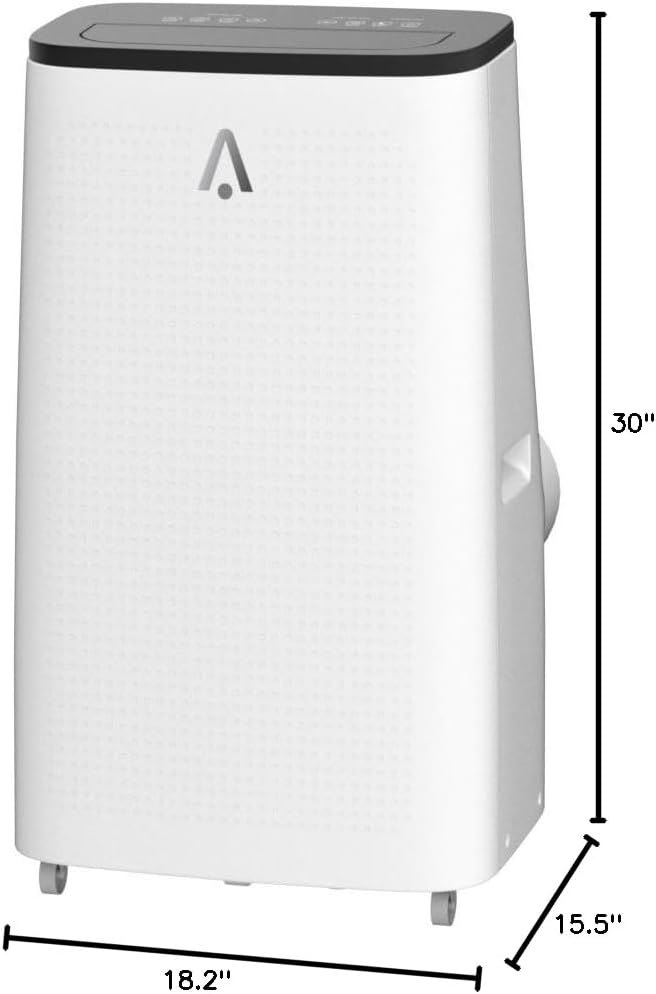
Image: Diagram illustrating the physical dimensions of the Acekool PAC Portable Air Conditioner.
Troubleshooting
If you encounter issues with your Acekool PAC Portable Air Conditioner, refer to the following common troubleshooting steps:
- Unit Not Turning On:
- Check if the power cord is securely plugged into a grounded outlet.
- Press the reset button on the power cord plug.
- Ensure there is no power outage in your area.
- Insufficient Cooling:
- Verify that the exhaust hose is properly installed and sealed to the window kit, expelling hot air outside.
- Check if the air filter is clean. A clogged filter can restrict airflow and reduce cooling efficiency.
- Ensure the room size is within the recommended coverage area (up to 750 sq. ft.).
- Close all windows and doors in the room to prevent warm air from entering.
- Confirm the desired temperature setting is lower than the ambient room temperature.
- Water Leakage or Full Tank Indicator:
- If the "Full Tank" indicator lights up, drain the water from the unit using the drain plugs.
- Ensure the drain plugs are securely closed after draining.
- If using continuous drainage, check that the drain hose is not kinked or blocked.
- Unusual Noise:
- Ensure the unit is placed on a flat, stable surface.
- Check for any obstructions in the air intake or exhaust vents.
Warranty and Support
The Acekool PAC Portable Air Conditioner comes with a 1-year standard warranty. For any product-related inquiries, technical assistance, or warranty claims, please contact Acekool Customer Service.
Customer Support: For assistance, please refer to the contact information provided in your warranty card or visit the official Acekool website.
Returns: This product is eligible for 30-day easy returns.


