
Introduction
Thank you for choosing the BOMATA T101 Digital Instant Read Thermometer. This device is designed for quick and accurate temperature measurement of various substances, including food, liquids, and more. Its waterproof design and durable construction make it an essential tool for your kitchen and beyond. Please read this manual thoroughly before use to ensure proper operation and maintenance.

Figure 1: BOMATA T101 Digital Instant Read Thermometer
Product Overview
Key Features:
- IPX7 Waterproof Rating: Designed to withstand splashes and can be rinsed under running water for easy cleaning.
- Fast and Accurate Readings: Provides temperature readings within 2-4 seconds with an accuracy of ±1.8°F (±1°C) and 0.1°F increments.
- Wide Temperature Range: Measures temperatures from -58°F to +572°F (-50°C to +300°C).
- Easy-to-Use Interface: Features simple ON/OFF, HOLD, and °C/°F switch buttons.
- Convenient Design: Includes a 5-inch food-safe 304 stainless steel probe and a color-matching protective sheath with a pocket clip.
- Power Saving: Automatically turns off after 10 minutes of inactivity.
Components Included:
- BOMATA T101 Digital Instant Read Thermometer
- Probe Protection Tube with Pocket Clip
- Instruction Manual (includes warranty information)
- 2 x LR44 Batteries (pre-installed)
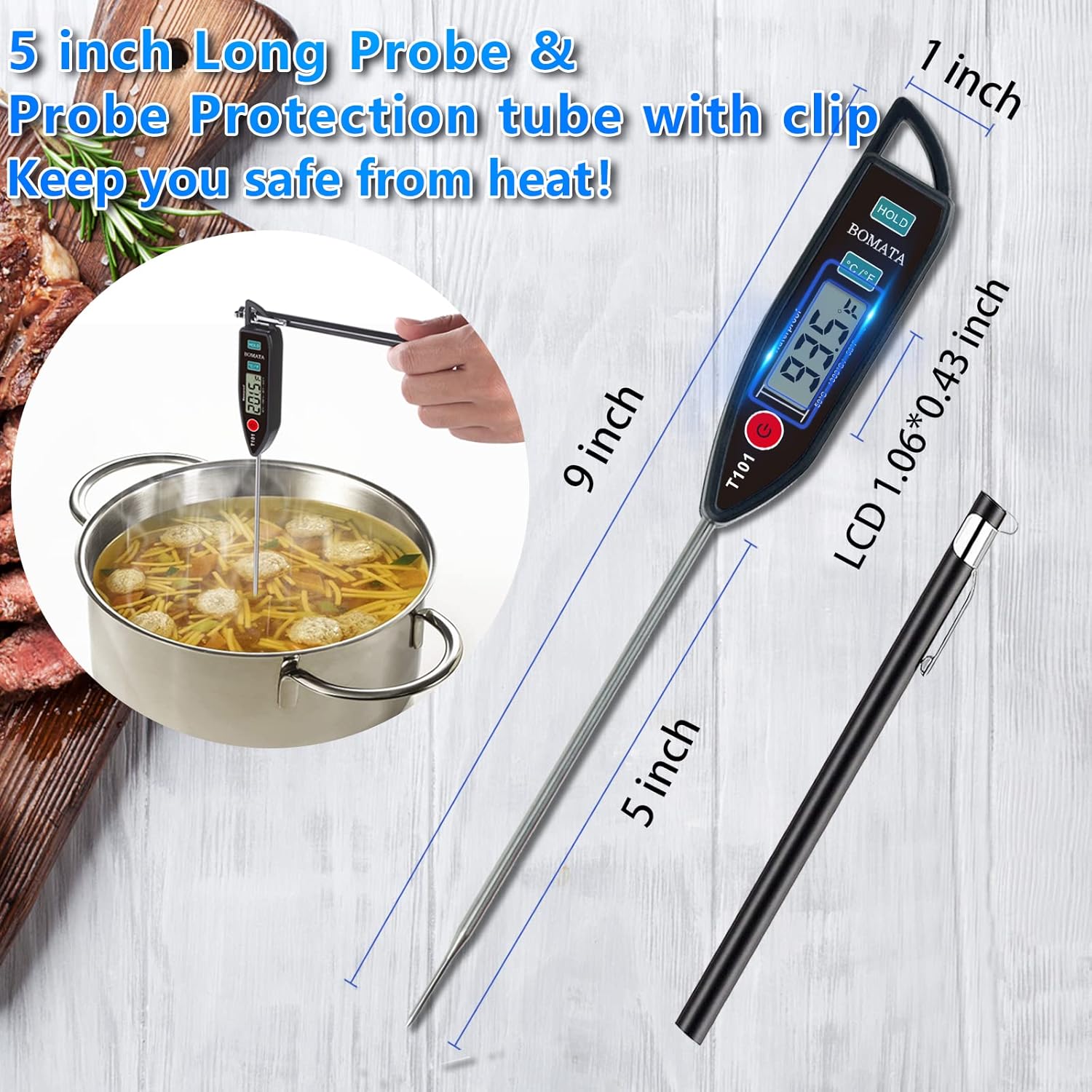
Figure 2: Thermometer Dimensions and Probe Length
Setup
Battery Installation:
The BOMATA T101 thermometer comes with two LR44 batteries pre-installed. If replacement is needed:
- Locate the battery compartment on the back of the thermometer head.
- Use a small coin to twist the battery cover counter-clockwise to open.
- Remove the old batteries and insert two new LR44 batteries, ensuring the correct polarity (+/-).
- Replace the battery cover and twist clockwise to secure.

Figure 3: Battery Compartment and LR44 Batteries
Operating Instructions
Power On/Off:
- Press the ON/OFF button to turn the thermometer on.
- Press the ON/OFF button again to turn the thermometer off.
- The thermometer will automatically shut off after 10 minutes of inactivity to conserve battery life.
Switching Temperature Units (°C/°F):
- With the thermometer powered on, press the °C/°F button to toggle between Celsius and Fahrenheit units.
Taking a Temperature Reading:
- Ensure the thermometer is powered on.
- Carefully insert the stainless steel probe into the center of the food or liquid you wish to measure. Ensure the probe tip is fully immersed and not touching bone, fat, or the bottom of the container.
- Wait for 2-4 seconds for the reading to stabilize on the digital display.
Using the HOLD Function:
- While taking a reading, press the HOLD button to freeze the current temperature displayed on the screen. This allows you to remove the probe from the heat source and read the temperature comfortably.
- Press the HOLD button again to release the function and resume live temperature readings.

Figure 4: Thermometer Controls

Figure 5: Versatile Applications of the T101 Thermometer
Maintenance and Care
Cleaning:
- The BOMATA T101 is IPX7 waterproof, allowing for easy cleaning. After each use, rinse the probe and the body of the thermometer under running water.
- Use mild soap if necessary.
- Wipe dry with a clean cloth.
- Do not iron. Hand wash only.

Figure 6: Cleaning the Waterproof Thermometer
Storage:
- Always store the thermometer with the probe protection tube in place to prevent damage to the probe and ensure safety.
- Store in a clean, dry place away from extreme temperatures.
Troubleshooting
| Problem | Possible Cause | Solution |
|---|---|---|
| No display / Thermometer won't turn on | Dead or incorrectly installed batteries. | Check battery polarity. Replace LR44 batteries if necessary. |
| Inaccurate readings | Probe not fully inserted; probe tip touching bone, fat, or container; extreme ambient temperature. | Ensure probe is inserted correctly into the center of the item. Avoid contact with hard surfaces. Allow thermometer to acclimate to room temperature before use. |
| Slow response time | Temperature difference is too small; probe not fully immersed. | Ensure adequate immersion depth. The thermometer typically responds within 2-4 seconds for significant temperature changes. |
Specifications
| Attribute | Detail |
|---|---|
| Model Name | T101 |
| Brand | BOMATA |
| Color | Black |
| Temperature Range | -58°F to +572°F (-50°C to +300°C) |
| Accuracy | ±1.8°F (±1°C) |
| Response Time | 2-4 seconds |
| Resolution | 0.1°F |
| Probe Material | Food-safe 304 Stainless Steel |
| Probe Length | 5 inches |
| Waterproof Rating | IPX7 |
| Power Source | 2 x LR44 Batteries (included) |
| Auto-Off | 10 minutes of inactivity |
| Certifications | CE, FCC |
| Item Weight | 1.34 ounces |
Warranty and Support
Warranty Information:
The BOMATA T101 Digital Instant Read Thermometer comes with a 10-year warranty, reflecting its durable design and quality construction. This warranty covers manufacturing defects and ensures long-term reliability for cooking, BBQ, and liquid temperature measurements.
Customer Support:
For any questions, concerns, or warranty claims, please contact BOMATA customer support through the retailer's platform or refer to the contact information provided on the product packaging or the official BOMATA website. Please have your model number (T101) and purchase details ready when contacting support.