
1. Product Overview
The Fotopro X-Aircross 2 is a lightweight and compact carbon fiber travel tripod designed for photographers and videographers. It features a quick-locking system for rapid setup and a versatile ball head for various shooting angles.
- Fast Extension: Equipped with a patented quick-locking system for rapid leg extension.
- Lightweight & Compact: Weighs only 1.98 lbs (0.94 kg) with a folded height of 14.2 inches (36.5 cm), making it ideal for travel.
- High Load Capacity: Supports cameras up to 22 lbs (10 kg).
- 360-Degree Panorama Ball Head: Allows for precise multi-angle adjustments and accurate panoramic shots.
- Durable & Sturdy: Constructed from 3K high-tech carbon fiber for excellent strength and stability.
- Flexible & Extendable: Features 5-section carbon fiber legs and a twist-lock system, adjustable from 6.8 inches (17.3 cm) to 60 inches (152.4 cm).
- Invertible Center Axis: Provides amazing low angles for macro shooting.
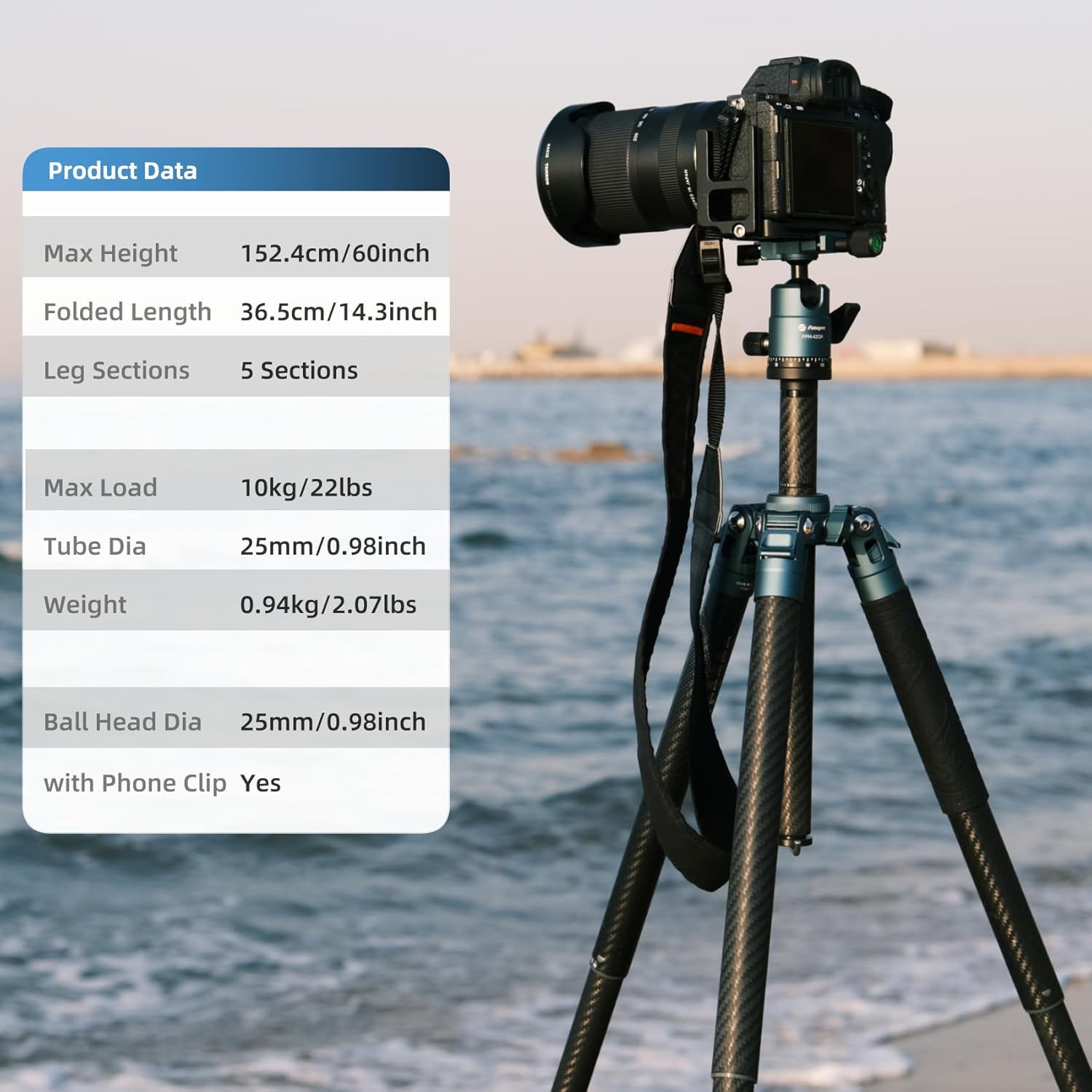
Image 1: Key product data for the Fotopro X-Aircross 2 Tripod, including max height, folded length, leg sections, max load, tube diameter, weight, and ball head diameter.

Image 2: The Fotopro X-Aircross 2 Tripod extended to its maximum height of 60 inches (152.4 cm) with a camera mounted.

Image 3: The Fotopro X-Aircross 2 Tripod folded to 14.3 inches (36.5 cm) and shown on a scale indicating its ultra-lightweight design at 2.07 lbs (0.94 kg), fitting easily into a backpack.
2. Setup Guide
2.1 Unpacking and Initial Inspection
Carefully remove the tripod and its accessories from the packaging. Inspect all components for any signs of damage. Ensure all parts listed in the packing list are present.
2.2 Extending and Retracting Legs
- To extend a leg section, twist the rubberized lock counter-clockwise until it loosens.
- Pull the leg section downwards to extend it to the desired length.
- Twist the lock clockwise to secure the leg section in place. Repeat for all sections and legs.
- To retract, reverse the process: twist counter-clockwise, push the leg section in, then twist clockwise to lock.

Image 4: Visual guide for extending and locking the tripod legs using the twist-lock mechanism. Turn left to unlock, pull downward to extend, and turn right to lock.
2.3 Adjusting Leg Angles
Each leg features an angle adjustment lock. Press the lock to release the leg and adjust it to one of the three available angles for stability on uneven terrain or for low-angle shots. Release the lock to secure the leg in position.
2.4 Attaching the Ball Head and Camera
- Ensure the ball head is securely screwed onto the tripod's main column. The tripod supports both 1/4-inch and 3/8-inch mounting options.
- Attach the quick release plate to the bottom of your camera by screwing the 1/4-inch screw into the camera's tripod mount.
- Open the quick release clamp on the ball head.
- Slide the camera with the attached quick release plate into the clamp until it clicks securely into place. Tighten the clamp lever to ensure the camera is firmly mounted.

Image 5: Diagram showing the universal 1/4-inch and 3/8-inch screw mounts on the tripod, allowing compatibility with various camera equipment and accessories.
2.5 Center Column Adjustment and Inversion
The center column can be extended for additional height. Loosen the locking collar at the base of the center column, raise or lower the column, and then tighten the collar. For macro photography or extremely low angles, the center column can be inverted. To do this, fully extend and remove the center column, then reinsert it upside down into the tripod's base, securing the ball head at the bottom.
2.6 Attaching Accessories
The tripod features dual 1/4-inch threaded holes on the main body, allowing you to attach various accessories such as external monitors, microphones, or LED lights using compatible articulating arms.
3. Operating Instructions
3.1 Ball Head Operation
The FPH-42QR ball head allows for smooth and precise camera positioning. Use the main locking knob to control the ball's movement. Loosen it to adjust the camera angle freely, and tighten it to lock the camera in position. A separate knob controls the 360-degree panning base for panoramic shots.
3.2 Vertical and Horizontal Shooting
The ball head's design allows for quick transitions between horizontal and vertical shooting orientations. Simply loosen the main locking knob, tilt the camera into the desired orientation, and re-tighten the knob.

Image 6: The tripod supporting a camera in both vertical and horizontal shooting positions, demonstrating its 22 lbs (10 kg) max load capacity.
3.3 Using the Integrated Phone Clip
The tripod includes a hidden phone clip within the center column. Unscrew the bottom cap of the center column to reveal and extract the phone clip. This clip can be attached to the ball head or an accessory arm to securely hold your smartphone for photography or video recording.

Image 7: A user demonstrating the integrated phone clip, which can be pulled out from the center column and attached to the tripod for smartphone use.
3.4 Stability Hook
A hook is located at the bottom of the center column. You can hang your camera bag or a counterweight from this hook to increase the tripod's stability, especially in windy conditions or when using heavy camera setups.

Image 8: A backpack hanging from the stability hook at the bottom of the tripod's center column, illustrating how to add weight for increased stability.
4. Maintenance
Proper maintenance ensures the longevity and optimal performance of your Fotopro X-Aircross 2 tripod.
- Cleaning: After use, especially in dusty, sandy, or wet environments, wipe down the tripod legs and ball head with a soft, damp cloth. Avoid harsh chemicals.
- Lubrication: Periodically check the leg locks and ball head for smooth operation. If necessary, apply a small amount of silicone-based lubricant to moving parts, avoiding excessive application.
- Storage: Store the tripod in its padded carrying bag in a cool, dry place away from direct sunlight and extreme temperatures.
- Inspection: Regularly inspect all screws, joints, and locking mechanisms for tightness and wear. Tighten any loose screws with the provided Allen keys.
5. Troubleshooting
- Legs not extending/retracting smoothly: Ensure the twist locks are fully loosened. Clean any sand or debris from the leg sections.
- Camera not stable on ball head: Verify that the quick release plate is correctly seated and the clamp lever is fully tightened. Ensure the main ball head locking knob is securely tightened.
- Tripod feels wobbly: Check that all leg sections are fully extended and locked. Ensure leg angles are set correctly and evenly. Consider hanging a counterweight from the stability hook.
6. Specifications
| Feature | Specification |
|---|---|
| Brand | Fotopro |
| Model Name | X-Aircross 2 (also referred to as X-Aircross 3C in some specifications) |
| Material | Carbon Fiber |
| Item Weight | 898.11 Grams (approx. 1.98 lbs) |
| Weight Limit | 12 Kilograms (approx. 22 lbs) |
| Maximum Height | 64 Inches (162.5 cm) |
| Minimum Height | 6.8 Inches (17.3 cm) |
| Folded Size | 14.2 inches (36.0 cm) |
| Number of Leg Sections | 5 |
| Leg Diameter | 25 Millimeters |
| Tripod Head Type | Ball Head (FPH-42QR) |
| Special Feature | Foldable, Lightweight, 360-degree Ball Head, Quick Release Plate |
| Compatible Devices | Camera |
7. Official Product Videos
Fotopro X-Aircross 2 Travel Tripod Ultra Lightweight Tripod
Video 1: This video showcases the ultra-lightweight design and key features of the Fotopro X-Aircross 2 Travel Tripod, including its quick setup and portability.
Fotopro X-Aircross 2 Carbon Fiber Lightweight Travel Tripod
Video 2: A detailed overview of the Fotopro X-Aircross 2 Carbon Fiber Tripod, highlighting its lightweight construction and suitability for travel photography.
X-Aircross carbon fiber tripod blue
Video 3: This video demonstrates the features and usage of the X-Aircross carbon fiber tripod in blue, showcasing its design and functionality.
8. Warranty and Support
Fotopro products are designed for durability and performance. For warranty information, product support, or to explore other Fotopro products, please visit the official Fotopro Store.
