
ODK B01XS01998JP
ODK L-Shaped Desk User Manual
Model: B01XS01998JP
1. Product Overview
The ODK L-Shaped Desk is a versatile and stylish furniture piece designed for both computer work and gaming. Its L-shaped design maximizes corner space, making it suitable for various environments such as home offices, study rooms, or gaming setups. The desk features a durable construction with a high-strength melamine laminate top and a sturdy steel frame, ensuring stability and longevity. It also includes convenient storage solutions like a removable storage bag and an integrated monitor stand to enhance ergonomics and organization.
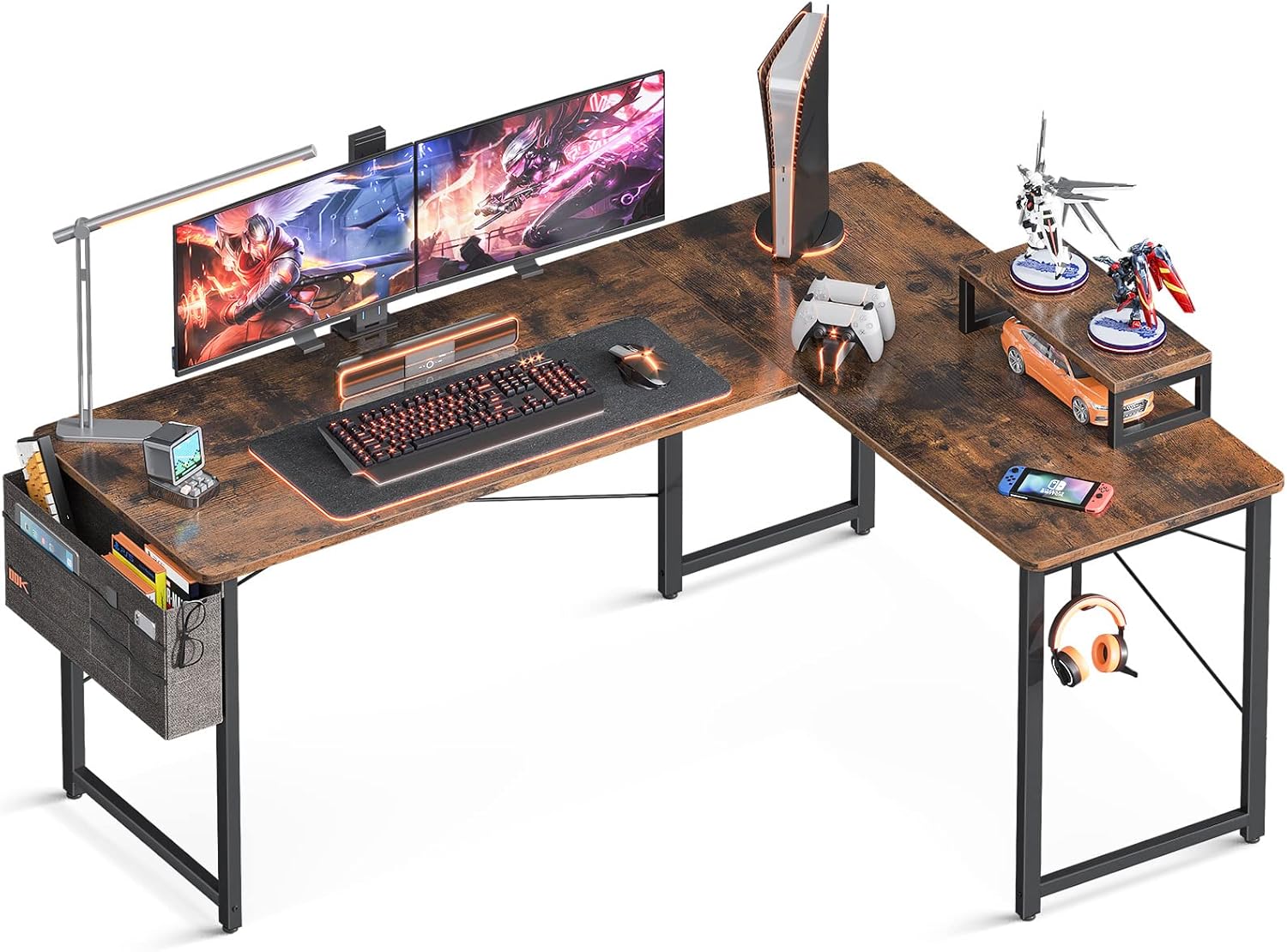
Figure 1.1: The ODK L-Shaped Desk in a typical setup, showcasing its spacious design and capacity for multiple monitors and peripherals.
2. Safety Information
- Ensure all components are securely fastened before use.
- Do not exceed the maximum load capacity of the tabletop (approximately 60 kg).
- Keep small parts away from children during assembly to prevent choking hazards.
- Avoid placing hot items directly on the desk surface without protection.
- Use caution when moving the assembled desk to prevent injury or damage.
- The desk top features a fillet design to reduce the risk of injury from accidental bumps.
3. Package Contents
Please verify that all parts are present before beginning assembly. If any parts are missing or damaged, please contact customer support.
| Part | Description | Quantity |
|---|---|---|
| A | Main Desktop Panel (Long) | 1 |
| B | Side Desktop Panel (Short) | 1 |
| C | Monitor Stand Panel | 1 |
| D | Steel Frame Legs | 4 |
| E | Reinforcement Pipes | Various |
| F | Cross-Bracing Hardware | Various |
| G | Adjustable Feet | 4 |
| H | Storage Bag | 1 |
| I | Headphone Hook | 1 |
| J | Assembly Hardware (Screws, Allen Wrench, etc.) | 1 set |
4. Assembly Instructions (Setup)
This desk requires customer assembly. Please follow these steps carefully. It is recommended to assemble the desk with two people for easier handling.
- Unpack and Identify Parts: Lay out all components on a clean, soft surface (e.g., a blanket or cardboard) to prevent scratches. Refer to the "Package Contents" section to identify each part.
- Assemble the Steel Frame:
- Attach the steel frame legs (D) to the reinforcement pipes (E) using the provided hardware (J). Ensure all screws are finger-tight at this stage.
- Install the cross-bracing hardware (F) to the frame for added stability. Tighten these screws securely.
- Attach Desktop Panels:
- Carefully place the main desktop panel (A) onto the assembled frame. Align the pre-drilled holes.
- Attach the side desktop panel (B) to the main panel and the frame. The L-shape can be configured to either the left or right side based on your preference.
- Secure both desktop panels to the frame using the appropriate screws from hardware (J). Once all panels are in place, fully tighten all screws on the frame and panels.
- Install Adjustable Feet: Screw the adjustable feet (G) into the bottom of each steel leg. These can be adjusted to level the desk on uneven floors.
- Assemble Monitor Stand: Attach the monitor stand panel (C) to its support legs (if separate) and place it on the desired section of the desk.
- Attach Accessories:
- Hang the storage bag (H) on the side of the desk using its integrated hooks.
- Attach the headphone hook (I) to the underside of the desk as desired.
- Final Check: Ensure all connections are tight and the desk is stable before placing any items on it.

Figure 4.1: Desk dimensions and structural overview, aiding in assembly and placement planning.
5. Features and Usage (Operating)
5.1 L-Shaped Design
The L-shaped configuration allows for optimal use of corner spaces, providing a large surface area for multiple monitors, keyboards, mice, and other peripherals. This design is ideal for creating a dedicated workspace for gaming, studying, or professional tasks.

Figure 5.1: The desk integrated into a home office environment, demonstrating its spacious and functional layout.
5.2 Integrated Monitor Stand
The included monitor stand elevates your display to an ergonomic height, helping to improve posture and reduce neck strain during long periods of use. This feature contributes to a more comfortable and efficient work or gaming experience.

Figure 5.2: A detailed view of the monitor stand, showing its elevation and potential for storing small items underneath.
5.3 Storage Bag and Headphone Hook
The removable storage bag provides convenient access to books, documents, and small accessories, keeping your desktop clutter-free. The headphone hook offers a dedicated spot to hang your headphones, preventing them from taking up valuable desk space or getting damaged.

Figure 5.3: The fabric storage bag attached to the desk, illustrating its capacity for various items like notebooks, pens, and glasses.

Figure 5.4: The headphone hook located on the underside of the desk, providing a convenient storage solution for audio equipment.
6. Care and Maintenance
- Cleaning: Wipe the desk surface with a soft, damp cloth. For stubborn stains, use a mild soap solution and dry immediately. Avoid abrasive cleaners or harsh chemicals, as they may damage the melamine laminate finish.
- Protection: Use coasters for drinks and placemats for hot items to protect the surface from heat and moisture damage.
- Inspection: Periodically check all screws and connections to ensure they remain tight. Re-tighten if necessary to maintain stability.
- Movement: When moving the desk, lift it rather than dragging it to prevent damage to the legs or floor.
7. Troubleshooting
| Problem | Possible Cause | Solution |
|---|---|---|
| Desk is wobbly/unstable. | Screws are loose; uneven floor. | Ensure all assembly screws are fully tightened. Adjust the leveling feet at the bottom of the legs until the desk is stable. |
| Parts do not align during assembly. | Incorrect orientation of parts; screws not fully loosened. | Double-check the assembly instructions for correct part orientation. Loosen all screws slightly, align parts, then re-tighten. |
| Surface scratches or marks. | Sharp objects; abrasive cleaning. | Use protective mats or pads for items that may scratch the surface. Clean with soft cloths and mild solutions only. Minor marks may be reduced with furniture polish. |
| Missing parts upon delivery. | Packaging error. | Contact ODK customer support immediately with your purchase details. |
8. Specifications
- Brand: ODK
- Model Number: B01XS01998JP
- ASIN: B0B1PX36P3
- Dimensions (L x W x H): Approximately 146 cm x 120 cm x 74 cm (57.5 in x 47.2 in x 29.1 in)
- Product Weight: Approximately 18.5 kg (40.8 lbs) (Package Weight)
- Material: Melamine Laminate (Top), Steel (Frame)
- Color: Vintage
- Load Capacity (Tabletop): Approximately 60 kg (132 lbs)
- Assembly Required: Yes (Customer Assembly)
9. Warranty and Support
The ODK L-Shaped Desk comes with a 1-year manufacturer's warranty from the date of purchase. This warranty covers defects in materials and workmanship under normal use.
For warranty claims, missing parts, or any other inquiries, please contact ODK customer support. Please have your purchase receipt and model number (B01XS01998JP) ready when contacting support.
Contact Information: Please refer to your purchase platform or the original packaging for the most current customer support contact details for ODK.
Related documentsB01XS01998JP


Ask a question about this manual
Ask about setup, troubleshooting, compatibility, parts, safety, or missing instructions. Manuals+ will review the question and use this page’s manual context to help answer it.