1. Introduction
Thank you for choosing the Moman C2 Wireless Lavalier Microphone System. This system is designed to provide high-quality audio recording for a variety of applications, including vlogging, live streaming, interviews, and video production. With its 2.4GHz wireless transmission, compact design, and versatile compatibility, the Moman C2 offers a reliable and convenient solution for capturing clear sound.
This manual provides detailed instructions on how to set up, operate, and maintain your Moman C2 Wireless Lavalier Microphone System. Please read this manual thoroughly before use to ensure optimal performance and longevity of your device.
2. Product Overview
The Moman C2 system consists of a transmitter, a receiver, and various accessories to facilitate its use with different devices.
2.1. Package Contents
- 1 x RX Receiver
- 1 x TX Transmitter
- 1 x 2-in-1 Charging Cable
- 1 x 3.5mm TRS Camera Cable
- 1 x 3.5mm TRRS Smartphone Cable
- 1 x Carrying Bag
- 1 x Lavalier Microphone (external)
- 1 x Type-C to Type-C Cable (not included in all packages, check your specific model)
- 1 x Type-C to Lightning Adapter (not included in all packages, check your specific model)
- 1 x Magnet (for flexible wearing)
- 1 x User Manual (this document)

Figure 2.1: Moman C2 Wireless Lavalier Microphone System and Included Accessories.

Figure 2.2: Moman C2 Transmitter and Receiver.
2.2. Key Features
- 2.4GHz Wireless Transmission: Provides a stable and reliable audio transmission up to 230ft/70m (LOS) or 492ft/150m (LOS) depending on environmental conditions.
- Broadcast-Quality Sound: Delivers clear audio with features like gain control and a 150Hz low-cut function to filter out low-frequency noises.
- TFT Screen Display: Bright screen on both transmitter and receiver to show working status, audio dynamic, audio level, and battery status.
- Versatile Compatibility: Works with DSLR cameras, camcorders, smartphones, tablets, and laptops using included 3.5mm TRRS & TRS cables.
- Compact & Lightweight: Each unit weighs approximately 39g with dimensions of 52x42x17mm, making them highly portable.
- Long Battery Life: Up to 8 hours of working time on a single charge, with a full charge achieved in about 1.5 hours using the 2-in-1 charging cable.
- Built-in and External Mic Support: Supports both the integrated omnidirectional microphone and the included external lavalier microphone.
- One-Button Noise Reduction: Filters out specific low-frequency noises for clearer sound output.
- Real-Time Monitoring: 3.5mm headphone jack on the receiver allows for real-time audio monitoring.
3. Setup
3.1. Charging the Devices
Before first use, fully charge both the transmitter (TX) and receiver (RX) units. Use the provided 2-in-1 charging cable to connect both units to a USB power source (e.g., wall adapter, power bank, computer USB port). A full charge typically takes about 1.5 hours.

Figure 3.1: Charging the Transmitter and Receiver.
3.2. Powering On/Off
To power on or off, press and hold the power button on each unit until the screen illuminates or turns off.
3.3. Pairing
The Moman C2 units are designed for automatic pairing upon power-on. Simply turn on both the transmitter and receiver, and they should connect automatically within a few seconds. The screen will indicate a successful connection.
3.4. Connecting to Your Device
The Moman C2 system is compatible with a wide range of recording devices. Select the appropriate cable for your setup:
- For DSLR Cameras/Camcorders: Use the 3.5mm TRS Camera Cable. Connect one end to the "OUT" port on the receiver and the other end to the microphone input jack on your camera.
- For Smartphones/Tablets (with 3.5mm jack): Use the 3.5mm TRRS Smartphone Cable. Connect one end to the "OUT" port on the receiver and the other end to the headphone/microphone jack on your smartphone/tablet.
- For Smartphones/Tablets (without 3.5mm jack): You may need an additional adapter (e.g., Lightning to 3.5mm for iPhone, USB-C to 3.5mm for Android) which is not included with the system.
- For Laptops/Computers: Use a USB-C to USB-C cable or a USB-C to USB-A adapter (not included) to connect the receiver to your computer's USB port.

Figure 3.2: Connection Methods for Different Devices.
3.5. Attaching the Microphone
The Moman C2 transmitter features a built-in omnidirectional microphone. For optimal sound quality or discreet placement, you can also use the included external lavalier microphone.
- Using Built-in Mic: Clip the transmitter directly onto your clothing, ensuring the microphone (top of the unit) is facing the sound source.
- Using External Lavalier Mic: Plug the external lavalier microphone into the 3.5mm "MIC IN" port on the transmitter. Clip the lavalier mic to your clothing, approximately 6-8 inches from your mouth.
The transmitter can be attached using its integrated clip or the provided magnet for more flexible placement options, such as under clothing.

Figure 3.3: Supporting Built-in and External Microphones.

Figure 3.4: Flexible Wearing Style and Magnetic Use.
4. Operating Instructions
4.1. Gain Control
The receiver features a gain control function (0-5 levels) to optimize signal levels. Adjust the gain using the dedicated buttons on the receiver to achieve the desired audio input level without distortion. Monitor the audio levels on the TFT screen.

Figure 4.1: Gain Control and Noise Reduction.
4.2. Low-Cut Function
To filter out specific low-frequency noises such as wind, air conditioning hum, or traffic noise, activate the 150Hz low-cut function. Refer to your device's specific button or menu option for this feature.
4.3. Mute Function
The transmitter has a one-button mute function. Press the mute button to temporarily silence the microphone input. Press it again to unmute.
4.4. Real-Time Monitoring
Connect headphones to the 3.5mm headphone jack on the receiver to monitor your audio in real-time. This allows you to check sound quality and make adjustments during recording.
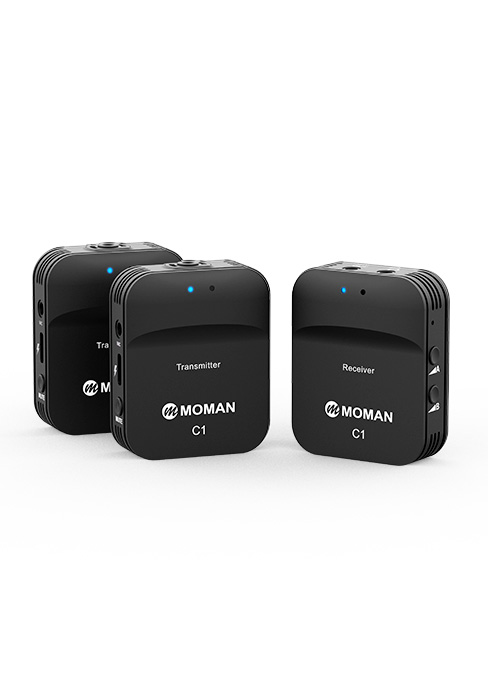
Figure 4.2: Real-Time Audio Monitoring.
4.5. Mono/Stereo Recording & Safety Output
The Moman C2 supports both Mono and Stereo recording modes, providing flexibility for post-processing. Additionally, it features a Safety Output mode, which records a secondary track at a lower decibel level (e.g., 6 dB lower) to prevent audio clipping or distortion in case of unexpected loud sounds.

Figure 4.3: Mono/Stereo Recording and Safety Output.
4.6. Usage Scenarios
The Moman C2 is ideal for various applications:
- Live Streaming: Capture clear audio for your online broadcasts.
- Vlogging: Enhance your video blogs with professional sound.
- Interviews: Record crisp dialogue for interviews.
- Video Recording: Improve audio quality for all your video projects.

Figure 4.4: Versatile Usage Scenarios.
4.7. Wireless Transmission Range
The Moman C2 system operates on a 2.4GHz spectrum, offering a transmission range of up to 492ft/150m in Line-of-Sight (LOS) conditions and up to 164ft/50m in Non-Line-of-Sight (NLOS) conditions. Optimal performance is achieved in open environments with minimal obstructions.

Figure 4.5: Wireless Transmission Range.
5. Maintenance
Proper maintenance ensures the longevity and optimal performance of your Moman C2 Wireless Lavalier Microphone System.
- Cleaning: Use a soft, dry cloth to clean the units. Do not use liquid cleaners or solvents.
- Storage: Store the system in the provided carrying bag when not in use to protect it from dust, moisture, and physical damage. Store in a cool, dry place.
- Battery Care: To preserve battery life, avoid fully discharging the units frequently. If storing for an extended period, charge the batteries to approximately 50% every three months.
- Avoid Extreme Conditions: Do not expose the units to extreme temperatures, direct sunlight, or high humidity.
6. Troubleshooting
If you encounter issues with your Moman C2 system, refer to the following common problems and solutions:
| Problem | Possible Cause | Solution |
|---|---|---|
| No sound output. |
|
|
| Poor sound quality (static, distortion). |
|
|
| Short battery life. |
|
|
7. Specifications
| Feature | Detail |
|---|---|
| Model Name | MO-C2-US |
| Brand | Moman |
| Connectivity Technology | 2.4GHz |
| Microphone Form Factor | Lavalier, Built-in |
| Polar Pattern | Omnidirectional |
| Signal-to-Noise Ratio | 80 dB |
| Number of Channels | 2 |
| Power Source | Battery Powered (1 Lithium Polymer battery required) |
| Battery Type | Lithium Ion |
| Item Dimensions (L x W x H) | 2.05 x 1.65 x 0.67 inches (52 x 42 x 17 mm) |
| Item Weight | 10.2 ounces (approx. 39g per unit) |
| Material | Plastic |
| Compatible Devices | Camcorder, Camera, Laptop, Personal Computer, Smartphone |
| Connector Type | 3.5 mm Jack, USB Type-C |
| Recommended Uses | Online meeting, Outdoor recording, Streaming, YouTube/Tiktok Vlog |
8. Official Product Videos
Watch these official videos for a visual guide on using your Moman C2 Wireless Lavalier Microphone System.
Video 8.1: Moman C2 Wireless Microphone System Overview and Features. This video demonstrates the key functionalities and benefits of the Moman C2 system, including its compact design, sound quality, and ease of use.
9. Warranty and Support
Moman products are designed for reliability and performance. For detailed warranty information, please refer to the warranty card included with your product or visit the official Moman website.
For technical support, troubleshooting assistance, or any inquiries regarding your Moman C2 Wireless Lavalier Microphone System, please contact Moman customer service. You can often find support contact information on the official Moman website or through your purchase platform.
A digital version of this user manual is also available for download: Download User Manual (PDF)


