
Introduction
This instruction manual provides guidance for the installation and use of the Lamshaw 3D Full Coverage PET Soft Screen Protector. This screen protector is specifically designed for the NAIXUES DK09 1.69" Smart Watch, offering comprehensive protection and maintaining screen functionality.
The package includes 3 units of the full coverage 3D screen protectors. Please note that the NAIXUES DK09 1.69" Smart Watch itself is not included.
Installation Guide
Follow these steps carefully to ensure a smooth and bubble-free application of your screen protector:
- Clean the Watch Screen: Use the provided wet wipe to thoroughly clean the watch screen. Follow with the dry wipe to ensure the screen is completely dry and free of dust or smudges.
- Prepare the Protector: Gently pull the tab to remove the protective film from the screen protector. Avoid touching the adhesive side of the protector to prevent fingerprints or dust.
- Align and Apply: Carefully align the screen protector with the watch screen. Once aligned, gently place the protector onto the watch screen. Do not press the middle of the protector at this stage.
- Remove Air Bubbles: Press the protector from one side to the other, gently squeezing out all air until the screen protector fits the entire watch face perfectly. If any bubbles remain, gently lift the corner of the protector near the bubbles to release them, then slowly re-apply it onto the watch screen, pushing the air out.
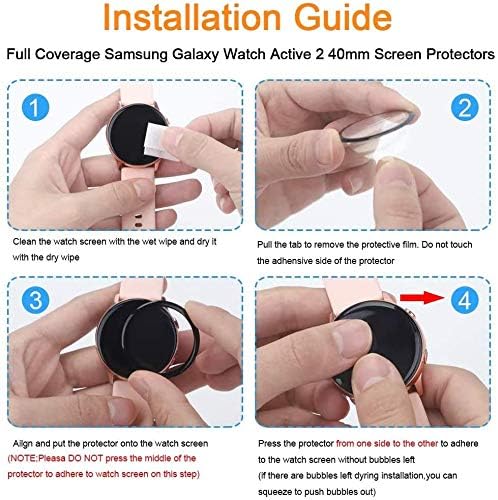
Image: Step-by-step visual guide for applying the screen protector.

Image: Demonstrates the process of gently pushing air bubbles out from the screen protector.
Video: A detailed demonstration of the screen protector installation process.
Product Features
The Lamshaw 3D Full Coverage PET Soft Screen Protector is engineered to enhance your smartwatch experience with the following features:
- Touch Sensitivity & HD Clarity: The screen protector adheres tightly to the watch, ensuring that the screen's sensitivity remains undiminished. It provides a 100% smooth touch feeling and an optically transparent level for a high-definition visual experience on your NAIXUES DK09 1.69" Smart Watch.
- Safety Protection: This full coverage screen protector offers edge-to-edge protection for your NAIXUES DK09 1.69" Smart Watch, safeguarding it from drops, scratches, and scrapes. Its design ensures it is not easy to come off unless intentionally peeled.

Image: Illustrates the bubble-free design of the screen protector, ensuring clear visibility.
Care and Maintenance
To maintain the clarity and effectiveness of your screen protector, follow these simple care guidelines:
- Regularly clean the screen protector with a soft, lint-free cloth to remove dust and smudges.
- Avoid using harsh chemicals or abrasive materials, as these can damage the protector's surface.
- If the protector begins to peel or shows significant wear, consider replacing it with a new one from the pack to ensure continued protection.
Troubleshooting
Issue: Air Bubbles After Installation
If you notice air bubbles after the initial application, do not worry. The soft PET material allows for re-adjustment:
- Gently lift the corner of the screen protector closest to the bubble.
- Slowly re-apply the protector onto the watch screen, using your finger or a soft card to push the air out towards the nearest edge.
- Ensure the screen is clean before re-application to prevent dust from being trapped.
Product Specifications
| Brand | Lamshaw |
| Compatible Device | NAIXUES DK09 1.69" Smart Watch |
| Material | Polyethylene Terephthalate (PET) |
| Item Hardness | Soft Screen Protector |
| Screen Size Compatibility | 1.69 Inches |
| Number of Items | 3 |
| Package Dimensions | 1.97 x 1.97 x 1.97 inches |
| Item Weight | 3.52 ounces |
Warranty Information
This product is covered by the manufacturer's standard warranty. For specific details regarding warranty coverage, duration, and claims, please refer to the packaging or contact the manufacturer directly. Keep your proof of purchase for warranty validation.
Customer Support
Should you have any questions, require assistance with installation, or encounter any issues with your Lamshaw screen protector, please contact our customer support team. Contact information can typically be found on the product packaging or the manufacturer's official website.