
Important Safety Information
Read all instructions carefully before operating the safe. Failure to follow these instructions may result in injury or damage to the safe. Keep this manual for future reference.
- Always store firearms unloaded and locked.
- Keep keys and access codes/fingerprints in a secure location, away from children and unauthorized individuals.
- Ensure the safe is securely mounted to prevent tipping or unauthorized removal.
- Do not store flammable materials or liquids inside the safe.
Product Overview
The KAER Rifle Safe provides secure storage for firearms and valuables, featuring multiple access methods including biometric fingerprint, digital keypad, and emergency key. It includes adjustable interior components for flexible storage.

Image: Overview of the KAER Rifle Safe, highlighting its exterior, digital keypad with fingerprint sensor, and the interior layout with adjustable racks.
Key Features:
- Three Access Methods: Biometric fingerprint, digital keypad, and emergency key.
- Capacity: Designed to accommodate 3-5 rifles, with a removable shelf for pistols and other items.
- 180-Degree Door Opening: Allows for full access to the safe's interior.
- Silent Mode: Option to disable keypad sounds for discreet operation.
- Locking System: Automatic lockout after 5 incorrect password attempts.
- Interior Lighting: For visibility in low-light conditions.
Package Contents
Verify that all items are present in the package:
- 1 x KAER Rifle Gun Safe Cabinet
- 2 x Backup Keys
- 4 x Anchor Bolts for Mounting
- 1 x Emergency Battery Pack
- 1 x Instruction Manual (this document)
- Removable Pistol Racks and Long Gun Racks
- Small Storage Box
Setup
1. Unpacking and Initial Inspection
Carefully remove the safe from its packaging. Inspect the safe for any signs of damage. Report any damage to the retailer immediately.
2. Battery Installation
- Locate the battery compartment, typically on the inside of the safe door or on the back of the keypad.
- Insert the required batteries (usually AA, not specified in input, but common for keypads) into the compartment, ensuring correct polarity.
- Close the battery compartment cover.
- Test the keypad to ensure it powers on.
Note: An emergency battery pack is included for temporary power if internal batteries are depleted.
3. Mounting the Safe
For optimal security, the safe must be securely mounted to a floor or wall. Four anchor bolts are provided for this purpose.
- Choose a suitable location for the safe, ensuring it is level and stable.
- Mark the drilling points through the pre-drilled holes at the back or bottom of the safe.
- Drill pilot holes into the floor or wall using an appropriate drill bit.
- Position the safe and secure it using the provided anchor bolts. Tighten all bolts firmly.

Image: Diagram showing the external and internal dimensions of the safe, along with the included keys, anchor bolts, and emergency battery pack.
4. Setting Up Access Methods
The safe supports three methods of access: fingerprint, digital keypad, and emergency key.
4.1. Programming the Digital Keypad Code
- With the safe door open, locate the reset button (usually a small button inside the door or battery compartment).
- Press the reset button. The indicator light will flash, indicating it's ready for programming.
- Enter your desired 4-8 digit code on the keypad, then press the "#" or "ENTER" button.
- Repeat the code and press "#" or "ENTER" again to confirm.
- Test the new code with the door open before closing it.
4.2. Registering Fingerprints
- With the safe door open, press the reset button.
- Place your finger firmly on the fingerprint sensor. The indicator light will flash.
- Lift and place your finger on the sensor multiple times (typically 3-5 times) from different angles until the indicator light confirms successful registration.
- Repeat for additional fingerprints as needed.
- Test registered fingerprints with the door open.

Image: Visual representation of the three access methods: fingerprint, digital password, and emergency key, each combined with turning the knob to open the safe.
Operating the Safe
1. Opening the Safe
1.1. Using Fingerprint Access
- Place a registered finger firmly on the fingerprint sensor.
- If recognized, the safe will unlock. Turn the knob to open the door.
1.2. Using Digital Keypad Access
- Enter your programmed digital code on the keypad.
- Press the "#" or "ENTER" button.
- If correct, the safe will unlock. Turn the knob to open the door.
1.3. Using Emergency Key Access
- Insert the emergency key into the keyhole, usually located behind a cover on the keypad.
- Turn the key and simultaneously turn the knob to open the door.
- Store emergency keys securely and separately from the safe.
2. Closing and Locking the Safe
Close the safe door firmly. The safe will automatically lock. Ensure the door is fully closed and secured.
3. Silent Mode Operation
To enable or disable keypad sounds:
- To activate Silent Mode: Long press the "*" button on the keypad.
- To deactivate Silent Mode (restore sound): Long press the "*" button again.

Image: Illustration of the safe's security features, including the lockout mechanism after 5 incorrect attempts and the silent mode activation/deactivation using the '*' button.
4. Interior Configuration
The safe features a removable shelf, pistol racks, and long gun racks to customize storage. These components can be adjusted or removed based on the size and number of items being stored.

Image: Interior view of the KAER Rifle Safe demonstrating its capacity for 3-5 guns, with removable long gun and short gun racks, and a small storage box.
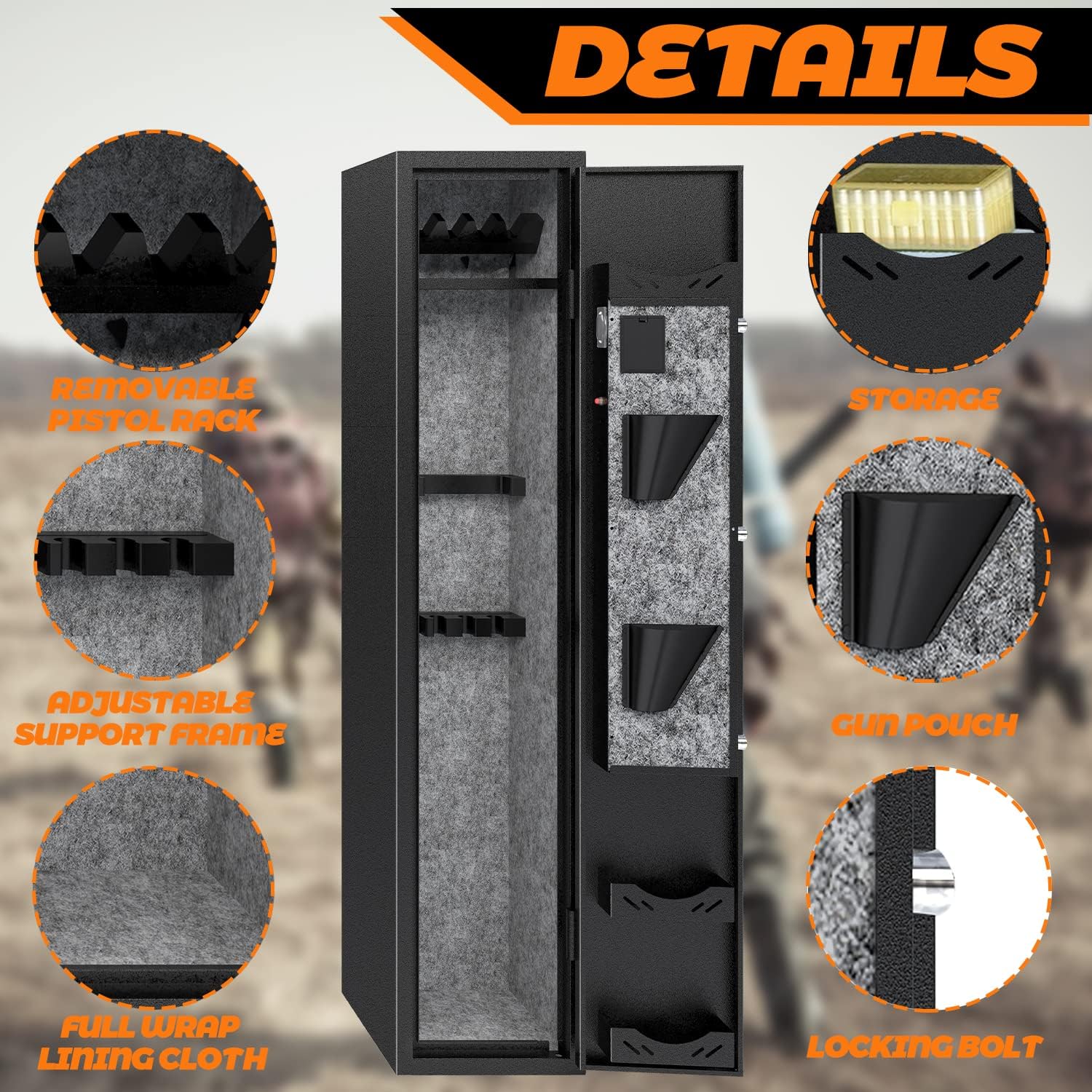
Image: Close-up details of the safe's interior, showing the removable pistol rack, adjustable support frame, full wrap lining cloth, storage box, gun pouch, and locking bolt mechanism.
Maintenance
- Cleaning: Wipe the exterior and interior surfaces with a soft, dry cloth. Avoid abrasive cleaners or solvents.
- Battery Replacement: Replace batteries promptly when the low battery indicator appears (if applicable) or if the keypad becomes unresponsive. Use high-quality alkaline batteries.
- Keypad and Sensor: Keep the digital keypad and fingerprint sensor clean and dry for optimal performance.
- Hinges and Locking Bolts: Periodically check hinges and locking bolts for smooth operation. Lubricate with a small amount of silicone spray if necessary.
Troubleshooting
| Problem | Possible Cause | Solution |
|---|---|---|
| Safe does not open with keypad/fingerprint. | Low batteries, incorrect code/fingerprint, keypad malfunction. | Replace batteries. Re-enter code carefully. Re-register fingerprint. Use emergency key. |
| Safe is locked out after multiple attempts. | 5 incorrect password/fingerprint entries. | Wait for the lockout period (1 minute) to expire. Use emergency key if immediate access is needed. |
| Keypad is unresponsive. | Dead batteries. | Replace batteries. Use the emergency battery pack for temporary power. |
| Door does not close or lock properly. | Obstruction, misaligned door, damaged locking mechanism. | Check for obstructions. Ensure safe is on a level surface. Contact customer service if damage is suspected. |
Specifications
| Feature | Detail |
|---|---|
| Brand | KAER |
| Model Number | f2296712-0151-41fd-bbaa-9b60c382c76c |
| Exterior Dimensions (H x W x D) | 54.33" x 11" x 11.8" |
| Interior Dimensions (H x W x D) | 54.13" x 11.61" x 8.66" |
| Lock Type | Electronic, Key, Fingerprint |
| Color | Black |
| Material | Acrylonitrile Butadiene Styrene (ABS) |
| Mounting Type | Floor Mount |
| Alarm | Audible (Lockout Alarm) |
| Water Resistance Level | Not Water Resistant |
| Rifle Capacity | 3-5 rifles (with/without scope) |
Customer Support
If you encounter any issues or have questions not covered in this manual, please contact KAER customer service. Our team is available to provide assistance and solutions.
Refer to your purchase documentation or the KAER brand store on Amazon for specific contact information:


