
1. Introduction
This manual provides essential information for the safe and effective operation of your VANPO Digital Torque Wrench, 3/8 Inch Drive, Model VP028. This advanced electronic tool is designed for precise torque management, offering high accuracy and ease of use across various applications.
Key Features:
- Upgraded Torque Range: 5-99.5 ft-lbs (6.8-135 Nm), expanding its utility for diverse tasks.
- Multiple Measurement Units: Displays measurements in N-m, kgf-cm, lbf-ft, and lbf-in for global compatibility.
- High Precision: Indicative value of ±2% clockwise and ±3% counterclockwise, conforming to DIN-ISO-6789 international standards.
- Audible and Visual Alerts: Buzzer and LED flash notifications prevent under-tightening or over-tightening.
- Two Measuring Modes: Features PEAK mode to record maximum torque value and TRACK mode for real-time torque display.
- Ergonomic Design: Comfortable handle for extended use and a direction switch knob for easy ratchet direction changes.
2. What's in the Box
- 1 x VANPO Digital Torque Wrench (3/8-Inch Drive)
- 2 x AAA Batteries
- 1 x Screwdriver
- 1 x Product Manual
- 1 x Calibration Report

Figure 2.1: The VANPO Digital Torque Wrench, screwdriver, and manual neatly organized in its protective case.
3. Setup
3.1 Battery Installation
The digital torque wrench requires 2 AAA batteries (included). To install or replace batteries:
- Locate the battery compartment on the handle.
- Use the provided screwdriver to unscrew the two screws securing the battery cover.
- Insert the 2 AAA batteries, ensuring correct polarity (+/-).
- Replace the battery cover and secure it with the screws.
3.2 Initial Power-On
After battery installation, press the power button (usually marked 'C' or 'ON/OFF') to turn on the device. The LCD display will illuminate, showing the current settings.

Figure 3.1: The wrench's display and control buttons, including the Unit Switch (U), Plus/Minus Torque (A/V), and ON/OFF (C) buttons.
4. Operating Instructions
4.1 Changing Measurement Units
Press the 'U' (Unit Switch) button to cycle through the available measurement units: N-m, kgf-cm, lbf-ft, and lbf-in.
4.2 Setting Target Torque Value
- Select your desired measurement unit using the 'U' button.
- Use the 'A' (Up) and 'V' (Down) buttons to adjust the target torque value. Long-press for quick adjustment, short-press for precise adjustment.
4.3 Selecting Operating Modes
The wrench offers two operating modes:
- TRACK Mode: Displays the torque value in real-time as force is applied.
- PEAK Mode: Records and displays the maximum torque value achieved during tightening.
Refer to the included manual for specific button presses to switch between these modes.
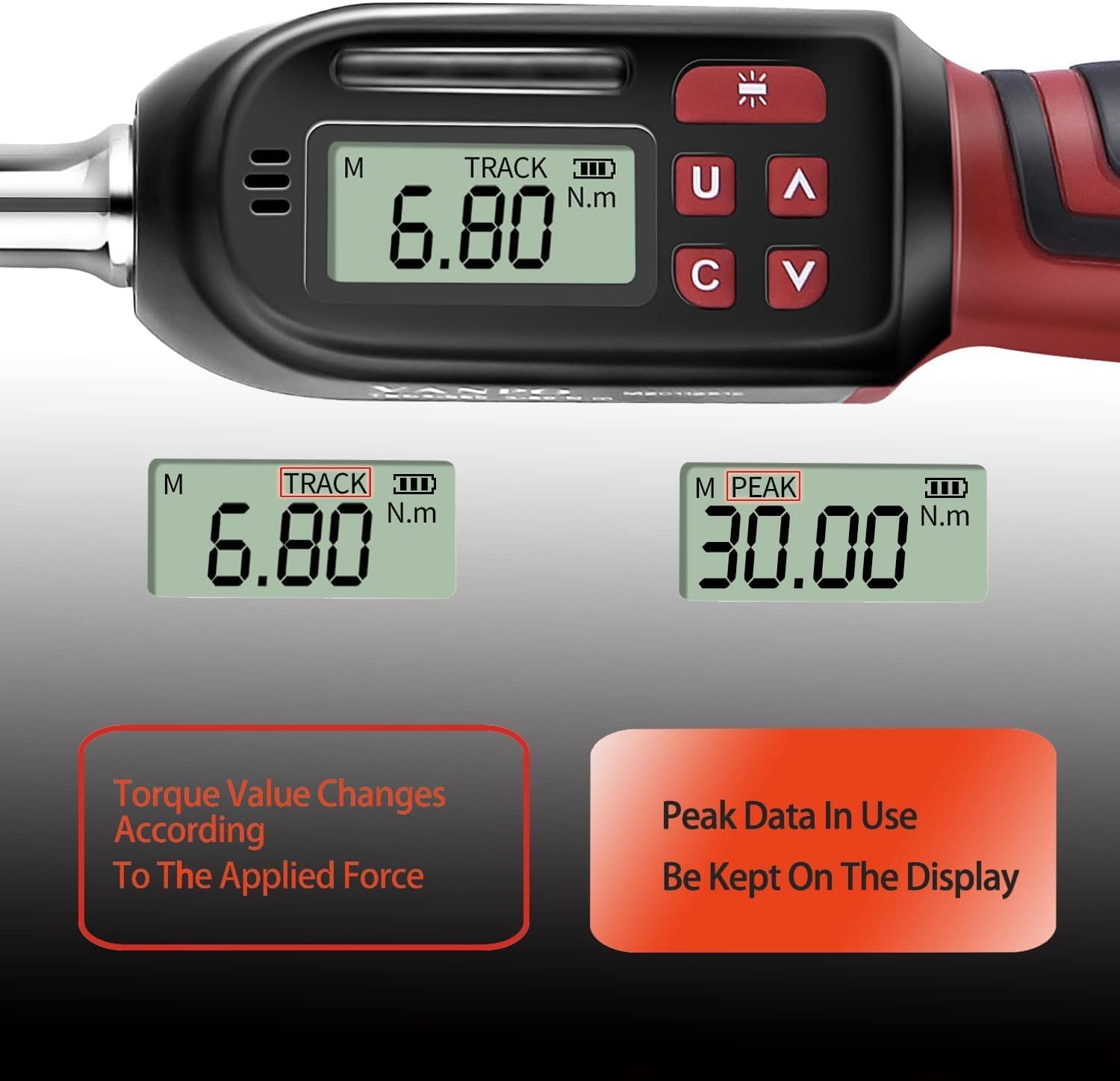
Figure 4.1: Illustration of the two measuring modes: TRACK mode for real-time display and PEAK mode for recording maximum torque.
4.4 Tightening Operation with Alerts
When tightening a fastener:
- As the applied torque approaches 85%-90% of the preset value, a green LED will light up in sequence, and the buzzer will emit intermittent beeps.
- When the preset torque value is reached (100%), a red LED will light up, and the buzzer will emit a continuous sound. This indicates that the target torque has been achieved, preventing over-tightening.

Figure 4.2: The wrench provides both audible (buzzer) and visual (LED) alerts to indicate when the target torque is being approached and reached.
4.5 Changing Ratchet Direction
To change the tightening direction (clockwise or counter-clockwise), hold the square interface part of the ratchet head with one hand and turn the ratchet disc with the other hand.

Figure 4.3: The ratchet head allows for easy switching between clockwise and counter-clockwise tightening directions.
5. Maintenance and Storage
5.1 General Care
- Do not exceed 110% of the maximum torque value, as this may damage the wrench.
- Avoid shaking or dropping the torque wrench violently.
- Do not store the wrench in places with excessive vibration.
- Do not use the digital torque wrench as a tapping tool.
5.2 Battery Removal
If the product will not be used for an extended period, remove the batteries to prevent leakage and potential damage to the device.
5.3 Calibration
The digital torque wrench is a precision measuring tool. Its accuracy may gradually decrease over time with use. The manufacturer recommends an inspection and recalibration once a year or after every 10,000 tightening operations.
6. Specifications
| Feature | Specification |
|---|---|
| Model Number | VP028 |
| Drive Size | 3/8-Inch |
| Torque Range | 5-99.5 ft-lbs / 6.8-135 Nm |
| Torque Accuracy | ±2% Clockwise, ±3% Counterclockwise |
| Measurement Units | N-m, kgf-cm, lbf-ft, lbf-in |
| Material | Chrome Vanadium Steel |
| Power Source | 2 x AAA Batteries (included) |
| Product Dimensions | 36 x 12 x 5 cm (13.82 x 4.84 x 2.48 inches) |
| Item Weight | 1.1 kg (2.22 pounds) |
7. Official Product Videos
VANPO Digital Torque Wrench, 5-99.5 Ft-lbs/6.8-135Nm
This video provides a detailed overview and demonstration of the VANPO Digital Torque Wrench, highlighting its features and operation for the 5-99.5 ft-lbs/6.8-135Nm model.
VANPO Digital Torque Wrench, 12.5-250.8 Ft-lbs/17-340Nm
This video demonstrates the functionality of a VANPO Digital Torque Wrench, specifically a model with a higher torque range (12.5-250.8 Ft-lbs/17-340Nm), showcasing similar operational principles.
8. Troubleshooting
If you encounter any issues with your VANPO Digital Torque Wrench, consider the following:
- No Display/Power: Check battery installation and ensure batteries are not depleted. Replace if necessary.
- Inaccurate Readings: Ensure the wrench has been calibrated recently. Avoid applying force exceeding 110% of the maximum torque.
- No Alerts: Verify that the target torque is set correctly and that the wrench is functioning in the appropriate mode (e.g., TRACK mode for real-time alerts).
For persistent issues, please contact customer support.
9. Warranty and Support
For warranty information, technical support, or service inquiries, please refer to the contact details provided in your product packaging or visit the official VANPO website. Keep your purchase receipt as proof of purchase for warranty claims.